

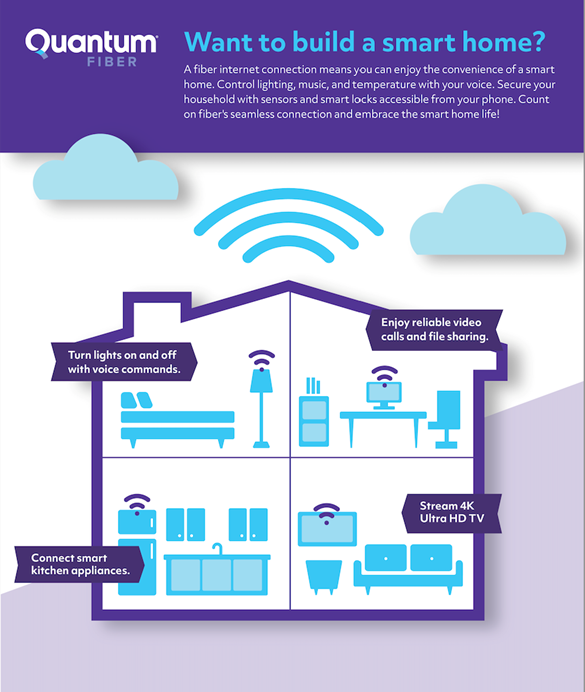
Imagine walking into your home, and with just a simple voice command, the lights adjust to your mood, the thermostat sets itself to your perfect temperature, and your favorite music starts playing. Sounds amazing, right?
You might think making your home smart is complicated or expensive, but it’s easier than you believe. You’ll discover simple steps to turn your house into a smart home that saves you time, boosts your comfort, and even helps cut costs.
Ready to transform your living space into a smarter, more convenient place? Let’s dive in and make it happen!
Credit: explore.quantumfiber.com
Choosing The Right Smart Devices
Choosing the right smart devices shapes your home’s comfort and security. It also helps save energy and makes daily tasks easier. Focus on devices that fit your lifestyle and budget. Prioritize ease of use and compatibility with your home’s existing technology.
Smart Speakers And Voice Assistants
Smart speakers act as the brain of your smart home. They respond to voice commands and control other devices. Popular options include Amazon Echo and Google Nest. Choose one that understands your language well. Check if it works with your other smart devices.
Smart Lighting Solutions
Smart lights let you control brightness and color from anywhere. They save energy by turning off automatically. You can set schedules to match your daily routine. Look for bulbs that fit your fixtures and offer easy app control.
Smart Thermostats
Smart thermostats keep your home comfortable and save energy. They learn your schedule and adjust temperatures automatically. Some models allow remote control via smartphones. Select a thermostat compatible with your heating and cooling system.
Security Cameras And Sensors
Security cameras keep an eye on your home 24/7. Sensors alert you to motion, doors opening, or smoke. Choose cameras with clear video and night vision. Sensors should be easy to install and connect to your smart system.
Credit: hometechhacker.com
Setting Up A Smart Hub
Setting up a smart hub is the first step to making your home smart. A smart hub acts as the brain of your smart home system. It connects and controls all your smart devices from one place. This makes managing your home easier and more efficient.
Benefits Of A Centralized Hub
A centralized hub lets you control all devices through one app or voice command. It reduces the need to open many apps for different devices. This saves time and keeps things simple. A smart hub also improves device compatibility. It helps devices from different brands work together smoothly. Security can improve too, since the hub manages access and updates. Overall, a smart hub creates a unified and organized smart home experience.
Popular Smart Hub Options
Several smart hubs are popular and easy to use. Amazon Echo and Google Nest Hub offer voice control features. Samsung SmartThings Hub supports many device types and brands. Apple HomePod works well for users in the Apple ecosystem. Each hub has unique features. Choose one that matches your devices and daily habits. Consider ease of setup, compatibility, and control style before buying.
Connecting Devices To The Hub
Connecting devices to your hub is simple. Start by powering on the device and enabling pairing mode. Open your hub’s app and follow the instructions to add a new device. The app will search and detect the device nearby. Once found, confirm the connection and name the device. Repeat this for all smart devices in your home. After setup, test each device to ensure proper control through the hub.
Automating Daily Tasks
Automating daily tasks can make life easier and save time. Smart homes use technology to handle everyday chores. This means less effort for you and more comfort. Setting up automation helps your devices work together smoothly. It can control lights, appliances, and security without manual input. Let’s explore some simple ways to automate your home.
Creating Routines And Scenes
Routines link several actions into one command. For example, a “Good Morning” routine can turn on lights and start the coffee maker. Scenes adjust multiple devices to a mood or activity. A “Movie Night” scene might dim lights and close curtains. These setups make daily life more convenient. You trigger routines or scenes by voice or app.
Scheduling Device Operations
Scheduling lets devices run at set times automatically. You can program lights to turn on at sunset. Thermostats can lower temperature at bedtime. This saves energy and keeps your home comfy. Scheduling is simple to set up in most smart home apps. It reduces the need to remember daily tasks.
Using Geofencing For Automation
Geofencing uses your phone’s location to control devices. It knows when you leave or come home. Lights can switch off when you leave the house. The thermostat adjusts to your preferred temperature on return. This smart feature enhances security and saves energy. It works quietly in the background without needing manual control.
Ensuring Network Security
Making your home smart means connecting many devices to the internet. This connection brings convenience but also risks. Protecting your network keeps your devices and data safe. Strong network security stops hackers and unwanted access.
Securing Your Wi-fi Network
Start by changing your Wi-Fi router’s default name and password. Use a strong password with letters, numbers, and symbols. Enable WPA3 or WPA2 encryption on your router. Turn off WPS to avoid easy hacking. Hide your network name to make it harder to find.
Updating Device Firmware
Smart devices need regular updates to fix security holes. Check for firmware updates often and install them quickly. Many devices update automatically; enable this feature if possible. Updated software keeps your devices safe from new threats.
Managing User Access
Limit who can control your smart home devices. Create separate accounts for family members with different access levels. Avoid sharing passwords openly. Remove old users who no longer need access. Use guest networks for visitors to protect your main system.
Integrating Smart Entertainment
Smart entertainment makes your home more fun and easy to use. It brings all your media devices together. You can control music, movies, and shows with simple commands. This section explains how to add smart entertainment to your home.
Smart Tvs And Streaming Devices
Smart TVs connect to the internet and offer apps for streaming shows and movies. They let you watch popular platforms without extra devices. Streaming devices like Roku or Amazon Fire stick turn regular TVs into smart ones. These devices are affordable and easy to set up. They provide a wide range of entertainment options.
Voice-controlled Media Playback
Voice control lets you play music or movies using simple speech commands. Devices like Amazon Echo or Google Home help with this. You can ask to pause, play, or change the volume. Voice control adds convenience and keeps your hands free. It works well with smart TVs and streaming devices.
Multi-room Audio Systems
Multi-room audio systems play music in different rooms at the same time. You control them with your phone or voice. Systems like Sonos or Google Nest offer great sound quality. You can enjoy music in the kitchen, living room, and bedroom together. These systems make your home feel connected and lively.
Optimizing Energy Efficiency
Optimizing energy efficiency in your smart home saves money and helps the environment. Smart devices manage power use better than regular gadgets. They reduce waste by turning off when not needed. Simple steps can make your home smarter and greener.
Smart Plugs And Power Strips
Smart plugs control devices remotely through apps. They cut power to appliances left on by mistake. Power strips with smart features can switch off multiple devices at once. Set schedules to turn off electronics during the night or work hours. This prevents energy drain from idle devices.
Energy Monitoring Tools
Energy monitors track how much electricity each device uses. Some smart meters show real-time data on your phone. This helps find appliances that use too much power. Knowing this allows you to change habits or upgrade to efficient models. Monitoring is key to spotting energy waste early.
Adjusting Settings For Savings
Smart thermostats save energy by learning your schedule. They lower heating or cooling when you are away. Adjust lighting brightness and timers to reduce use. Many devices offer eco-modes to cut power without losing comfort. Small setting changes add up to big savings.
Troubleshooting Common Issues
Setting up a smart home can bring many benefits. Yet, some common issues may appear. Troubleshooting helps fix these problems quickly. This way, your smart devices work smoothly and keep your home connected.
Connectivity Problems
Strong internet is key for smart devices. Weak Wi-Fi causes delays or device failures. Place your router in a central spot. Avoid walls and metal objects that block signals. Restart your router to refresh the connection. Use a Wi-Fi extender for larger homes. Check if your internet plan supports many devices at once.
Device Compatibility
Not all smart devices work well together. Check if your devices use the same platform. Popular options include Google Home, Alexa, or Apple HomeKit. Look for compatible apps and software updates. Avoid mixing too many brands. This reduces confusion and connection issues. Read user reviews about compatibility before buying new devices.
Resetting And Reconfiguring Devices
Resetting fixes many smart home problems. Find the reset button on your device. Hold it for the time given in the manual. This clears errors and restores factory settings. After resetting, reconfigure devices using their apps. Follow step-by-step instructions carefully. This helps devices connect properly to your network.

Credit: irishtechnews.ie
Frequently Asked Questions
What Are The First Steps To Make My Home Smart?
Start by choosing a smart hub like Amazon Echo or Google Home. Then, add compatible devices like smart bulbs, thermostats, and security cameras. Ensure your Wi-Fi is strong to support all devices smoothly. Prioritize your needs and budget for the best smart home setup.
Which Smart Devices Are Essential For Home Automation?
Essential smart devices include smart speakers, lights, thermostats, and security cameras. These devices improve convenience, energy efficiency, and security. Choose products that work well together and fit your lifestyle. Start small and expand your system over time for better control.
How Do I Secure My Smart Home Network?
Use a strong, unique Wi-Fi password and enable network encryption. Regularly update device firmware to fix security vulnerabilities. Consider setting up a separate network for smart devices. Use two-factor authentication where available to enhance your smart home security.
Can I Control Smart Home Devices Remotely?
Yes, most smart home devices allow remote control via smartphone apps. This lets you adjust settings, monitor security, and automate routines from anywhere. Ensure your devices are connected to the internet and properly configured for remote access.
Conclusion
Making your home smart brings ease and comfort every day. Start with simple devices like smart lights or thermostats. These tools save energy and fit your lifestyle. You control many things with just a phone or voice. Keep your setup safe by updating passwords and software.
Smart homes grow with you—add gadgets as you go. Enjoy the convenience and security a smart home offers. Small steps lead to big changes in your daily life. Embrace technology to make your home work better for you.
As an Amazon Associate, I earn from qualifying purchases.

