Have you ever been in the middle of your favorite song or an important call when suddenly one of your earbuds stops working? It’s frustrating, right?
You might wonder why this happens and how to fix it quickly. If you’re asking yourself, “Why is one of my earbuds not working? ” you’re not alone. Many people face this issue, and the good news is, the answer is often simpler than you think.
Keep reading, and you’ll discover easy ways to understand the problem and get your earbuds back to perfect sound.
Common Causes
One earbud not working is a common problem many face. It can happen for several reasons. Understanding these causes helps you fix the issue fast. Here are some common causes to check first.
Connection Issues
Bluetooth earbuds rely on a strong connection. Sometimes one earbud disconnects. This causes sound to play in only one ear. The connection may drop due to interference or distance. Restarting the earbuds or your device often helps. Also, check if both earbuds are paired properly.
Battery Problems
Battery issues often cause one earbud to stop working. One earbud may run out of charge faster. This happens if the battery is old or faulty. Make sure both earbuds are fully charged. Use the charging case and check for dirt on contacts. Replace the battery if needed.
Audio Settings
Sometimes audio settings cause sound imbalance. The device may send sound to only one earbud. Check stereo balance in your device’s settings. Reset the audio or try a different app. Adjust volume levels to ensure sound plays in both ears.
Physical Damage
Physical damage is a common cause of failure. Dropping or water exposure can harm one earbud. Dirt or earwax can block the speaker. Inspect the earbud for visible damage. Clean it gently and avoid harsh chemicals. Repair or replace the earbud if damaged.

Credit: www.liftingitalia.com
Troubleshooting Steps
One earbud not working can be frustrating. Simple steps often fix the problem. Try these easy troubleshooting tips before seeking help.
These steps cover common issues with earbuds. Follow each carefully to find the cause.
Check Bluetooth Connection
Start by checking your device’s Bluetooth settings. Make sure Bluetooth is on and connected to your earbuds. Disconnect and reconnect the earbuds to refresh the connection. Sometimes, restarting your device helps too. Confirm the earbuds show as connected in the Bluetooth menu.
Reset Earbuds
Resetting earbuds can clear minor glitches. Look up the reset method for your earbud brand. Usually, it involves holding buttons for a few seconds. After reset, pair earbuds with your device again. Reset can fix unbalanced audio or one earbud not working.
Inspect Charging Case
Check the charging case for dirt or damage. Make sure earbuds fit properly in the case. If one earbud does not charge, it may stop working. Clean charging contacts with a dry cloth. Try charging the case fully before using earbuds again.
Clean Earbuds
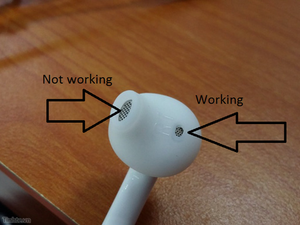
Earwax and debris can block sound or sensors. Use a soft, dry cloth or a small brush to clean earbuds gently. Avoid liquids or sharp objects. Check the speaker mesh for dirt. Clean earbuds regularly to maintain good sound and function.
Adjusting Device Settings
Adjusting your device settings can fix many problems with earbuds. Sometimes, one earbud may not work due to simple setting issues. Checking these settings helps you find the cause quickly.
Try these steps to make sure your earbuds work properly on your device.
Audio Balance
Audio balance controls the sound level between left and right earbuds. If the balance is off, one earbud may be silent or very quiet. Go to your device’s sound settings and find the balance option. Move the slider to the center to equalize the sound. This simple change often fixes one earbud not working.
Software Updates
Old software can cause earbuds to malfunction. Devices need updates to fix bugs and improve sound. Check for system updates in your device settings. Also, update the firmware for your earbuds if possible. Keeping software up to date helps both earbuds work well together.
App Configuration
Some earbuds use apps to control sound and settings. Check the app for any mute or mono sound settings. Make sure both earbuds are connected and active in the app. Reset settings in the app if one earbud still does not work. The app can control many features affecting sound quality.
When To Seek Professional Help
Sometimes, fixing earbuds on your own is not enough. Some problems need expert help. Knowing when to seek professional help can save time and money. Professionals have the tools and knowledge to fix complex issues. Ignoring serious problems may cause permanent damage to your earbuds.
Warranty And Repairs
Check if your earbuds are still under warranty. A warranty covers repairs or replacements for a certain time. Contact the manufacturer or seller to learn about your warranty options. Professional repair services often work with warranty claims. Avoid trying to fix your earbuds yourself during the warranty period. Doing so may void the warranty and leave you without coverage.
Replacement Options
Sometimes, repairing earbuds is not cost-effective. Professionals can help you decide if replacement is better. Some brands offer replacement parts or individual earbuds. Look for authorized service centers to get genuine parts. A professional can ensure the new parts fit and work well. They can also recycle or dispose of your old earbuds properly.
Tips To Prevent Future Issues
Troubles with one earbud not working can be frustrating. Taking simple steps can help avoid these problems. Care for your earbuds properly to keep them working well. Follow these tips to prevent future issues and enjoy clear sound every time.
Proper Storage
Store your earbuds in their case after use. This protects them from dust and damage. Avoid leaving them in pockets or bags without a case. Keep them away from moisture and extreme temperatures. Proper storage extends the life of your earbuds.
Regular Cleaning
Clean earbuds often to remove dirt and earwax. Use a soft cloth or a small brush. Avoid using water or harsh chemicals. Clean the charging contacts gently to ensure good connection. Regular cleaning keeps sound clear and prevents issues.
Battery Maintenance
Charge earbuds before the battery is completely empty. Avoid overcharging by unplugging when full. Use the original charger or a compatible one. Store earbuds with some charge if unused for a long time. Good battery care improves performance and lifespan.

Credit: www.youtube.com
Credit: www.ifixit.com
Frequently Asked Questions
Why Is Only One Earbud Not Producing Sound?
One earbud may not produce sound due to connection issues, dirt buildup, or hardware faults. Check Bluetooth settings and clean the earbud. Restart your device and try reconnecting. If the problem persists, the earbud might need repair or replacement.
How Can I Fix A Non-working Earbud Quickly?
Try resetting your earbuds by placing them in the charging case and removing them. Clean the earbud mesh gently. Check for software updates on your device. Re-pair the earbuds to your device to restore functionality.
Could Earwax Cause One Earbud To Stop Working?
Yes, earwax buildup can block sound output and affect earbud performance. Clean the earbud tips carefully with a soft brush or cloth. Avoid using sharp objects that may damage the mesh or internal components.
Does Bluetooth Connectivity Affect One Earbud Functioning?
Bluetooth connection issues can cause one earbud to stop working. Ensure your device is within range, and the earbuds are charged. Disconnect and reconnect the earbuds to your device to resolve connection problems.
Conclusion
A single earbud not working can be frustrating. Check the battery and connection first. Dirt or earwax can block sound. Try cleaning the earbud gently. Resetting the device often helps fix issues. Sometimes, software updates solve problems too. If nothing works, the earbud may need repair.
Taking care of earbuds extends their life. Small steps can bring your sound back. Keep these tips handy for quick fixes. Enjoy clear sound with both earbuds again.
As an Amazon Associate, I earn from qualifying purchases.