Are your Bose Quiet Comfort Earbuds acting up or not connecting properly? You’re not alone, and luckily, resetting them can often fix these common issues quickly.
In this guide, you’ll learn exactly how to reset your earbuds step-by-step, so you can get back to enjoying crystal-clear sound without any hassle. Keep reading to discover simple tricks that will make your earbuds feel brand new again.
Credit: www.headphonesty.com
Reset Methods
Resetting your Bose Quiet Comfort Earbuds can solve many common issues. Problems like audio glitches, connection errors, or unresponsive earbuds often improve after a reset. There are two main reset methods: Soft Reset and Factory Reset. Each method serves a different purpose and fixes different problems.
Soft Reset
The soft reset is a simple way to restart your earbuds. It does not erase any settings or paired devices. To perform a soft reset, place both earbuds in the charging case. Close the lid and wait for at least 10 seconds. Then, open the lid and take out the earbuds. They should turn on automatically and reconnect to your device.
Factory Reset
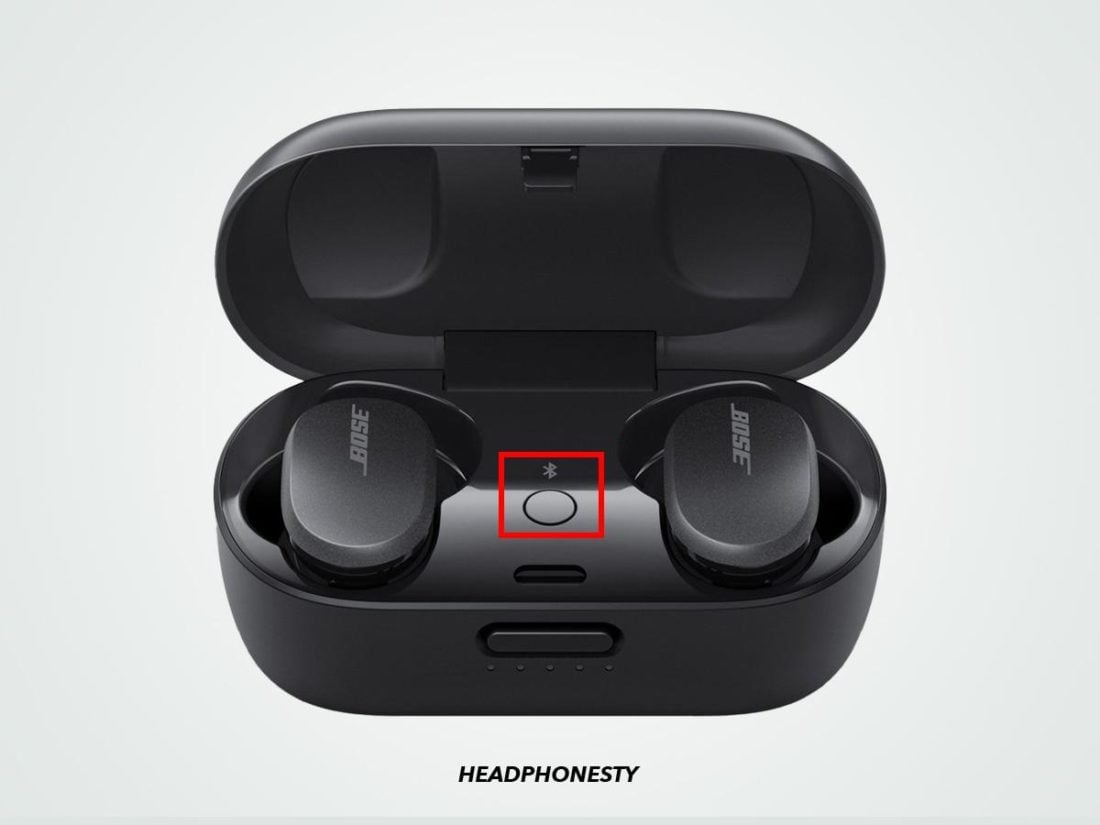
The factory reset erases all settings and paired devices. Use this method if the earbuds still have problems after a soft reset. To factory reset, place both earbuds in the charging case. Keep the lid open. Press and hold the Bluetooth button on the case for about 10 seconds. The earbuds will flash white, indicating the reset is complete. Close the lid, then open it again to restart the earbuds. You will need to pair them with your device again.

Credit: www.youtube.com
When To Reset
Resetting your Bose Quiet Comfort Earbuds can fix many problems. It helps restore settings and clear minor errors. Knowing when to reset saves time and frustration. Reset only when the earbuds do not work as expected. Below are common signs that show it is time to reset.
Common Issues
Sometimes, earbuds do not connect to your device. Sound may cut out or drop unexpectedly. Noise cancellation may stop working properly. Buttons might not respond or control functions fail. These are clear signs to try resetting the earbuds.
Performance Troubles
Battery drains faster than usual without heavy use. Audio quality sounds distorted or uneven. Earbuds do not charge or show incorrect battery levels. Resetting can often fix these performance problems quickly.
Step-by-step Reset Process
Resetting your Bose Quiet Comfort Earbuds can fix many issues fast. Follow these clear steps to reset your earbuds properly. This process helps refresh your earbuds and clear small glitches. It’s simple and takes only a few minutes.
Preparing Your Earbuds
First, place the earbuds in their charging case. Make sure the case has enough battery power. Close the lid and wait at least 30 seconds. This step ensures the earbuds are off and ready to reset.
Performing The Reset
Open the charging case lid. Press and hold the Bluetooth button on the back of the case. Keep holding the button for about 10 seconds. The earbuds’ light will flash white, then amber. Release the button when the light changes. This signals the earbuds reset successfully.
Reconnecting Devices
After resetting, remove the earbuds from the case. Turn on Bluetooth on your device. Search for “Bose Quiet Comfort Earbuds” in the Bluetooth list. Select your earbuds to pair and connect. Test the sound to confirm the connection works well.

Credit: www.youtube.com
Tips After Reset
Resetting your Bose Quiet Comfort Earbuds can fix many issues. After a reset, some steps help you get the best experience. These tips improve sound quality and comfort. Follow them to enjoy your earbuds fully again.
Firmware Updates
Check for firmware updates after resetting your earbuds. Updates fix bugs and improve performance. Use the Bose Music app to see if a new version is available. Keep your earbuds connected to your phone during the update. Updated firmware keeps your earbuds working smoothly.
Customizing Settings
Reset clears your personal settings. Customize them again for better sound and comfort. Adjust noise cancellation levels to suit your environment. Set your preferred equalizer settings in the Bose Music app. Personal settings make your earbuds feel just right.
Troubleshooting Reset Problems
Troubleshooting reset problems for Bose Quiet Comfort Earbuds can be tricky. Sometimes, the reset does not work as expected. This section helps you understand common issues and easy fixes. Knowing these tips saves time and frustration.
Reset Fails
Sometimes, the earbuds do not reset properly. This can happen if the earbuds are not placed correctly in the case. Make sure both earbuds sit firmly in the charging case. Hold the reset button long enough, about 10 seconds. Try resetting again after a few minutes if it still fails.
Battery Concerns
Low battery can stop the reset process. Check if the earbuds and case have enough charge. Connect the case to a power source using the original cable. Let it charge for at least 30 minutes. After charging, try the reset steps again. Batteries must have some power to reset correctly.
Frequently Asked Questions
How Do I Reset Bose Quiet Comfort Earbuds?
To reset, place both earbuds in the charging case. Close the lid and wait 30 seconds. Open the lid, then press and hold the Bluetooth button until the light blinks blue. This resets the earbuds to factory settings.
Why Should I Reset My Bose Quiet Comfort Earbuds?
Resetting fixes connectivity, sound, and software issues. It clears paired devices and restores default settings. This helps improve performance when earbuds act unresponsive or don’t connect properly.
Will Resetting Erase My Bose Quiet Comfort Earbuds Settings?
Yes, resetting deletes all saved settings and paired devices. The earbuds return to factory defaults. You will need to pair them again with your devices after resetting.
How Often Should I Reset Bose Quiet Comfort Earbuds?
Reset only when troubleshooting problems like connection drops or audio glitches. Frequent resets are unnecessary and don’t improve normal usage. Use reset as a last resort for persistent issues.
Conclusion
Resetting your Bose Quiet Comfort Earbuds can fix many common issues. It helps refresh the connection and improve sound quality. The process is quick and simple to follow. Keep your earbuds charged before starting the reset. After resetting, pair them again with your device.
This can solve problems like no sound or connectivity drops. Try this step before seeking help or service. It saves time and can bring your earbuds back to normal. Enjoy clear sound and smooth use once more. Easy to do, worth trying!
As an Amazon Associate, I earn from qualifying purchases.