Are you struggling to get your Jabra earbuds connected? You’re not alone.
Sometimes, even the best earbuds can feel tricky to set up. But don’t worry—connecting your Jabra earbuds is easier than you think. Once you know the simple steps, you’ll enjoy clear sound and hands-free freedom in no time. Keep reading, and you’ll discover how to connect your earbuds quickly and effortlessly, so you can focus on what matters most.
Prepare Your Jabra Earbuds
Preparing your Jabra earbuds correctly is the first step for a smooth connection. This ensures the earbuds work well and connect without problems. Follow these simple steps to get your earbuds ready.
Charge The Earbuds Fully
Start by placing the earbuds in their charging case. Make sure the case has enough battery power. Let the earbuds charge until the indicator light shows they are full. Fully charged earbuds last longer and connect better.
Turn On Pairing Mode
Take the earbuds out of the case. Press and hold the button on each earbud. Wait until the LED light flashes blue or white. This means the earbuds are ready to connect. Now, they can find your phone or device easily.
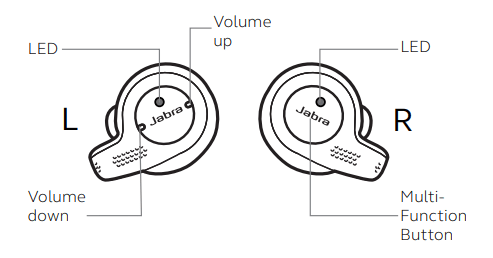
Credit: www.jabra.com
Enable Bluetooth On Your Device
To connect your Jabra earbuds, enabling Bluetooth on your device is the first step. Bluetooth allows your device to find and link with wireless gadgets. Without turning it on, your earbuds cannot connect.
Turning on Bluetooth is simple and quick. It prepares your device to search for nearby devices like your Jabra earbuds.
Access Bluetooth Settings
Open your device’s settings menu. Look for the Bluetooth option. Tap on it to open Bluetooth settings. You will see a toggle switch or button. Tap the toggle to turn Bluetooth on. The status should change to “On” or “Enabled.”
Make Device Discoverable
Next, make your device visible to nearby gadgets. This setting is often called “Discoverable” or “Visible.” It allows your Jabra earbuds to find your device. Usually, your device becomes discoverable once Bluetooth is on. Some devices need you to tap a button to make them visible. Stay on this screen while pairing your earbuds.
Pair Jabra Earbuds With Your Device
Pairing your Jabra earbuds with a device is quick and simple. This process lets you enjoy music and calls wirelessly. Follow clear steps to connect your earbuds to smartphones, tablets, or computers.
Select Earbuds From Available Devices
Turn on Bluetooth on your device. Open the Bluetooth settings menu. Make sure your Jabra earbuds are in pairing mode. Look for your earbuds name in the list of available devices. Tap the earbuds name to start connecting. Your device will begin to link with the earbuds immediately.
Confirm Pairing Request
A pairing request may pop up on your device screen. Check the request carefully. Press “Pair” or “Connect” to confirm the connection. Wait for a few seconds as the devices finalize pairing. A sound or light on the earbuds shows connection success. Your Jabra earbuds are now ready to use.
Troubleshoot Connection Issues
Connection issues with Jabra earbuds can be frustrating. Sometimes, the earbuds do not connect or drop the connection. These problems often have simple fixes. Follow these steps to troubleshoot and restore your earbuds quickly.
Reset Earbuds
Resetting the earbuds clears any temporary glitches. Take the earbuds out of your device’s Bluetooth list. Turn off the earbuds and wait 10 seconds. Press and hold the earbuds’ buttons until the LED flashes. This process resets the earbuds to factory settings. After resetting, pair the earbuds again with your device.
Update Firmware
Outdated firmware can cause connection problems. Check the Jabra Sound+ app for updates. Connect your earbuds to the app and look for a firmware update option. Download and install any available updates. Updated firmware improves performance and fixes bugs. Always keep your earbuds’ software current for the best experience.
Check Device Compatibility
Not all devices fully support Jabra earbuds. Verify your device supports Bluetooth audio connections. Some older devices may have limited compatibility. Check your device’s Bluetooth version and compare it with the earbuds’ requirements. Using incompatible devices can cause poor connection or no connection at all. Use a compatible device for smooth pairing and sound quality.
Optimize Your Earbuds Experience
Optimizing your Jabra earbuds improves sound and comfort. Small changes make a big difference in daily use. Adjust settings to fit your hearing and environment. Enjoy clearer calls, better music, and longer battery life.
Customize Sound Settings
Adjust equalizer settings to match your music style. Choose presets like bass boost or speech clarity. Fine-tune volume levels for each earbud. Use noise cancellation features to reduce background noise. Customize controls for play, pause, or skip tracks. These tweaks help your earbuds work better for you.
Use Jabra App Features
Download the Jabra Sound+ app for more options. The app updates your earbuds’ software automatically. It provides personalized sound profiles based on your hearing. Use it to check battery status and find lost earbuds. The app also offers guided setup for new features. It makes managing your earbuds simple and effective.

Credit: darsalud.com.ve

Credit: www.youtube.com
Frequently Asked Questions
How Do I Pair Jabra Earbuds With My Phone?
Turn on Bluetooth on your phone. Press and hold the Jabra earbuds’ button until the LED flashes. Select “Jabra” from the list of available devices on your phone to connect.
Why Won’t My Jabra Earbuds Connect To Bluetooth?
Ensure the earbuds are in pairing mode and Bluetooth is enabled on your device. Restart both devices and try reconnecting. Check for software updates on your phone and earbuds.
Can I Connect Jabra Earbuds To Multiple Devices?
Yes, Jabra earbuds support multi-device pairing. You can connect them to two devices simultaneously. This allows seamless switching between calls and media on both devices.
How Do I Reset My Jabra Earbuds Connection?
Turn off the earbuds. Press and hold the multifunction button for 10 seconds until the LED flashes purple. This resets Bluetooth settings and clears previous pairings.
Conclusion
Connecting your Jabra earbuds is simple and quick. Just follow the basic steps carefully. Make sure your device’s Bluetooth is turned on. Put your earbuds in pairing mode. Choose the earbuds from the device list. Once connected, enjoy clear sound and hands-free calls.
Troubleshoot any issues by restarting your earbuds or device. Practice a few times to get comfortable with the process. This way, you can use your Jabra earbuds anytime without trouble. Stay connected and enjoy your music or calls easily.
As an Amazon Associate, I earn from qualifying purchases.