If you’ve just got your Bose QuietComfort Earbuds, you probably can’t wait to experience their amazing sound and comfort. But before you dive into your favorite tunes, you need to connect them properly to your device.
Don’t worry—it’s easier than you think. In this guide, you’ll learn exactly how to connect your Bose QuietComfort Earbuds step by step. Follow along, and you’ll be enjoying crystal-clear audio in no time. Ready to unlock the full potential of your earbuds?
Let’s get started!
Credit: support.bose.com
Preparing Your Earbuds
Before connecting your Bose QuietComfort Earbuds, prepare them properly. This helps ensure a smooth and trouble-free setup. Start by making sure the earbuds and the case are fully charged. Next, check for any firmware updates. These updates keep your earbuds working well and add new features. Proper preparation saves time and avoids connection issues.
Charging The Case And Earbuds
Place the earbuds inside the charging case. Close the lid to start charging automatically. Connect the charging case to a power source using the included USB cable. Let the case and earbuds charge fully before use. A full charge helps avoid interruptions during setup. Check the LED indicators on the case to see the charging status. Green means fully charged, amber means charging.
Checking For Firmware Updates
Download the Bose Music app on your smartphone. Open the app and connect your earbuds. Look for the firmware update option in the app. Follow the prompts to download and install updates. Keep the earbuds inside the case during this process. Firmware updates improve sound quality and fix bugs. Check for updates regularly to keep your earbuds current.
Credit: www.youtube.com
Turning On And Pairing Mode
Turning on and pairing your Bose QuietComfort Earbuds is the first step to enjoy great sound. This process lets your earbuds connect to your device easily. Follow simple steps to power them up and activate pairing mode for a smooth start.
Powering Up The Earbuds
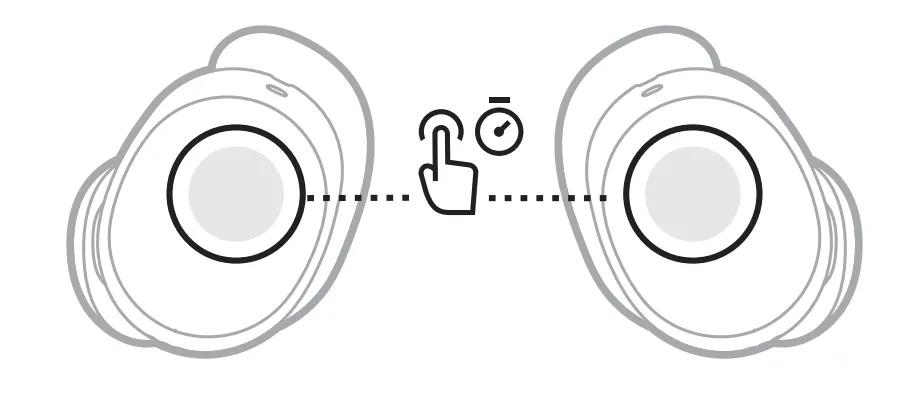
Take the earbuds out of their charging case. They turn on automatically. If not, press and hold the button on each earbud for two seconds. You will hear a tone confirming power on. The earbuds are now ready for pairing.
Activating Bluetooth Pairing
Press and hold the button on the right earbud for about three seconds. A voice prompt will say “Ready to connect.” The light on the earbud will blink blue. This means the earbuds are in pairing mode. Now, open the Bluetooth settings on your device to connect.
Connecting To Devices
Connecting your Bose QuietComfort Earbuds to devices is simple and quick. The earbuds use Bluetooth technology to link with many devices. This section explains how to pair them with smartphones, tablets, and laptops. It also covers using the earbuds with more than one device.
Pairing With Smartphones
Start by taking the earbuds out of their case. They will automatically enter pairing mode. On your smartphone, open the Bluetooth settings. Look for “Bose QuietComfort Earbuds” in the list. Tap on the name to connect. A confirmation sound will play from the earbuds when connected.
Connecting To Tablets And Laptops
Make sure the earbuds are in pairing mode. On your tablet or laptop, open Bluetooth settings. Find “Bose QuietComfort Earbuds” in the device list. Select it to begin pairing. Wait for the confirmation sound before using the earbuds.
Using With Multiple Devices
The earbuds can remember several devices. You can switch between two devices easily. To change devices, pause audio on one device. Play audio on the other device. The earbuds will switch automatically. This feature helps when using different gadgets.

Credit: www.youtube.com
Troubleshooting Connection Issues
Connection problems with Bose QuietComfort Earbuds can be frustrating. Simple steps often fix these issues fast. This guide helps you solve common connection troubles. Follow these tips to enjoy clear, uninterrupted sound.
Resetting The Earbuds
Resetting the earbuds often resolves many connection errors. First, place the earbuds in the charging case. Close the lid and wait for at least 30 seconds. Open the case and press the Bluetooth button for 10 seconds. The earbuds will flash white, signaling a reset. After this, pair them with your device again.
Clearing Bluetooth Cache
Old Bluetooth data can cause connection problems. Clearing the cache helps refresh the connection. On your device, go to Bluetooth settings. Find Bose QuietComfort Earbuds in the list and select “Forget” or “Remove.” Restart your device to clear temporary data. Then, pair the earbuds again for a fresh start.
Common Connection Problems
Some issues happen more often than others. The earbuds may not appear on the device list. Make sure they are charged and in pairing mode. Sometimes, interference from other devices blocks the signal. Move to a different area to avoid interference. Software updates can also cause glitches. Check for updates on both earbuds and your device.
Optimizing Your Listening Experience
Optimizing your listening experience with Bose QuietComfort Earbuds enhances sound quality and comfort. Proper setup ensures you enjoy clear audio and effective noise cancellation. Small adjustments can make a big difference in how you hear music or calls.
Adjusting Earbud Fit
Start by choosing the right ear tips from the set. The earbuds should fit snugly without pain. A good seal blocks outside noise and improves sound quality. Gently insert the earbuds and twist slightly for a secure fit. Check comfort by wearing them for a few minutes. Change tips if you feel discomfort or hear sound leaking.
Using The Bose Music App
Download the Bose Music App on your smartphone. The app helps customize sound settings easily. Use it to adjust noise cancellation levels to your preference. Try the equalizer to balance bass, mids, and treble. The app also updates earbud firmware for better performance. Explore features like Find My Buds to locate your earbuds quickly.
Frequently Asked Questions
How Do I Pair Bose Quietcomfort Earbuds With My Phone?
To pair your Bose QuietComfort Earbuds, turn them on and enable Bluetooth on your phone. Select the earbuds from the Bluetooth list to connect. Follow on-screen prompts if needed to complete pairing.
What Should I Do If Bose Earbuds Won’t Connect?
If your Bose earbuds won’t connect, try resetting them by placing them in the case and holding the Bluetooth button. Restart your phone’s Bluetooth and attempt pairing again.
Can I Connect Bose Quietcomfort Earbuds To Multiple Devices?
Yes, Bose QuietComfort Earbuds support multi-device connection. You can pair them with two devices and switch between them without disconnecting.
How To Reset Bose Quietcomfort Earbuds For Connection Issues?
To reset, place earbuds in the charging case and leave the lid open. Press and hold the Bluetooth button for 10 seconds until the light flashes.
Conclusion
Connecting Bose QuietComfort Earbuds is simple and quick. Follow the steps carefully to pair your device without trouble. Enjoy clear sound and comfort once connected properly. Keep earbuds charged for the best experience. Troubleshoot any issues by restarting the earbuds or device.
This guide helps you stay connected and enjoy music anytime. Now, you are ready to use your Bose earbuds easily.
As an Amazon Associate, I earn from qualifying purchases.