If you’ve just got your JBL Vibe Earbuds and can’t wait to enjoy your favorite music, you’re in the right place. Pairing your earbuds might seem tricky at first, but with the right steps, you’ll be connected in no time.
Imagine jumping straight into crystal-clear sound without any frustrating delays or confusing setups. This guide will walk you through every step, making the process simple and quick. Keep reading, and you’ll have your JBL Vibe Earbuds paired perfectly before you know it.
Preparing Your Earbuds
Preparing your JBL Vibe earbuds is the first step to enjoy great sound. Proper preparation ensures smooth pairing and better performance. Follow these simple steps to get your earbuds ready.
Charge The Earbuds Fully
Place the earbuds in the charging case. Make sure the case has enough power. Connect the case to a charger using the USB cable. Let the earbuds charge until the indicator shows full. Fully charged earbuds last longer and work without interruptions.
Power On The Earbuds
Take the earbuds out of the charging case. They will turn on automatically. If not, press and hold the power button on each earbud. Wait for the LED light to blink, showing they are on. Powered-on earbuds are ready to pair with your device.

Credit: www.youtube.com
Activating Pairing Mode
Activating pairing mode is the first step to connect your JBL Vibe earbuds to any device. This mode allows the earbuds to be discoverable so your phone, tablet, or computer can find them. Without entering pairing mode, the earbuds cannot link to your device.
Sometimes, the earbuds might not respond or fail to connect. Resetting the earbuds can fix these issues and make pairing easier. After resetting, the earbuds return to their original settings, clearing any old connections.
Resetting The Earbuds
Place both earbuds into the charging case. Close the lid and wait for 10 seconds. Open the case and take out the earbuds. Press and hold the touch area on both earbuds for about 10 seconds. The LED lights will flash, showing the earbuds have reset. Now, the earbuds are ready for fresh pairing.
Entering Pairing Mode
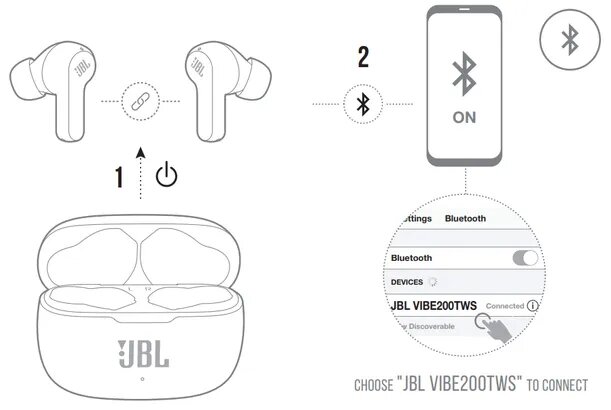
Remove the earbuds from the charging case. They will turn on automatically. If they do not enter pairing mode, press and hold the touch area on both earbuds for 3 seconds. The LED lights will blink white, indicating pairing mode is active. Open Bluetooth on your device and search for ‘JBL Vibe.’ Select it to connect. Once paired, the LED lights stop blinking and stay solid.
Connecting To Your Device
Connecting your JBL Vibe Earbuds to a device is quick and simple. Follow a few easy steps to enjoy clear sound and hands-free calls. This section guides you through the connection process.
Open Bluetooth Settings
First, turn on your device’s Bluetooth. Open the settings menu and find the Bluetooth option. Tap it to see available devices nearby.
Select Jbl Vibe Earbuds
Look for “JBL Vibe Earbuds” in the list of Bluetooth devices. Tap on the name to start pairing. Make sure your earbuds are on and near your device.
Confirm Pairing
Your device may ask you to confirm the connection. Accept the prompt to complete the pairing. Once done, your earbuds are ready to use.
Credit: theiideacompany.com
Troubleshooting Pairing Issues
Pairing issues with JBL Vibe Earbuds can be frustrating. Sometimes, earbuds do not connect to your device. This section helps fix common problems quickly. Follow these simple steps to get your earbuds working again.
Restart Devices
Turn off your JBL Vibe Earbuds and your phone or computer. Wait for about 10 seconds. Then, turn both devices back on. Restarting clears minor glitches. It refreshes the connection and often solves pairing problems fast.
Forget And Re-pair
Go to your device’s Bluetooth settings. Find JBL Vibe Earbuds in the paired devices list. Select “Forget” or “Remove” to delete the connection. Now, put your earbuds in pairing mode again. Search for them on your device and connect fresh. This resets the link and fixes hidden errors.
Update Firmware
Check if your JBL Vibe Earbuds have the latest firmware. Use the official JBL app or website. Updates improve performance and fix bugs. Follow the instructions to download and install the update. Updated earbuds pair more smoothly with devices.
Optimizing Your Experience
Optimizing your experience with JBL Vibe earbuds helps you enjoy sound and comfort fully. Small changes can make a big difference. This section explains key tips to get the best from your earbuds.
Adjusting Earbud Fit
Proper fit keeps earbuds comfortable and sound clear. Try different ear tip sizes until you find the best seal. A good fit blocks outside noise and improves bass. Push the earbuds gently into your ears for stability. Check for any discomfort and adjust as needed.
Using Touch Controls
JBL Vibe earbuds have touch controls for easy use. Tap once to play or pause music. Double tap skips to the next track. Hold to activate voice assistant or answer calls. Learn these controls to use earbuds without reaching for your phone. This saves time and keeps you focused.
Maintaining Battery Life
Battery care ensures your earbuds last longer each day. Charge them fully before first use. Use the charging case to store and recharge earbuds. Avoid leaving earbuds in extreme temperatures. Turn off earbuds when not in use to save power. Regular charging keeps your earbuds ready anytime.
Credit: www.jbl.com
Frequently Asked Questions
How Do I Pair Jbl Vibe Earbuds With My Phone?
Turn on your JBL Vibe earbuds and enable Bluetooth on your phone. Select “JBL Vibe” from the available devices list. Once connected, you’ll hear a confirmation sound. Your earbuds are now paired and ready to use.
What If Jbl Vibe Earbuds Won’t Pair?
Ensure earbuds are fully charged and in pairing mode. Restart your phone’s Bluetooth and try again. If issues persist, reset the earbuds by holding the power button for 10 seconds, then attempt pairing once more.
Can Jbl Vibe Earbuds Pair With Multiple Devices?
JBL Vibe earbuds support pairing with one device at a time. To connect to a new device, disconnect from the current one first. This ensures stable connection and optimal audio performance.
How To Reset Jbl Vibe Earbuds For Pairing?
Place earbuds in the charging case and close the lid. Wait for 10 seconds, then open the lid. Press and hold the button on both earbuds for 10 seconds until lights flash. The earbuds are now reset for pairing.
Conclusion
Pairing JBL Vibe earbuds is simple and quick. Just follow the steps carefully. Your earbuds will connect to your device smoothly. Enjoy clear sound and easy control anytime. Keep your earbuds charged for the best experience. Troubleshoot gently if connection issues appear.
Now, you can listen to music or take calls hands-free. Stay connected without hassle wherever you go. Simple setup means more time enjoying your audio. Try it out today and hear the difference.
As an Amazon Associate, I earn from qualifying purchases.