

Are you tired of struggling with your TV’s sound? Wondering how to make your movies and shows come alive with clear, powerful audio?
A soundbar might be the perfect solution, but how do soundbars connect to TVs? Understanding the simple ways to link these two devices can instantly boost your viewing experience. You’ll discover easy methods to connect your soundbar to your TV, helping you enjoy richer sound without any hassle.
Keep reading, and you’ll be ready to transform your home entertainment setup in no time.
Credit: www.samsung.com
Wired Connection Options
Soundbars connect to TVs in different ways. Wired connections provide clear sound and stable links. They avoid delays and interruptions common with wireless setups.
Wired options include HDMI ARC, optical cables, and auxiliary or RCA cables. Each has unique features and fits different TV and soundbar models.
Hdmi Arc Connection
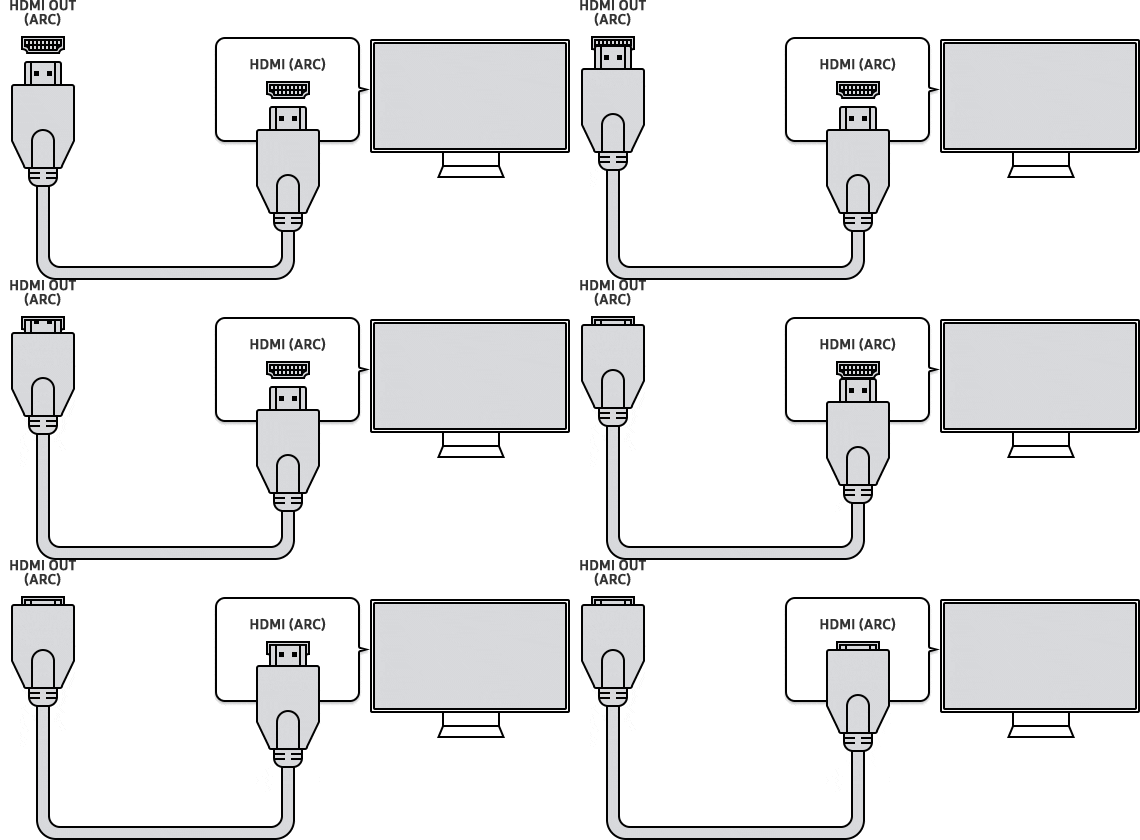
HDMI ARC stands for Audio Return Channel. It sends audio from the TV to the soundbar using one cable. This cable also controls volume and power between devices.
Most modern TVs and soundbars support HDMI ARC. It delivers high-quality sound, including surround sound formats. Setup is simple—connect the HDMI cable to the ARC port.
Optical Cable Setup
Optical cables use light to send digital audio signals. They deliver clear sound with no interference. This cable is common on many TVs and soundbars.
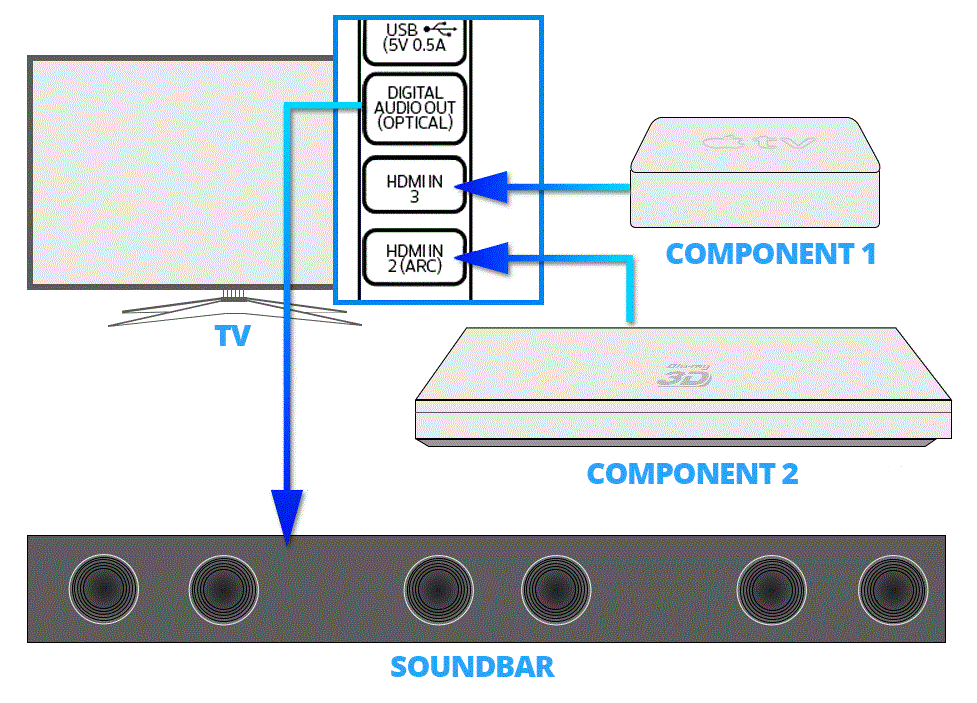
Connect the optical cable to the TV’s optical out port and the soundbar’s optical in. It supports surround sound but lacks control features like HDMI ARC.
Auxiliary And Rca Cables
Auxiliary (3.5mm) and RCA cables are older but still useful. They send analog audio signals from TV to soundbar. These cables are easy to find and use.
Auxiliary cables plug into the headphone jack or audio out on the TV. RCA cables use red and white connectors for left and right audio channels. Sound quality is lower than digital options.
Credit: www.sony.co.uk
Wireless Connection Options
Soundbars connect to TVs without wires through wireless options. These options offer clean setups and easy control. Wireless connections reduce cable clutter and improve room aesthetics. Many modern soundbars support multiple wireless methods for flexibility.
Bluetooth Pairing
Bluetooth is a popular way to link soundbars to TVs. It sends audio signals wirelessly over short distances. Most TVs and soundbars have built-in Bluetooth support. Pairing is simple: turn on Bluetooth on both devices and select the soundbar on the TV. Bluetooth works well for casual listening without extra cables. Sound quality depends on the Bluetooth version and codecs used.
Wi-fi And Smart Features
Some soundbars connect to TVs using Wi-Fi networks. Wi-Fi allows higher sound quality and stable connections. Smart soundbars use Wi-Fi to access apps and streaming services. They can sync with TVs that support Wi-Fi audio streaming. This method supports multi-room audio and voice control. Wi-Fi connections require both devices on the same network. Setup often involves apps or TV menus for easy pairing.
Choosing The Right Connection
Choosing the right connection between your soundbar and TV matters a lot. It affects how clear the sound is and how easy it is to use. Different connections work in different ways. Understanding these options helps you pick the best one for your setup.
Compatibility Considerations
Not all soundbars and TVs connect the same way. Check the ports on both devices first. Common ports include HDMI, optical audio, and Bluetooth. Some older TVs may lack HDMI ARC ports. Make sure your TV supports the connection type you want.
Also, some soundbars need special cables or adapters. Confirm what cables come with your soundbar. This avoids extra purchases later. Look at the user manuals for clear details on compatibility.
Audio Quality Comparison
Different connections offer different sound quality. HDMI ARC carries high-quality sound signals. It supports surround sound formats. Optical audio also delivers good quality but may lack some formats. Bluetooth is wireless and convenient but may reduce sound clarity. Wired connections usually have less delay than wireless ones.
Choose the connection that matches your sound needs. If you want the best home theater experience, HDMI ARC is often best. For simple stereo sound, optical or Bluetooth can work well.
Ease Of Setup
Some connections are easier to set up than others. Bluetooth connects without cables. It pairs quickly but may need re-pairing sometimes. HDMI ARC requires one cable and auto-syncs audio and volume controls. Optical needs one cable but might need manual audio settings on your TV. Consider how much effort you want to spend on setup.
Look for plug-and-play options for simple use. A quick setup means you enjoy better sound faster.
Troubleshooting Common Issues
Soundbars improve TV audio but sometimes cause issues. Troubleshooting helps fix problems fast. Simple checks often solve common issues. This section covers easy solutions for frequent soundbar troubles.
No Sound Problems
Check if the soundbar is powered on. Ensure the TV volume is not muted or too low. Confirm the TV audio output matches the soundbar input type. Use the correct cable or Bluetooth connection. Restart both devices to refresh the connection. Test another device to isolate the problem.
Sync And Delay Fixes
Audio delay makes sound and picture mismatch. Use the soundbar’s audio sync settings. Adjust delay in small steps until sound matches video. Some TVs have audio delay controls too. Keep firmware updated for better sync performance. Wired connections often reduce delay compared to Bluetooth.
Connection Drops
Wireless dropouts happen with Bluetooth or Wi-Fi. Move the soundbar closer to the TV. Remove obstacles between devices. Reduce interference from other electronics. Use a wired connection if drops persist. Restart devices to reset connections. Check for firmware updates to fix bugs.
Tips For Optimal Soundbar Placement
Placing your soundbar correctly improves your TV’s audio quality. Small changes in position make a big difference. Follow these tips to get clear and balanced sound. Good placement helps you enjoy movies, shows, and music better.
Positioning For Best Audio
Place the soundbar directly below or above your TV screen. Keep it centered for balanced sound from left to right. Make sure the speakers face your seating area. Avoid blocking the soundbar with objects or furniture. Position it at ear level for the best listening experience. If wall-mounted, use a bracket that keeps it stable and secure.
Avoiding Interference
Keep other electronic devices away from the soundbar. Wireless routers, cordless phones, and microwaves can cause sound issues. Avoid placing the soundbar inside a closed cabinet. This blocks sound and reduces clarity. Use short and high-quality cables to connect your soundbar. Clear line of sight helps if your remote uses infrared signals.
Credit: www.crutchfield.com
Frequently Asked Questions
How Do Hdmi Arc Connections Work For Soundbars?
HDMI ARC sends audio from your TV to the soundbar using one HDMI cable. It simplifies setup and supports high-quality sound formats like Dolby Digital.
Can Soundbars Connect To Tvs Wirelessly?
Yes, many soundbars use Bluetooth or Wi-Fi to connect wirelessly. This option reduces cable clutter and allows flexible speaker placement.
What Is The Best Cable For Tv To Soundbar Connection?
An HDMI ARC cable is the best choice for soundbars. It carries high-quality audio and enables control through one remote.
How To Connect A Soundbar Using Optical Cable?
Use an optical cable to link your TV’s optical audio out to the soundbar. It delivers clear digital sound but lacks control features.
Conclusion
Connecting a soundbar to a TV is simple and quick. Use the right cable or wireless option for your devices. Most soundbars support HDMI, optical, or Bluetooth connections. Check your TV’s ports before buying a soundbar. Proper connection improves sound quality and your viewing experience.
Try different settings to find the best audio. Enjoy clearer sound without extra speakers or wires. Soundbars make watching movies and shows more fun. Choose the method that works best for your setup. Easy steps lead to better TV sound today.
As an Amazon Associate, I earn from qualifying purchases.
