

Have you ever noticed a small flower icon on your iPhone camera and wondered what it means? That little symbol might seem simple, but it holds the key to making your photos look stunning.
Understanding what the flower represents can help you capture clearer, more vibrant pictures every time you snap a shot. If you want to unlock the full potential of your iPhone camera and take your photography skills to the next level, keep reading.
You’re about to discover how this tiny icon can make a big difference in your photos.

Credit: www.reddit.com
Flower Icon Purpose
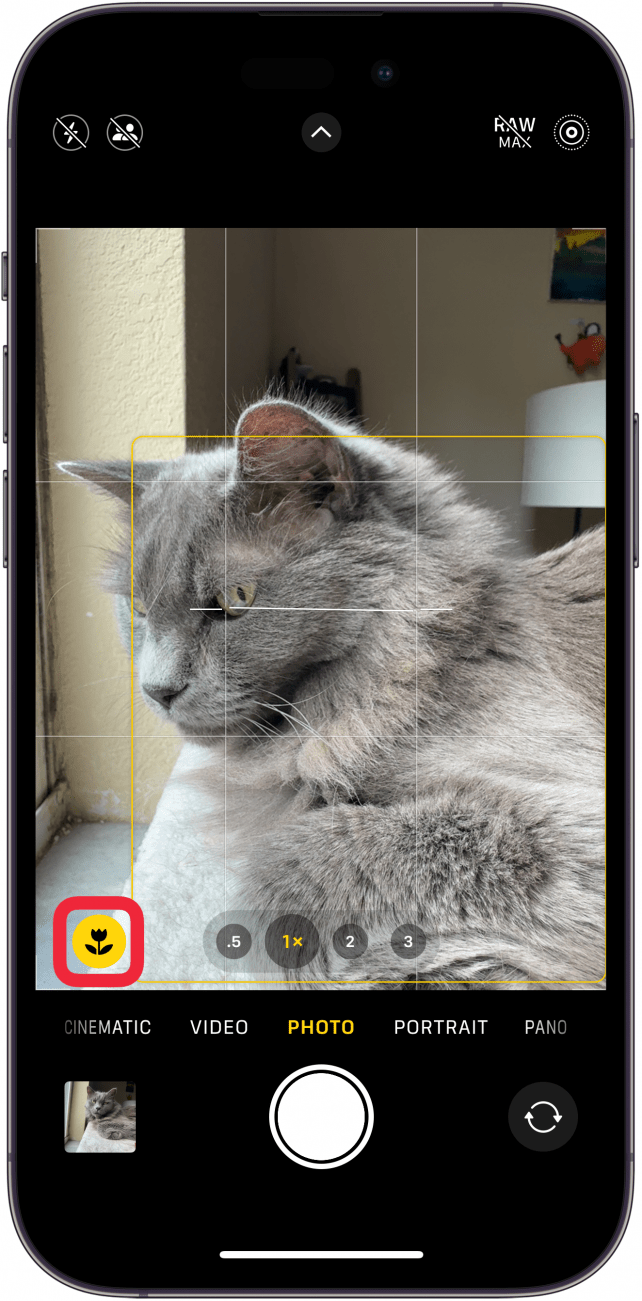
The flower icon on the iPhone camera shows a special feature for close-up photos. It helps users know when the camera is ready to take sharp pictures of small objects. This icon is not just decoration; it has a clear purpose that improves your photo quality.
Macro Mode Indicator
The flower icon appears when the iPhone switches to Macro Mode. Macro Mode lets the camera focus on tiny details. This mode works best for close objects, like flowers or insects. The icon tells you the camera is using this mode for better results.
Enhanced Close-up Focus
The flower icon also means the camera improves focus at short distances. It helps capture clear and sharp images of small subjects. Without this feature, close-up photos might look blurry. The icon shows the camera is ready to get every detail right.
When Flower Icon Appears
The flower icon on the iPhone camera appears at specific moments. It signals the camera’s macro mode is active. This mode helps capture small objects or details up close. Understanding when this icon shows up can improve your photo skills.
Knowing why the flower icon appears lets you take better close-up shots. It tells you the camera focuses on tiny details. Here are the main reasons the flower icon appears on your screen.
Proximity To Subject
The flower icon appears when you hold your phone very close. The camera detects you are near a small object. It switches to macro mode automatically. This mode captures sharp, detailed images of tiny subjects.
Moving closer to flowers, insects, or small items triggers the icon. It helps the camera adjust focus for these close distances. Watch for the flower icon to know your phone is ready for macro shots.
Lighting Conditions
Lighting can affect the flower icon’s appearance. Macro mode often activates in good light. Bright light helps the camera focus on small details. Low light may prevent the icon from showing up.
The camera uses light to create clear close-up photos. If the light is too dim, the flower icon might disappear. Bright, natural light works best for macro photos on iPhone.
Using Macro Mode Effectively
The flower icon on the iPhone camera shows that Macro mode is active. This mode helps you take very close photos. Small details become clear and sharp. Learning to use Macro mode well makes your photos look better. It lets you capture tiny parts of nature and objects in great detail.
Macro photography means focusing on subjects very close to the lens. The iPhone adjusts settings to get the best clarity. Knowing which subjects work best and how to keep photos sharp is key. These tips will help you take clear, beautiful macro shots with your iPhone.
Best Subjects For Macro Shots
Flowers are perfect for macro photography. Their petals and textures show up clearly. Insects like bees or butterflies also make interesting subjects. Leaves, water droplets, and small objects like jewelry work well too. Look for things with fine details or patterns. These subjects show more when you get close.
Tips For Clear Close-ups
Hold your phone steady to avoid blurry photos. Use natural light for the best colors and details. Tap the screen to focus on your subject precisely. Keep the subject still while you take the picture. Try to stay close, but not too close. Experiment with angles to find the sharpest view.
Credit: www.iphonelife.com
Hidden Features Linked To Flower Icon
The flower icon on the iPhone camera is more than just a symbol. It hints at special features that improve your photos. These features work quietly in the background. They help you take clearer and sharper pictures without extra effort.
Understanding these hidden tools lets you use your iPhone camera better. It makes capturing moments easier and more fun. Let’s explore what these features do.
Automatic Focus Adjustments
The flower icon signals the camera’s focus system at work. It adjusts focus automatically to keep your subject sharp. This means less blurry pictures, especially for close-up shots.
The camera senses the distance and changes focus quickly. It works well for photos of flowers, food, or small objects. You get crisp images every time.
Improved Image Stabilization
Another feature linked to the flower icon is image stabilization. It reduces blur caused by shaky hands. This helps you take steady photos even without a tripod.
The camera uses software and hardware to steady the image. It works best in low light or slow shutter settings. Your pictures come out clear and smooth.
Troubleshooting Flower Icon Issues
The flower icon on the iPhone camera shows the macro mode. This mode helps you take close-up photos of small objects. Sometimes, the flower icon may not appear or the photos look blurry. These issues can stop you from capturing sharp close-up shots. Here are simple ways to fix common problems with the flower icon.
Icon Not Appearing
The flower icon might not show if your iPhone camera is not close enough. Move the camera closer to the object. The icon usually appears within 2 to 3 centimeters.
Check if your iPhone model supports macro mode. Older models may not have this feature. Also, make sure your iPhone’s software is up to date. Updates can fix bugs that stop the icon from showing.
Restart the camera app or your phone. This can clear small glitches. If the problem continues, reset the camera settings in your phone’s settings menu.
Blurry Macro Photos
Blurry macro photos often happen due to shaky hands. Keep your phone steady while taking pictures. Use a stand or rest your phone on a flat surface for better stability.
Clean the camera lens before shooting. Dirt or fingerprints can blur your photos. Tap the screen on your subject to focus. The flower icon will help the camera focus closer.
Try to use good lighting. Low light can cause blurry images. Bright natural light works best for macro shots. Adjust the distance slowly until the image becomes sharp.
Credit: www.reddit.com
Comparing Macro Mode Across Iphones
The flower icon on the iPhone camera shows the Macro Mode. This mode lets you take close-up photos. You can capture tiny details clearly. Not all iPhones support this feature. The experience changes from one model to another.
Comparing Macro Mode across iPhones helps you know which phone fits your needs. It also shows how Apple improved this feature over the years. Let’s explore the models that support Macro Mode and the improvements made.
Models Supporting Macro
Macro Mode first appeared in the iPhone 13 Pro and Pro Max. These models introduced a dedicated ultra-wide lens for close-up shots. The iPhone 14 Pro and Pro Max continued this feature with better sensors. Earlier models like iPhone 12 or iPhone SE do not support Macro Mode.
Basic iPhone models can zoom in, but they lack true Macro capabilities. Only Pro models offer the automatic switch to Macro when you get close to a subject. This makes taking sharp, detailed photos easier and faster.
Feature Improvements Over Time
Apple has refined Macro Mode with each new iPhone Pro release. The iPhone 13 Pro brought the ability to focus as close as 2 centimeters. The 14 Pro models improved autofocus speed and image clarity. Night mode Macro also became available, letting you shoot in low light.
Software tweaks help reduce blurriness and enhance color accuracy. The camera app now switches seamlessly between lenses for better results. These improvements make Macro photography more accessible and enjoyable on newer iPhones.
Frequently Asked Questions
What Does The Flower Icon Mean On Iphone Camera?
The flower icon on iPhone camera represents the Macro mode. It activates close-up photography, allowing sharp focus on tiny objects or details.
How To Use The Flower Symbol For Better Photos?
Tap the flower icon to enable Macro mode. It helps capture fine details by focusing on objects very close to the lens.
Why Is The Flower Icon Important In Iphone Photography?
The flower icon indicates Macro mode, crucial for detailed close-up shots. It enhances photo clarity and sharpness for small subjects.
Can The Flower Icon Improve Iphone Photo Quality?
Yes, using the flower icon activates Macro mode. It boosts photo quality by focusing sharply on tiny or close objects.
Conclusion
The flower icon on the iPhone camera shows the Macro mode. It helps you take close-up photos with clear details. This feature works best for small objects like flowers and insects. Using Macro mode makes pictures sharper and more focused.
Knowing this icon helps you use your camera better. Try it next time for creative shots. Understanding simple icons improves your photo experience. Keep exploring your iPhone camera features for great results.
As an Amazon Associate, I earn from qualifying purchases.
