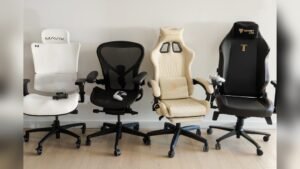
Are you spending hours in your gaming chair and wondering if it’s hurting your posture? You’re not alone.
Many gamers ask the same question because good posture is key to staying comfortable and avoiding pain. But are gaming chairs really bad for your back, neck, or shoulders? The answer might surprise you. Keep reading to discover the truth about gaming chairs and how they can affect your posture—plus simple tips to protect your body while you play.
Your comfort and health matter, and this guide will help you get both right.
Impact Of Gaming Chairs On Posture
Gaming chairs are popular for long gaming sessions. Many wonder how these chairs affect posture. Posture impacts comfort and health during gaming. Understanding the role of gaming chairs helps choose the right seat.
Common Posture Issues In Gamers
Gamers often sit for hours without breaks. This causes slouching and rounded shoulders. Neck strain happens from leaning forward too much. Lower back pain is common due to poor support. These issues lead to discomfort and health problems.
Design Features Of Gaming Chairs
Gaming chairs have high backs to support the spine. They include adjustable armrests for arm comfort. Many come with lumbar cushions to support the lower back. Headrests help keep the neck aligned. The seat height adjusts to fit different desks. These features aim to improve sitting posture.
Ergonomic Benefits And Drawbacks
Gaming chairs promote better posture with their design. Lumbar support helps reduce lower back strain. Adjustable parts allow users to customize fit. Some chairs may encourage sitting too long without breaks. Not all designs fit every body type well. Choosing the right chair and using good habits matter most.
Comparing Gaming Chairs With Office Chairs
Gaming chairs and office chairs serve similar purposes but differ in design and function. Comparing these chairs helps understand which supports better posture. Both chairs aim to offer comfort during long hours of sitting. Yet, their features and focus areas vary greatly.
Support And Adjustability Differences
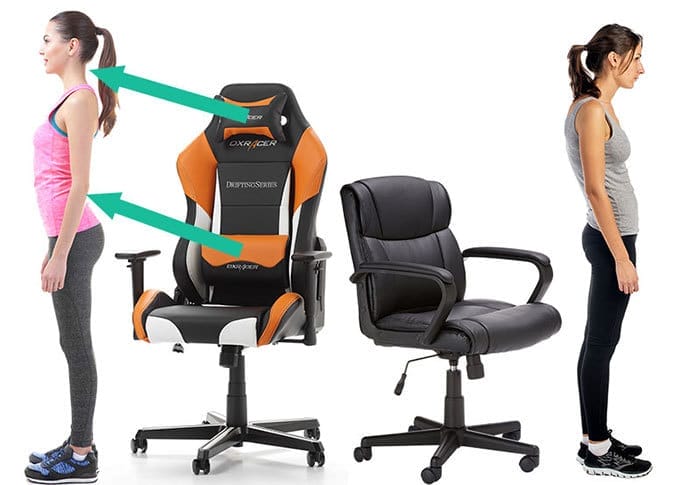
Office chairs often have multiple adjustable parts. You can change seat height, armrests, and back support easily. Gaming chairs focus on a sleek look with less adjustability. Many gaming chairs include lumbar and neck pillows. These pillows may not suit all body types. Office chairs usually provide better ergonomic support overall.
Material And Build Quality
Office chairs use breathable mesh or high-quality fabric. This material helps reduce sweating and improves comfort. Gaming chairs often use synthetic leather, which looks stylish. Synthetic leather can cause heat and sweating. Office chairs tend to have stronger frames for daily use. Gaming chairs focus more on style than durability.
Long-term Comfort And Health Effects
Office chairs are designed for long hours of work. They promote good posture and reduce back strain. Gaming chairs might encourage slouching due to their shape. Prolonged use of gaming chairs can lead to discomfort. Choosing a chair with proper support is key. Good posture lowers risks of pain and injury over time.
How To Use Gaming Chairs For Better Posture
Using a gaming chair correctly helps improve posture and comfort. Proper use reduces strain on your back and neck. Small adjustments make a big difference during long gaming sessions.
Follow these tips to get the most from your gaming chair. Stay comfortable and protect your spine while you play.
Optimal Sitting Positions
Sit with your feet flat on the floor. Keep your knees at a 90-degree angle. Your back should rest against the chair’s backrest. Avoid slouching or leaning forward. Keep your shoulders relaxed and down.
Position your head so it aligns with your spine. Look straight ahead, not down or up. This reduces neck strain and keeps your posture upright.
Adjusting Chair Settings
Adjust the chair height so your elbows stay close to your body. Your arms should form a 90-degree angle at the elbow. Tilt the backrest slightly to support the natural curve of your spine. Use the lumbar pillow if your chair has one. Set armrests to support your arms without raising your shoulders.
Incorporating Movement And Breaks
Take breaks every 30 to 60 minutes. Stand, stretch, or walk around to relieve muscle tension. Change your sitting position regularly to avoid stiffness. Small movements prevent fatigue and improve blood flow. Use breaks to reset your posture before sitting again.
Credit: chairsfx.com
Alternatives To Gaming Chairs
Gaming chairs are popular but not always best for posture. Many gamers seek better options to stay comfortable and healthy during long sessions. Alternatives to gaming chairs offer varied support and flexibility. These options can improve your posture and reduce body strain.
Ergonomic Office Chairs
Ergonomic office chairs focus on body support. They adjust to your back, neck, and arms. These chairs help keep your spine aligned. Breathable materials keep you cool. Many models have lumbar support to ease lower back pain. They suit both work and gaming.
Standing Desks
Standing desks let you change your position often. Standing reduces pressure on your lower back. You can switch between sitting and standing anytime. This movement helps improve circulation. It also reduces fatigue during long periods of use. Standing desks encourage better posture habits.
Customizable Seating Options
Customizable seating lets you tailor comfort to your needs. Options include adjustable cushions and seat height. Some chairs come with movable armrests and backrests. This flexibility supports your unique body shape. Custom seats help prevent stiffness and pain. They adapt as your posture or activity changes.
Expert Opinions And Research Findings
Experts and researchers have studied gaming chairs and their impact on posture. Their opinions help us understand if these chairs are good or bad for spinal health. This section shares key findings and advice from professionals.
Studies On Gaming Chairs And Spinal Health
Research shows that some gaming chairs support the spine well. They often include lumbar cushions and adjustable features. These help maintain the natural curve of the lower back.
Still, not all gaming chairs are equal. Poor design or lack of adjustments can cause slouching. Slouching puts pressure on the spine and muscles.
One study found that sitting for long hours in any chair can harm posture. It is important to take breaks and move around. Good chairs alone cannot prevent all posture problems.
Recommendations From Health Professionals
Doctors and physical therapists suggest choosing chairs with good back support. Adjustable height and armrests are also important. These features help keep the body aligned.
Experts stress the value of sitting with feet flat on the floor. The knees should be at a 90-degree angle. This position reduces strain on the lower back.
Many professionals advise taking short breaks every hour. Stretching and walking ease muscle tension. This habit improves overall spinal health.

Credit: vixencomposites.com
.jpg)
Credit: vixencomposites.com
Frequently Asked Questions
Are Gaming Chairs Harmful To Spinal Health?
Gaming chairs can harm spinal health if poorly designed or misused. Proper lumbar support and correct posture are essential to prevent strain and discomfort during long gaming sessions.
Do Gaming Chairs Improve Or Worsen Posture?
Gaming chairs improve posture when ergonomically designed and adjusted correctly. Without proper use, they may worsen posture by encouraging slouching or uneven weight distribution.
How Can Gaming Chairs Affect Long-term Posture?
Long-term posture can suffer if a gaming chair lacks adjustable features. Consistent poor seating habits lead to back pain, muscle stiffness, and spinal misalignment over time.
What Features In Gaming Chairs Support Good Posture?
Adjustable lumbar support, seat height, backrest tilt, and armrests promote good posture. These features help maintain spinal alignment and reduce pressure on muscles during extended use.
Conclusion
Gaming chairs are not always bad for posture. Choosing the right chair matters most. Chairs with good support help keep your back straight. Sitting too long without breaks can hurt posture. Moving and stretching often is important too. Using a gaming chair correctly makes a difference.
Pay attention to your body’s signals daily. A healthy posture keeps you comfortable and focused. Your chair can help or harm your spine. Make smart choices for better sitting habits.
As an Amazon Associate, I earn from qualifying purchases.