

Are you tired of feeling like someone is always watching your every move online? Trackers follow your browsing habits, steal your data, and invade your privacy without you even realizing it.
But what if you could take back control and keep your information safe? You’ll discover simple and effective ways to get rid of trackers for good. Keep reading, and you’ll learn how to protect yourself from being tracked—easily and quickly.
Your privacy matters, and it’s time to reclaim it.

Credit: www.wikihow.com
Types Of Trackers
Trackers collect data about your online activities. They help websites and apps learn more about you. This data often targets ads or monitors behavior. Understanding different tracker types helps you block them effectively.
Cookies And Their Role
Cookies are small files stored on your device. They save your preferences and login info. Websites use cookies to remember your actions. Advertisers use them to show tailored ads. Some cookies track you across many sites.
Browser Fingerprinting
Browser fingerprinting collects details about your browser setup. It checks your screen size, fonts, and plugins. This info creates a unique browser profile. Sites use this profile to recognize you. It works even if cookies are off.
Ip Address Tracking
Your IP address reveals your general location. Websites and services log this address. They track visits and behavior by IP. It links your device to your internet provider. IP tracking helps identify and monitor users online.
Mobile App Trackers
Many apps collect data on your phone usage. They track app activity, location, and device info. Apps share this data with advertisers or analytics firms. These trackers run in the background. They collect data even when you don’t use the app.
Why Trackers Matter
Trackers are small tools used by websites to watch your online actions. They collect data about what you do, where you go, and what you like. This data helps companies learn about users but can also cause privacy problems. Understanding why trackers matter helps you see why removing them is important.
Impact On Privacy
Trackers gather a lot of personal information without clear permission. This can include your location, browsing habits, and interests. Such data collection can feel like an invasion of privacy. It also increases the risk of your data being misused or stolen.
Data Monetization
Companies use the data from trackers to make money. They sell or share this information with other businesses. This process happens without users getting paid or fully understanding it. Your personal data becomes a product for profit.
Targeted Advertising
Trackers help create ads tailored to your behavior. You might see ads related to things you searched for or visited online. This can feel helpful but often feels intrusive. It also limits your online experience by controlling what you see.
Tools To Block Trackers
Trackers follow your online steps and collect data about you. Blocking them helps protect your privacy. Various tools exist to stop trackers from gathering your information. Using these tools makes your internet use safer and less intrusive.
Browser Extensions
Browser extensions are small programs added to your web browser. They block trackers from loading on websites. Popular extensions include uBlock Origin and Privacy Badger. These tools stop ads and tracking scripts from running. They work quietly in the background, improving your browsing experience.
Privacy-focused Browsers
Privacy-focused browsers are built to limit tracking by default. Examples include Brave and Tor Browser. These browsers block trackers automatically without extra setup. They also clear cookies and history regularly to protect your identity. Using such browsers reduces online tracking significantly.
Vpn Services
VPNs hide your real IP address by routing traffic through other servers. This makes it harder for trackers to link activities to you. VPN services encrypt your data, adding another privacy layer. Choose VPNs with a strict no-logs policy for better protection.
Anti-tracking Apps
Anti-tracking apps run on your device to block trackers across apps and browsers. They scan and stop tracking attempts in real time. Apps like Disconnect and Blokada help reduce data collection on smartphones. These apps add extra security beyond browser tools.

Credit: family1st.io
Adjusting Browser Settings
Adjusting your browser settings is a simple way to reduce online tracking. Browsers store information about your visits to websites. Changing a few settings helps protect your privacy. This section explains easy steps to adjust your browser for fewer trackers.
Disabling Third-party Cookies
Third-party cookies come from sites other than the one you visit. They often track your activity across many websites. Disabling them stops these trackers from collecting your data. You can find this option in your browser’s privacy settings. Turn off third-party cookies to block most trackers.
Clearing Cache And Cookies
Browsers save files and cookies to speed up your visits. These saved files can also store tracking data. Clearing your cache and cookies removes old trackers. Do this regularly to keep your browser clean. Look for this option in your browser’s history or privacy menu.
Enabling Do Not Track
Do Not Track sends a signal to websites asking them not to track you. Most browsers have this feature in privacy settings. Turn on Do Not Track to tell sites to respect your privacy. Some sites may ignore the request, but it helps reduce tracking overall.
Managing Mobile Privacy
Managing mobile privacy is key to protecting your personal data. Mobile devices track a lot of information through apps and browsers. Taking control helps stop unwanted tracking and keeps your data safe.
App Permissions
Apps ask for permissions to access your data and device features. Review these permissions carefully. Only allow what is necessary for the app to work. Deny access to sensitive data like location or contacts if it is not needed.
Change app permissions in your phone settings. This limits what apps can track or collect. Regularly check permissions and revoke those that seem excessive. This simple step reduces data exposure on your phone.
Using Private Browsers
Private browsers do not save your browsing history or cookies. They block trackers from websites. Use private browsers for safer and more private internet use.
Choose browsers that focus on privacy and block ads automatically. This prevents websites from collecting your data. Private browsing helps keep your online actions hidden from trackers.
Limiting Ad Tracking
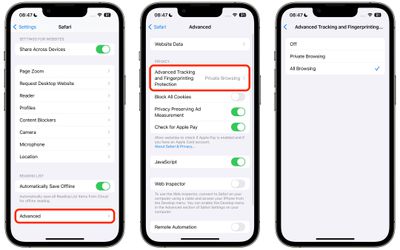
Ad tracking follows your activity to show targeted ads. Turn off ad tracking in your phone’s privacy settings. This reduces the amount of personal data advertisers can collect.
Use settings to limit tracking across apps and websites. This does not stop ads but makes them less personalized. Limiting ad tracking protects your privacy without affecting your phone’s performance.
Credit: www.macrumors.com
Safe Browsing Habits
Safe browsing habits reduce the chance of being tracked online. They help protect your privacy and keep your data secure. Following simple steps makes your internet use safer.
Avoiding Suspicious Links
Suspicious links often carry trackers or malware. Do not click on links from unknown emails or messages. Check URLs carefully before clicking. Look for strange spellings or unexpected web addresses. Staying cautious stops many trackers from gaining access.
Using Secure Connections
Always use websites with HTTPS in their address. It means the connection is encrypted and safer. Avoid public Wi-Fi for sensitive activities. Use a VPN to protect your connection on public networks. Secure connections reduce the risk of data interception.
Regular Software Updates
Keep your browser and software up to date. Updates fix security flaws that trackers exploit. Enable automatic updates to stay protected. Updated software improves performance and blocks new threats. This simple step strengthens your online safety every day.
Advanced Techniques
Advanced techniques help block trackers more deeply. They protect your privacy beyond simple tools. These methods require some setup but offer stronger security.
Using Tor Network
Tor hides your IP address by routing traffic through many servers. It makes you harder to track online. Use the Tor browser to browse anonymously. It blocks many trackers by design. Tor slows internet speed but improves privacy greatly.
Blocking Trackers With Hosts File
The hosts file can stop trackers at your device level. It blocks tracker domains by redirecting them to a fake address. Edit the hosts file to add known tracker URLs. This prevents your device from connecting to those trackers. It works across all browsers and apps.
Encrypting Internet Traffic
Encryption hides your data from trackers and hackers. Use a VPN to encrypt your internet connection. VPNs create a secure tunnel for your data. They hide your IP and encrypt all online activity. Encryption makes tracking and spying very difficult.
Frequently Asked Questions
What Are Common Types Of Online Trackers?
Online trackers include cookies, beacons, and fingerprinting scripts. They collect data on your browsing habits. These trackers help advertisers target you with personalized ads. Understanding these types helps you choose effective removal tools.
How Can I Block Trackers On My Browser?
Use privacy-focused browsers or add tracker-blocking extensions. Popular tools include uBlock Origin and Privacy Badger. Regularly clear cookies and cache to reduce tracking. Enabling browser privacy settings also limits data collection.
Are Vpns Effective Against Trackers?
VPNs mask your IP address, enhancing online privacy. However, they don’t block trackers embedded in websites. Combining VPNs with tracker blockers offers stronger protection against tracking.
Can Mobile Devices Be Tracked Similarly?
Yes, mobile apps and browsers use trackers too. Use privacy settings, limit app permissions, and install tracker-blocking apps. Regular updates improve security and reduce tracking risks.
Conclusion
Getting rid of trackers helps protect your online privacy. Use strong tools like VPNs and ad blockers. Clear cookies and browser history often. Change your privacy settings regularly. Stay aware of what you share online. Small steps make a big difference.
Take control of your digital space today. Privacy matters for everyone, everywhere. Keep your data safe and secure.
As an Amazon Associate, I earn from qualifying purchases.
