

Are you confused about how laptop sizes are measured? You’re not alone.
When you shop for a new laptop, the size number you see can be puzzling. Is it the width, the height, or something else? Understanding how laptop size is measured helps you pick the perfect device that fits your needs—whether for work, gaming, or travel.
Keep reading, and you’ll learn exactly what those numbers mean and how to choose the right size for you.
Credit: knomo.com
Laptop Size Basics
Laptop size is an important factor for many users. It affects portability and comfort. Knowing how size is measured helps you choose the right device.
Laptop size is not just about width or height. It mainly focuses on the screen size. This size affects how big the laptop feels and how easy it is to carry.
Common Measurement Units
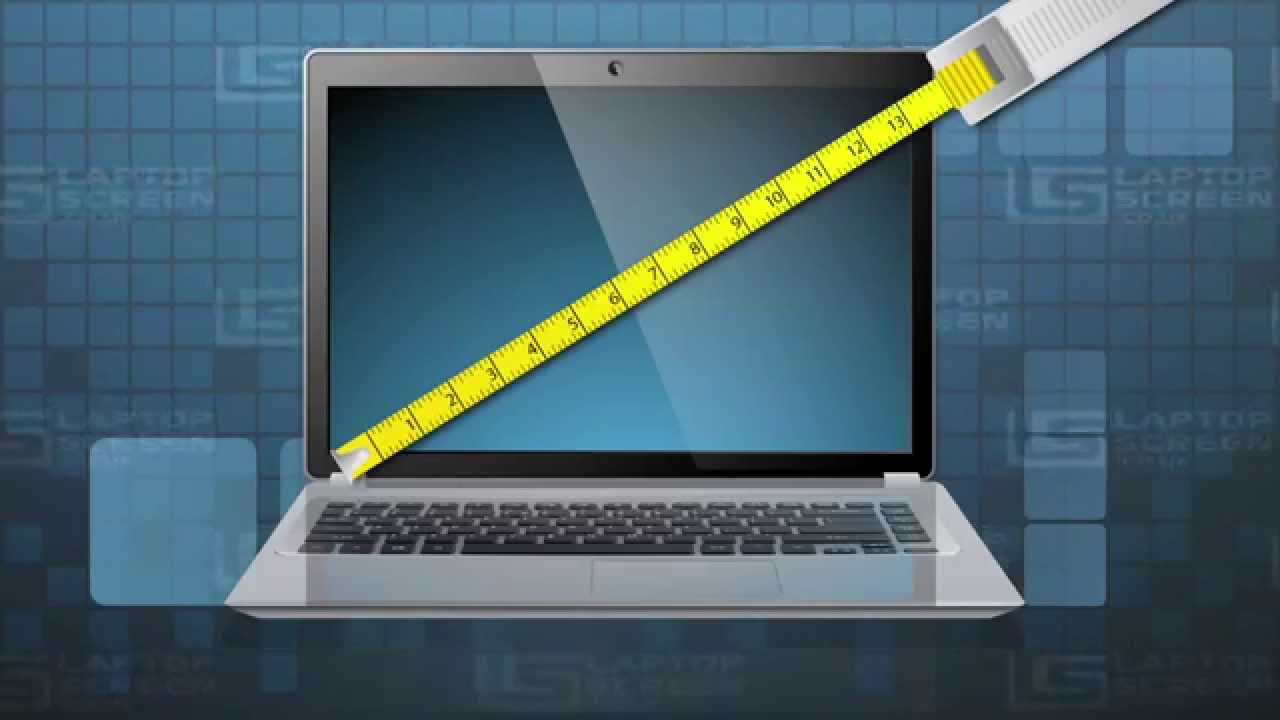
Inches are the most common unit for laptop size. The screen size is usually given in inches. This number shows the diagonal length of the screen.
Centimeters are less common but sometimes used. Inches remain the standard in most stores and online listings.
What Screen Size Means
Screen size is the diagonal distance from one corner to the opposite. It does not include the laptop frame or bezel. This size tells you how large the display area is.
A 15-inch laptop screen means the visible part is 15 inches across diagonally. Bigger screens offer more space for work or entertainment. Smaller screens make laptops lighter and easier to carry.
Credit: www.youtube.com
Measuring Screen Dimensions
Understanding how laptop screen size is measured helps you pick the right device. Screen dimensions tell you about the visible area of the display. Knowing this can guide you in choosing a laptop that fits your needs for work, study, or entertainment.
Diagonal Measurement Method
The most common way to measure a laptop screen is by its diagonal length. This means measuring from one corner of the screen to the opposite corner. The size is given in inches. This method only measures the display area, not the laptop body.
Aspect Ratio Impact
Aspect ratio is the shape of the screen, shown as width to height. Common ratios are 16:9 or 16:10. A wider ratio means a wider screen for the same diagonal size. This affects how much you see horizontally and vertically on the screen.
Bezel Size Considerations
Bezel is the frame around the screen. A thick bezel makes the laptop bigger without increasing the screen size. Thin bezels mean more screen in a smaller laptop body. Bezel size does not change the diagonal measurement but affects the laptop’s overall size.
Other Laptop Dimensions
Laptop size is not just about the screen. Other dimensions also affect how a laptop fits your needs. These include width, depth, thickness, weight, and layout. Each part plays a role in comfort and portability. Understanding these helps you pick the right laptop.
Width And Depth
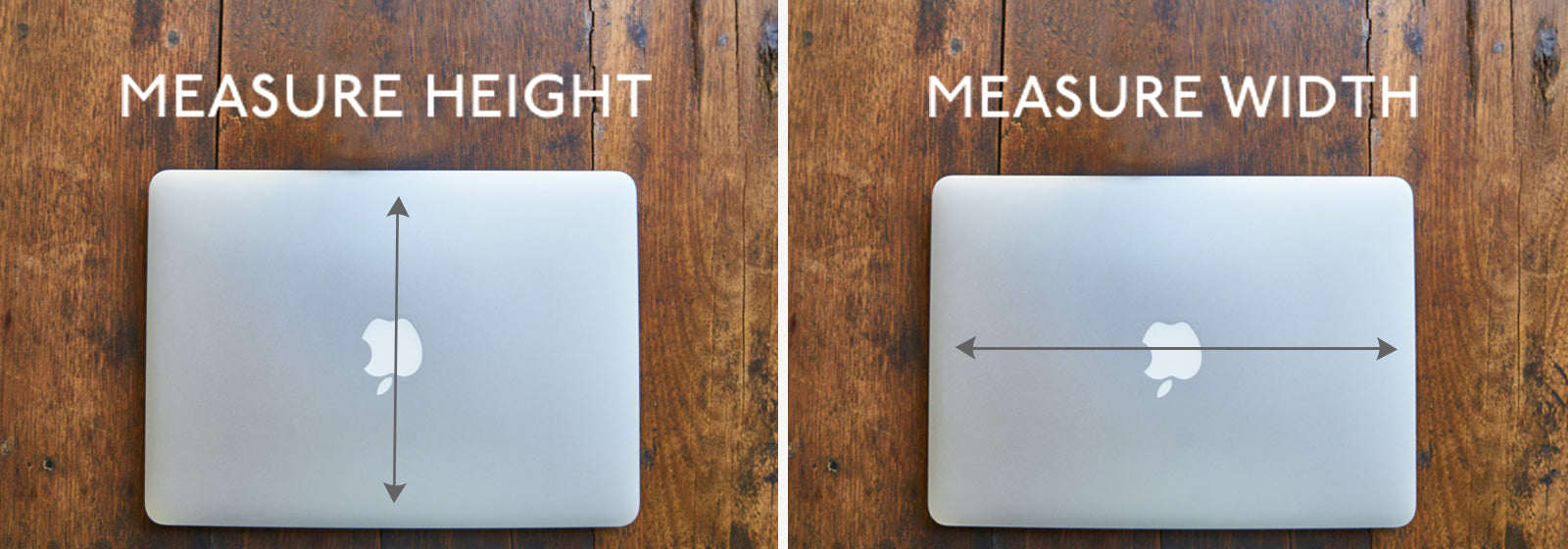
Width and depth are the horizontal and vertical measurements of the laptop base. Width is how wide the laptop is from left to right. Depth measures from front to back. These dimensions affect how much space the laptop takes on a desk or in a bag. Smaller width and depth mean easier carrying and storage.
Thickness And Weight
Thickness refers to how tall the laptop is when closed. Slimmer laptops feel lighter and look sleek. Weight is important for carrying the laptop around all day. Lighter laptops reduce strain on your arms and shoulders. Both thickness and weight influence overall portability and comfort.
Port And Keyboard Layout
Port layout means where USB, HDMI, and charging ports are placed. Good placement allows easy connection of devices without clutter. Keyboard layout affects typing comfort and speed. Key size and spacing matter, especially for long typing sessions. A well-designed layout improves user experience and efficiency.
Screen Resolution And Quality
Screen resolution and quality play a big role in how a laptop looks and works. They affect the sharpness and color of images and text. Understanding these factors helps you choose the right laptop for your needs.
Pixels And Clarity
Pixels are tiny dots that make up the screen image. More pixels mean clearer and sharper images. A higher resolution gives better detail in photos, videos, and text. Low resolution can make things look blurry or pixelated.
Display Types
Laptops use different display types. Common ones include LCD, LED, and OLED. Each type shows colors and brightness differently. OLED screens often have deeper blacks and more vibrant colors. LCD and LED are usually more affordable but may not be as bright.
Effect On Viewing Experience
Screen quality changes how you see content. A good screen reduces eye strain and shows colors accurately. It also improves watching videos and playing games. Poor quality screens can cause discomfort and dull visuals.
Choosing The Right Size
Choosing the right laptop size affects your daily use and comfort. Size impacts how easy it is to carry, how well it fits your workspace, and how comfortable it feels to use. Understanding your needs helps pick the best size for you.
Portability Needs
Think about where you will carry the laptop most. Smaller laptops are lighter and fit easily in bags. They suit travel or school use. Bigger laptops are heavier and best kept on a desk.
Usage Scenarios
Consider what tasks you do often. For writing and browsing, small laptops work fine. For video editing or gaming, bigger screens give better views. Choose size based on your daily activities.
Ergonomics And Comfort
Look at how the laptop feels when you use it. A bigger screen is easier on your eyes. The keyboard size also matters for typing comfort. Pick a size that feels natural and reduces strain.

Credit: geekscallout.co.uk
Trends In Laptop Sizes
Laptop sizes have changed a lot over the years. People want different things from their laptops now. Some want something light and easy to carry. Others need big screens for work or play. The market has grown to meet these needs. This created new styles and sizes of laptops.
Many laptops are made to be thin and light. Others have big screens for better viewing. Some even change shape or have two screens. These trends show how laptop sizes match user habits and tasks.
Ultrabooks And Thin Designs
Ultrabooks are very thin and light laptops. They usually have screens between 11 and 14 inches. These laptops are easy to carry everywhere. They fit well in bags and small spaces. Many people use them for work or school. Battery life is often long. Thin designs do not mean weak power. These laptops balance good speed and portability.
Gaming And Large Screens
Gaming laptops often have large screens. Sizes usually start at 15 inches and go up to 17 inches. Big screens help players see game details clearly. These laptops are heavier but very powerful. They have strong graphics cards and fast processors. The size helps keep the laptop cool during use. Gamers prefer these for better visual experience.
Convertible And Dual Screens
Convertible laptops can change shape. They fold or twist to become tablets. Screen sizes vary but often stay between 13 and 15 inches. Dual-screen laptops have two screens instead of one. This adds space for multitasking. Users can run two apps side by side. These designs support creativity and productivity. They show how laptops adapt to new needs.
Frequently Asked Questions
How Is Laptop Screen Size Measured?
Laptop screen size is measured diagonally from one corner to the opposite corner. This measurement excludes the bezel. It represents the visible display area inside the laptop frame.
What Units Are Used To Measure Laptop Size?
Laptop size is usually measured in inches. The diagonal length of the screen is the most common size indicator. Some regions may use centimeters but inches remain standard.
Does Laptop Size Include The Keyboard Area?
No, laptop size measurement only includes the screen diagonal. The keyboard, trackpad, and outer casing are not part of this measurement. Size refers strictly to display dimensions.
Why Is Laptop Size Important For Buyers?
Laptop size affects portability, screen visibility, and usability. Smaller screens are more portable, while larger screens offer better viewing comfort. Choosing the right size depends on user needs.
Conclusion
Measuring a laptop size is simple once you know the key points. The screen size shows the main dimension. It is measured diagonally from corner to corner. Other parts like width and depth help to understand the full size. Knowing these helps you pick the right laptop for your needs.
Size affects portability and usability. Always check the measurements before buying. This way, you get a laptop that fits your lifestyle. Remember, size matters but so does performance. Choose wisely and enjoy your device.
As an Amazon Associate, I earn from qualifying purchases.

