

Are you planning to travel soon and wondering if you can put your laptop in checked baggage? It’s a common question that many travelers face.
You want to keep your laptop safe, but you also want to pack smart and avoid any trouble at the airport. You’ll discover the risks and rules about checking in your laptop. Knowing this can save you from damage, loss, or even delays.
Keep reading to find out exactly what you should do with your laptop before you fly.

Credit: www.myticketstoindia.com
Risks Of Checking Laptops
Checking laptops in baggage carries several risks. Laptops are delicate and valuable. Putting them in checked bags can lead to damage, theft, or privacy issues. Understanding these risks helps travelers make safer choices.
Potential Damage During Transit
Checked bags move a lot. Bags get thrown and stacked under heavy luggage. This rough handling can harm laptops. Screens may crack, or internal parts can break. Baggage handlers do not treat bags gently. Even strong cases might not stop all damage.
Theft And Security Concerns
Checked bags pass through many hands. Some people might steal items inside. Laptops are easy targets because they are small and valuable. Airport security checks can expose laptops to theft. Once stolen, recovering a laptop is difficult. Theft risk is high in checked luggage.
Data Privacy Risks
Storing laptops in checked bags risks data privacy. Thieves can access sensitive files and personal info. Laptops might get hacked if left unattended. Airport staff or others may view private data. Protecting data requires extra caution. Checking laptops increases the chance of data exposure.
Airline Policies On Electronics
Airline policies on electronics vary widely across carriers and countries. These rules affect how you can carry devices like laptops. Knowing these policies helps you avoid problems at the airport. Airlines focus on safety and security when setting these rules. Carrying electronics properly protects your devices and complies with regulations.
Common Restrictions
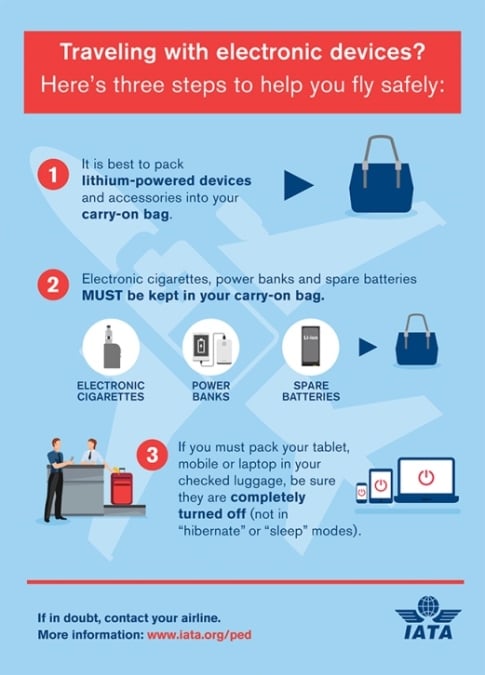
Most airlines do not allow laptops in checked baggage. The risk of damage or theft is high. Batteries in laptops can also pose fire hazards. Airlines often require laptops to be in carry-on bags. Some may allow them in checked bags only if the battery is removed. Always check the airline’s policy before packing your laptop.
Variations By Airline
Each airline has its own rules for electronics. Some airlines are stricter about battery-powered devices. Others may allow laptops in checked baggage with special packing. Low-cost airlines often have tighter restrictions. Premium airlines may offer more flexibility. Always confirm rules directly from the airline’s website or customer service.
Impact Of International Regulations
International safety rules affect airline policies on laptops. Organizations like ICAO set standards for battery transport. These rules limit battery size and type in checked bags. Airlines must follow these international regulations. This makes policies consistent across many countries. Still, local rules can add extra restrictions.
Packing Laptops Safely
Packing laptops safely is very important when traveling by air. Laptops are fragile and can get damaged easily. They need extra care, especially if placed in checked baggage. Protecting your laptop helps avoid costly repairs or data loss.
Proper packing can keep your laptop safe from shocks and bumps. It also protects the device from moisture and dust. Taking simple steps can make a big difference during travel.
Protective Cases And Padding
Use a sturdy, padded laptop case for protection. Soft cases reduce small scratches but may not protect well from impacts. Hard cases provide better defense against drops.
Wrap the laptop in bubble wrap or foam before placing it in your bag. Add extra padding around the laptop inside the suitcase. This reduces movement and absorbs shocks.
Removing Batteries
Remove the laptop battery before packing if possible. Batteries can overheat or leak during flights. Keep the battery in your carry-on bag for safety.
Check airline rules about batteries. Some airlines restrict certain battery types in checked baggage. Follow their guidelines to avoid problems.
Securing Accessories
Keep laptop accessories like chargers and cables organized. Place them in a separate pouch or compartment. This prevents damage to both the laptop and accessories.
Avoid loose items inside the suitcase. They can scratch or press against the laptop. Secure all parts tightly to minimize movement.

Credit: uuhluggages.com
Alternative Options To Checked Baggage
There are safer choices than placing your laptop in checked baggage. These alternatives protect your device from damage and theft. They also make traveling less stressful. Explore options that keep your laptop close and secure.
Carry-on Benefits
Keeping your laptop in a carry-on bag lets you control its safety. You avoid rough handling and lost luggage risks. It also allows easy access during the flight. This way, you can work or enjoy entertainment without interruption.
Shipping Electronics Separately
Shipping your laptop separately ensures it stays safe in special packaging. Professional services handle electronics carefully to avoid damage. This method reduces the chance of loss during travel. It is useful for long trips or when carrying many gadgets.
Using Laptop Storage Services
Some airports offer laptop storage services for travelers. You can leave your device in a secure locker while you travel light. This option helps if you do not need your laptop immediately. It provides peace of mind and easy retrieval after your trip.
Tips For Airport Security Screening
Airport security checks can be stressful, especially with electronics like laptops. Knowing how to handle these checks can make your experience smoother. Simple steps help you pass through security faster and with less hassle. This section shares useful tips for laptop screening at the airport.
Preparing Your Laptop For Inspection
Take your laptop out of its bag before you reach the scanner. Place it in a separate bin to speed up the process. Remove any covers or cases from the laptop. Keep your laptop charged. Sometimes officers ask you to turn it on.
Handling Security Requests
Listen carefully to the security officer’s instructions. Answer questions politely and clearly. Show your laptop and accessories if asked. Stay calm even if officers ask for extra checks. Cooperation helps you move through quickly.
Avoiding Common Mistakes
Don’t keep your laptop inside your bag during screening. Avoid packing it with metal items that can cause alarms. Don’t forget to remove power banks or cables from your bag. Always double-check your bag before security to avoid surprises.
Insurance And Backup Strategies
Protecting your laptop during travel goes beyond packing. Insurance and backup strategies help secure your device and data. These steps reduce risks and ease worries about loss or damage.
Travel Insurance For Electronics
Travel insurance can cover laptops against theft, loss, or damage. Check if your policy includes electronics protection. Some credit cards offer extra coverage for devices bought with their card. Keep receipts and serial numbers for claims. Understand policy limits and exclusions before traveling.
Data Backup Before Travel
Backing up data is crucial before any trip. Use cloud storage or external drives to save important files. This step protects your information if your laptop is lost or stolen. Regular backups keep your data safe and accessible. Test backups to ensure files open correctly.
Tracking And Recovery Tools
Install tracking software on your laptop to help locate it if lost. Many tools allow remote locking or data wiping to protect privacy. Enable device location services before traveling. These tools improve chances of recovery and keep data secure.
Credit: planeteliege.com
Frequently Asked Questions
Can I Put My Laptop In Checked Baggage?
It is generally not recommended to put laptops in checked baggage. Laptops are fragile and can be damaged during handling. Also, batteries may pose safety risks in the cargo hold. Carrying laptops in carry-on bags is safer and preferred by airlines.
Are Laptops Allowed In Checked Baggage On Flights?
Laptops are allowed in checked baggage, but airlines advise against it. Security risks and potential damage are concerns. Always check your airline’s specific rules before packing your laptop in checked baggage to avoid issues at the airport.
What Are The Risks Of Checking In A Laptop?
Checking in a laptop risks physical damage from rough handling. Laptops can also be stolen or lost in checked baggage. Additionally, lithium batteries in laptops may cause fire hazards in the cargo hold. Carry-on is the safest option for laptops.
How Should I Pack My Laptop For Air Travel?
Always pack your laptop in a padded sleeve or case. Keep it in your carry-on bag for protection and easy access. Avoid placing laptops in checked baggage to minimize damage and loss risks during air travel.
Conclusion
Packing a laptop in checked baggage can be risky. Laptops may get damaged or lost during travel. Airlines often advise carrying laptops in carry-on bags instead. This keeps your device safe and close to you. Always check airline rules before packing your laptop.
Secure your laptop with a padded case for extra protection. Remember, keeping electronics with you reduces chances of theft or damage. Choose carry-on to travel smarter and safer with your laptop.
As an Amazon Associate, I earn from qualifying purchases.

