

Are you unsure about your laptop’s screen size? Knowing the exact size can help you choose the right accessories, improve your work setup, or even decide on an upgrade.
But finding this information isn’t always straightforward. Don’t worry—you’re just a few simple steps away from discovering your laptop’s screen size quickly and easily. Keep reading, and by the end of this article, you’ll have all the tips you need to measure your laptop screen like a pro.
Check Laptop Specifications
Checking your laptop’s specifications is a simple way to find the screen size. These details often include the screen size in inches. You can access this information through official sources linked to your laptop model.
Knowing the exact screen size helps in buying accessories or upgrading your device. It also gives you a better understanding of your laptop’s display quality and usability.
Look At Manufacturer’s Website
Visit the official website of your laptop’s brand. Enter your laptop model in the search box. The product page usually lists full specifications. Screen size is almost always shown there. This source is reliable and up to date.
Some brands have a support section where you can find detailed specs. Use your laptop’s serial number for more accurate results. Manufacturer websites also provide manuals and guides.
Use Product Manual Or Box
The product manual often contains detailed specs. Check the first few pages or the technical section. The screen size is commonly listed alongside other hardware details.
Look at the laptop’s original box if you still have it. Manufacturers print screen size on the box label. This method is quick and requires no internet access.
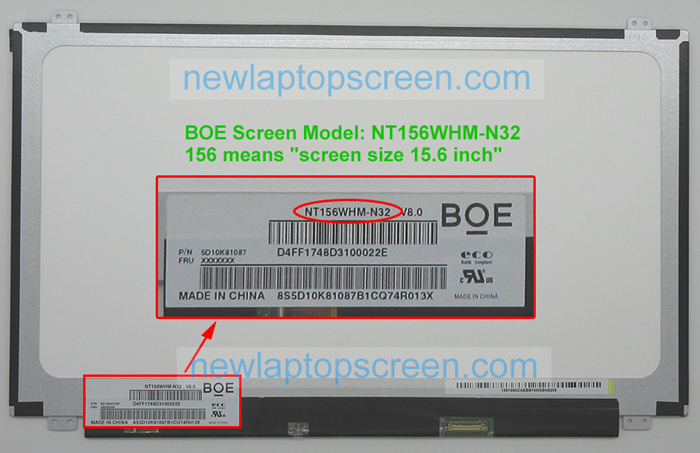
Credit: www.newlaptopscreen.com
Measure Screen Manually
Measuring your laptop screen manually is a simple way to find its size. It helps you know the exact screen dimensions without guessing. This method uses basic tools and easy steps anyone can follow.
Tools Needed For Measurement
First, gather the tools. You will need a ruler or a tape measure. Make sure it has inches or centimeters marked clearly. A pen and paper may help to note the size.
Steps To Measure Screen Size
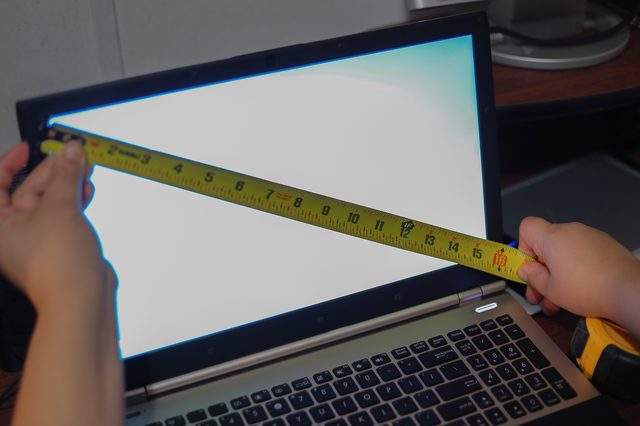
Start by turning off the laptop. This avoids any glare on the screen. Place the ruler or tape measure at one corner of the screen.
Measure diagonally from the bottom left to the top right corner. Do not include the frame or bezel around the screen. The size you get is the screen size in inches or centimeters.
Write down the number. This is your laptop screen size. Check your measurement twice for accuracy.
Use Operating System Settings
Finding your laptop’s screen size can be simple using your operating system settings. These settings show detailed display information. This method works without extra tools or apps. Just follow a few easy steps inside your system’s display options. Below are steps for both Windows and Mac users.
Windows Display Settings
Right-click on the desktop and select “Display settings.” Scroll down to find “Display resolution.” The recommended resolution usually matches your screen size. It helps estimate the screen dimensions in inches. You can also check “Advanced display settings” for exact details. Here, the screen size is often listed in inches. This method quickly shows your laptop screen size on Windows.
Mac Display Preferences
Click the Apple icon in the top-left corner and choose “System Preferences.” Select “Displays” from the menu. The “Display” tab shows resolution and scaling options. Click “Scaled” to see available resolutions. These options relate to your screen size. You can find exact screen size details under “About This Mac.” Select “Displays” to view the physical screen size in inches. This helps Mac users identify their laptop screen size fast.
Credit: www.blisscomputers.net
Identify Screen Size Using Model Number
Knowing your laptop’s screen size helps you choose the right accessories. It also helps when you want to replace or upgrade your device. One easy way to find the screen size is by using your laptop’s model number. The model number carries detailed info about your laptop, including the screen size.
Start by finding the model number on your laptop. Then, use the model number to search online. This method saves time and gives accurate results.
Find Model Number On Laptop
Look at the bottom of your laptop for a sticker or label. The model number is often near the barcode or serial number. Sometimes, it is printed under the battery or inside the battery compartment. If you cannot find a sticker, check the laptop’s packaging or user manual. The model number usually starts with letters and includes numbers.
Search Model Online
Open a web browser and enter the model number in a search engine. Add “screen size” to the search for better results. Visit the official brand website or trusted tech sites for details. You can also find user reviews or tech forums with useful info. This way, you get the exact screen size and other specs.
Third-party Software Tools
Third-party software tools help you find your laptop’s screen size quickly. They show detailed information about your display without manual measurements. These tools work on different operating systems and provide accurate results.
Screen Size Checker Apps
Screen size checker apps are simple and easy to use. They detect your laptop’s display dimensions and show the size in inches. Some apps also provide resolution and pixel density information. These apps save time and avoid guesswork.
Many screen size checker apps are free and lightweight. They do not slow down your system or require complex setup. Just install the app and run it to get your screen size.
System Information Utilities
System information utilities offer more than just screen size. They give a full report of your laptop’s hardware and software details. These utilities can show your screen size along with other useful specs.
Built-in tools like Windows System Information or third-party options like CPU-Z display screen details. You can find your screen size under display or monitor sections. These utilities provide reliable data for tech-savvy users.

Credit: www.youtube.com
Why Knowing Screen Size Matters
Knowing your laptop’s screen size helps you make smart choices. It affects how you use your device daily. Screen size impacts comfort, clarity, and the tools you select for your laptop. Understanding this detail can improve your overall experience.
Choosing Accessories
Screen size guides you in picking the right accessories. For example, laptop cases fit based on screen dimensions. A case too small or too big won’t protect well. Screen size also helps select the best screen protectors. It ensures full coverage and avoids bubbles or gaps.
Understanding Display Quality
Screen size relates to display quality and resolution. Larger screens show more details but need higher resolution. Smaller screens may have sharper images at the same resolution. Knowing screen size helps you judge the display’s clarity. It lets you choose a laptop that fits your viewing needs.
Frequently Asked Questions
How Do I Measure My Laptop Screen Size Accurately?
To measure your laptop screen size, use a ruler or tape. Measure diagonally from the top-left to bottom-right corner of the display. Exclude the bezel or frame. The result is your screen size in inches, which helps in choosing accessories or replacements.
Where Can I Find The Laptop Screen Size In Settings?
You can find your laptop screen size in display settings on Windows or Mac. However, it usually shows resolution, not size. For exact size, check your laptop’s manual or manufacturer’s website by entering your model number.
Why Is Knowing My Laptop Screen Size Important?
Knowing your laptop screen size helps in buying the right accessories like screen protectors or laptop bags. It also assists in selecting compatible external monitors and understanding display quality, improving your overall computing experience.
Can I Find Laptop Screen Size Using Model Number?
Yes, using your laptop’s model number, you can find screen size online. Visit the manufacturer’s website or search your model on trusted tech sites. They provide detailed specs including accurate screen dimensions.
Conclusion
Knowing your laptop’s screen size helps you choose the right device. Measure the screen from corner to corner carefully. Check your laptop’s settings or manual for exact size. This info guides you in buying cases or accessories. It also helps with software and display settings.
Keep these tips in mind for quick and easy checking. Now, you can find your laptop screen size with confidence. Simple steps. Clear results.
As an Amazon Associate, I earn from qualifying purchases.

