

Have you ever spent hours working on a flat monitor, only to end the day with a stiff neck and tired eyes? It’s frustrating when your screen just doesn’t feel right.
Small details, like screen size and curve, can make a big difference in comfort and productivity. Choosing the right curved monitor changes how you work every day. It reduces eye strain, gives you more space to see your tasks, and helps you focus better.
Whether you’re writing reports, designing, or managing data, the right monitor makes your work feel easier and even enjoyable. In this article, we’ll explore some of the best curved monitors for work that bring comfort and clarity to your desk. Keep reading to find the perfect screen that fits your needs and helps you work smarter, not harder.
Lg 34wr55qk-b 34-inch Ultrawide Curved Computer Monitor

The LG 34WR55QK-B 34-inch UltraWide WQHD Curved Computer Monitor is ideal for professionals and creatives who require expansive screen real estate and crisp visuals for multitasking, content creation, or immersive work environments. It is perfect for users who value a combination of high resolution, smooth performance, and ergonomic flexibility to enhance productivity and reduce eye strain during extended use.
Pros:
- UltraWide WQHD (3440 x 1440) resolution offers sharp and vibrant images with ample workspace.
- Curved screen design provides an immersive viewing experience that reduces distortion and enhances comfort.
- 100Hz refresh rate and 5ms response time ensure smooth visuals and minimal motion blur, ideal for fast-paced tasks.
- HDR10 support delivers richer colors and better contrast for lifelike visuals.
- Reader Mode reduces blue light emission to protect eyes during long work sessions.
- Multiple connectivity options including HDMI, DisplayPort, and USB Type-C for versatile device compatibility.
- Tilt and height adjustable stand promotes ergonomic comfort tailored to individual user preferences.
Cons:
- The 15.2 pounds weight makes it less portable and requires a sturdy desk setup.
- No built-in speakers which means additional audio equipment is needed for sound.
- Limited color gamut compared to professional-grade monitors for color-critical work.
The LG 34WR55QK-B features a stunning 34-inch curved UltraWide WQHD display that enhances productivity by providing extensive horizontal workspace, ideal for multitasking with multiple windows or detailed editing. Its 100Hz refresh rate and fast 5ms response time contribute to smooth and fluid visuals, minimizing lag and motion blur, which benefits gamers and video editors alike. The inclusion of HDR10 technology elevates image quality by enhancing contrast and color depth, making media consumption and creative work more vibrant and engaging.
Connectivity is versatile, with HDMI, DisplayPort, and USB Type-C ports allowing seamless connection to a wide range of devices including laptops, desktops, and peripherals. The ergonomically designed tilt and height adjustable stand ensures users can customize their viewing angle for maximum comfort and reduced fatigue during long working hours. Additionally, the Reader Mode helps protect eyes by reducing blue light exposure, making this monitor a great choice for those spending extended periods in front of the screen. Overall, the LG 34WR55QK-B combines performance, comfort, and visual excellence to meet the needs of demanding users.
Samsung 27″ Essential S3 Series Fhd Curved Computer Monitor

The Samsung 27″ Essential S3 (S36GD) Series FHD 1800R Curved Computer Monitor is ideal for gamers, professionals, and everyday users seeking an immersive visual experience with enhanced comfort. If you want a reliable monitor that delivers smooth performance and reduces eye strain during extended use, this model is a great choice.
Pros:
- Curved 1800R screen for an immersive viewing experience
- 100Hz refresh rate ensuring smooth gameplay and video playback
- Game Mode enhances visuals tailored for gaming
- Advanced Eye Comfort technology reduces eye fatigue during prolonged use
- Multiple connectivity options with HDMI and D-sub ports
- Sleek black design fits well in any workspace
Cons:
- Full HD resolution might not satisfy users looking for higher 4K detail
- No built-in speakers, requiring external audio solutions
The Samsung 27″ Essential S3 features a 27-inch curved display with a 1800R curvature, which wraps slightly around your field of view to create a more natural and immersive visual environment. This curvature helps reduce distortion at the edges and enhances depth perception, making it ideal for gaming and multimedia consumption. The monitor supports a 100Hz refresh rate, which provides smoother motion and reduces blur during fast-paced scenes, a significant advantage for gamers and video editors alike.
Equipped with Game Mode, the monitor optimizes color and contrast settings to improve gaming visuals for a more engaging experience. Additionally, the Advanced Eye Comfort technology reduces blue light emissions and flickering, protecting your eyes during long hours of use. The inclusion of both HDMI and D-sub ports ensures compatibility with a wide range of devices, making it versatile for various setups. Overall, this monitor balances performance, comfort, and connectivity, making it a solid choice for users who want a dependable and enjoyable viewing experience.
Dell 34 Plus Usb-c Curved Monitor

The Dell 34 Plus USB-C Curved Monitor – S3425DW is ideal for professionals and enthusiasts who require a large, immersive display for multitasking, creative work, or gaming. If you seek a high-resolution, ultra-wide screen with vibrant colors and smooth performance, this monitor is a perfect choice for enhancing productivity and entertainment experiences.
Pros:
- Stunning 34-inch curved 21:9 ultra-wide display with 3440 x 1440 resolution for immersive viewing.
- High refresh rate of up to 120 Hz ensures smooth motion, ideal for gaming and fast-paced content.
- AMD FreeSync Premium support reduces screen tearing and stuttering for a seamless experience.
- Excellent color accuracy with 99% sRGB and 95% DCI-P3 coverage, perfect for creative professionals.
- VA panel technology delivers deep contrast with a 3000:1 contrast ratio, enhancing image depth.
- Integrated speakers provide convenient audio without extra peripherals.
- USB-C connectivity simplifies cable management and supports power delivery.
Cons:
- Heavier weight at 20.68 pounds may require a sturdy desk or mount.
- The Ash White color might not suit all office aesthetics.
- No built-in HDR support, which some users may expect at this price point.
The Dell 34 Plus USB-C Curved Monitor features a large 3440 x 1440 VA panel that offers a crisp and expansive workspace, ideal for multitasking and immersive content consumption. Its curved design enhances viewing comfort by reducing eye strain and providing a more natural field of view. The monitor’s 120 Hz refresh rate combined with AMD FreeSync Premium technology ensures fluid visuals, making it suitable for both professional work and gaming enthusiasts who demand smooth performance.
Color reproduction is a standout feature, with the display covering 99% sRGB and 95% DCI-P3 color spaces. This makes it a reliable choice for graphic designers, photographers, and video editors who require accurate and vibrant colors. Additionally, the high 3000:1 contrast ratio provided by the VA panel delivers deep blacks and vivid images, enhancing overall picture quality. The inclusion of integrated speakers and USB-C connectivity adds convenience, allowing users to reduce cable clutter and enjoy multimedia content without needing extra accessories.
Lg 32mr50c-b Curved Monitor
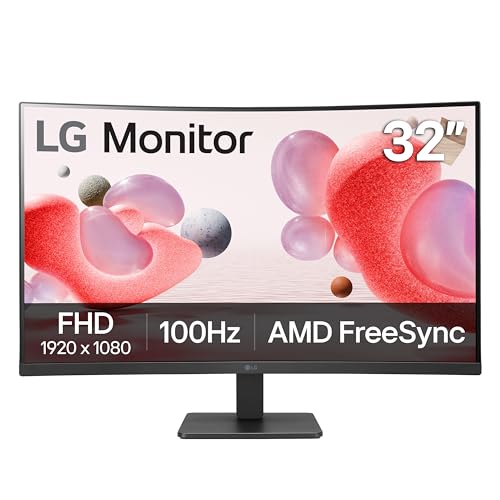
The LG 32MR50C-B Curved Monitor is ideal for gamers and professionals seeking an immersive visual experience with smooth performance. This 32-inch FHD display with a 100Hz refresh rate and AMD FreeSync technology is perfect for users who want to reduce screen tearing and input lag during fast-paced gaming or multimedia tasks. Its ergonomic tilt stand and sleek black design also make it suitable for office environments requiring both style and functionality.
Pros:
- Curved 32-inch FHD display offers immersive viewing angles and enhanced visual comfort.
- 100Hz refresh rate ensures smooth and fluid motion for gaming and video playback.
- AMD FreeSync technology minimizes screen tearing and stuttering.
- OnScreen Control and Dynamic Action Sync features improve user customization and responsiveness.
- Black Stabilizer enhances visibility in dark scenes, ideal for gaming.
- Ergonomic tilt stand for comfortable viewing angles.
Cons:
- Resolution is limited to Full HD, which may not satisfy users seeking 4K clarity.
- Relatively heavy weight at 11.3 pounds, making it less portable.
- No mention of height adjustment or swivel features on the stand.
The LG 32MR50C-B features a large curved screen that enhances immersion by wrapping the display slightly around your field of view, reducing eye strain during extended use. The 100Hz refresh rate combined with AMD FreeSync technology ensures that fast-moving visuals remain smooth and free from distracting artifacts, making it an excellent choice for gaming enthusiasts. Additionally, the OnScreen Control software allows easy customization of display settings directly from the desktop, streamlining user experience.
Beyond gaming, this monitor’s Black Stabilizer feature brightens dark scenes, improving visibility in shadowy areas, which can be beneficial for content creators and professionals working with video or images. The tilt stand provides ergonomic flexibility, allowing users to adjust the screen angle for optimal comfort. Overall, the combination of style, performance, and user-friendly features makes the LG 32MR50C-B a versatile monitor for a variety of applications.
Sansui 34-inch Curved Gaming Monitor

The SANSUI 34-Inch Curved Gaming Monitor is ideal for avid gamers and creative professionals seeking an immersive visual experience with high performance. If you want a monitor that combines a stunning UWQHD resolution of 3440 x 1440 with a smooth refresh rate of up to 165Hz, this curved display is perfect for you. Its advanced features such as 1ms response time, HDR support, and wide color gamut coverage make it suitable for fast-paced gaming as well as color-critical work.
Pros:
- Ultra-wide 34-inch curved screen with 1500R curvature enhances immersion and reduces eye strain.
- High refresh rate up to 165Hz ensures smooth and responsive gameplay.
- 1ms (MPRT) response time minimizes motion blur for crisp visuals.
- HDR and 300 nits brightness deliver vibrant and detailed images.
- Wide color gamut with sRGB 125% and DCI-P3 95% for accurate color reproduction.
- Multiple connectivity options including HDMI x2 and DisplayPort 1.4 x2 with included DP cable.
- Picture-in-Picture (PIP) and Picture-by-Picture (PBP) functionality for multitasking.
- AMD FreeSync support reduces screen tearing and stuttering.
Cons:
- Relatively heavy weight at approximately 15.75 pounds, which may require a sturdy desk or mounting solution.
- Brightness of 300 nits may not be sufficient for very bright ambient environments.
- No built-in speakers, so external audio devices are necessary.
The SANSUI 34-Inch Curved Gaming Monitor boasts a stunning UWQHD 3440 x 1440 resolution that provides ample screen real estate for immersive gaming and productivity. The 165Hz refresh rate combined with an ultra-fast 1ms MPRT response time ensures that fast-moving visuals remain crisp and fluid, giving gamers a competitive edge. The 1500R curvature wraps the display around your field of view, reducing distortion and making long sessions more comfortable.
In addition to gaming, this monitor excels in color accuracy and image quality thanks to its support for HDR, a brightness of 300 nits, and wide color gamut coverage including sRGB 125% and DCI-P3 95%. These features benefit content creators and professionals who demand precise color reproduction. The inclusion of PIP/PBP modes and multiple connectivity options including HDMI and DisplayPort interfaces provide versatility for multitasking and connecting multiple devices simultaneously.
Frequently Asked Questions
What Is The Best Curved Monitor Size For Work Productivity?
A 34-inch curved monitor offers ample screen space for multitasking. It enhances focus and reduces eye strain during extended work hours. Models like the LG 34WR55QK-B and Dell S3425DW provide excellent resolution and ergonomic features suited for professionals.
How Does Curvature Affect Work Comfort On Monitors?
Curved monitors reduce glare and minimize distortion by matching the natural field of view. This improves comfort and immersion, especially on ultra-wide screens. The Samsung 27″ Essential S3 with 1800R curvature is ideal for reducing eye fatigue during long work sessions.
Are Usb-c Ports Important In Curved Work Monitors?
Yes, USB-C ports simplify connectivity by supporting power, video, and data through one cable. Monitors like the LG 34WR55QK-B and Dell S3425DW offer USB-C, making workspace cleaner and enhancing compatibility with modern laptops.
Which Curved Monitor Resolution Is Best For Detailed Work?
UltraWide WQHD (3440 x 1440) resolution is ideal for detailed tasks. It provides crisp images and ample workspace. The LG 34WR55QK-B and SANSUI 34-inch monitors deliver this resolution, supporting better clarity and productivity.
What Refresh Rate Suits Curved Monitors For Office Use?
A refresh rate of 100Hz or higher ensures smooth visuals and reduces screen flicker. Monitors like the LG 32MR50C-B and Samsung Essential S3 provide 100Hz, balancing performance and eye comfort for typical office applications.
Do Curved Monitors Support Eye Strain Reduction Features?
Yes, many curved monitors include eye comfort modes and flicker-free technology. Samsung’s Advanced Eye Comfort and LG’s Reader Mode help reduce strain. These features are essential for long working hours on curved screens.
Conclusion
Choosing the best curved monitor for work depends on your needs and budget. The LG 34WR55QK-B offers a sharp, wide view with great adjustability. Samsung’s 27″ Essential S3 is a solid choice for clear visuals and eye comfort. Dell’s 34 Plus USB-C monitor stands out with vibrant colors and smooth performance.
LG’s 32MR50C-B provides reliable speed and good screen quality. The SANSUI 34-Inch monitor gives extra brightness and color range, ideal for detailed tasks. All these monitors bring comfort and efficiency to your workspace. Think about screen size, resolution, and features that suit your daily work.
A good curved monitor can reduce eye strain and help you focus better. Pick one that fits your desk and work style for the best results. Working with the right screen makes every task easier and more enjoyable.
As an Amazon Associate, I earn from qualifying purchases.

