

Have you ever spent hours coding, only to feel tired and frustrated because your keyboard just doesn’t keep up? Maybe the keys feel stiff, or the layout slows you down.
Small annoyances like these can make long coding sessions harder than they need to be. But choosing the right keyboard can change everything. A good keyboard feels smooth, responds quickly, and even helps reduce strain on your fingers. It makes typing easier and more enjoyable every day.
In this article, I’ll share some of the best keyboards for coding that can improve your workflow and comfort. Whether you want quiet keys, wireless freedom, or cool features like backlighting and programmable buttons, there’s something here for you. Let’s explore these options and find the perfect keyboard to boost your coding experience.
Logitech Mx Keys S Wireless Keyboard

The Logitech MX Keys S Wireless Keyboard is ideal for professionals, creatives, and tech enthusiasts who demand a blend of comfort, precision, and versatility in their typing experience. If you work across multiple devices or platforms such as Windows PC, Linux, Chrome, or Mac, and desire a sleek, low-profile keyboard that supports fluid and quiet typing, this keyboard is designed for you. Its programmable keys and backlighting make it especially suited for those who value customization and productivity in various lighting conditions.
Pros:
- Fluid and precise typing with low-profile keys that reduce fatigue
- Quiet keystrokes, ideal for shared or quiet workspaces
- Programmable keys for enhanced productivity and customization
- Backlighting adapts to lighting conditions for comfortable use day and night
- Bluetooth connectivity and USB-C rechargeable battery for convenience and wireless freedom
- Compatible with multiple operating systems including Windows, Linux, Chrome, and Mac
- Stylish graphite color with a modern and sleek design
Cons:
- Slightly higher price point compared to basic keyboards
- May require time to customize and learn programmable keys effectively
- No numeric keypad, which might be a downside for users needing extensive number input
The Logitech MX Keys S Wireless Keyboard features a thoughtfully crafted low-profile key design that delivers a comfortable and precise typing experience. The keys are designed to be fluid and responsive, which significantly reduces finger fatigue during extended typing sessions. The quiet keystroke mechanism makes it an excellent choice for office environments or shared spaces where noise can be a distraction. This keyboard’s backlighting automatically adjusts to ambient lighting, allowing users to work effortlessly in any lighting condition without straining their eyes.
Connectivity is a strong highlight, with both Bluetooth and USB-C rechargeable options providing flexibility and convenience. Users can easily switch between multiple devices, making this keyboard versatile for multitasking across different platforms. The programmable keys offer users the ability to customize shortcuts and commands, boosting productivity and streamlining workflows. Its compatibility with Windows PC, Linux, Chrome, and Mac ensures that it fits seamlessly into diverse tech ecosystems, while the sleek graphite finish adds a modern aesthetic to any workspace.
Rk Royal Kludge S98 Mechanical Keyboard

The RK ROYAL KLUDGE S98 Mechanical Keyboard is ideal for tech enthusiasts, gamers, and professionals who seek a compact yet highly functional keyboard with wireless versatility and customizable features. Those who value a tactile typing experience combined with modern conveniences like a smart display and a multifunctional knob will find this keyboard perfectly suited to their needs.
Pros:
- 96% layout offers a compact form without sacrificing key functionality.
- Wireless connectivity via Bluetooth, 2.4G, and USB-C for versatile use.
- Hot-swappable keys allow for easy customization without soldering.
- Smart display and knob enhance user control and convenience.
- Creamy sounding switches provide a satisfying typing and gaming experience.
- Robust build with a stylish clay green design fits any desktop setup.
Cons:
- Weighs 3.0 pounds, which might be less portable for some users.
- Software support may have a learning curve for beginners.
- Limited to 98 keys, which may not suit users needing a full-size keyboard.
The RK ROYAL KLUDGE S98 features a top-mounted 96% layout that balances compactness with functionality, making it an excellent choice for users who want to save desk space without losing essential keys. Its triple connectivity options, including Bluetooth, 2.4G wireless, and USB-C, ensure seamless compatibility with multiple devices, enhancing productivity and gaming flexibility. The hot-swappable design allows users to easily customize switches, catering to personalized typing preferences.
Additionally, the inclusion of a smart display and a multifunctional knob elevates the user experience by providing quick access to settings and multimedia controls. The keyboard’s creamy sounding switches deliver a tactile and satisfying feedback, making long typing sessions more comfortable. Its stylish clay green color and solid build quality add aesthetic appeal and durability, making the RK ROYAL KLUDGE S98 a reliable companion for both work and play.
Redragon K580 Vata Rgb Led Backlit Mechanical Gaming Keyboard

The Redragon K580 VATA RGB LED Backlit Mechanical Gaming Keyboard with Macro Keys and Dedicated Media Controls is ideal for gamers and tech enthusiasts who demand high performance and customization from their keyboards. If you are looking for a durable, responsive, and visually appealing keyboard with the flexibility of hot-swappable sockets and the convenience of onboard macro recording, this keyboard is designed for you. Its Blue Switches provide satisfying tactile feedback, making it perfect for both gaming and typing.
Pros:
- Customizable RGB LED backlighting for enhanced aesthetics and better visibility in low light
- Hot-swappable sockets allow easy switch replacement without soldering
- Onboard macro recording enables personalized key commands for efficient gameplay
- Dedicated media controls provide quick access to volume and playback functions
- Durable build quality with a comfortable layout suitable for extended use
Cons:
- Blue Switches may be too noisy for quiet environments
- Relatively heavier weight might reduce portability
- No wireless connectivity option, limiting flexibility in setup
The Redragon K580 VATA features a robust design equipped with Blue mechanical switches, which deliver crisp tactile feedback and audible clicks, enhancing the gaming experience by providing precise keystrokes. The RGB LED backlit keys can be customized to match your gaming setup or mood, improving both style and functionality during late-night sessions. Additionally, the inclusion of hot-swappable sockets means users can easily upgrade or replace switches without technical hassle, extending the lifespan and personalization of the keyboard.
Furthermore, the keyboard’s onboard macro recording allows gamers to program complex commands directly onto the keyboard, streamlining gameplay and boosting efficiency. The dedicated media controls ensure that users can adjust volume or control playback without interrupting their focus. With its substantial dimensions and solid build weight, the keyboard offers a stable and comfortable platform for extended gaming or work sessions, making it a valuable tool for serious users.
Logitech G Pro Mechanical Gaming Keyboard
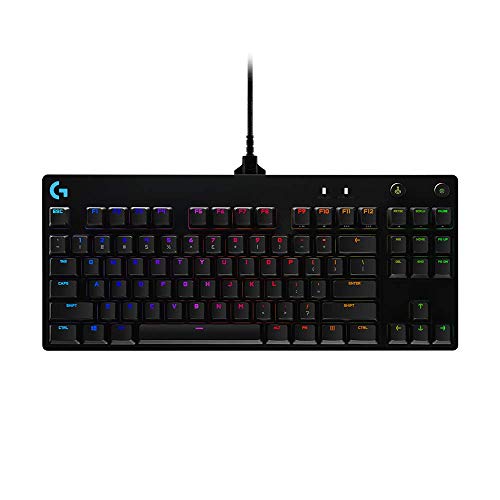
The Logitech G PRO Mechanical Gaming Keyboard is ideal for gamers and professionals who need a compact, high-performance keyboard without sacrificing functionality. Its ultra-portable tenkeyless design makes it perfect for users who prefer a minimalist setup or require a keyboard that is easy to transport for gaming tournaments or work on the go.
Pros:
- Ultra Portable Tenkeyless Design saves desk space and enhances mobility.
- Detachable Micro USB Cable offers convenience and easy replacement.
- 16.8 Million Color LIGHTSYNC RGB Backlit Keys provide customizable lighting effects for immersive gaming experiences.
- High-quality mechanical switches ensure precise and responsive keystrokes.
- Durable build from a trusted brand, Logitech G.
Cons:
- Lacks a numeric keypad, which may not suit users needing extensive number input.
- At 2.16 pounds, it might be slightly heavy for some users seeking ultra-lightweight keyboards.
- Micro USB cable instead of USB-C, which is less future-proof.
The Logitech G PRO Mechanical Gaming Keyboard features a sleek black design with dimensions optimized for portability, measuring 14.9 inches in length and weighing just over two pounds. Its tenkeyless format removes the numeric keypad, making it ideal for gamers who prioritize desk space and need a keyboard that fits easily into a backpack or carrying case. The detachable micro USB cable adds to the convenience, allowing for quick disconnection and replacement if needed.
The standout feature of this keyboard is its 16.8 million color LIGHTSYNC RGB backlit keys, which allow users to personalize their setup with vibrant lighting effects that can synchronize with games, music, and other media. This not only enhances visual appeal but can also improve gameplay by highlighting important keys. Additionally, the mechanical switches provide tactile feedback and durability, ensuring an excellent typing and gaming experience for both casual users and competitive gamers alike.
Keychron K2 Mechanical Keyboard
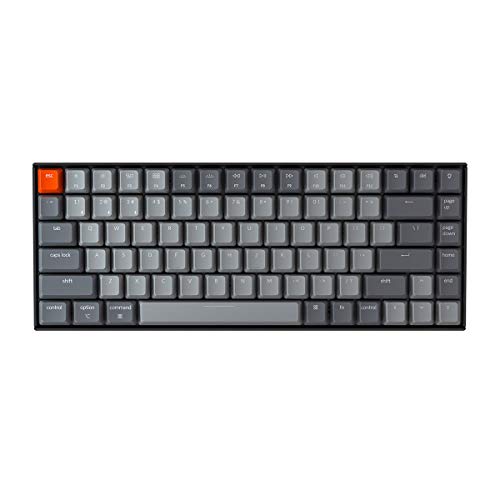
The Keychron K2 75% Layout Bluetooth Wireless Mechanical Keyboard is ideal for users who seek a compact yet highly functional keyboard that seamlessly supports both Mac and Windows systems. This keyboard is perfect for professionals, gamers, and enthusiasts who want a high-quality typing experience with wireless convenience and robust mechanical switches. If you value portability, durability, and advanced features like anti-ghosting and N-key rollover, this keyboard is an excellent choice.
Pros:
- Compact 75% layout saves desk space without compromising key functionality
- Bluetooth wireless connectivity for easy pairing with multiple devices
- Brown mechanical switches provide tactile feedback with quieter operation
- White LED backlit keys enhance visibility in low-light conditions
- USB-C connection ensures fast and reliable wired charging or use
- Anti-ghosting and N-key rollover for precise key recognition, ideal for gaming
- Compatibility with both Mac and Windows platforms
Cons:
- May have a learning curve for users transitioning from full-size keyboards
- Limited color options with only brown switch variant available
- White LED backlighting lacks customizable RGB options
The Keychron K2 features a thoughtfully designed 75% layout that strikes the perfect balance between functionality and compactness. This makes it suitable for users who want to maximize desk space while retaining essential keys. The keyboard’s brown mechanical switches offer a satisfying tactile bump without the loud click, making it ideal for office environments and shared spaces. Moreover, the Bluetooth wireless capability allows effortless connection to laptops, tablets, or smartphones, providing flexibility for on-the-go use.
Users will appreciate the white LED backlit keys that improve visibility during nighttime or dimly lit settings, enhancing productivity. The inclusion of USB-C connectivity ensures quick charging and the option to switch to a wired connection when needed. Additionally, the keyboard’s anti-ghosting and N-key rollover features guarantee that every keystroke is registered accurately, which is especially beneficial for gamers and fast typists. Overall, the Keychron K2 delivers a premium typing experience tailored for modern users who demand both style and substance.
Frequently Asked Questions
What Keyboard Features Improve Coding Efficiency?
Keyboards with programmable keys, comfortable layout, and quiet typing boost coding speed. Backlighting and wireless options enhance usability. Mechanical switches offer tactile feedback for accuracy. These features reduce fatigue and improve focus during long coding sessions.
Are Mechanical Keyboards Better For Coding Than Membrane Ones?
Mechanical keyboards provide better tactile feedback and durability. They reduce typing errors and increase speed. Programmable keys and hot-swappable switches add customization. Many coders prefer mechanical keyboards for their reliability and comfort compared to membrane keyboards.
Which Keyboard Is Best For Multi-device Connectivity?
The Logitech MX Keys S supports Bluetooth and USB-C connections. It pairs easily with Windows, Mac, Linux, and Chrome devices. Multi-device connectivity allows seamless switching, enhancing productivity across platforms.
How Important Is Keyboard Backlighting For Coding?
Backlighting improves visibility in low-light environments. It reduces eye strain and helps locate keys quickly. RGB options add customization, while white LED backlighting offers clarity. Backlit keyboards are essential for night coding sessions.
Can Hot-swappable Keyboards Enhance Coding Experience?
Yes, hot-swappable keyboards like RK ROYAL KLUDGE S98 allow easy switch replacement. This customization improves typing comfort and sound preference. It also extends keyboard lifespan, making it ideal for dedicated coders.
Do Wireless Keyboards Affect Typing Performance For Coders?
Modern wireless keyboards like Keychron K2 offer low-latency connections. They provide freedom from cables without sacrificing responsiveness. Wireless keyboards are practical and reliable for coding when paired with Bluetooth or USB receivers.
Conclusion
Choosing the right keyboard can greatly improve your coding comfort and productivity. Each keyboard on this list offers unique features to suit different needs. Whether you prefer wireless convenience or mechanical keys with satisfying feedback, there is an option for you.
Backlighting and programmable keys can help speed up your workflow. Compact designs save desk space without losing important functions. Quiet typing helps maintain focus during long coding sessions. Compatibility with various operating systems ensures smooth use across devices. Taking time to find the best fit means less strain and more efficient coding.
Remember, the best keyboard is one that feels right for you and supports your daily tasks. Keep these options in mind as you upgrade your coding setup. Your hands and work will thank you.
As an Amazon Associate, I earn from qualifying purchases.

