

Have you ever felt your fingers getting tired, or worse, noticed mistakes piling up after hours of coding? It’s frustrating when your keyboard just doesn’t keep up with your flow.
Choosing the right keyboard can change all that. It makes typing smoother, faster, and even more comfortable. Suddenly, long coding sessions feel less like a chore and more like a creative journey. Whether you want quiet keys, customizable buttons, or a sleek design, the right keyboard can boost your focus and productivity.
In this article, I’ll share some of the best keyboards for programming that can help make your daily work easier and more enjoyable. Keep reading to find the perfect match for your coding needs.
Logitech Mx Keys S Wireless Keyboard

The Logitech MX Keys S Wireless Keyboard is ideal for professionals, creatives, and tech enthusiasts who seek a reliable, sleek, and efficient typing experience. If you work across multiple operating systems like Windows PC, Linux, Chrome, or Mac, and value a low profile keyboard with programmable keys and advanced connectivity options, this keyboard is designed for you. Its quiet, precise typing and backlighting make it perfect for both office environments and late-night work sessions.
Pros:
- Fluid and precise typing experience with low profile keys
- Programmable keys for customized shortcuts and enhanced productivity
- Backlighting for comfortable use in low-light conditions
- Wireless connectivity via Bluetooth and USB-C rechargeable battery
- Compatible across multiple platforms including Windows, Linux, Chrome, and Mac
- Sleek graphite color design that fits modern workspaces
Cons:
- Higher price point compared to basic wireless keyboards
- May require time to customize and get used to programmable keys
- Not ideal for users preferring mechanical key switches
The Logitech MX Keys S features a slim profile with keys designed for quiet, fluid, and precise typing, reducing fatigue during long typing sessions. The backlighting adapts automatically to the surrounding light, ensuring optimal visibility without draining the battery. With a robust rechargeable battery charged via USB-C, users benefit from convenience and long usage times without frequent replacements.
Additionally, its programmable keys allow users to tailor the keyboard to their workflow, improving efficiency and productivity. The multi-device Bluetooth connectivity supports seamless switching between computers, making it an excellent choice for multitaskers. The compact dimensions and elegant graphite color complement any desk setup, combining aesthetics with performance for a superior typing experience.
Rk Royal Kludge S98 Mechanical Keyboard

The RK ROYAL KLUDGE S98 Mechanical Keyboard is ideal for professionals, gamers, and tech enthusiasts seeking a compact yet highly functional mechanical keyboard. If you want a versatile keyboard with wireless connectivity options, a smart display, and a premium typing experience, this keyboard is perfect for you.
Pros:
- Smart display and knob for enhanced control and customization.
- Top mount 96% layout offers a compact design without sacrificing key functionality.
- Multiple connectivity options: Bluetooth, 2.4G wireless, and USB-C.
- Hot swappable switches allow for easy customization and maintenance.
- Software support for personalized key mapping and lighting effects.
- Creamy sounding mechanical switches provide a satisfying typing experience.
Cons:
- May be slightly heavier than other compact keyboards at 3.0 pounds.
- The Sky Blue color might not appeal to users preferring more neutral tones.
- Software customization could have a learning curve for beginners.
The RK ROYAL KLUDGE S98 features a smart display and a control knob, allowing users to easily adjust settings and monitor keyboard status without interrupting workflow. Its top mount 96% layout condenses the keyboard footprint while retaining nearly all essential keys, making it ideal for users with limited desk space. With versatile connectivity options including Bluetooth, 2.4G wireless, and USB-C, users can seamlessly switch between devices and enjoy a clutter-free setup.
Additionally, the keyboard’s hot swappable capability lets users replace switches effortlessly, providing a customizable typing feel tailored to personal preferences. Supported by dedicated software, users can personalize key functions and lighting effects to enhance productivity and aesthetics. The creamy sounding switches deliver a pleasant tactile and auditory experience, boosting comfort for long typing or gaming sessions.
Logitech G213 Prodigy Gaming Keyboard

The Logitech G213 Prodigy Gaming Keyboard with LIGHTSYNC RGB Backlit Keys is ideal for gamers who want a reliable and responsive keyboard without breaking the bank. It is perfect for both casual and competitive players seeking a durable and visually appealing keyboard that enhances their gaming experience. Additionally, users who appreciate customizable lighting effects and tactile feedback will find this keyboard a great fit.
Pros:
- Customizable LIGHTSYNC RGB backlighting for immersive gaming ambiance
- Durable and spill-resistant design suitable for long gaming sessions
- Responsive and tactile keys provide excellent feedback and accuracy
- Integrated media controls for easy access during gameplay
- Comfortable wrist rest for extended use without strain
Cons:
- Lacks mechanical switches, which some gamers may prefer for feel and durability
- Slightly bulky design might not be ideal for compact setups
- Limited macro customization compared to high-end gaming keyboards
The Logitech G213 Prodigy features LIGHTSYNC RGB technology that allows users to customize lighting effects, creating an immersive and personalized gaming environment. Its keys are designed to be highly responsive and provide tactile feedback, which helps improve accuracy and speed during intense gaming moments. The keyboard is also built to withstand spills, making it a durable choice for everyday use.
In addition to its gaming-centric features, the keyboard includes dedicated media controls, allowing users to adjust volume or play/pause music without interrupting gameplay. Its comfortable wrist rest supports long hours of use, reducing fatigue and improving overall comfort. Compact yet robust, the Logitech G213 Prodigy blends style, functionality, and durability, making it a strong contender for gamers seeking performance and aesthetics in one package.
Corsair K55 Core Rgb Membrane Wired Gaming Keyboard

The Corsair K55 CORE RGB Membrane Wired Gaming Keyboard is ideal for gamers and professionals seeking a quiet yet responsive keyboard with customizable lighting and enhanced durability. If you want a keyboard that balances performance and comfort for long gaming or work sessions, this keyboard is an excellent choice. Its spill resistance feature makes it perfect for users prone to accidental spills, while the ten-zone RGB lighting offers vibrant customization for a personalized setup.
Pros:
- Quiet, responsive membrane switches for comfortable typing and gaming
- Spill-resistant design enhances durability and longevity
- Ten-zone RGB lighting customizable with iCUE software
- Dedicated media keys for easy control of audio and video
- Compatible with both PC and Mac systems
Cons:
- Membrane switches may not satisfy users preferring mechanical keys
- Wired connection limits portability compared to wireless options
- Limited to QWERTY NA layout, which may not suit all regional preferences
The Corsair K55 CORE features quiet, responsive membrane switches that deliver smooth keystrokes without the loud clicking of mechanical keyboards, making it ideal for shared spaces. Its spill resistance ensures that minor accidents won’t damage the keyboard, giving users peace of mind during intense gaming sessions or work. The keyboard’s ten-zone RGB lighting allows users to customize colors and effects easily through the iCUE software, enhancing the aesthetic appeal and improving visibility in low-light environments.
Additionally, the inclusion of dedicated media keys offers quick access to volume, playback, and other controls, improving user convenience without interrupting gameplay or work. The keyboard’s compatibility with both PC and Mac platforms ensures versatility across different systems. With its sleek black design and robust build, the Corsair K55 CORE RGB provides a feature-rich experience tailored to meet the needs of gamers and productivity-focused users alike.
Redthunder K95 Wireless Mechanical Keyboard
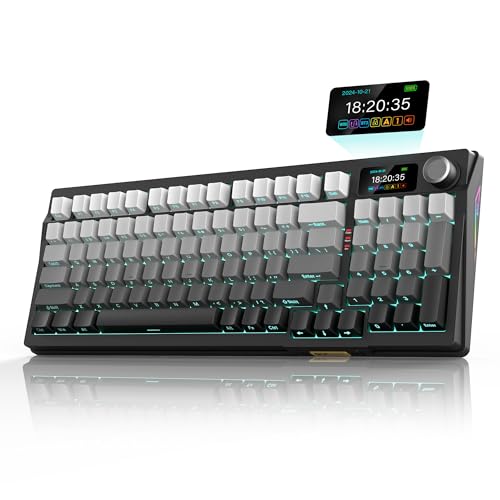
The RedThunder K95 Wireless Mechanical Keyboard is ideal for gamers, programmers, and tech enthusiasts who demand a versatile and high-performance keyboard. Its combination of wireless connectivity, customizable hot-swap switches, and an integrated TFT screen makes it perfect for users seeking both functionality and aesthetics in their workspace. If you want a keyboard that adapts to different devices and offers immersive typing experiences, this model is a great choice.
Pros:
- Versatile trip-modes connection allowing seamless switching between multiple devices.
- Customizable gasket hot-swap design enables easy switch replacement without soldering.
- Integrated TFT screen and control knob for enhanced user interface and control.
- Pre-lubed linear switches provide smooth and quiet keystrokes.
- Durable side printed PBT keycaps with a stylish gradient gray finish.
- Eye-catching RGB backlit lighting for a personalized look.
Cons:
- Relatively heavier weight might affect portability.
- Premium features may come at a higher price point compared to basic models.
The RedThunder K95 Wireless Mechanical Keyboard stands out with its innovative features such as the TFT screen and a tactile control knob, which allow users to customize settings and monitor system information without leaving their workflow or gaming session. The trip-modes connection ensures seamless transitions between different devices, making it highly adaptable for multi-device environments. This flexibility is a major benefit for professionals who work across laptops, desktops, and tablets.
Additionally, the gasket custom hot-swap design gives users the freedom to swap out switches easily, tailoring the keyboard’s feel and sound to personal preferences without needing technical expertise. The inclusion of pre-lubed linear switches enhances typing smoothness and reduces noise, which is perfect for both gaming and office use. The side printed PBT keycaps ensure durability and resist wear, while the elegant gray gradient color and RGB backlighting add a visually appealing touch that complements any setup.
Frequently Asked Questions
What Makes Logitech Mx Keys S Ideal For Programming?
Logitech MX Keys S offers quiet, precise typing with low-profile keys. It supports multi-device Bluetooth connection and USB-C recharge. Programmable keys and backlighting enhance productivity in varied lighting conditions, making it perfect for long programming sessions across Windows, Mac, Linux, and Chrome systems.
How Does Rk Royal Kludge S98 Support Coding Efficiency?
The RK ROYAL KLUDGE S98 features a compact 96% layout with hot-swappable mechanical switches. It provides wireless connectivity via Bluetooth, 2. 4G, or USB-C. Its smart display and knob improve workflow, while creamy switch sounds offer a satisfying typing experience for programmers.
Are Gaming Keyboards Like Logitech G213 Good For Programming?
Yes, Logitech G213 Prodigy combines durable membrane switches with RGB backlighting. It delivers responsive keypresses and comfortable typing for long hours. Although designed for gaming, its features support programming needs with spill resistance and media controls for multitasking.
What Benefits Do Corsair K55 Core’s Membrane Switches Offer?
Corsair K55 CORE uses quiet, responsive membrane switches suitable for programming. It includes ten-zone RGB backlighting and media keys for convenience. Spill resistance adds durability, while iCUE compatibility allows customization, making it an affordable and practical choice for coders.
Why Choose Redthunder K95 For Programming Tasks?
RedThunder K95 Wireless features hot-swappable linear switches and a TFT screen with knob for enhanced control. It offers trip-mode wireless connectivity and RGB backlighting. Side-printed PBT keycaps ensure durability and comfort, making it a versatile and premium mechanical keyboard for programmers.
Conclusion
Choosing the best keyboard for programming depends on your personal needs and budget. Each keyboard on this list offers unique features to enhance your typing experience. Whether you prefer quiet, low-profile keys or tactile mechanical switches, there is an option for you.
Wireless models provide convenience, while wired keyboards offer reliable performance. Backlighting helps when working in low light. Programmable keys can improve productivity by allowing shortcuts. Consider the keyboard layout and compatibility with your devices. Remember, comfort matters during long coding sessions.
Take time to select a keyboard that feels good and meets your work demands. The right keyboard can make programming easier and more enjoyable. Keep your priorities clear and choose the one that fits your style best. Happy coding!
As an Amazon Associate, I earn from qualifying purchases.

