

Imagine walking into your home and having the lights adjust just the way you like them. What if your thermostat knows exactly when to warm up or cool down, saving you money without any effort?
Making your home smart isn’t just about cool gadgets—it’s about making your life easier, safer, and more comfortable. In this guide, you’ll discover simple steps you can take right now to turn your home into a smart home that works for you.
Ready to see how small changes can make a big difference? Keep reading, and let’s get started.
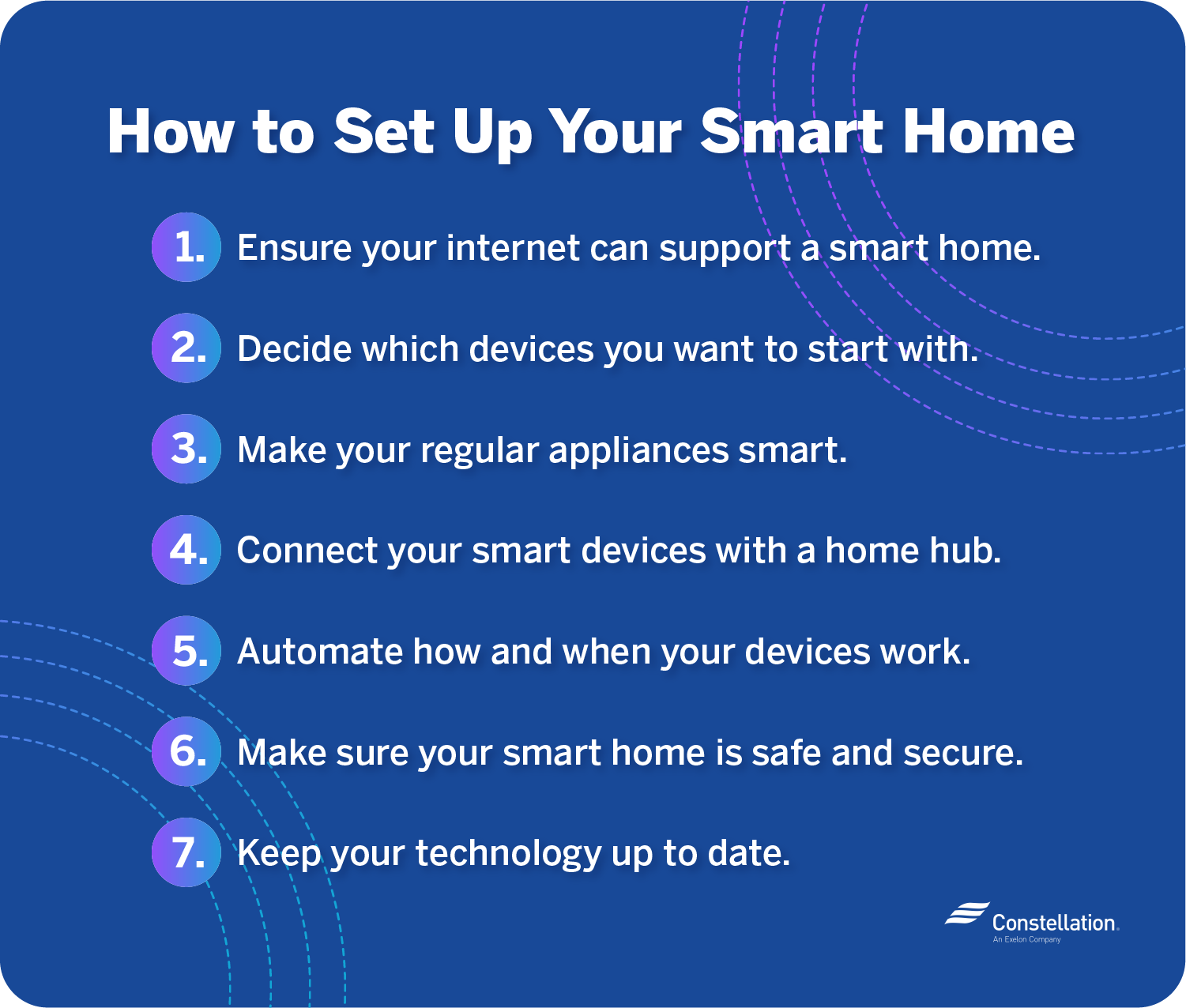
Credit: blog.constellation.com
Choosing The Right Smart Devices
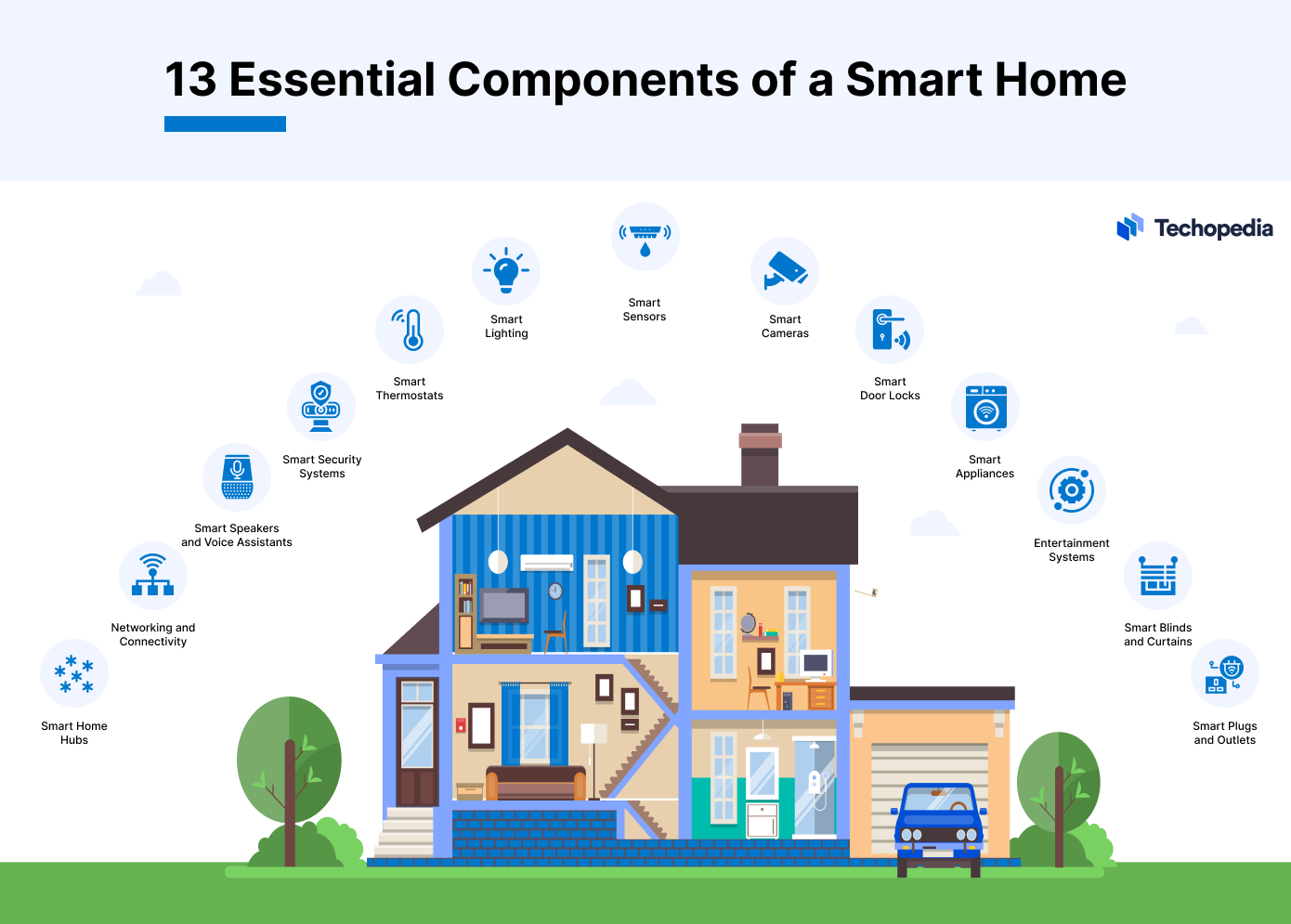
Choosing the right smart devices shapes your smart home’s ease and comfort. Each device adds unique value to your daily life. Focus on devices that match your lifestyle and budget. Compatibility with your home setup is key. Reliable brands and good reviews help guide your choices. Here are some essential smart devices to consider for your home.
Smart Lights And Switches
Smart lights bring convenience and energy savings. Control brightness and colors from your phone. Schedule lights to turn on or off automatically. Smart switches let you control regular bulbs without rewiring. They fit into existing light fixtures easily. Choose devices that work with your preferred voice assistant.
Smart Thermostats
Smart thermostats keep your home comfortable and save energy. They learn your schedule and adjust temperatures automatically. Control your heating and cooling from anywhere using an app. Some models offer energy reports to help reduce bills. Pick thermostats compatible with your heating system and smart hub.
Security Cameras And Sensors
Security cameras provide peace of mind with real-time video. Motion sensors alert you to unexpected movement. Door and window sensors notify you about openings. Choose devices with clear video and reliable alerts. Look for cameras with night vision and easy installation options.
Voice Assistants
Voice assistants make smart homes hands-free and simple. Use voice commands to control lights, music, and devices. They answer questions and set reminders for you. Pick assistants that support your other smart devices. Ensure they understand your language clearly for smooth use.
Credit: mazaya-iot.org
Setting Up A Reliable Network
Setting up a reliable network is the first step to making your home smart. All smart devices need a strong and steady internet connection. A weak network can cause delays and frustration. Reliable Wi-Fi helps devices work smoothly and respond quickly.
Upgrading Your Wi-fi
Old routers can slow down your smart home. Choose a modern router with high speed and wide coverage. Look for routers that support the latest Wi-Fi standards like Wi-Fi 6. Place the router in a central spot for better signal reach. Avoid walls and metal objects that block signals.
Using Mesh Networks
Large homes often have Wi-Fi dead zones. Mesh networks use multiple devices to spread Wi-Fi evenly. Each device acts as a signal point, reducing weak spots. Mesh systems are easy to set up and manage. They keep your smart devices connected without interruption.
Ensuring Network Security
Smart homes hold a lot of personal data. Protect your network with a strong password. Change the default router login details. Use WPA3 encryption for better security. Keep your router firmware up to date. Turn off remote access if you do not need it.
Integrating Devices For Seamless Control
Integrating devices is the key to making your smart home work smoothly. It allows different gadgets to talk to each other. This creates a simple and easy way to control everything from one place. With integration, your smart home feels connected and responsive.
Devices like lights, locks, cameras, and thermostats can all be linked. This helps you manage your home with less effort. The result is a smarter, more comfortable living space that fits your needs.
Connecting Through A Hub
A hub acts as the central point for your smart devices. It brings all gadgets together in one network. This makes controlling your devices easier and faster. Many hubs support popular brands and different types of devices.
Using a hub reduces the need for multiple apps. You can control lights, cameras, and sensors from one place. Some hubs offer voice control with assistants like Alexa or Google.
Using Smart Home Apps
Smart home apps provide another way to manage your devices. Most brands have their own app for control. These apps let you turn devices on or off, check status, and adjust settings.
Some apps work with multiple brands, so you can use fewer apps. They often include features like notifications and device schedules. Apps make your home more convenient and responsive.
Creating Automation Routines
Automation routines connect different devices to work together. For example, lights can turn on when you unlock the door. Or the thermostat can adjust when you leave the house.
Routines save time and add comfort. You can set them up using your hub or app. They make your smart home feel alive and smart without extra effort.
Enhancing Home Security
Keeping your home safe is very important. Smart home technology helps protect your house easily. It gives you control and peace of mind. Small devices can do big things for your home security.
Smart security tools are easy to use. They alert you about unusual activities fast. These tools help stop break-ins and keep your family safe.
Smart Locks And Doorbells
Smart locks let you lock and unlock doors from anywhere. No more hiding keys outside. You can give access to friends or workers temporarily. Smart doorbells have cameras to see who is at the door. They send alerts when someone rings. You can talk to visitors without opening the door. This adds a strong layer of security.
Motion Detectors
Motion detectors sense movement around your home. They turn on lights or alarms if needed. You can set alerts for unexpected motion. This helps catch intruders early. Motion sensors also save energy by lighting only when needed.
Remote Monitoring
Remote monitoring lets you watch your home from your phone. You can check live video anytime. It helps you see if everything is safe. Some systems send alerts if they detect problems. You can call for help quickly if needed. This feature makes you feel safe even when away.
Boosting Energy Efficiency
Making your home smarter helps save energy and reduce bills. Smart devices control energy use without effort. This section shows easy ways to boost your home’s energy efficiency.
Smart Thermostat Scheduling
Smart thermostats learn your routine and adjust temperatures. They lower heating or cooling when you are away. This saves energy by not wasting power on empty rooms. You can also set schedules to fit your daily life.
Automated Lighting
Automated lights turn on and off based on movement or time. This stops lights from staying on unnecessarily. Use dimmers and timers to control brightness and duration. It helps reduce electricity use and makes your home safer.
Energy Monitoring Tools
Energy monitors track how much power each device uses. You see which appliances consume the most energy. This helps you decide what to change or upgrade. Some tools send alerts to prevent waste and lower costs.

Credit: irishtechnews.ie
Troubleshooting Common Issues
Setting up a smart home can bring many benefits. Sometimes, small problems can stop things from working well. Knowing how to fix these issues helps keep your smart home running smoothly.
This section covers common problems and quick fixes. It helps you enjoy your smart devices without stress.
Connectivity Problems
Smart devices need a strong internet connection. A weak Wi-Fi signal can cause devices to disconnect or lag. Place your router in a central spot for better coverage. Restart your router if devices won’t connect. Check if your network is overloaded by too many devices. Using a Wi-Fi extender can improve signal in larger homes.
Device Compatibility
Not all smart devices work well together. Check if your devices use the same platform or app. Some devices only work with specific voice assistants. Read product details before buying to avoid compatibility issues. Using a hub can connect devices from different brands. This helps manage all devices in one place.
Firmware Updates
Firmware is the software inside your smart devices. Updates fix bugs and improve performance. Regularly check for updates in the device app. Set devices to update automatically if possible. Skipping updates can cause errors or security risks. Always update to keep devices working well and safe.
Expanding Your Smart Home Over Time
Expanding your smart home over time makes your living space more comfortable and efficient. Start with a few basic devices and add more as you go. This gradual approach helps you learn and adapt without feeling overwhelmed. It also spreads out the cost and effort.
Adding New Devices
Choose devices that match your needs and lifestyle. Start with essentials like smart lights or a thermostat. Later, add smart locks, cameras, or voice assistants. Check device compatibility with your current system before buying. Small steps create a seamless smart home experience.
Upgrading Existing Systems
Keep your smart home updated for better performance. Replace old devices with newer models that offer more features. Update software regularly to fix bugs and improve security. Upgrading helps your system run smoothly and stay safe.
Staying Informed About Trends
Follow trusted sources for smart home news and reviews. Learn about new devices and technology improvements. This knowledge helps you make smart choices for your home. Being informed keeps your smart home modern and useful.
Frequently Asked Questions
What Are The Basics Of A Smart Home Setup?
A smart home setup starts with a reliable Wi-Fi network. You need smart devices like lights, thermostats, and security cameras. A central hub or app controls these devices. This setup allows automation and remote control for convenience and energy efficiency.
How Do Smart Home Devices Improve Security?
Smart home devices enhance security through real-time monitoring and alerts. Cameras, smart locks, and sensors detect unusual activities. You can remotely lock doors and view live footage. This instant access helps prevent break-ins and keeps your home safer.
What Energy Savings Can Smart Homes Offer?
Smart homes optimize energy use with automated controls. Thermostats adjust temperatures based on occupancy and time. Smart lighting turns off when rooms are empty. These features reduce electricity bills and lower your carbon footprint effectively.
Are Smart Homes Compatible With Voice Assistants?
Yes, most smart homes integrate with voice assistants like Alexa, Google Assistant, or Siri. Voice control adds hands-free convenience. You can operate devices, set routines, and get information quickly using simple voice commands.
Conclusion
Making your home smart brings comfort and ease every day. Small changes can save energy and time. Start with simple devices like smart lights or thermostats. These tools help control your home from anywhere. Smart homes also improve safety with security cameras and alarms.
Take it step by step and enjoy the benefits. Smart living is about convenience, saving money, and peace of mind. Your home becomes more efficient and enjoyable. Begin now and experience how smart technology fits your life.
As an Amazon Associate, I earn from qualifying purchases.

