

Are you wondering how to find out your laptop’s screen size quickly and accurately? Knowing your laptop screen size is more important than you might think.
It helps you choose the right accessories, understand display quality, and even decide on the best laptop for your needs. You’ll learn simple steps to measure your laptop screen size yourself. By the end, you’ll be confident in identifying your screen size without any confusion.
Keep reading—you’re just minutes away from mastering this easy skill!

Credit: geekscallout.co.uk
Tools Needed
To measure a laptop screen, a few simple tools are needed. A ruler or a measuring tape works best. The tool should have inches or centimeters clearly marked. A flat surface helps keep the laptop steady. Sometimes, a notebook and pen help to note down measurements. No special or expensive tools are required. Just these basic items make measuring easy and accurate.
Measuring The Screen Diagonal
First, find the edges of the laptop screen. Look at the screen, not the whole laptop body. The screen edges are where the display ends.
Next, use a measuring tape or a ruler. Place it at one corner of the screen.
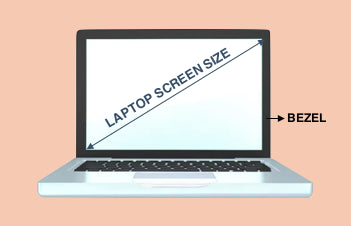
Measure diagonally from one corner to the opposite corner. This means from the bottom left to the top right, or bottom right to top left.
The number you get is the screen size. It is usually shown in inches.
Screen Size Vs. Screen Resolution
Screen size means the physical width and height of the laptop screen. It is measured diagonally from one corner to the opposite corner. This size is shown in inches, like 13 inches or 15 inches.
Screen resolution means how many tiny dots or pixels the screen shows. It is written as width × height, like 1920 × 1080 pixels. Higher resolution means a sharper and clearer image.
Screen size and resolution are not the same. A big screen with low resolution looks less clear. A small screen with high resolution looks very sharp.
Resolution affects display by changing how clear images and text appear. Higher resolution shows more detail. Lower resolution can make pictures look blurry or blocky.
Credit: www.agvabags.com
Check Laptop Model Specifications
Start by finding the model number on your laptop. It is usually on a sticker at the bottom or inside the battery compartment. Write it down or take a photo to keep it safe.
Next, visit the official website of your laptop brand. Enter the model number in the search box. This will show the official specifications for your device.
The screen size is often listed under the display or screen section. It is measured diagonally from one corner to the opposite corner. The size is usually in inches.
| Step | Action |
|---|---|
| 1 | Find the model number on your laptop |
| 2 | Go to the official website |
| 3 | Search using the model number |
| 4 | Check screen size in the specs |
Common Screen Size Standards
Most laptops have screen sizes measured diagonally in inches. Common sizes include 13.3″, 14″, 15.6″, and 17.3″. Smaller laptops often have 11″ to 13″ screens. Larger ones go up to 17″ or more. The size affects portability and viewing space.
Aspect ratio is the width-to-height ratio of the screen. Popular ratios are 16:9 and 16:10. A 16:9 screen is wider, good for videos. A 16:10 screen offers more vertical space, helpful for work and reading.
| Screen Size (inches) | Common Aspect Ratio | Use Case |
|---|---|---|
| 11 – 13 | 16:9 | Portable and light laptops |
| 14 – 15.6 | 16:9 or 16:10 | Balanced for work and media |
| 17 and above | 16:9 | Desktop replacement, gaming |

Credit: www.youtube.com
Tips For Accurate Measurement
Always measure the screen itself, not the outer edges or frame. The frame can be thicker or thinner, which changes the size. Use a ruler or tape measure to get the diagonal length of the screen. This is the standard way to find the screen size.
Keep your measurements in the same unit, like inches or centimeters. Mixing units can cause mistakes. For laptops, inches are usually best. Start measuring from the bottom left corner of the screen to the top right corner. Avoid including the border or plastic parts around the screen.
Frequently Asked Questions
How Do I Measure My Laptop Screen Size Accurately?
To measure your laptop screen size, use a ruler or tape measure. Measure diagonally from the top-left corner to the bottom-right corner of the screen, excluding the bezel. This diagonal length in inches is your laptop’s screen size.
What Units Are Used To Measure Laptop Screen Size?
Laptop screen size is measured in inches, representing the diagonal length of the display. This measurement excludes the bezel and helps compare screen sizes across different models.
Does Screen Size Include The Laptop Bezel?
No, screen size excludes the bezel. It only measures the visible display area diagonally across the screen. The bezel is the frame around the screen and is not counted.
How To Measure Laptop Screen Size Without Tools?
You can estimate screen size by comparing it to a standard object, like a credit card or phone. Then, look up your laptop model specifications online for exact screen dimensions.
Conclusion
Measuring your laptop screen size is simple and useful. Use a ruler or tape measure to find the diagonal length. This helps you choose the right laptop for your needs. Knowing screen size improves your buying decisions and daily use.
Always measure carefully to get an accurate size. Now, picking a laptop feels easier and clearer. Small steps make a big difference. Keep this guide handy for future laptop shopping.
As an Amazon Associate, I earn from qualifying purchases.

