

Are you trying to find the perfect fit for your laptop bag, desk space, or maybe even a new laptop stand? Knowing how to measure your laptop correctly can save you a lot of hassle.
Imagine buying accessories that don’t fit or struggling to carry your laptop comfortably. By learning a few simple steps, you’ll be able to measure your laptop quickly and accurately. Keep reading, and you’ll never have to guess your laptop size again.
Choosing The Right Tools
Use a ruler or a tape measure for laptop size. A digital caliper helps with small parts like USB ports. Always choose tools that show millimeters or inches.
Measure the laptop’s width, depth, and height carefully. Keep the tool straight to avoid mistakes. Take notes for each side.
Tips for accurate measurements:
- Place the laptop on a flat surface.
- Use the same tool for all parts.
- Measure twice to be sure.
- Write down numbers immediately.

Credit: www.wikihow.com
Measuring Laptop Dimensions
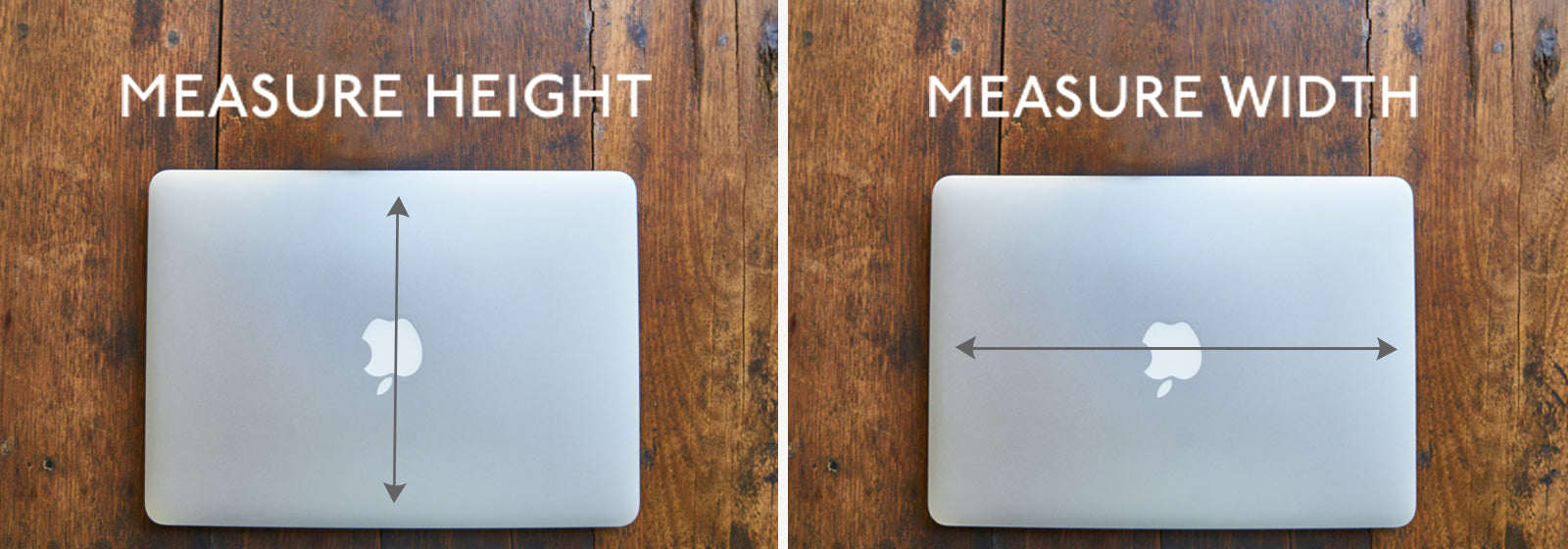
Start measuring the width by placing a ruler or tape measure across the laptop’s front edge. This shows how wide the laptop is from side to side. Next, measure the depth from the front to the back edge. These two numbers help know the laptop’s footprint on a desk.
For height, close the laptop and measure from the base to the top of the lid. This tells how tall the laptop is when closed. To find the thickness, measure the laptop’s side edge at its thickest point. Thickness shows how slim or bulky the laptop feels.
Use a flat surface and hold the measuring tool steady. Write down all numbers in inches or centimeters. These simple steps help understand the laptop’s size better.
Measuring Laptop Screen Size
The laptop screen size is measured by its diagonal length. Use a ruler or tape to measure from one corner of the screen to the opposite corner. This gives the screen size in inches.
Aspect ratio shows the width compared to the height of the screen. Common ratios are 16:9 or 4:3. A wider screen (like 16:9) is good for watching videos. A taller screen (like 4:3) is better for reading and writing.
| Aspect Ratio | Description | Use |
|---|---|---|
| 16:9 | Wider screen | Watching videos, movies |
| 4:3 | Taller screen | Reading, writing documents |
Measuring Laptop Accessories
Measure the laptop’s width, height, and depth in inches or centimeters. Add a little extra space to fit the laptop comfortably inside the sleeve. Sleeves that are too tight can damage the laptop or scratch the screen. Choose sleeves made from soft materials for better protection. Look for sleeves with padding to protect against bumps.
For laptop bags, check the bag’s internal dimensions before buying. Bags with extra compartments help carry chargers, mouse, and other accessories. Make sure the bag has strong handles and straps for easy carrying. Lightweight bags reduce strain on your shoulders. Waterproof bags protect your laptop from rain and spills.
Common Measurement Mistakes
Measuring a laptop can be tricky. Many make the mistake of measuring only the screen size. This often leads to wrong results. Always include the laptop’s outer edges for a true size.
Use a rigid ruler or tape measure. Soft tape can bend and cause errors. Place the ruler flat against the laptop edges. Avoid gaps between the ruler and laptop.
Double-check all measurements. Measure width, height, and depth twice. Write down each number to compare. Small differences can affect fitting laptop bags or cases.
Measure the laptop while it is closed. Open laptops change shape and size. For screen size, measure diagonally from corner to corner.

Credit: www.youtube.com
Applying Measurements For Purchase
Measure the laptop’s length, width, and height carefully. Check the specs against these numbers to find the best fit. Size affects how easy it is to carry and use.
Compare the screen size and weight with your needs. A smaller laptop is lighter and easier to carry, but a bigger screen is better for work or movies.
Make sure the laptop fits with your accessories. Check if your bag, docking station, or stand matches the laptop’s size. Ports and connectors also matter for compatibility.
| Measurement | Why it Matters |
|---|---|
| Length & Width | Fits in bags and on desks |
| Height | Affects portability and comfort |
| Weight | Easier to carry daily |
| Port Locations | Ensures accessory compatibility |
Credit: knomo.com
Frequently Asked Questions
How Do I Measure My Laptop Screen Size?
Measure diagonally from one corner of the screen to the opposite corner. Exclude the bezel for accurate size. Use a ruler or tape measure for precision. This measurement reflects the laptop’s screen size in inches.
What Tools Are Needed To Measure A Laptop?
You need a ruler or a flexible tape measure. These tools help measure screen size, width, and depth. They ensure accurate dimensions for fitting cases or bags. A precise tool avoids errors in laptop measurements.
Why Measure A Laptop Before Buying Accessories?
Measuring ensures accessories fit perfectly without damage. Cases, sleeves, and stands require exact dimensions. Proper fit protects the laptop and improves usability. It saves time and prevents unnecessary returns.
How To Measure Laptop Thickness Accurately?
Close the laptop and measure from the base to the top lid. Use a caliper or ruler for accuracy. Thickness affects portability and compatibility with bags. Precise measurement helps choose suitable accessories.
Conclusion
Measuring a laptop is simple and helps you choose the right size. Start with the screen size, then check width and depth. Don’t forget the thickness and weight for easy carrying. Use a tape measure or ruler for accuracy. Knowing these numbers avoids surprises when buying or fitting your laptop.
Take your time and measure carefully. This way, you get a laptop that fits your needs and space perfectly.
As an Amazon Associate, I earn from qualifying purchases.

