

Are you curious about your laptop’s screen size but don’t have a ruler handy? Knowing your laptop’s screen size is easier than you think, and you don’t need to pull out any measuring tape.
Whether you’re shopping for a new laptop bag, updating your device specs, or just want to know more about your gear, this quick guide will show you simple ways to find your screen size in seconds. Keep reading, and you’ll discover easy tricks that save you time and frustration—no measuring required!
Check Laptop Model Specifications
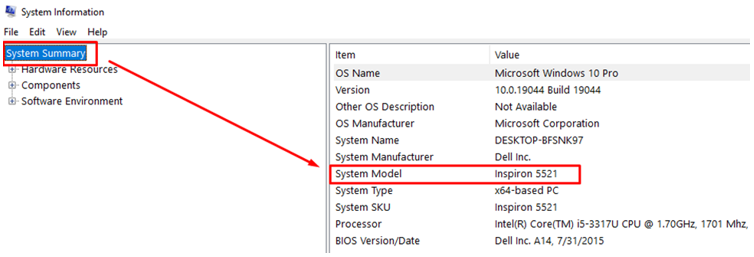
First, find your laptop’s model number. This is usually on a sticker under the laptop or inside the battery compartment. You can also check system settings for the model name.
Next, visit the manufacturer’s official website. Enter the model number in the search bar. The site will show detailed specs, including the screen size.
Another way is to check online retail listings. Websites like Amazon or Best Buy list laptop models with full specs. Look for the screen size in the product description.
Use System Information Tools
The screen size of a laptop is often listed in the system settings. On Windows, open Display Settings by right-clicking the desktop. Look for the resolution; it hints at screen size but is not exact. For exact size, check the laptop model online using system info.
On a Mac, click the Apple logo, then choose About This Mac. The window shows the screen size next to the model name. This method is quick and reliable.
For Linux, open System Details or use commands like xdpyinfo. These tools show screen resolution and model info. Use the model number to find exact size online.
Compare With Standard Screen Sizes
Most laptops have screen sizes between 11 to 17 inches. Common sizes include 13.3″, 14″, 15.6″. These sizes are measured diagonally from one corner to another. Comparing your laptop screen with these sizes helps guess its size without tools.
| Screen Size (inches) | Typical Use | Width x Height (approx.) |
|---|---|---|
| 13.3″ | Portable, light laptops | 11.6″ x 6.5″ |
| 14″ | Balanced size and portability | 12.2″ x 6.8″ |
| 15.6″ | Standard size for many users | 13.6″ x 7.6″ |
Aspect ratios affect screen shape. Most laptops use 16:9 ratio. This means width is 16 units and height is 9 units. Some use 16:10 or 3:2. These change screen height and width but not the diagonal size.

Credit: geekscallout.co.uk
Use Screen Resolution As A Clue
Screen resolution shows how many pixels fit on the screen. Common laptop resolutions include 1366×768, 1920×1080, and 2560×1440. Higher resolution usually means a bigger screen, but not always.
Here is a simple table to match common resolutions with typical screen sizes:
| Resolution | Common Screen Size |
|---|---|
| 1366 x 768 | 11″ to 14″ |
| 1920 x 1080 (Full HD) | 13″ to 15.6″ |
| 2560 x 1440 (QHD) | 14″ to 17″ |
| 3840 x 2160 (4K UHD) | 15″ to 17″ |
Resolution is a helpful hint but not exact. Some small laptops have high resolution screens. Big screens can use lower resolution too. Pixel density (PPI) also affects the display sharpness.
Use resolution as a rough guide. For exact size, measuring is best.
Leverage Online Screen Size Calculators
Online screen size calculators help find laptop screen size fast. Enter your laptop model or measure the width and height of the visible screen area. The calculator then shows the screen size in inches.
Accuracy depends on correct input. Measure the screen area carefully, avoiding the frame. Use a ruler or tape measure for precise numbers. Check multiple calculators to compare results.
Tips for best results:
- Use the diagonal length if asked.
- Exclude the laptop bezel when measuring.
- Use official model numbers for better accuracy.
- Try several calculators to confirm size.
Credit: linuxhint.com
Estimate Using Keyboard Layout
Key sizes on most laptops are similar. You can use this fact to estimate your screen size.
Count the number of keys across the keyboard width. Compare this with a device whose screen size you know.
For example, a laptop with a 15-inch screen often has about 15 keys in a row. If your laptop has fewer or more keys, the screen size changes.
Use a reference device like a friend’s laptop or a store display. Check how many keys fit across the keyboard.
This method gives a quick idea of screen size without measuring tools.

Credit: www.youtube.com
Frequently Asked Questions
How Can I Find My Laptop Screen Size Digitally?
You can find your laptop screen size by checking the display settings or system information. Look for the model number online to get exact screen dimensions.
Where To Find Laptop Screen Size Without Physical Measurement?
Check the laptop’s specifications on the manufacturer’s website using the model number. This usually includes screen size details.
Can I Use Software To Determine Laptop Screen Size?
Yes, some software or apps can detect your screen size by reading display resolution and physical dimensions.
Is Screen Resolution Related To Screen Size?
Screen resolution shows pixel count, not physical size. Knowing resolution alone won’t tell you the actual screen size.
Conclusion
Knowing your laptop screen size is easier than it seems. Check the model number or look online for details. Use built-in settings or simple tools on your device. No need to measure with a ruler or tape. These quick steps save time and effort.
Now you can find screen size anytime, anywhere. Understanding this helps in choosing accessories or software. Keep these tips handy for future use. Simple and fast—just what you need.
As an Amazon Associate, I earn from qualifying purchases.

