Are your Bose earbuds acting up or not connecting like they used to? Sometimes, all they need is a quick restart to get back to perfect sound.
But if you’re not sure how to restart your Bose earbuds, don’t worry—you’re in the right place. In this guide, you’ll learn simple, step-by-step ways to restart your earbuds and fix common issues fast. Keep reading, and you’ll have your Bose earbuds working smoothly again in no time.
Common Reasons For Restarting
Restarting your Bose earbuds can fix many common problems quickly. It refreshes the device and clears minor bugs. Knowing why you might need to restart helps you solve issues faster. Below are some usual reasons for restarting Bose earbuds.
Sound Issues
Sound problems often need a quick restart. Sometimes, the audio cuts out or sounds distorted. Restarting can reset the audio system inside the earbuds. This action often brings the sound back to normal.
Connectivity Problems
Bluetooth connection troubles are common with wireless earbuds. They may fail to pair or keep disconnecting. Restarting the earbuds resets the Bluetooth module. This helps restore a stable connection with your device.
Battery Glitches
Bose earbuds may show wrong battery levels or stop charging. Restarting can fix these battery glitches by recalibrating the battery sensor. It ensures the earbuds show accurate power status and charge properly.
Simple Restart Steps
Restarting your Bose earbuds can fix many common issues. It refreshes the connection and clears minor glitches. The process is simple and quick. Follow these easy steps to restart your earbuds properly.
Powering Off Properly
Press and hold the power button on your earbuds. Hold it for about 5 seconds. Wait until the lights turn off completely. This ensures the earbuds shut down fully. Avoid just putting them in the case. Proper shutdown helps reset the device.
Powering On
Press and hold the power button again. Keep holding until the earbuds light up. You may hear a startup sound. This means the earbuds are turning on. Now they are ready to connect to your device. Turning them on correctly avoids connection errors.
Using The Bluetooth Menu
Open the Bluetooth settings on your phone or computer. Find your Bose earbuds on the list. Tap the earbuds name to disconnect. Wait a few seconds. Then tap again to reconnect. This helps refresh the Bluetooth connection. It can solve pairing or sound problems quickly.
Resetting Bose Earbuds
Resetting Bose earbuds can solve many common issues. It clears settings and helps the earbuds work like new again.
This process is simple and quick. It restores the original factory settings and removes any saved data.
Factory Reset Process
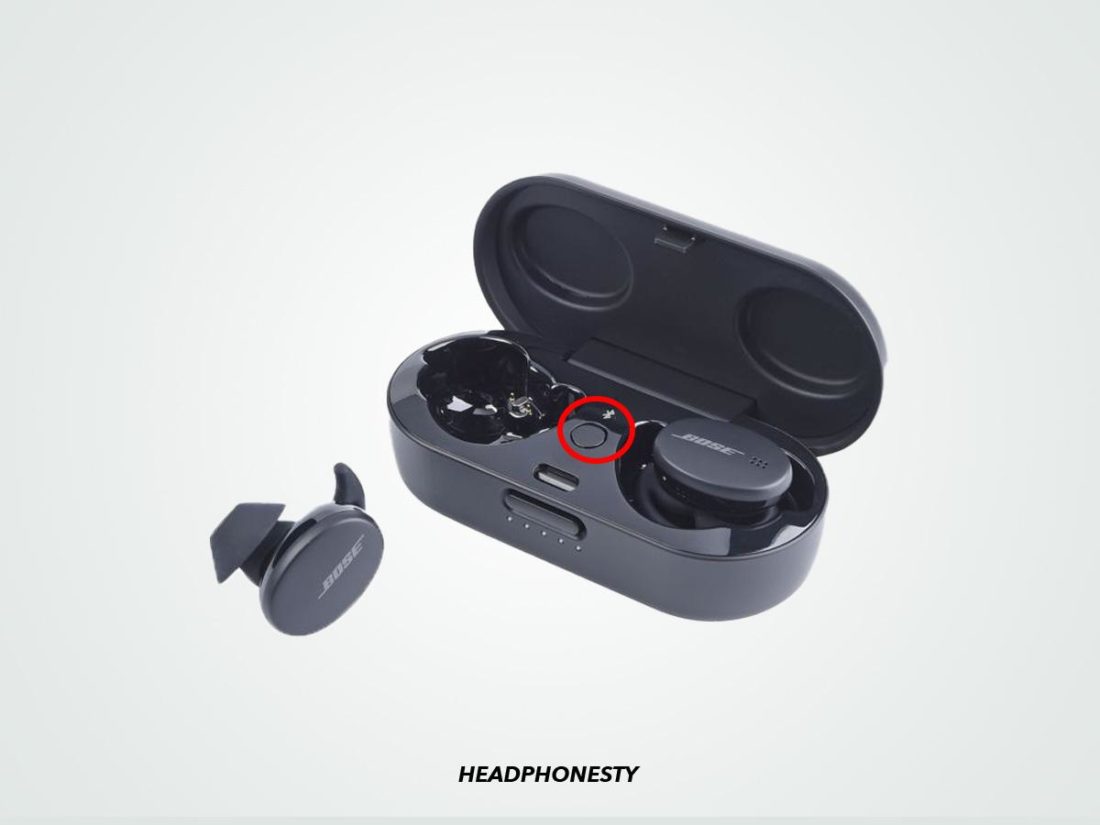
First, place both earbuds in the charging case. Keep the lid open during the reset.
Press and hold the Bluetooth button on the case for about 10 seconds. Wait until the LED light blinks white and amber.
Release the button. The earbuds will now reset to factory settings. Close the lid and reopen to restart the earbuds.
When To Reset
Reset the earbuds if they do not connect to your device. Also, reset if sound quality drops or controls stop responding.
Try a reset if the earbuds turn off randomly or won’t charge properly. It fixes many small software glitches.
Effects Of Reset
Resetting deletes all paired devices from memory. You must pair the earbuds again with your phone or other devices.
Any customized settings will be lost. The earbuds return to their original state from the factory.
The reset does not harm the earbuds. It only clears the software and settings for better performance.
Credit: www.esseg.eu
Charging And Battery Tips
Proper charging and battery care keep your Bose earbuds working well. Good habits help the battery last longer and perform better. Understanding how to charge and maintain the battery makes a big difference.
Ensuring Full Charge
Always charge your earbuds fully before use. A full charge gives the best listening time. Plug the earbuds into the charger and wait until the indicator shows they are done. Avoid using them while charging to speed up the process.
Battery Maintenance
Keep the battery healthy by not letting it drain completely often. Charge the earbuds before the battery is very low. Store them in a cool, dry place when not in use. Avoid exposure to extreme heat or cold to protect the battery.
Charging Case Use
Use the charging case to store and charge earbuds safely. The case holds extra power for on-the-go charging. Make sure the case itself is charged regularly. Clean the case and earbuds contacts to ensure good connection and charging.
Firmware Updates
Firmware updates are key to keeping Bose earbuds working well. These updates fix problems and add new features. They also improve sound quality and battery life. Installing updates regularly helps earbuds run smoothly.
Firmware updates can solve many issues without needing a full restart. They also prepare earbuds for future improvements. Knowing how to check and update firmware is important for every user.
Checking For Updates
Open the Bose Connect app on your phone. Make sure your earbuds are connected. The app will show if an update is available. If yes, it will ask you to start the update. You can also check the settings menu for updates.
Updating Process
Keep earbuds close to your phone during the update. Do not turn off the earbuds or the app. The update may take a few minutes. Wait until the app says the update is complete. After this, the earbuds restart automatically.
Benefits Of Updates
Updates fix bugs that cause sound or connection issues. They can improve battery performance and charging speed. New features may be added for better control. Updates help earbuds stay compatible with new devices.

Credit: support.bose.com
Troubleshooting Persistent Issues
Persistent issues with Bose earbuds can be frustrating. Simple restarts might not fix deeper problems. This section helps you troubleshoot common issues. Follow these steps to restore your earbuds’ performance.
Re-pairing Devices
Unpair your Bose earbuds from your device. Turn off Bluetooth on your device. Turn earbuds off and then back on. Enable Bluetooth and pair again. This refreshes the connection and often solves syncing problems. Try playing audio after re-pairing.
Cleaning Earbuds
Dirt and earwax can block sound or sensors. Use a soft, dry cloth to wipe earbuds gently. Avoid water or harsh cleaners. Check the charging contacts for debris. Clean with a soft brush or cotton swab. Proper cleaning improves sound quality and charging.
Contacting Support
If problems remain after these steps, contact Bose support. Provide details about your issue and model. Support can offer advanced help or repair options. Use official channels for reliable assistance. Keep your purchase information handy for faster service.
Credit: support.bose.com
Frequently Asked Questions
How Do I Restart Bose Earbuds Quickly?
To restart Bose earbuds, press and hold the power button for 10 seconds. Release it when the LED flashes. This resets the earbuds without deleting paired devices.
Why Restart Bose Earbuds For Connectivity Issues?
Restarting Bose earbuds refreshes their internal software. It resolves minor glitches causing connection drops or audio problems. This simple step often restores smooth Bluetooth performance.
Can Restarting Bose Earbuds Fix Sound Problems?
Yes, restarting can fix audio glitches. It clears temporary bugs affecting sound quality or volume control. If issues persist, try resetting the earbuds fully.
How Often Should I Restart Bose Earbuds?
Restart earbuds only when experiencing issues like freezing or poor connection. Frequent restarts are unnecessary and won’t improve performance without a real problem.
Conclusion
Restarting Bose earbuds can fix many common issues quickly. Just follow the simple steps outlined above. This process helps refresh your earbuds and improve performance. Keep your earbuds charged and clean for best results. Try restarting whenever you face connection or sound problems.
It saves time and avoids extra troubleshooting. Enjoy clear sound and smooth use with these easy tips. Your Bose earbuds will work better and last longer. Simple care makes a big difference in daily use.
As an Amazon Associate, I earn from qualifying purchases.