

Have you ever wondered why so many people are switching to curved monitors? You might think it’s just a stylish design choice, but there’s more to it than meets the eye.
A curved screen can actually change the way you see your work, games, and movies—making everything feel more immersive and comfortable. If you’ve been curious about whether a curved monitor is worth it for you, keep reading. This article will uncover the real benefits and help you decide if it’s time to make the switch.
Enhanced Immersion
Curved monitors offer a unique way to improve how you see and feel your screen. They bring you closer to the action and make your experience more natural. This feeling is called enhanced immersion. It helps you stay focused and enjoy what you do on your computer more.
Curved screens change how you look at your display. They create a sense of depth and space. This makes movies, games, and work feel bigger and more real. The curve matches the shape of your eyes, so your view wraps around you. This wrap-around effect pulls you into the screen’s world.
Wrap-around Effect
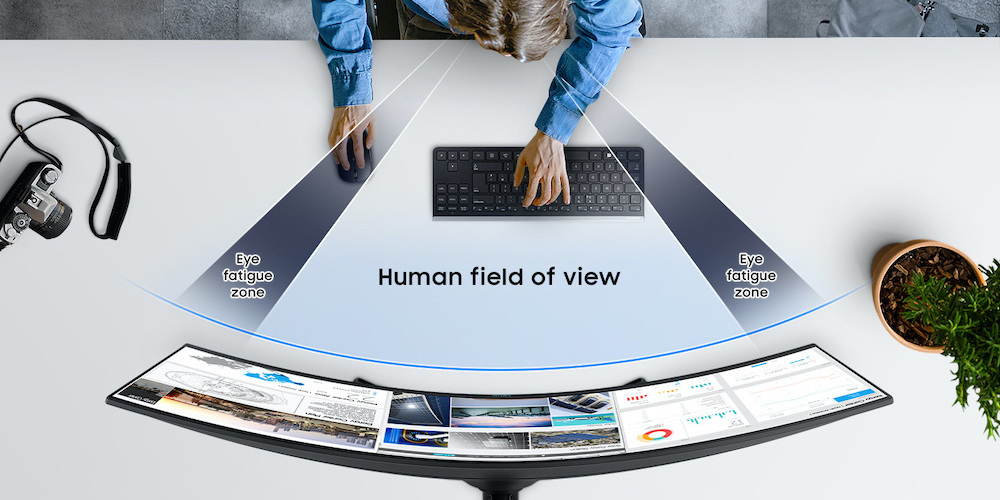
The curve of the monitor bends the edges toward you. This shape fits your natural field of view. It covers more of your side vision than flat screens. You see more details without turning your head. This effect makes images feel more three-dimensional and alive. It feels like the screen surrounds you softly. This helps you focus better on what you see.
Reduced Peripheral Distractions
Curved monitors block out some distractions at the sides. The edges curve away from your side vision less than flat monitors. This means less chance of seeing things behind or beside you. Your eyes stay on the screen longer. This helps you keep your attention and work or play better. It feels like your screen is your own space.
Credit: www.viewsonic.com
Improved Comfort
Curved monitors offer better comfort during long hours of use. They reduce strain and make viewing easier on the eyes. The design supports natural positions, helping users avoid discomfort. This improves focus and reduces fatigue. Comfort is a key reason many choose curved screens over flat ones.
Reduced Eye Strain
Curved screens match the natural curve of the eye. This reduces the need to refocus frequently. The eyes stay relaxed for longer periods. Less eye movement means less dryness and irritation. Users experience less tiredness after using curved monitors.
Natural Viewing Angles
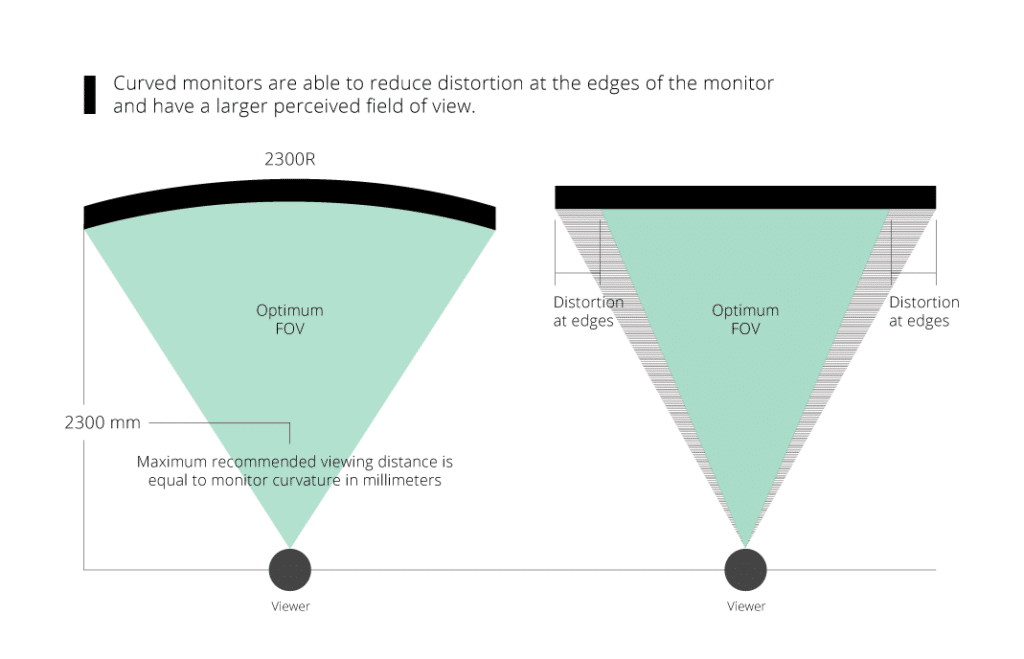
The curve allows the entire screen to stay at an equal distance. This creates uniform focus across the display. Users do not have to turn their heads much. It feels more natural and less tiring. The screen edges stay clear and easy to see without distortion.
Better Visual Depth
Curved monitors offer a unique way to see images with more depth. They wrap the screen around your eyes. This shape helps make pictures feel more real and alive. Your eyes can see the whole screen at once without moving too much.
Better visual depth means images look less flat. You can notice small details easier. This makes the screen more comfortable to use for a long time.
Enhanced 3d Perception
The curve of the monitor tricks your brain into thinking images have depth. Objects on the screen seem to pop out. This creates a strong 3D effect without special glasses. You feel like you are inside the scene rather than just watching it.
This effect is perfect for movies and games. It helps you enjoy visuals with extra realism. The curved screen guides your eyes naturally. This reduces strain and keeps images sharp.
Realistic Image Curvature
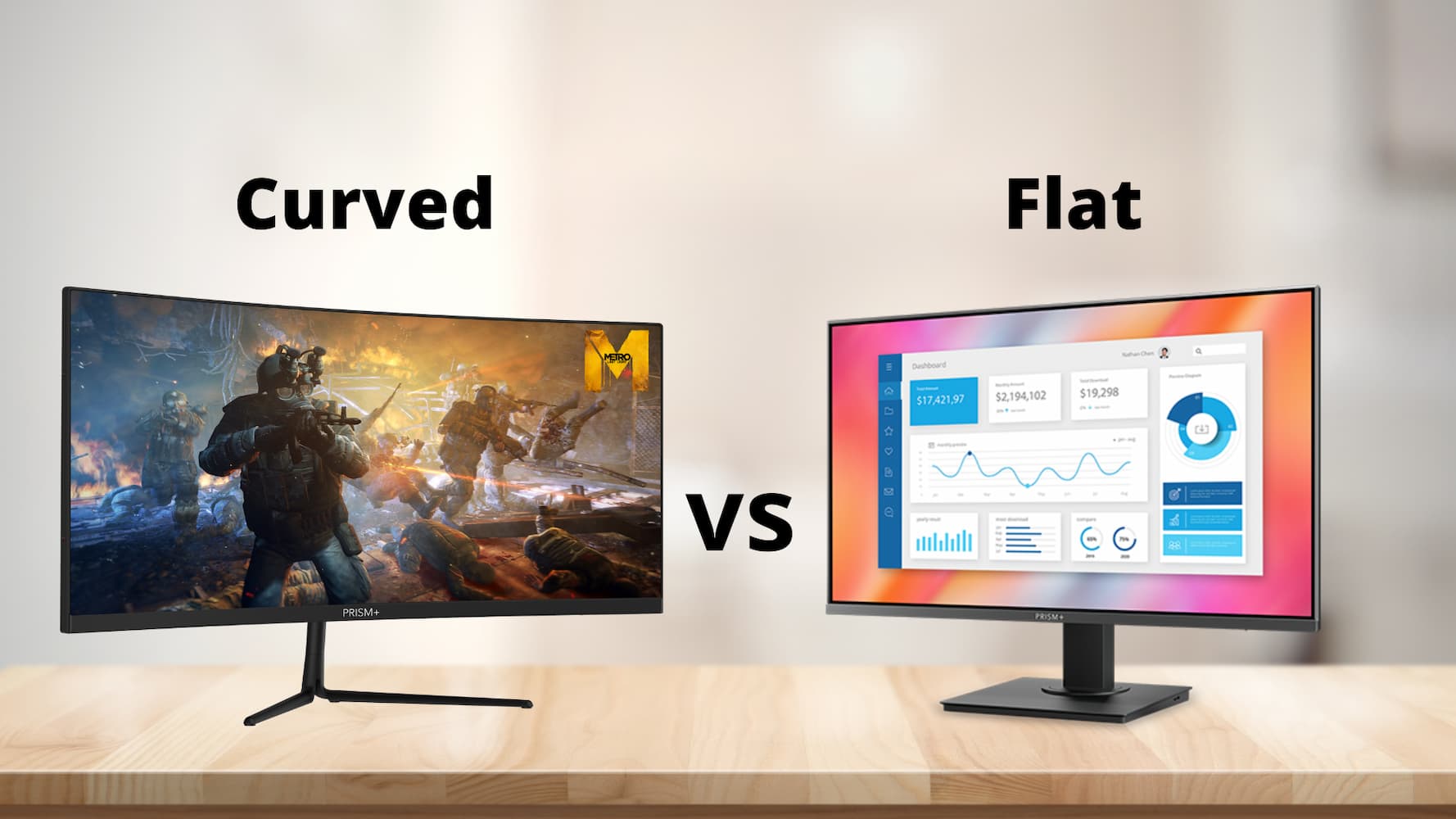
Flat screens show images on a straight surface. Curved monitors match the natural curve of your eyes. This means the edges of the screen look less distorted. Pictures remain clear and true to life across the entire display.
The curved shape creates a smooth transition from the center to the edges. It feels like looking through a window. This makes scenes and objects appear more natural and easier to understand.
Credit: prismplus.sg
Wider Field Of View
A curved monitor offers a wider field of view compared to flat screens. It wraps the display slightly around your eyes. This design helps you see more content without moving your head. The curved shape matches the natural curve of your eyes. It creates a more natural and comfortable viewing experience. You feel more immersed in what you watch or work on.
Expansive Screen Experience
The wider field of view lets you enjoy a bigger visual space. You can see edges of the screen more clearly. This reduces the need to squint or lean forward. The curve brings the edges closer to your eyes. It makes the screen feel larger without increasing its size. Watching videos or playing games feels more real and engaging. The image wraps around your vision, drawing you in.
Ideal For Multitasking
A curved monitor helps manage many windows at once. The wider view fits multiple apps side by side. It is easier to switch between tasks quickly. You can keep an eye on emails, chats, and documents without losing focus. The screen curve reduces glare and reflections on the sides. This makes reading text easier and less tiring. Multitasking becomes smoother and more efficient with this setup.
Gaming Advantages
Curved monitors offer unique benefits for gamers. They change how you see the game world. These screens wrap slightly around your view. This design helps make gaming more immersive and focused.
Two main advantages stand out: greater focus and improved reaction times. Both help boost your gaming performance.
Greater Focus
A curved screen matches the shape of your eyes. It reduces distractions from the edges of the screen. You see less of the room around you. This helps you concentrate on the game itself. The curve keeps your eyes steady. Less eye movement means less strain and better focus. You feel more inside the game world. This focus can make gameplay more intense and enjoyable.
Improved Reaction Times
The curve of the screen brings the edges closer to you. This means you notice actions happening on the sides faster. Your eyes catch more details without moving too much. Quick reactions matter in fast games like shooters and racers. A curved screen helps you spot enemies or obstacles sooner. Your hands can respond faster to what you see. This can give you an edge in competitive gaming.
Professional Use Cases
Curved monitors offer distinct advantages for many professional settings. They improve focus by matching the natural curve of the human eye. This design reduces eye strain and enhances the viewing experience. Professionals benefit from clearer, wider visuals that boost productivity.
Creative Work Benefits
Creative professionals like graphic designers and video editors gain much from curved screens. The curved shape wraps images around the viewer. It helps see details better and reduces distortions at the edges. Colors appear more consistent across the screen, aiding precise editing. The immersive view lets artists focus on their work without distractions.
Data Analysis Efficiency
Data analysts and financial experts handle large spreadsheets and complex charts. Curved monitors create a panoramic view, making it easier to compare numbers side by side. The gentle curve keeps all parts of the screen in clear view. This setup reduces the need to scroll or switch tabs often. Analysts can spot trends and errors faster with less eye fatigue.
Choosing The Right Curve
Choosing the right curve for a monitor is important for comfort and visual experience. The curve affects how you see the screen and how your eyes move. Picking the best curve radius and matching it to the screen size can reduce eye strain and improve immersion. Let’s explore how to choose the right curve for your needs.
Curve Radius Explained
The curve radius is the measure of how tight the curve is on the monitor. It is usually shown in millimeters, like 1500R or 1800R. The smaller the number, the stronger the curve. A 1500R curve bends more sharply than a 3000R curve.
This radius shows the circle size if you complete the curve. For example, a 1500R curve means the screen’s curve matches a circle with a 1500 mm radius. A tighter curve wraps more around your field of view.
Matching Curve To Screen Size
Screen size affects which curve radius feels natural. Smaller monitors (around 24 inches) often work best with a gentle curve like 1800R or 3000R. This avoids distortion and keeps images clear.
Larger screens (27 inches or more) benefit from a stronger curve, like 1500R. This curve helps fill your vision and makes viewing easier. It also reduces glare and reflections on big screens.
Choosing a curve that fits the screen size improves comfort and image quality. It creates a better balance between immersion and eye comfort.
Credit: insights.samsung.com
Potential Drawbacks
Curved monitors offer an immersive experience, but they also have some drawbacks. Understanding these limitations helps in choosing the right monitor for your needs. Here are two main concerns to keep in mind.
Viewing Angle Limitations
Curved screens work best when you sit in the center. Sitting off to the side can cause distortion. Colors and brightness may look uneven from wide angles. This affects group viewing or sharing the screen. Flat monitors offer more consistent viewing angles for multiple viewers.
Desk Space Considerations
Curved monitors usually take up more desk space. Their shape requires deeper desks for comfortable use. Smaller desks may feel crowded or limit monitor placement. This can reduce space for other items like keyboards or speakers. Measuring your desk before buying helps avoid space problems.
Frequently Asked Questions
What Are The Benefits Of Using A Curved Monitor?
Curved monitors provide immersive viewing by wrapping the display around your field of vision. They reduce eye strain and glare. The curved shape enhances depth perception, making games and movies more engaging. Overall, they offer a more comfortable and natural viewing experience.
How Does A Curved Monitor Improve Gaming Experience?
A curved monitor offers a wider field of view, enhancing peripheral vision in games. It creates a more immersive environment by reducing distortion at edges. This setup helps gamers track in-game action smoothly. The curve also minimizes reflections, improving visual clarity during fast gameplay.
Are Curved Monitors Better For Productivity Tasks?
Yes, curved monitors increase productivity by reducing eye fatigue during long hours. The curve keeps the entire screen at a uniform distance, improving focus. They enhance multitasking by offering wider screens that fit multiple windows comfortably. This leads to a more efficient and ergonomic workspace.
Do Curved Monitors Cause Any Eye Strain?
Curved monitors generally reduce eye strain compared to flat screens. Their shape aligns with the natural curve of your eyes, reducing the need for constant refocusing. However, improper setup or excessive screen time can still cause discomfort. Proper distance and angle are essential for comfort.
Conclusion
Curved monitors offer a more natural view for your eyes. They help reduce glare and improve focus. You feel more wrapped in the screen, which can boost comfort. This makes long hours of work or play easier. The curve matches how we see the world around us.
It may not be for everyone, but many find it helpful. Choose what fits your needs and space best. A curved monitor can change how you use your computer daily. Simple, yet effective for a better screen experience.
As an Amazon Associate, I earn from qualifying purchases.

