

Have you ever wondered if your security camera can do more than just record video? Imagine being able to hear what’s happening, not just see it.
This could change the way you protect your home or business. But do security cameras have audio features, and how reliable are they? If you want to make sure you’re getting the full picture, including sound, keep reading. By the end of this article, you’ll know exactly what to look for and how audio can boost your security.
Credit: montavue.com
Audio Features In Security Cameras
Security cameras often include audio features that improve overall surveillance. Audio lets you hear sounds near the camera. This helps to catch important details missed by video alone. It adds another layer of security and awareness. Understanding audio features helps you choose the right camera for your needs.
Types Of Audio Capabilities
Security cameras have different audio options. Some cameras only record sound. Others allow two-way talk. Two-way audio lets you speak and listen through the camera. Audio recording captures background noise, voices, or alarms. Some advanced models filter noise for clearer sound. Choose audio features based on your security needs and environment.
Built-in Microphones Vs External Mics
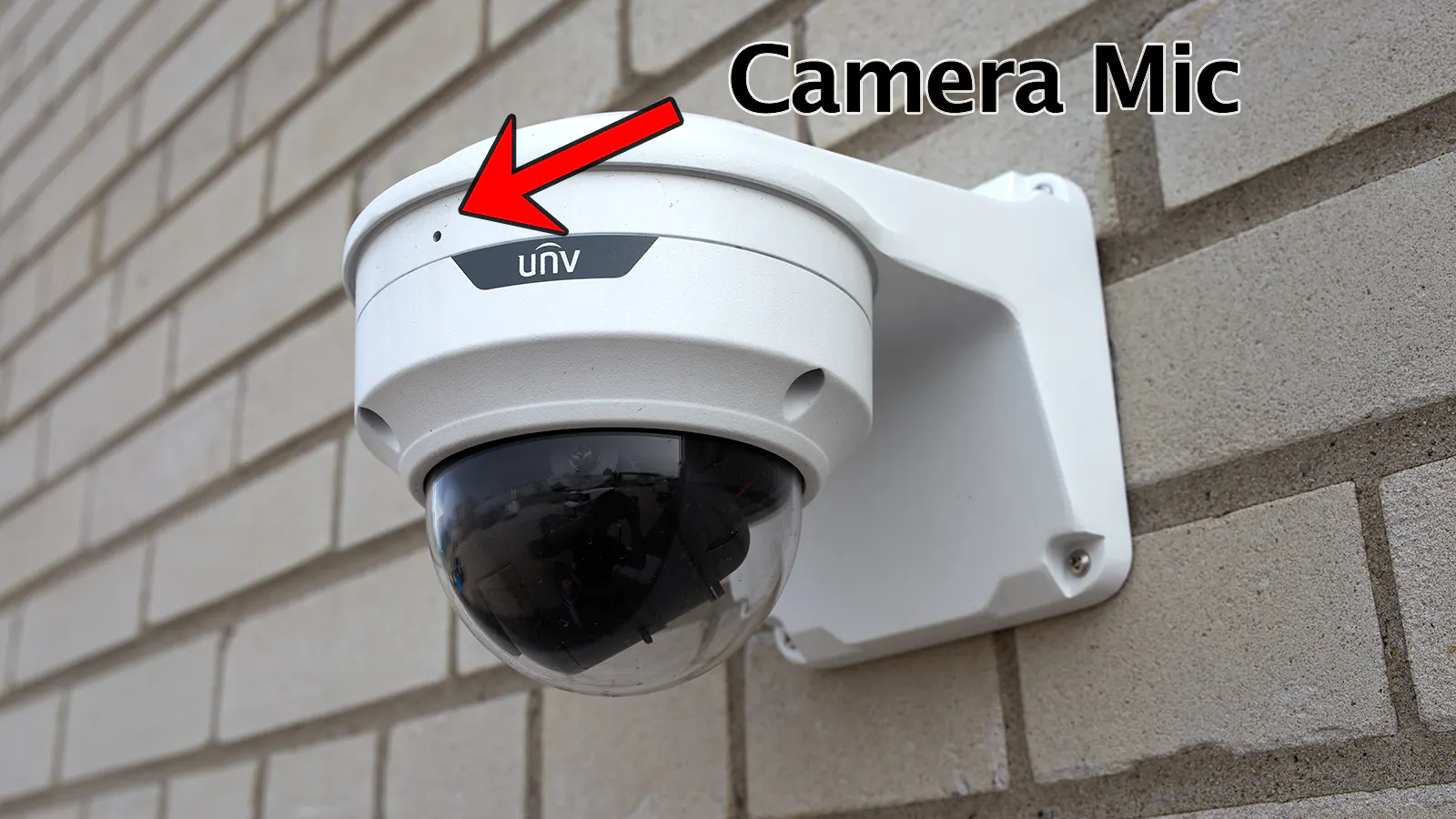
Many cameras have built-in microphones. These are small and easy to use. Built-in mics work well indoors or close to sounds. External microphones attach to cameras for better sound quality. They pick up voices from farther away. External mics are useful in noisy or large areas. Decide between built-in or external mics depending on your space and audio clarity needs.
Credit: www.xlrsecurity.com
Legal Aspects Of Audio Recording
Audio recording with security cameras raises important legal questions. Laws vary widely by location. Knowing these rules protects your rights and respects others’ privacy. It helps avoid fines or legal trouble. Understanding legal aspects is crucial before using audio-capable cameras.
Consent Laws By Region
Many places require consent before recording audio. Some regions need all parties to agree. Others allow recording if one person consents. Laws depend on federal, state, or local rules. Always check the rules where you live or install cameras. Consent laws aim to protect personal conversations from being recorded secretly.
Privacy Concerns
Recording audio can invade privacy. People expect privacy in homes and private spaces. Recording without permission can harm trust and relationships. Businesses must respect customer and employee privacy. Cameras with audio should not capture private talks. Protecting privacy means using audio recording carefully and legally.
Benefits Of Audio In Surveillance
Audio in surveillance cameras adds a new layer to security systems. It helps capture sounds along with video, making monitoring more effective. The benefits of having audio in security cameras are clear. It supports better understanding and faster response to incidents.
Enhanced Security Monitoring
Audio allows security teams to hear what is happening, not just see it. Sounds like voices, alarms, or breaking glass alert them to possible issues. This helps spot problems quicker and take action faster. It also improves communication between security staff and people on site.
Improved Evidence Collection
Audio recordings provide extra proof during investigations. Hearing conversations or noises can clarify what happened. This makes it easier for police or courts to understand events. Audio evidence often supports video and strengthens case details.
Credit: www.reddit.com
Limitations Of Audio Recording
Audio recording in security cameras can add value but has clear limits. It does not always capture sound perfectly. Various factors affect sound quality and usefulness.
Understanding these limits helps set the right expectations. It also guides better use of audio features in surveillance.
Technical Challenges
Microphones in security cameras are small and sensitive. They pick up background noise easily. Wind, traffic, and other sounds can interfere. This reduces audio clarity and makes it hard to hear important sounds.
Audio range is often limited. Sounds far from the camera may be faint or missed. Some cameras do not record audio continuously to save space. This can result in missing key moments.
Potential For Misinterpretation
Audio recordings can be unclear or incomplete. This can lead to wrong conclusions. Voices may sound muffled or distorted.
Background noises might be mistaken for important sounds. Without seeing the full scene, it is easy to misunderstand what was said or heard. Audio alone rarely tells the full story.
Choosing Cameras With Audio
Choosing security cameras with audio can enhance your safety and monitoring. Cameras that record sound give extra information beyond video. You can hear voices, noises, or alarms around the camera area. This helps you understand events better and respond faster.
Audio cameras suit many places like homes, offices, and stores. They let you check conversations or detect unusual sounds. Pick cameras with clear sound quality and easy controls. Consider how the audio works with your existing security system.
Key Features To Consider
Look for cameras with two-way audio to listen and speak. Good microphones catch clear sound even from a distance. Check if the camera offers noise reduction to avoid background noise. See if audio records with video for full evidence. Confirm the camera supports your internet or app connection. Privacy settings matter; make sure you can mute or disable audio.
Popular Models With Audio Support
Many brands offer cameras with built-in microphones and speakers. Some models include night audio for sound in the dark. Wireless cameras with audio provide easy installation and flexibility. Check user reviews to find reliable and clear sound quality. Affordable options exist that do not sacrifice audio performance. Choose models compatible with your smartphone or security system.
Installation Tips For Audio Cameras
Installing audio cameras requires careful planning. Proper setup improves sound capture and overall security. Small details make big differences in audio performance. Below are important tips to help place and optimize audio cameras effectively.
Optimal Placement
Place cameras where sound is clear and not blocked. Avoid corners or tight spaces that trap noise. Keep cameras away from loud machines or fans. Position microphones close to the main sound source. Ensure no objects cover the microphone. Install cameras at ear level for best audio pickup. Test different spots to find the best sound quality.
Audio Quality Optimization
Use cameras with noise reduction features. Adjust microphone sensitivity to avoid distortion. Check for echo or background noise during testing. Use external microphones for better sound in large areas. Keep cables secure to prevent interference. Regularly clean microphones to remove dust and dirt. Update camera firmware for improved audio functions.
Frequently Asked Questions
Do Security Cameras Record Audio As Well?
Many security cameras have built-in microphones to record audio. However, not all models include this feature. Check product specifications to confirm if audio recording is supported before purchasing.
Is Audio Recording Legal With Security Cameras?
Audio recording laws vary by location. Some places require consent from all parties involved. Always research local regulations to ensure compliance when using audio-enabled cameras.
Can I Disable Audio On My Security Camera?
Yes, most security cameras allow users to disable audio recording. This option is usually found in the device’s settings or app, giving users control over privacy preferences.
Does Audio Improve Security Camera Effectiveness?
Audio can enhance security by capturing conversations and sounds. It helps provide context to video footage, aiding investigations and improving overall surveillance quality.
Conclusion
Security cameras can have audio, but not all do. Some models include microphones for sound recording. Laws about audio recording vary by location. Always check local rules before using audio features. Audio can help catch more details during incidents. Yet, some people prefer cameras without sound for privacy.
Choose a camera that fits your needs and legal limits. Clear video combined with sound improves security. Think carefully before adding audio to your system. It can make your space safer and more informed.
As an Amazon Associate, I earn from qualifying purchases.
