

Have you ever felt unsure if a security camera is actually recording you? Knowing whether a camera is on can protect your privacy and give you peace of mind.
You’ll discover simple tricks to spot an active security camera quickly and easily. By the end, you’ll feel confident identifying when you’re being watched—and when you’re not. Keep reading to learn how to take control of your surroundings right now.
Credit: reolink.com
Spotting The Power Indicator
Spotting the power indicator on a security camera is an easy way to know if the device is on. Most cameras have small LED lights that show their status. These lights help you quickly check if the camera is active or off. Understanding these signals saves time and helps with security checks.
Common Led Light Locations
Power indicator lights often sit near the camera lens. Some cameras place LEDs on the front or side. Others hide them near the power cable or base. These lights are small but visible in low light. Knowing where to look makes it simple to spot an active camera.
What Different Colors Mean
LED colors tell different messages about the camera’s state. A green light usually means the camera is on and working. Red often signals recording or standby mode. Blue can show the camera is connected to Wi-Fi. No light may mean the camera is off or unplugged.
Credit: www.xlrsecurity.com
Checking The Lens For Movement
Checking the lens for movement is a simple way to see if a security camera is on. Many cameras move their lenses when recording or tracking. This movement helps the camera cover more area and stay focused on the subject. Watching the lens carefully can reveal signs that the camera is active.
Detecting Pan-tilt Actions
Pan-tilt cameras can turn side to side and up or down. These movements help the camera watch a larger space. Watch the lens for smooth, slow movements. If it shifts direction regularly, the camera is likely on. Fixed cameras do not move, so any motion suggests activity.
Observing Lens Focus Changes
Some cameras adjust their lens focus automatically. This means the lens moves slightly to keep images clear. Look for small, subtle lens shifts in and out. These changes often happen when the camera zooms or focuses. If you see this, the camera is probably recording.
Using A Flashlight To Detect Infrared
Using a flashlight to detect infrared light is a simple way to find out if a security camera is on. Most security cameras use infrared LEDs to see in the dark. These LEDs are invisible to the naked eye but can be spotted with a flashlight. This method helps you check a camera without special tools.
How Ir Leds Appear In The Dark
Infrared LEDs emit light that humans cannot see. At night, these LEDs glow faintly red. The glow shows the camera is active and watching. Sometimes, the red light is very dim and hard to notice. It looks like tiny dots or small circles near the camera lens.
Simple Flashlight Technique
Take a flashlight and turn it on. Point it directly at the camera lens in a dark room. Look through the flashlight beam carefully. The infrared LEDs will reflect the light and appear as bright spots. This reflection proves the camera is on. Try moving the flashlight slightly to see all LED lights.
Listening For Audio Cues
Listening for audio cues is a simple way to tell if a security camera is on. Some cameras make sounds during operation. These sounds can help you identify if the device is active. Paying close attention to subtle noises can reveal the camera’s status quickly.
Sounds From Motorized Cameras
Motorized security cameras often move to cover different areas. When they turn or tilt, you may hear soft whirring or clicking sounds. These noises come from small motors inside the camera. If you hear these sounds, the camera is likely powered on and working.
Not all cameras move, but motorized ones use sound to adjust their view. The noise is usually low but distinct in a quiet room. Listening carefully can help you detect these moving parts.
Other Audible Indicators
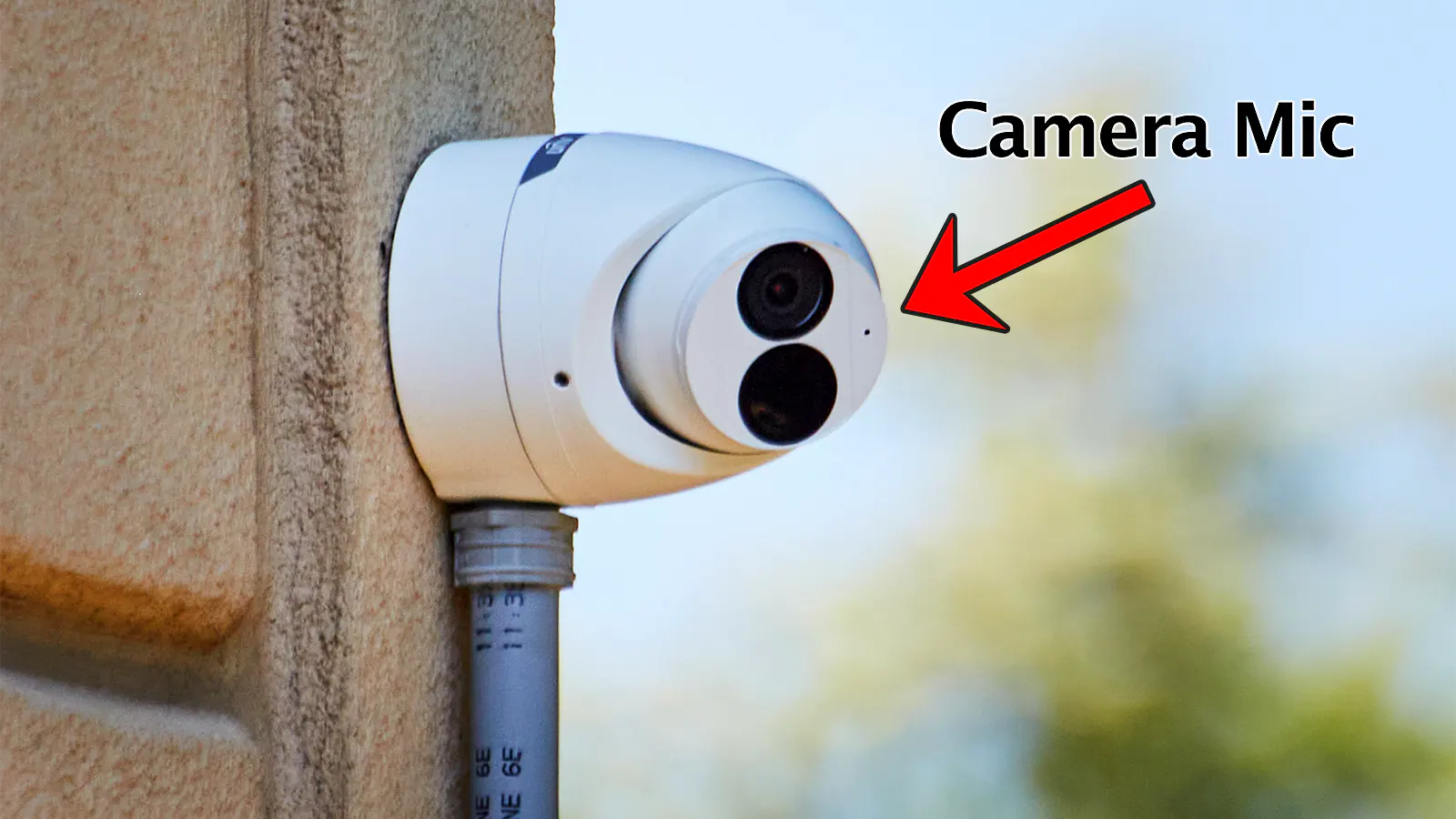
Some cameras emit a faint humming or buzzing sound when active. This noise comes from internal electronics or infrared lights. Infrared lights help cameras see in the dark and sometimes make a soft sound.
Occasionally, you might hear beeps or clicks when the camera starts recording or changes modes. These sounds serve as alerts to the user or security system. Paying attention to such sounds can confirm that the camera is on.
Testing With A Smartphone Camera
Testing a security camera with a smartphone camera is a simple and quick way to know if it is on. Most security cameras use infrared light to see in the dark. This light is invisible to the human eye but can be seen through your smartphone camera. This method requires no special tools or skills. Anyone can do it at home or work.
Why Smartphone Cameras Work
Smartphone cameras can detect infrared light that security cameras emit. Infrared LEDs around the camera lens send this light to help the camera see in low light. Your phone’s camera sensor picks up this light, showing a faint glow on the screen. This glow means the security camera is powered and likely recording.
Step-by-step Testing Method
First, open your smartphone camera app. Point the phone camera at the security camera lens. Make sure the area is dim or dark for better visibility. Look at your phone screen to spot any small glowing light near the camera lens. If you see a purple or white light, the camera is active. If no light appears, the camera might be off or not using infrared lights. Repeat this test at different angles for accuracy.
Inspecting The Wiring And Power Source
Inspecting the wiring and power source helps to know if a security camera is on. The wires carry power and data to the camera. Checking these parts shows if the camera works or not. This step is simple and does not need special tools.
Tracing Cables And Connections
Start by following the cables from the camera to their end. The wires usually run along walls or ceilings. Look for any plugged-in cables or loose ends. A connected and tight cable means the camera likely has power. Cut or damaged cables may mean the camera is off or broken.
Check if the cables are connected to a recording device or monitor. These connections often show the camera is active. Unplugged or missing cables may mean no power or no signal sent by the camera.
Identifying Power Adapters
Look for the power adapter linked to the camera. Most cameras use a small box plugged into a wall outlet. The adapter converts electricity to a safe level for the camera. An adapter with a lit LED light usually means it is working.
Unplug the adapter and see if the camera shuts off. If yes, it shows the power source controls the camera’s operation. If the adapter is missing or disconnected, the camera is off or not functioning.
Recognizing Hidden Or Dummy Cameras
Hidden and dummy cameras can be tricky to spot. They often blend into the background. Sometimes, they look like regular objects. Knowing how to find them helps protect your privacy. You can avoid being recorded without your knowledge. This section explains how to recognize these cameras clearly.
How To Differentiate Real Vs Fake
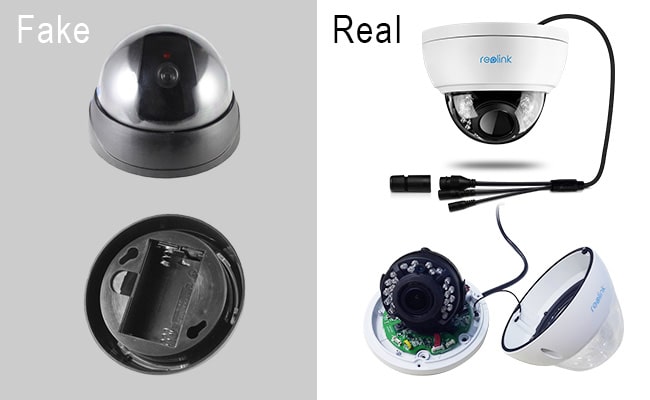
Real cameras have a small lens that moves or shines. Dummy cameras might have no lens or a painted one. Real cameras often have wires or power sources. Fake cameras may lack these details. Some dummy cameras have blinking red lights to trick people. Real cameras usually do not blink like that. Check for weight too. Real cameras feel heavier than plastic fakes.
Signs Of Tampering Or Modification
Look closely for loose parts or scratches near the camera. Tampered cameras may have tape or glue marks. Wires might be cut or reconnected strangely. The camera cover could be cracked or misplaced. If the device looks new but the area is old, be cautious. Signs of recent work can mean modification. Always trust your instincts about unusual devices.
Credit: www.xlrsecurity.com
Frequently Asked Questions
How Can I Tell If A Security Camera Is Recording?
Check for a small blinking red or green light near the lens. Some cameras also emit a faint hum or click when active.
Do Security Cameras Show Visible Lights When On?
Many cameras have LED indicators that glow when powered. However, some models use infrared and show no visible light.
Can I Detect A Hidden Security Camera Easily?
Use a flashlight to scan the area; camera lenses reflect light differently. Special camera detector apps can also help identify hidden devices.
What Signs Indicate A Wireless Security Camera Is Active?
Look for blinking lights, listen for faint noises, or use a smartphone app to detect Wi-Fi signals from the camera.
Conclusion
Knowing how to tell if a security camera is on helps keep you safe. Small signs like blinking lights or lens reflections often reveal active cameras. Using simple tools like a flashlight or phone can also help. Always stay alert and check your surroundings carefully.
Being aware gives you peace of mind and control. Stay safe by spotting cameras early and acting wisely.
As an Amazon Associate, I earn from qualifying purchases.
