

Have you ever wondered if your dash camera is recording every moment on the road? Knowing when and how your dash cam records can make a big difference in protecting you during an accident or dispute.
You might be surprised to learn that not all dash cameras record all the time. Understanding how your device works can help you feel more secure and get the most out of it. Keep reading to discover the truth about dash cam recording and how it impacts your safety.
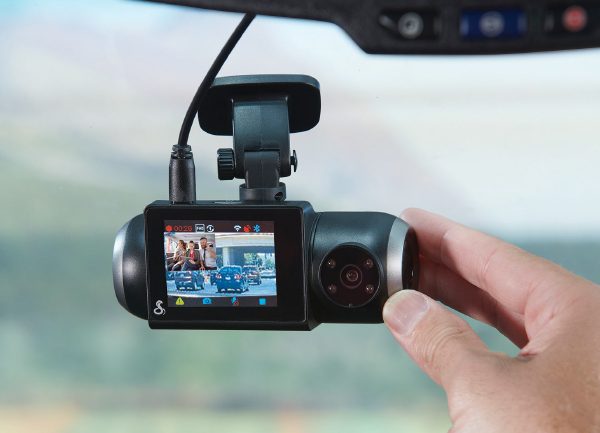
Credit: www.cobra.com
How Dash Cameras Work
Dash cameras are small devices that record video inside and outside a vehicle. They help drivers capture important moments on the road. Understanding how these cameras work helps to know if they record all the time or only at certain moments.
Power Sources And Activation
Dash cameras need power to work. Most use the car’s battery through the cigarette lighter or a USB port. Some connect directly to the car’s fuse box for constant power. This allows the camera to turn on as soon as the car starts.
Some dash cams have a built-in battery. This lets them record even when the car is off. But the battery lasts only a short time. Usually, the camera activates when it detects motion or impact.
Continuous Vs Event-based Recording
Continuous recording means the dash cam films non-stop while powered. It saves video in small clips that loop over old footage when full. This way, it always has recent video saved.
Event-based recording starts only when the camera senses movement or a crash. It saves clips around the event and protects them from deletion. This saves storage space and focuses on important moments.
Many dash cameras use both methods. They record continuously while driving and switch to event mode when parked. This gives full coverage without wasting storage.
Types Of Recording Modes
Dash cameras do not record all the time in the same way. They use different recording modes to save space and focus on important moments. These modes help the camera capture video efficiently and protect your data.
Knowing these recording modes helps you understand how your dash cam works. It also shows how it keeps your car safe without recording useless footage.
Loop Recording Explained
Loop recording means the camera records continuously in small video files. When the memory is full, the oldest files get deleted. This way, the camera never stops recording. It keeps saving new videos without needing to clear space.
This mode is perfect for driving because it captures every moment. You do not need to press any button to start or stop recording. The camera works automatically.
Motion Detection Features
Motion detection makes the camera start recording only when it senses movement. It saves memory by not recording empty roads or quiet parking lots. The camera watches for any motion nearby.
This feature is useful for capturing unexpected events. It records only when something happens around your car.
Parking Mode Functions
Parking mode activates when you park your car and turn off the engine. The camera stays on and records if it detects impact or movement. It helps catch vandalism or accidents while parked.
This mode uses less power but keeps your car protected. It records only important events during parking hours.
Factors Influencing Recording Time
Dash cameras do not always record nonstop. Several factors affect how long these devices record. Understanding these elements helps users manage their dash cams better. It also clarifies why recording time varies across different models and settings.
Storage Capacity Limits
Dash cams save videos on memory cards. The size of these cards limits recording time. Smaller cards fill up quickly, stopping new recordings. Larger cards hold more footage but still have limits. Some dash cams overwrite old videos automatically. This process keeps the camera recording continuously, but only for a set time.
Battery Life Considerations
Dash cameras rely on batteries or car power. Battery life affects how long the camera can record without charging. Cameras with small batteries record for shorter periods. Plugging into the car’s power keeps the camera on longer. Battery health also plays a role. A weak battery reduces recording time.
User Settings And Preferences
Users can change dash cam settings to control recording time. Video quality settings affect file size and storage use. Higher quality videos use more space and shorten recording length. Some users choose motion detection to save storage. The camera records only when it senses movement. Loop recording allows continuous capture by deleting old files. These settings help users balance recording time and storage.
Credit: www.blackboxmycar.com
Benefits Of Continuous Recording
Continuous recording means the dash camera records non-stop while powered. This feature keeps every moment on the road saved. It helps drivers stay safe and protected in many ways.
With continuous recording, no event goes unnoticed. Every detail, from small incidents to serious accidents, is captured. This constant recording provides a clear record of what happened.
Provides Complete Evidence For Accidents
Continuous recording captures the full story during accidents. It shows the moments before, during, and after a crash. This evidence is useful for insurance claims and police reports.
Improves Driver Safety
Knowing the camera records all the time encourages careful driving. Drivers tend to avoid risky behavior. This leads to safer roads for everyone.
Records Unexpected Events
Road events can happen anytime. Continuous recording ensures no surprise is missed. This helps in documenting road hazards or unusual incidents immediately.
Supports Parking Protection
Many dash cams continue recording even when parked. This feature captures damage or theft attempts. It offers peace of mind when leaving the car unattended.
Makes Reviewing Footage Easy
With continuous files, reviewing video is simple. You can find exact moments without gaps. This saves time during investigations or memory review.
Drawbacks Of Non-stop Recording
Dash cameras that record all the time can create some problems. Constant recording uses a lot of storage space. This means the memory card fills up quickly.
Also, non-stop recording can drain your car battery if the camera runs while the car is off. This can cause starting issues. The camera may also wear out faster due to continuous use.
Reviewing hours of footage takes time. It can be hard to find important clips among long videos. This reduces the usefulness of the dash cam.
High Storage Requirements
Continuous recording needs large memory cards. Small cards fill up fast and overwrite old videos. This can delete important evidence if you do not save it in time.
Battery Drain Concerns
Dash cams that record nonstop use power even when the car is off. This can drain the car battery. You may face trouble starting your vehicle.
Wear And Tear On The Device
Recording all the time causes the camera to heat up. This constant use can shorten its lifespan. The device may fail sooner than expected.
Difficulty In Finding Important Footage
Long videos make it hard to spot key moments. Users spend more time searching through hours of clips. Important events might be missed or overlooked.
Tips To Optimize Dash Cam Usage
Using a dash camera properly makes a big difference in how well it works. Simple tips help you get the most from your device. These tips cover recording settings, storage, and upkeep. Follow them to keep your dash cam ready and reliable.
Choosing The Right Recording Mode
Dash cams often have different recording modes. Some record only when the car moves. Others record all the time. Pick a mode that fits your needs. Continuous recording helps catch every moment. Motion detection saves storage by recording only when needed.
Managing Storage Efficiently
Storage fills up fast with video files. Use a large memory card to hold more footage. Regularly delete old or unimportant videos. Some dash cams overwrite old files automatically. This keeps storage free without your help. Check your storage space often to avoid missing important recordings.
Regular Maintenance And Updates
Keep your dash cam clean and secure. Wipe the lens to avoid blurry videos. Make sure the camera is firmly attached. Check for software updates from the manufacturer. Updates fix bugs and improve performance. Regular care ensures your dash cam works well over time.

Credit: gpstechnologies.com
Frequently Asked Questions
Do Dash Cameras Record Continuously?
Most dash cameras record continuously while the vehicle is on. They loop the footage, overwriting old files automatically. When the car is off, recording usually stops unless parking mode is enabled.
Can Dash Cameras Record When The Car Is Parked?
Yes, many dash cameras have parking mode. This mode records when motion or impact is detected. It helps capture incidents even when the vehicle is unattended.
How Long Do Dash Cameras Store Recorded Videos?
Dash cameras store videos based on memory card capacity. Older footage is overwritten automatically in a loop. Users can save important clips manually to prevent deletion.
Does Dash Camera Recording Drain Car Battery?
Dash cameras use minimal power but can drain the battery if left on too long. Parking mode may need a hardwire kit to avoid battery drain.
Conclusion
Dash cameras do not record all the time by default. Most cameras start recording only when the car moves or detects motion. Some models offer continuous recording but need constant power. Knowing how your dash camera works helps you use it better.
Choose a camera that fits your needs and budget. Recording wisely keeps important moments safe and saves storage space. Always check your dash cam settings for the best results. This way, you stay protected on the road without extra hassle.
As an Amazon Associate, I earn from qualifying purchases.
