

Are you trying to find the right laptop but feel confused about the size? Knowing how to measure a laptop can save you time and help you pick one that fits your needs perfectly.
Whether you want a compact device for travel or a larger screen for work, understanding the exact dimensions is key. In this guide, you’ll learn simple steps to measure your laptop accurately. Keep reading, and you’ll never have to guess if a laptop will fit your bag, desk, or lifestyle again.
Credit: www.youtube.com
Choose The Right Tools
Choosing the right tools makes measuring a laptop easier and more accurate. The tools you pick affect how precise your results will be. Simple tools often work well, but some devices give better accuracy. Prepare your tools before starting to avoid mistakes.
Selecting A Measuring Tape
A measuring tape is flexible and easy to use. It can measure curved or flat edges with ease. Choose a tape with clear numbers for better reading. A soft tape made of fabric or plastic works best. Avoid metal tapes that might scratch your laptop.
Using A Ruler Or Caliper
A ruler is good for straight edges and quick checks. Use a ruler with millimeter marks for more detail. A caliper offers precise measurements, especially for thickness. It can measure small parts like ports and buttons. Hold the caliper steady for the best accuracy.
Preparing A Flat Surface
Place your laptop on a flat, clean surface before measuring. A stable surface prevents slipping and wrong readings. Use a table or desk with enough space. Clear the area to avoid distractions or damage. This setup helps keep your measurements consistent.
Measure The Laptop Dimensions
Measuring your laptop’s dimensions helps you find the right case or bag. It also ensures the laptop fits your workspace or backpack. Use a ruler or tape measure for accurate results. Measure each side carefully for exact numbers.
Measuring Width
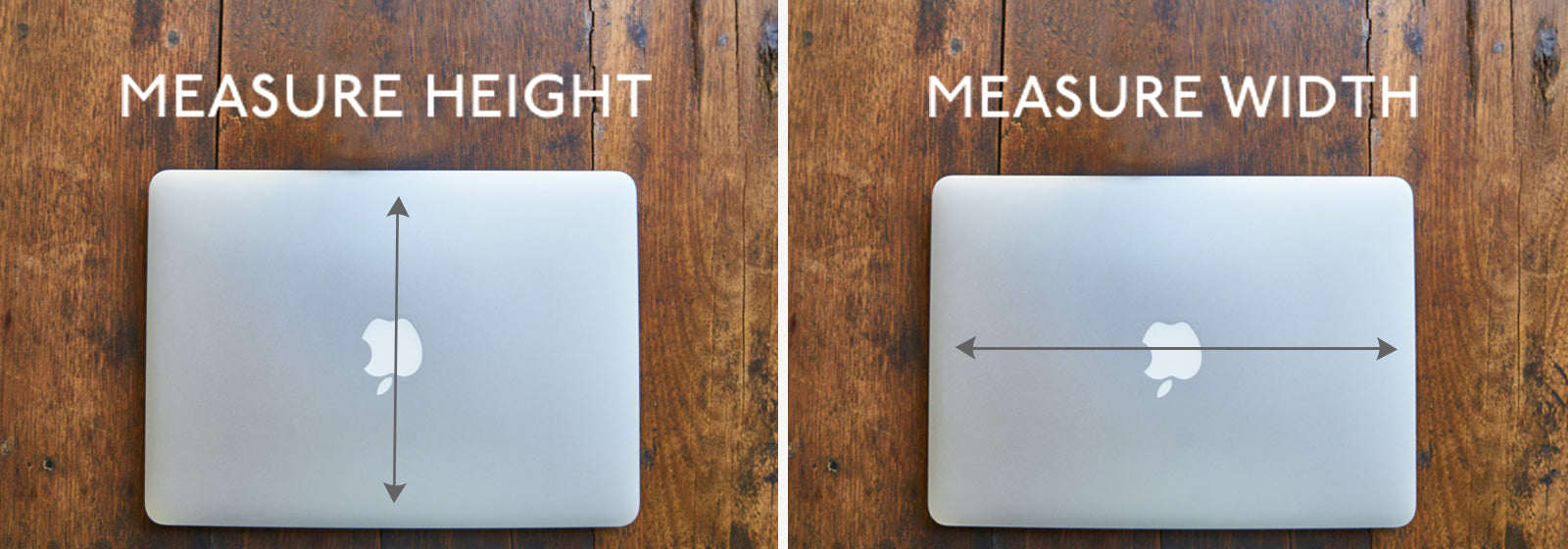
Place the laptop on a flat surface, closed. Measure straight across the front edge from left to right. Note the length in inches or centimeters. This is your laptop’s width.
Measuring Depth
Next, measure from the front edge to the back edge. Keep the ruler straight and close to the laptop’s side. Write down this number as the depth. It shows how deep the laptop is.
Measuring Thickness
Hold the laptop closed and measure from the bottom to the top. Use the thickest part for this measurement. This tells you how thick the laptop is. Record this number carefully for accuracy.
Check Screen Size
Checking the screen size is an important step to measure a laptop. The screen size tells you how big the display is. It affects how you watch videos, work, or play games. Knowing the exact size helps you pick the right laptop for your needs.
Measuring Diagonal Screen Length
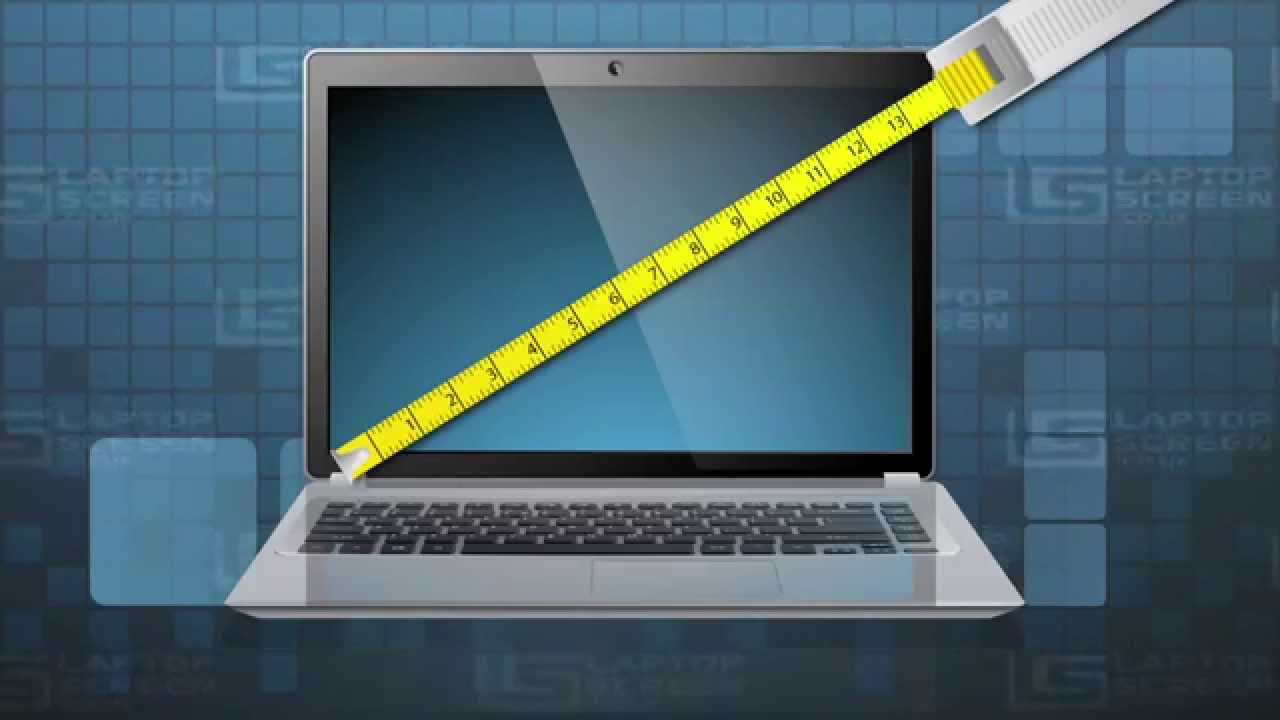
Measure the screen size by its diagonal length. Use a ruler or tape measure. Start at the bottom left corner of the screen. Measure straight to the top right corner. Do not include the laptop frame or bezel. The number you get is the screen size in inches. Most laptop screens range from 11 to 17 inches diagonally.
Understanding Aspect Ratio
The aspect ratio shows the shape of the screen. It is the ratio of the width to the height. Common aspect ratios are 16:9 and 16:10. A 16:9 screen is wide and good for watching videos. A 16:10 screen is taller and helps with reading or writing. Knowing the aspect ratio helps you understand the screen layout better.

Credit: www.matein.com
Account For Accessories
Measuring a laptop is not just about the screen size or the body. Accessories like the keyboard, palm rest, ports, and hinges also affect the total size. These parts can add extra width or depth. Ignoring them can lead to wrong measurements. Take time to include all these elements for accuracy.
Considering Keyboard And Palm Rest
The keyboard and palm rest add to the laptop’s width and length. Some keyboards have extra keys or numeric pads, making them wider. Palm rests can have different sizes and shapes. Measure from the edge of the palm rest to the other side. This gives a better idea of the laptop’s full footprint.
Including Ports And Hinges
Ports on the sides or back can stick out and add to the laptop’s thickness. Hinges can also add extra depth when the laptop is closed. Check for USB, HDMI, and charging ports. Measure the laptop with these parts included. This helps to know the exact space the laptop will take up.
Record And Compare Measurements
Recording and comparing measurements is a key step when measuring a laptop. It helps to ensure accuracy and avoid mistakes. This process also makes choosing the right laptop bag or case easier. Take time to note every detail carefully.
Writing Down Accurate Numbers
Use a ruler or tape measure for precise results. Write down the laptop’s width, height, and depth. Record numbers in centimeters or inches, whichever is easier for you. Double-check the numbers before moving on. Clear and neat notes help prevent confusion later.
Comparing With Laptop Bags Or Cases
Match your measurements with the size of laptop bags or cases. Check product descriptions or labels for their internal dimensions. Your laptop should fit comfortably without being too tight. Leave a little extra space for ease of use and protection. This step helps you find the perfect fit quickly.
Credit: knomo.com
Tips For Precision
Measuring a laptop needs care and attention. Small errors can lead to wrong size results. Follow simple tips to get precise measurements every time. This helps when buying cases or accessories that fit perfectly.
Measuring Multiple Times
Measure the laptop more than once. Take at least two or three measurements. Compare them to find any differences. This confirms accuracy and reduces mistakes. Use the same method each time for consistency.
Avoiding Common Mistakes
Do not measure on uneven surfaces. Place the laptop on a flat table. Measure the width, height, and depth carefully. Avoid including extra parts like cables or stands. Use a clear ruler or tape measure for exact numbers.
Frequently Asked Questions
How Do I Measure A Laptop Screen Size?
Measure diagonally from one corner to the opposite corner of the screen. Include only the display area, excluding bezels. This gives the accurate screen size in inches, helping you compare laptop displays easily.
What Tools Do I Need To Measure A Laptop?
Use a flexible measuring tape or a ruler for precise measurements. A measuring tape works best for curved edges. Ensure you measure in inches or centimeters, depending on your preference or regional standard.
How To Measure Laptop Width And Depth Accurately?
Measure the laptop’s width from left to right edges. Measure depth from front to back edges. Keep the laptop closed on a flat surface for exact results. These dimensions help determine the laptop’s portability and fit in bags.
Why Is Knowing Laptop Size Important?
Laptop size affects portability, screen visibility, and usability. Knowing exact size helps choose the right case or bag. It also helps compare different models based on your space and usage needs.
Conclusion
Measuring a laptop is simple with the right steps. Always use a ruler or tape measure for accuracy. Measure the screen diagonally to know its size. Don’t forget to check the width, height, and depth too. These numbers help you compare different models easily.
Knowing your laptop’s size makes buying cases or bags easier. Take your time and measure carefully. This helps avoid mistakes and saves money. Now, you can choose the perfect laptop with confidence.
As an Amazon Associate, I earn from qualifying purchases.

