

Have you ever thought about freeing up your desk space and improving your viewing angle by mounting your monitor? You might wonder, can all monitors be mounted, or are there limits you should know?
Whether you want a cleaner setup or better ergonomics, understanding which monitors can be mounted and how is key. Keep reading to discover what makes a monitor mountable and how you can transform your workspace with the right setup. Your perfect monitor arrangement could be just a few steps away.

Credit: www.vesa-standard.com
Types Of Monitor Mounts
Monitor mounts come in different styles to fit various needs and spaces. Each type offers unique benefits and suits specific setups. Understanding these types helps choose the best option for your monitor.
Desk Mounts
Desk mounts attach directly to your desk surface. They save space by lifting the monitor off the desk. Most desk mounts have adjustable arms for height and angle changes. These mounts are great for small work areas and improve ergonomics.
Wall Mounts
Wall mounts fix the monitor to a wall. They clear desk space completely and create a clean look. These mounts are ideal for tight spaces or shared rooms. Some wall mounts allow tilting and swiveling for better viewing angles.
Ceiling Mounts
Ceiling mounts hang the monitor from above. They are useful in places without desk or wall space. Ceiling mounts are common in public areas or offices with open layouts. They offer flexible positioning but need secure installation.
Freestanding Mounts
Freestanding mounts sit on the desk without attaching to it. They use a heavy base to hold the monitor steady. These mounts are easy to move and do not damage furniture. Freestanding options suit users who often change their setup.
Credit: www.brateck.com
Common Mounting Standards
Mounting a monitor depends on common standards. These standards help you know if a monitor fits a mount. They guide the size and type of mount needed. Understanding these standards makes mounting easier and safer.
Vesa Compatibility
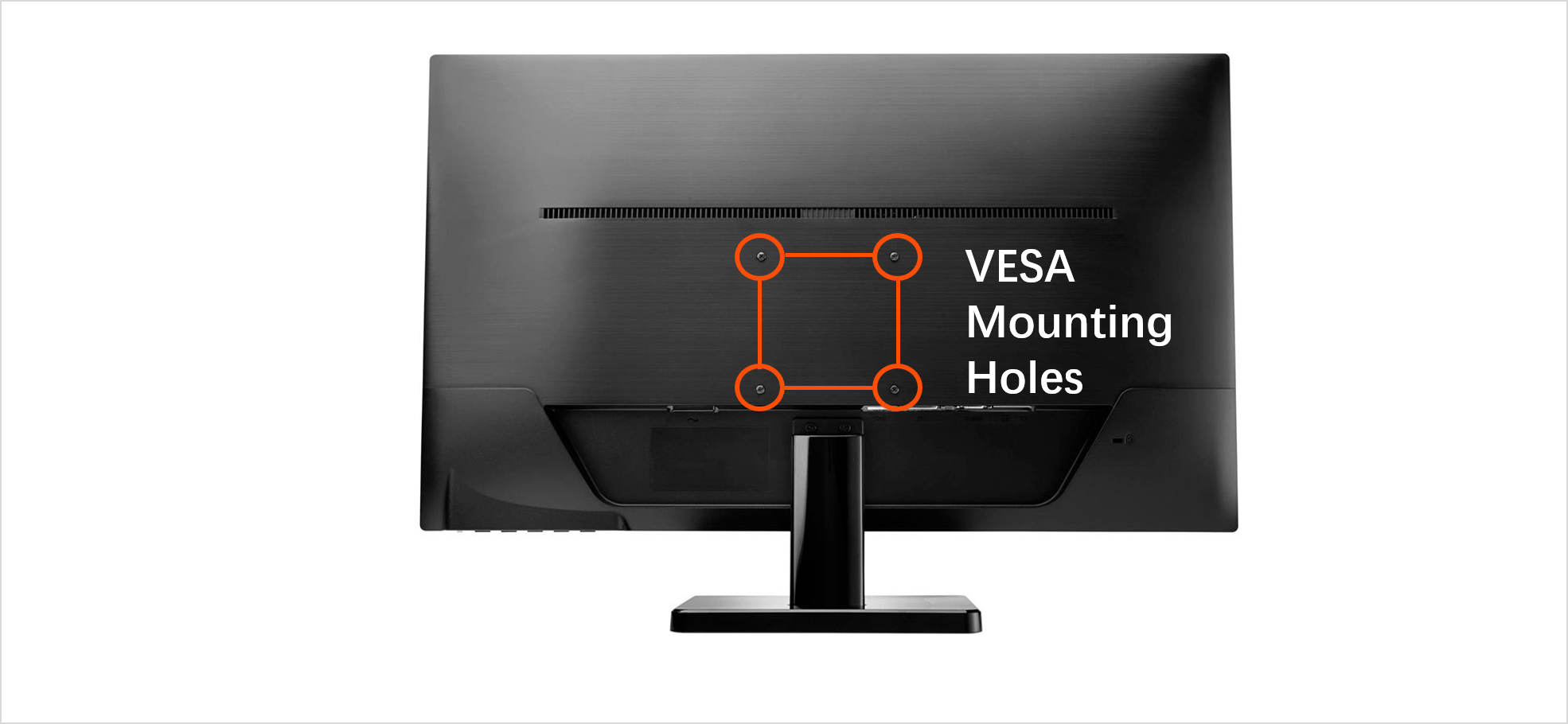
Most monitors use the VESA standard for mounting. VESA means Video Electronics Standards Association. It sets the size and pattern of holes on the back of a monitor. These holes match the screws on a mount. Common VESA sizes are 75×75 mm and 100×100 mm.
If a monitor is VESA compatible, you can use most mounts. This standard is popular and reliable. It fits on walls, desks, or arms easily. Check your monitor’s VESA size before buying a mount.
Non-vesa Monitors
Some monitors lack VESA holes. These are called non-VESA monitors. They cannot fit standard mounts right away. You may need an adapter or special bracket. Adapters add holes to the back of the monitor. This makes mounting possible.
Non-VESA monitors limit your mounting options. The adapters vary by monitor brand and model. Choose adapters carefully for a secure fit. Without an adapter, mounting may damage the monitor.
Proprietary Mounts
Certain brands use proprietary mounts. These mounts fit only specific models. They often have unique shapes or connectors. Proprietary mounts provide a perfect fit but less flexibility.
Using proprietary mounts means buying from the same brand. Mixing brands usually does not work. Check if your monitor uses a proprietary mount. This helps avoid buying the wrong mounting system.
Checking Your Monitor For Mounting
Before mounting a monitor, check if it supports mounting. Not all monitors are designed to be mounted. Some lack the necessary features to attach to a stand or wall mount. Checking your monitor helps avoid buying the wrong mount or damaging the screen. This step saves time and effort.
Finding Vesa Mounting Holes
Most monitors use VESA mounting standards. These are square or rectangular holes at the back. Check for four screw holes arranged in a pattern. The pattern size is usually 75×75 mm or 100×100 mm. If your monitor has these holes, it supports VESA mounts. If not, mounting might be tricky or impossible.
Measuring Monitor Weight And Size
Weight matters when choosing a mount. Check your monitor’s weight in the manual or product label. Make sure the mount supports at least that weight. Also, measure the screen size diagonally in inches. Larger monitors may need stronger mounts. Choose a mount that can hold your monitor safely.
Assessing Stand Design
Some monitors have built-in stands that cannot be removed. These stands may block mounting holes or prevent using a mount. Try to remove the stand gently to check for mounting options. If the stand is fixed, mounting might not be possible. Knowing this helps you plan better for your setup.
Mounting Solutions For Non-compatible Monitors
Some monitors do not fit standard mounting systems. These non-compatible monitors need special solutions to be mounted safely. Various options exist to make these monitors work with wall or desk mounts. These solutions help save space and improve comfort.
Adapter Kits
Adapter kits change the mounting pattern of a monitor. They add holes or plates that fit standard mounts. These kits are simple to install and often cost less. They allow older or unusual monitors to attach to modern mounts.
Custom Brackets
Custom brackets are made for specific monitor shapes and sizes. They offer strong support and secure mounting. These brackets can be metal or plastic and designed to fit exact models. Custom brackets provide a perfect fit when adapters do not work.
Third-party Mounts
Third-party mounts offer flexible solutions for odd monitors. These mounts come with adjustable arms and universal plates. They fit many types of monitors, including non-standard ones. Third-party mounts are good choices when original mounts are unavailable.
Installation Tips And Safety
Installing a monitor mount takes care and attention. It helps keep your workspace neat and safe. Follow some simple tips to ensure a strong setup. Safety should always come first during installation.
Tools Needed
Gather the right tools before starting the installation. You will need a screwdriver, a drill, and a level. A stud finder helps locate wall supports. Measuring tape ensures correct placement. Having all tools ready saves time and avoids mistakes.
Securing The Mount
Attach the mount firmly to a solid surface. Use wall studs or strong anchors for support. Tighten screws securely but avoid over-tightening. Check the mount’s weight limit matches your monitor. Make sure the mount does not wobble or move after installation.
Cable Management
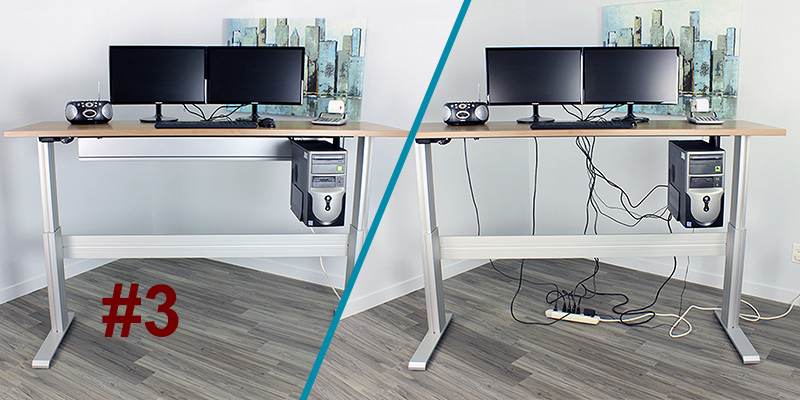
Organize cables to prevent tangles and damage. Use clips or ties to keep cables neat. Avoid stretching or bending cables sharply. Proper cable management improves safety and workspace look. It also makes cleaning easier around your monitor.
Benefits Of Using Monitor Mounts
Using monitor mounts brings many benefits. They improve comfort and help organize your workspace. Monitor mounts make your setup cleaner and more flexible. Many people find their work easier and healthier with a mount. Below are some key benefits of using monitor mounts.
Ergonomics
Monitor mounts help set screens at eye level. This reduces neck and eye strain. You can adjust height, tilt, and angle easily. Good posture improves when the monitor is correctly placed. It helps prevent headaches and discomfort during long work hours.
Desk Space Optimization
Mounts free up valuable desk space. Your desk looks less crowded and more organized. You can place other items where the monitor used to be. It creates a cleaner and more productive workspace. Small desks benefit greatly from using a monitor mount.
Multi-monitor Setup
Monitor mounts make multiple screens easier to manage. They allow perfect alignment and spacing between monitors. You can adjust each screen separately for comfort. This setup enhances multitasking and workflow efficiency. It is ideal for work, gaming, or creative projects.
Troubleshooting Common Issues
Mounting a monitor can sometimes cause challenges. Troubleshooting common issues helps ensure a safe and stable setup. Understanding these problems saves time and frustration. Below are frequent concerns and tips to fix them.
Mount Compatibility Problems
Not all monitors fit every mount. Check the VESA pattern on the back of your monitor. It must match the mount’s holes. Some monitors lack VESA holes, making mounting difficult. In that case, use a special adapter or a desk stand.
Weight Limit Concerns
Each mount has a maximum weight limit. Exceeding this limit risks damage or falling. Weigh your monitor before buying a mount. Choose a mount that can hold more weight than your monitor. This adds extra safety and stability.
Alignment And Stability
Proper alignment keeps your monitor level and secure. Tighten all screws and bolts firmly. Use a level tool to check if the monitor is straight. Loose mounts cause shaking and may damage the screen. Adjust and secure until the monitor feels stable and steady.
Credit: www.raproducts.com
Frequently Asked Questions
Can All Monitors Be Mounted On A Wall?
Not all monitors can be wall-mounted. Only those with VESA mounting holes fit standard mounts. Check your monitor’s specifications to confirm compatibility before purchasing a mount.
What Is Vesa Compatibility In Monitors?
VESA compatibility means your monitor has standardized mounting holes. These holes follow specific measurements for easy attachment to stands or wall mounts. It ensures a secure and stable fit.
How Do I Check If My Monitor Is Mountable?
Look for VESA mounting holes on the back of your monitor. These are usually four screw holes in a square pattern. Also, check the user manual or product specs for mounting details.
Are Curved Monitors Mountable Like Flat Ones?
Most curved monitors support VESA mounting, but some don’t. Always verify the manufacturer’s specifications to see if your curved monitor is mountable before buying a mount.
Conclusion
Not all monitors can be mounted easily. Check the back of your screen for mounting holes. These holes follow a standard size called VESA. If your monitor lacks these holes, mounting becomes tricky. Some monitors need special adapters or stands.
Always measure and match the mount with your monitor size. A good mount saves space and improves comfort. Choose carefully to avoid damage or poor fit. Mounting your monitor right makes your workspace neat and organized. Simple steps lead to a better viewing experience.
As an Amazon Associate, I earn from qualifying purchases.

