

If you want to take apart your Das Keyboard safely and easily, you’re in the right place. Whether you need to clean it, fix a sticky key, or upgrade the switches, knowing how to disassemble your keyboard step-by-step can save you time and frustration.
In this guide, you’ll discover simple instructions that anyone can follow—even if you’ve never opened a keyboard before. Ready to get your hands on your Das Keyboard and learn the secrets inside? Keep reading, and by the end, you’ll feel confident tackling the job yourself.
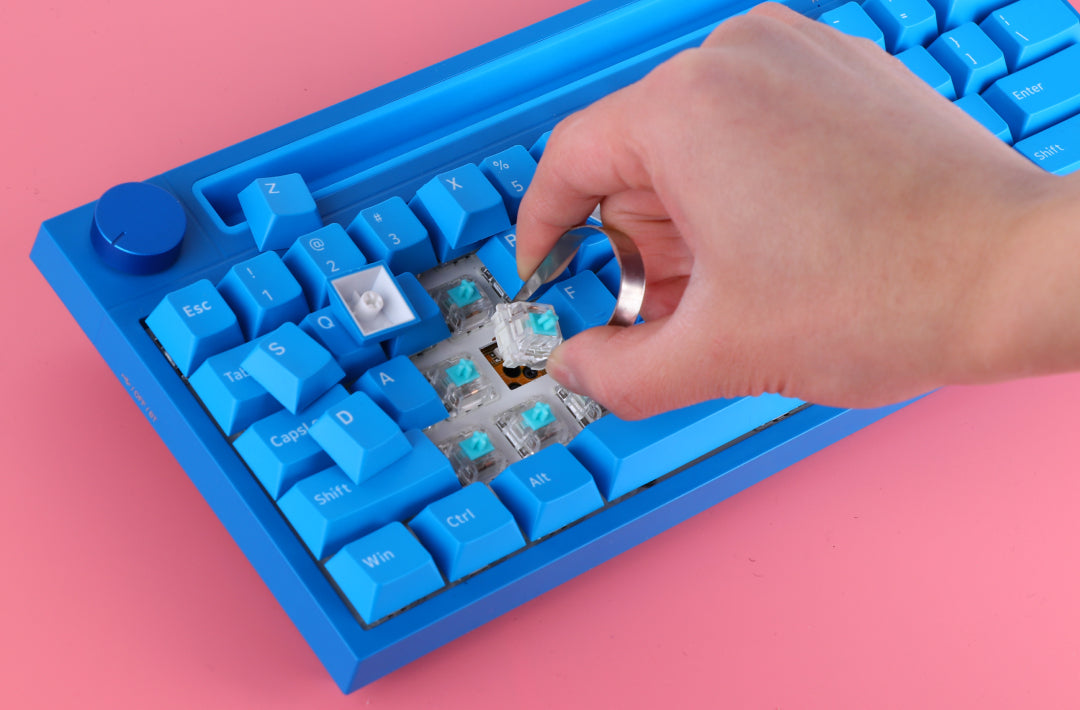
Credit: epomaker.com
Tools Needed
Before you start taking apart your Das Keyboard, gather the right tools. Having proper tools makes the process smooth and safe. It also helps avoid damage to your keyboard parts.
Keep your workspace clean and organized. This way, you won’t lose small screws or pieces. Now, let’s explore the basic tools you need.
Phillips Screwdriver
A Phillips screwdriver is essential for removing screws. Das Keyboards usually have small Phillips screws holding the case. Use a small to medium-sized screwdriver for best control. Avoid using a flathead screwdriver as it can strip screws.
Keycap Puller
A keycap puller helps remove the keyboard keys gently. It prevents damage to the keycaps and switches. You can use a wire or plastic puller. Pull the keycaps straight up for safe removal.
Plastic Pry Tools
Plastic pry tools help open the keyboard case without scratching it. Metal tools can cause marks or break plastic clips. Use a plastic pry tool to separate parts carefully. Work slowly to avoid breaking any clips inside.
Small Container
Use a small container to store screws and small parts. This keeps them from getting lost during disassembly. Label the container if you have many small pieces. It makes reassembly easier and faster.
Credit: www.gloriousgaming.com
Preparing The Keyboard
Preparing the keyboard is the first step in safely taking apart a Das Keyboard. This step helps avoid damage and makes the process easier.
Before starting, clear a clean space to work. Keep small parts safe to prevent loss.
Turn Off And Unplug The Keyboard
Always unplug the keyboard from the computer. This stops any electrical problems. Turning it off is important for safety and prevents accidental key presses.
Gather Necessary Tools
Use the right tools for the job. A small screwdriver, key puller, and container for screws are helpful. Having tools ready speeds up the work.
Remove All Keycaps
Use a keycap puller to gently remove keys. Pull straight up to avoid breaking switches. Place keycaps in a safe place to keep them organized.
Clean The Keyboard Surface
Wipe the keyboard surface with a dry cloth. Remove dust and dirt before opening it. A clean surface helps you see screws and parts clearly.
Removing Keycaps
Removing keycaps is the first step in disassembling a Das Keyboard. It lets you clean or replace keys easily. This process is simple but needs care to avoid damage.
Start by preparing a keycap puller tool. Using the right tool makes removal safe. Avoid pulling keys with fingers alone.
Using A Keycap Puller
Place the keycap puller over the key. Make sure it grips the key firmly. Pull straight up slowly and gently. The keycap will pop off without force.
Handling Large Keys
Large keys like spacebar or enter need extra care. They have stabilizer bars underneath. Pull these keys evenly from both sides. Avoid twisting or bending the keycap.
Storing Removed Keycaps
Keep the removed keycaps in a safe place. Use a small container or tray. This prevents losing any keys during cleaning or repair.
Unscrewing The Case
Unscrewing the case is the first step to open your Das Keyboard safely. This step lets you access the inside parts for cleaning or repair. Take your time and be gentle to avoid damage.
Use the right tools to remove the screws. Keep all screws in one place to avoid losing them. Follow these simple steps for a smooth process.
Gather The Necessary Tools
Find a small Phillips-head screwdriver. This tool fits the screws on most Das Keyboards. Using the correct screwdriver prevents stripping the screws.
Turn Off And Unplug The Keyboard
Always unplug the keyboard before starting. This avoids any electrical issues or damage. Safety first.
Locate All Screws On The Back
Flip the keyboard over carefully. Look for screws on the back panel. Some screws hide under rubber feet or stickers. Check closely to find them all.
Remove The Screws Carefully
Unscrew each screw slowly. Keep them in a small container. This keeps them safe and easy to find later. Don’t force any screw.
Separating The Keyboard Layers
Separating the keyboard layers is a key step in disassembling a Das Keyboard. This process lets you access the internal parts for cleaning or repair. Each layer has a specific role and careful handling is important.
Understanding how to separate these layers helps avoid damage. The layers fit tightly, so patience and gentle work are needed. Follow the steps carefully to keep all parts safe.
Preparing Your Workspace
Clear a flat surface to work on. Use a soft cloth to protect the keyboard. Gather small containers for screws and tiny parts. Good lighting helps you see small details clearly.
Removing The Keycaps
Start by gently pulling off the keycaps. Use a keycap puller or fingers. Place the keycaps in order for easy reassembly. Do not force any keycap to avoid breaking it.
Unscrewing The Back Panel
Flip the keyboard over to find the screws. Use a proper screwdriver to remove them. Keep screws safe in a container. Slowly lift the back panel to expose inner layers.
Separating The Top Frame
The top frame holds the key switches. Carefully lift it from the keyboard base. Use a plastic tool to pry if needed. Avoid bending or snapping the frame edges.
Detaching The Circuit Board Layer
The circuit board sits beneath the top frame. Disconnect any cables gently. Unscrew the board if screws hold it. Handle the board by edges to prevent damage.
Handling The Pcb And Switches
Handling the PCB and switches of a Das Keyboard requires care and attention. These parts are delicate and vital for the keyboard’s function. Proper handling prevents damage and ensures smooth reassembly.
The PCB, or printed circuit board, holds the electronic components. The switches sit on the PCB and register each key press. Understanding their layout helps during disassembly and repair.
Preparing Your Workspace
Clear a flat surface to work on. Use a soft cloth or mat to avoid scratches. Keep small containers for screws and parts. This organization helps avoid losing pieces.
Removing The Switches Safely
Use a switch puller tool to remove switches. Gently press the tool around the switch. Pull straight up to avoid bending pins. Avoid force to protect the PCB holes.
Cleaning The Pcb And Switches
Use a soft brush to remove dust from the PCB. Avoid liquids unless you use isopropyl alcohol and a lint-free cloth. Clean switch pins carefully to maintain good contact.
Inspecting For Damage
Look for broken or bent pins on switches. Check the PCB for cracks or burnt spots. Replace any damaged parts before reassembling the keyboard.
Cleaning And Maintenance Tips
Cleaning and maintaining your Das Keyboard is important for its long life. Dust, dirt, and debris can build up under the keys. This buildup can affect typing and cause damage over time. Regular cleaning keeps your keyboard working well and looking good.
Preparing Your Workspace
Clear a flat, clean surface to work on. Use a soft cloth or towel to protect the keyboard. Gather tools like a small screwdriver and a key puller. Have a can of compressed air ready. This setup makes the process easier and safer.
Removing The Keycaps
Use the key puller to gently lift each keycap. Start with the larger keys like spacebar and enter. Place the keycaps in a bowl to avoid losing them. Avoid pulling too hard to prevent damage to the switches.
Cleaning The Keycaps
Soak the keycaps in warm, soapy water for 15 minutes. Use a soft brush to scrub dirt off each keycap. Rinse with clean water and dry thoroughly with a towel. Make sure keycaps are fully dry before reattaching.
Cleaning The Keyboard Base
Use compressed air to blow out dust and debris from the keyboard base. Wipe the surface gently with a damp microfiber cloth. Avoid letting moisture get into the keyboard’s electronics. Use cotton swabs to clean around the switches carefully.
Once everything is dry, place the keycaps back in their positions. Press each keycap down firmly until it clicks. Double-check all keys are secure and working properly. This ensures your Das Keyboard is ready for use again.

Credit: www.youtube.com
Reassembling The Keyboard
Reassembling the Das Keyboard is a careful process. It needs patience and attention to detail. Putting it back together correctly ensures it works well and lasts long.
Follow these steps to reassemble your keyboard without trouble. Keep all parts organized and clean during the process. Take your time to avoid mistakes.
Preparing The Components
Start by laying out all parts on a clean surface. Check each piece for dust or damage. Clean any dirt with a soft cloth. Make sure screws and small parts are easy to reach.
Reattaching The Keycaps
Place each keycap back on its switch carefully. Press down firmly but gently. Check that the keys sit evenly. Align keys in the correct rows to avoid errors.
Securing The Keyboard Case
Place the keyboard base over the internal parts. Make sure all cables and connectors are inside properly. Screw the case tightly but do not overtighten. This keeps the keyboard stable and safe.
Testing The Keyboard
Connect the keyboard to your computer. Test every key to confirm it works. Check for stuck or unresponsive keys. Fix any issues before full use.
Frequently Asked Questions
How Do I Safely Disassemble A Das Keyboard?
Start by unplugging the keyboard. Use a keycap puller to remove all keycaps. Unscrew the back panel carefully. Avoid using excessive force to prevent damage.
What Tools Are Needed To Open A Das Keyboard?
You will need a keycap puller, a small Phillips screwdriver, and a flat tool. These help remove keycaps and screws safely without damaging components.
Can I Clean My Das Keyboard After Disassembly?
Yes, disassembling allows thorough cleaning. Use compressed air and a soft brush to remove dust. Avoid liquids on electronic parts to prevent damage.
How To Reassemble The Das Keyboard After Cleaning?
Align the back panel and screw it in place. Replace keycaps according to their original positions. Test all keys before regular use to ensure functionality.
Conclusion
Taking apart a Das Keyboard is simple with the right steps. Use the right tools and work slowly. Keep track of all small parts to avoid losing them. Clean each piece carefully before reassembling. Doing this helps your keyboard last longer and work better.
Practice patience and stay organized throughout the process. Now, you can confidently handle your Das Keyboard with ease.
As an Amazon Associate, I earn from qualifying purchases.

