

How much computer storage do you really need? It’s a question that can feel confusing, but getting it right is easier than you think.
Whether you’re buying a new computer or upgrading your current one, choosing the right amount of storage can save you from future headaches. Too little, and you’ll quickly run out of space. Too much, and you might be wasting money on storage you don’t use.
This guide will help you understand exactly how much storage fits your needs, so you can make a smart choice without second-guessing yourself. Keep reading to find out what works best for you.
Storage Types Explained
Understanding storage types helps you choose the right option for your computer. Storage varies by speed, size, and cost. Knowing the differences saves money and improves performance. Let’s explore the main storage types to help you decide.
Hdd Vs Ssd
Hard Disk Drives (HDDs) use spinning disks to save data. They offer large space at a low price. But, HDDs are slower and less durable. Solid State Drives (SSDs) store data on chips. SSDs are faster and more reliable. They cost more but speed up your system. For everyday use, SSDs improve startup and loading times. HDDs suit users needing lots of storage for less money.
External Storage Options
External storage connects to your computer through USB or other ports. It is portable and easy to use. You can back up files or move data between devices. External drives come in HDD and SSD types. Choose SSD for speed, HDD for more space at a lower price. External storage adds flexibility without opening your computer. It helps keep your main drive free and fast.
Cloud Storage Benefits
Cloud storage saves files on internet servers. You access data from any device with internet. It protects files if your computer breaks. Cloud storage offers automatic backups and sharing options. It usually costs monthly or yearly fees. Use cloud storage for important documents and photos. It saves space on your computer. Cloud storage keeps your data safe and easy to reach.
Factors Influencing Storage Needs
Choosing the right computer storage depends on several key factors. These factors help match your storage to your actual needs. Understanding them can save money and avoid running out of space. Let’s explore what influences storage requirements.
Usage Patterns
How you use your computer affects the storage size you need. Casual users who browse the web and check emails need less space. People who install many programs or work with large files need more. Frequent downloading or saving many photos also requires bigger storage.
File Types And Sizes
Different files take up different amounts of space. Documents and spreadsheets use little storage. Photos and music files need moderate space. Videos and high-resolution images require much larger storage. Knowing the type of files you keep helps choose the right size.
Future Proofing
Think about future needs before buying storage. Your storage needs may grow with time. New apps, bigger files, and more data can fill space fast. Adding extra storage now can prevent running out later. It is smart to plan for growth to avoid hassle.
Storage For Everyday Users
Everyday users need the right amount of computer storage for smooth use. Storage affects how many files you keep and how fast your computer runs. Finding the right size helps avoid running out of space or spending too much on storage you don’t need.
Most daily tasks don’t require huge storage. Knowing common activities helps decide the best storage size.
Web Browsing And Documents
Web browsing uses little storage. Browsers save small files like cookies and cache. Documents like Word or Excel files take up more space. A few gigabytes of storage usually cover these needs. Around 128GB is enough for many users.
Media Consumption
Watching videos and listening to music needs more space. Streaming does not save many files locally. Downloading videos or music uses more storage. A 256GB drive offers room for some offline media. This size fits users who keep favorite movies or playlists.
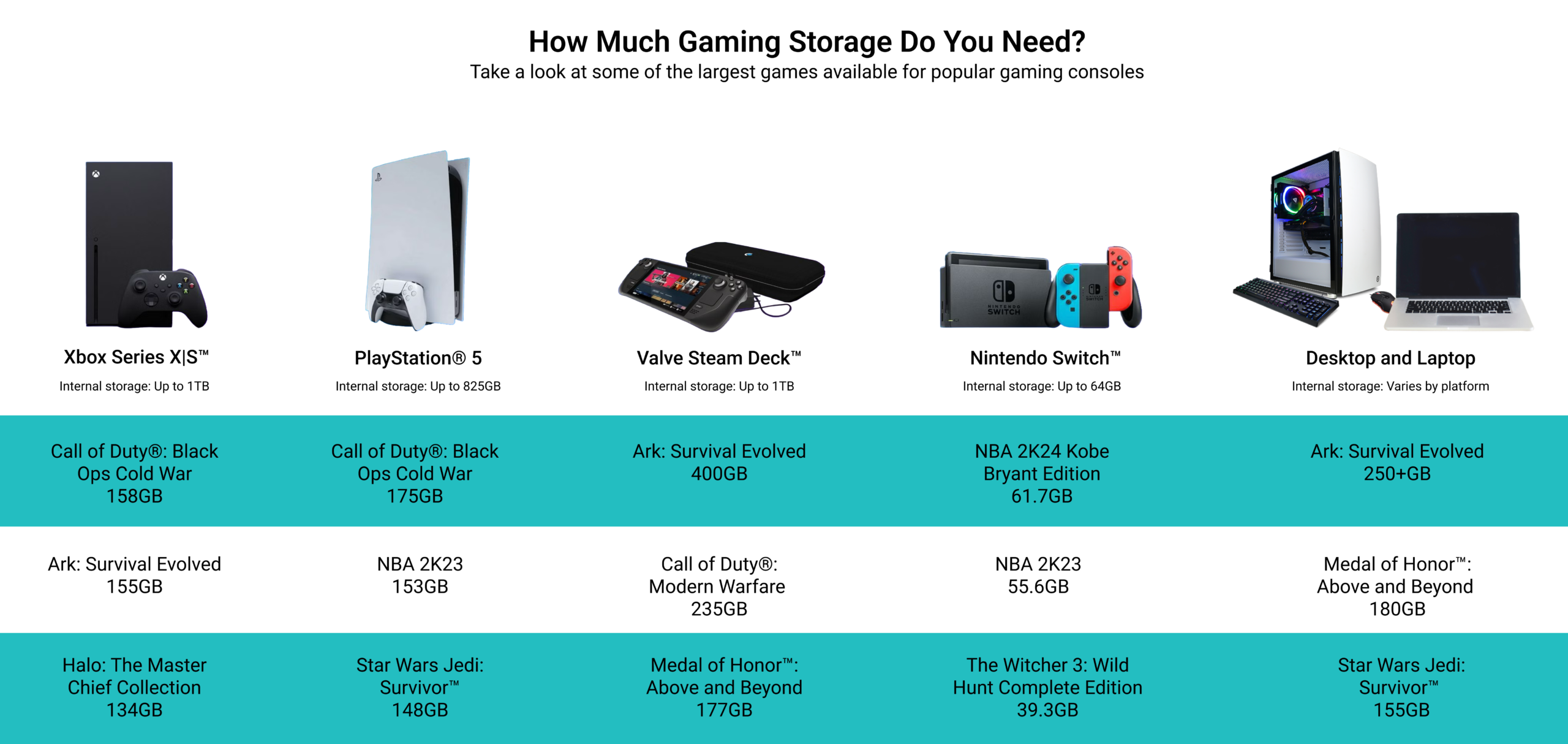
Basic Gaming
Basic games need moderate storage. Small or older games often take less than 10GB each. A 256GB or 512GB drive can hold several games. This size fits casual gamers with a few favorite titles.
Credit: ampinc.com
Storage For Creatives
Creative work demands more computer storage than basic tasks. Artists, editors, and producers often handle large files. Choosing the right storage size helps keep projects safe and workflows smooth. Storage needs vary by creative type and project scale.
Photo And Video Editing
High-resolution photos and videos take up a lot of space. A single raw photo can be hundreds of megabytes. Videos, especially in 4K or higher, quickly fill storage. Editors need fast drives with at least 1TB to 2TB. This allows room for original files and edited versions.
Graphic Design Files
Graphic files vary in size depending on complexity. Vector files are smaller but layered designs grow large. Working with many layers or high-res textures increases storage needs. Designers should aim for 500GB to 1TB for smooth work. Saving backups and versions requires extra space too.
Audio Production
Audio files take less space than videos but add up fast. Multi-track recordings and high-quality samples need more storage. Producers benefit from 500GB to 1TB of fast storage. This keeps tracks organized and lets editing run without delays. Archiving old projects frees space for new work.
Storage For Gamers
Gamers need more than just a fast computer. Storage plays a big role in gaming. Games take up space. Saves and updates need room too. Choosing the right storage helps games run smooth and load fast.
Game Installation Sizes
Modern games are large. Many require 50GB or more. Some popular titles can need over 100GB. Installing multiple games means more storage. Plan for space beyond just one game.
Download Management
Games often get updates. These updates add files and take space. Downloaded content like skins or expansions also grow storage needs. Manage downloads by deleting old or unused files. Keep storage free for new content.
Performance Considerations
Storage speed affects game performance. Solid State Drives (SSDs) load games faster than Hard Disk Drives (HDDs). Faster load times mean less waiting. SSDs also reduce lag when streaming game assets. Choose storage that balances speed and capacity.
Storage For Professionals
Professionals need more storage than average users. Their work involves large files and complex data. Choosing the right storage size helps keep work smooth and fast. Storage must match the demands of their daily tasks.
Large Databases
Large databases require huge amounts of storage. Data grows quickly with each new entry. Professionals managing databases need terabytes of space. Fast storage also speeds up data access and queries.
Virtual Machines
Virtual machines take up a lot of storage. Each virtual machine needs its own space for OS and apps. Running multiple machines means multiplying storage needs. Professionals should plan for extra space to avoid slowdowns.
Software Development
Software developers store code, libraries, and testing environments. Projects often include many files and backups. Developers use storage to keep versions safe and organized. Plenty of space helps avoid interruptions during coding.
Estimating Your Storage Needs
Estimating your computer storage needs starts with understanding how much space you currently use. It also involves thinking about future needs. This helps you pick the right storage size. Avoid buying too little or too much space. Both can cause problems later.
Calculating Current Usage
Check how much storage your files take now. Look at documents, photos, videos, and apps. Use your computer’s storage settings to see exact numbers. Write down the total used space. This gives a base for your estimate.
Anticipating Growth
Think about how your storage needs may grow. Will you save more photos or videos soon? Do you plan to install bigger programs? Add extra space for new files. A good rule is to add 20% to 30% more than your current use.
Balancing Cost And Capacity
Storage size affects cost. Bigger drives cost more. Decide how much you want to spend. Find a balance between enough space and budget. Choose a size that fits your needs and wallet. Avoid buying the smallest drive to save money.
Tips To Optimize Storage
Optimizing computer storage is key to keeping your device fast and efficient. Good storage habits help you avoid running out of space. Follow simple tips to manage and save storage wisely.
Regular Cleanup
Delete old files and unused apps often. Clear your browser cache and temporary files. Remove duplicate photos and videos to free up space. Regular cleanup stops storage from filling up quickly.
Using External Drives
External drives store large files safely. Use them for photos, videos, and backups. They keep your computer’s internal storage free. External drives are easy to connect and use.
Leveraging Cloud Services
Cloud storage saves files online. Access your files from any device. It reduces the need for big local storage. Choose a trusted cloud service with enough free space.
Emerging Storage Trends In 2025
Storage needs keep changing fast. New technology makes storing data easier and faster. In 2025, storage trends will shape how much space people require. Understanding these trends helps choose the right storage for computers.
Advances In Ssd Technology
Solid State Drives (SSD) are faster than traditional hard drives. New SSDs will store more data in smaller sizes. They will last longer and use less power. Prices will drop, making SSDs common in many devices.
Hybrid Storage Solutions
Hybrid storage uses both SSD and hard drives together. It balances speed and large storage space. Users get fast access to important files and lots of space for others. This approach suits many users with different storage needs.
Ai And Storage Management
Artificial Intelligence (AI) helps manage storage smartly. It can find and remove unused files automatically. AI predicts storage needs and suggests upgrades. This makes storage more efficient and saves space without user effort.
Credit: www.gamesradar.com
Credit: eshop.macsales.com
Frequently Asked Questions
How Much Storage Do I Need For Everyday Use?
For everyday tasks, 256GB to 512GB is usually sufficient. It stores documents, photos, and some apps comfortably. If you handle more media or software, consider higher storage.
Is 1tb Storage Enough For Gaming And Media?
Yes, 1TB is ideal for gamers and media lovers. It holds many games, videos, and music files. It balances capacity and cost effectively.
Should I Choose Ssd Or Hdd For Storage?
SSD offers faster speed and reliability but costs more. HDD provides more space at a lower price but is slower. For performance, SSD is better; for budget, HDD works.
How Do I Estimate Storage For Professional Use?
Calculate your file types and sizes. Video editing and design need more space, often 1TB or more. Office work requires less, around 256GB to 512GB.
Conclusion
Choosing the right computer storage depends on your needs and habits. Think about the files you keep and how often you add new ones. Small storage works for simple tasks like browsing or writing. Bigger storage suits those who save photos, videos, or games.
Remember, storage affects your computer’s speed and space. Plan well to avoid running out of room quickly. A balanced choice keeps your computer running smoothly. Storage size matters. Choose what fits your daily use best.
As an Amazon Associate, I earn from qualifying purchases.

