

Have you ever wondered what really separates computer storage from memory? You might use these terms like they mean the same thing, but they actually play very different roles in how your computer works.
Understanding the difference can help you make smarter choices when buying or upgrading your device. Keep reading, and by the end, you’ll know exactly how storage and memory affect your computer’s speed, capacity, and overall performance. This knowledge will give you the power to boost your tech skills and get the most out of your machine.
Computer Storage Basics
Computer storage is a key part of any computer system. It holds data and programs for long-term use. Unlike memory, storage keeps information even when the power is off.
Storage allows you to save files, install software, and keep your operating system. It plays a big role in how your computer works every day.
Types Of Storage Devices
There are several types of storage devices. Hard drives (HDDs) use spinning disks to store data. They are common and offer large space at low cost.
Solid State Drives (SSDs) use flash memory. They are faster and more reliable than HDDs but cost more. USB flash drives and memory cards also use flash memory.
Optical drives use CDs, DVDs, or Blu-rays to store data. These are less common now but still useful for some tasks.
Role Of Storage In Computing
Storage keeps your data safe and ready to use. It stores your documents, photos, and videos. It also holds system files needed for your computer to run.
Storage helps your computer load software quickly. More storage means you can save more files and programs. It works together with memory to keep your computer running smoothly.
Memory Fundamentals
Memory is a key part of every computer. It helps the computer work fast and run programs. Memory stores data that the computer uses right now. This is different from storage, which holds data for a long time. Understanding memory basics helps you know how computers work.
Types Of Memory
Computers use different kinds of memory. The most common is RAM, or Random Access Memory. RAM is fast and temporary. It clears when the computer turns off. Another type is cache memory. Cache is even faster and helps the processor work better. Then there is ROM, or Read-Only Memory. ROM holds important instructions that never change. Each type plays a special role in computer function.
Memory’s Role In Performance
Memory affects how fast a computer runs. More RAM means the computer can handle more tasks at once. Fast memory helps programs open quickly. It also improves how smoothly the computer works. If memory is too small, the computer slows down. The processor waits for data from memory. Good memory helps the computer do more without lag.
Storage Vs Memory: Key Differences
Understanding the difference between computer storage and memory is important. Both play a vital role in how computers work. They store data but serve different purposes. This section breaks down key differences to clarify their roles.
Volatility And Data Retention
Memory is volatile, meaning it loses data when power is off. It stores data temporarily while programs run. Storage, on the other hand, is non-volatile. It keeps data even when the computer is turned off. This makes storage ideal for saving files and software.
Speed And Access Times
Memory is much faster than storage. It allows the CPU to access data quickly. This speed helps programs run smoothly. Storage devices work slower but hold more data. They are not designed for rapid data access like memory.
Capacity And Cost
Storage devices have larger capacity than memory. You can store thousands of files on storage. Memory comes in smaller sizes due to cost and speed. Storage is cheaper per gigabyte compared to memory. This makes storage best for long-term data keeping.

Credit: www.youtube.com
How Storage And Memory Work Together
Storage and memory work closely to make your computer run smoothly. Each has a clear role but depends on the other. Storage holds your files and programs for a long time. Memory keeps data ready for quick use by the processor.
This teamwork helps your computer handle tasks fast and store information safely. Understanding their interaction shows why both are vital for good performance.
Data Flow In A Computer
Data moves from storage to memory before the processor uses it. When you open a file, the computer copies it from storage to memory. Memory holds this data temporarily for quick access. The processor reads and writes data in memory during tasks. After work, important changes save back to storage. This process repeats constantly while the computer runs.
Impact On User Experience
Fast memory lets your computer respond quickly to commands. Slow storage can delay loading programs and files. Enough memory prevents your system from freezing or slowing down. Large storage means you can keep more files and apps. Both affect how smooth and fast your computer feels. Good balance between memory and storage improves overall use.
Common Storage And Memory Technologies
Common storage and memory technologies form the backbone of every computer system. They serve different purposes but work together to keep computers fast and efficient. Storage holds data and files long-term. Memory helps the computer think and work quickly by holding data it needs right now.
Understanding the main types of storage and memory helps you grasp how computers manage information. Here are some popular technologies used today.
Hard Drives And Ssds
Hard drives (HDDs) store data on spinning disks. They offer large space at a low price. Data access is slower due to moving parts. Solid State Drives (SSDs) use flash memory. They have no moving parts, making them faster and more reliable. SSDs help computers boot up quickly and load files faster than HDDs. Both types save data even when the computer is off.
Ram Variants And Uses
RAM stands for Random Access Memory. It is temporary memory the computer uses to run programs. Data in RAM disappears when the computer turns off. There are different types of RAM. DDR4 is common in modern computers. It is faster and uses less power than older types. RAM helps your computer multitask and run apps smoothly.

Credit: pediaa.com
Choosing Between Storage And Memory Upgrades
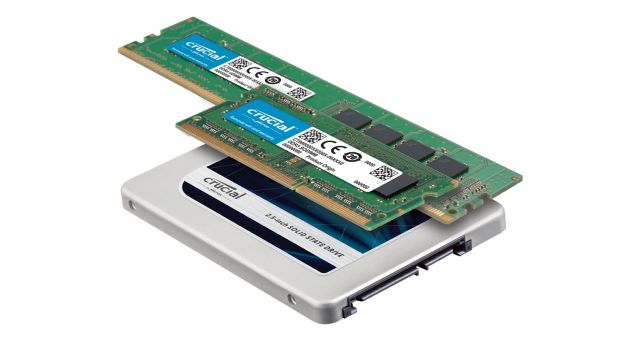
Choosing between storage and memory upgrades depends on your computer’s needs. Both improve performance but in different ways. Storage holds your files and programs. Memory (RAM) helps your computer run tasks faster. Understanding when to upgrade each can save money and improve your experience.
When To Upgrade Storage
Upgrade storage if your computer runs out of space. Low storage slows down file saving and program installation. Large files like photos and videos need more space. An upgrade helps store more data and backups. Faster storage, like SSDs, also improves loading times for files and apps.
When To Upgrade Memory
Upgrade memory if your computer feels slow during multitasking. More RAM allows smooth switching between apps. It helps with running programs like browsers or editing software. Low memory causes freezing or delays. Increasing RAM improves overall speed and responsiveness while working.
Credit: www.crucial.com
Frequently Asked Questions
What Is Computer Memory Used For?
Computer memory temporarily stores data and instructions for quick access. It helps the CPU process tasks faster. Memory is volatile, losing data when power is off. It improves system speed and multitasking efficiency.
How Does Storage Differ From Memory?
Storage holds data permanently, even without power. Memory is temporary and faster but loses data when off. Storage includes hard drives and SSDs. Memory includes RAM and cache. Storage capacity is larger but slower than memory.
Can Memory Affect Computer Speed?
Yes, memory size and speed directly impact computer performance. More RAM allows better multitasking and faster data access. Insufficient memory causes slowdowns and frequent loading times. Upgrading memory often improves overall system responsiveness.
Is Storage Important For Data Safety?
Storage is crucial for long-term data preservation. It retains files, applications, and system information securely. Backup storage protects against data loss. Proper storage solutions ensure data remains safe even after shutdown.
Conclusion
Computer storage and memory serve different roles in a computer system. Storage holds data long-term, even when the power is off. Memory, or RAM, works fast but loses data when the power goes out. Both are important for a computer to work well.
Understanding their differences helps you choose the right device. It also makes troubleshooting easier. Remember, storage keeps your files safe. Memory helps your computer run programs quickly. Knowing this can improve your tech knowledge and use.
As an Amazon Associate, I earn from qualifying purchases.

