

Have you ever wondered what really sets computer storage apart from computer memory? You might be using both every day without fully understanding how they work or why they matter.
Knowing the difference can help you make smarter choices when buying a computer or troubleshooting issues. You’ll discover clear, simple explanations that break down these two key parts of your computer. By the end, you’ll feel confident in how your device stores and processes information—and why that matters to you.
Keep reading to unlock the secrets behind computer storage and memory!
Computer Storage Basics
Computer storage holds all data and files on a device. It keeps information safe even when the power is off. Storage is different from memory, which works with data actively in use. Understanding storage basics helps you know how your computer saves and accesses data.
Storage devices vary in size, speed, and type. Each device has a specific role in storing your digital world. Let’s explore the main points of computer storage.
Types Of Storage Devices
There are many storage devices used in computers. Hard Disk Drives (HDDs) use spinning disks to store data. Solid State Drives (SSDs) use flash memory and are faster. USB flash drives and memory cards are portable storage options. Optical discs like CDs and DVDs store data but are less common now.
Storage Capacity And Speed
Storage capacity means how much data a device can hold. It ranges from a few gigabytes to several terabytes. Speed tells how fast data can be read or written. SSDs are much faster than HDDs. Faster storage helps your computer run programs and load files quickly.
Data Persistence In Storage
Data persistence means data stays saved after power is off. Storage devices keep information safe for long periods. This is different from memory, which loses data when the computer shuts down. Persistent storage lets you save documents, photos, and software permanently.

Credit: www.youtube.com
Computer Memory Essentials
Computer memory is a key part of how computers work. It stores data and instructions that the processor uses. Memory helps the computer run programs and perform tasks quickly.
Without memory, the processor cannot access information fast enough. Memory acts as a temporary workspace. It holds data while the computer is on and working.
Types Of Memory
There are two main types of computer memory: primary and secondary. Primary memory includes RAM and cache. It is fast but holds data only while the computer is on.
Secondary memory includes hard drives and SSDs. This memory stores data even when the computer is off. It is slower but holds much more information.
Memory Speed And Volatility
Memory speed affects how fast data moves to the processor. RAM is very fast, helping the computer work smoothly. Cache memory is even faster but smaller in size.
Volatility means whether memory keeps data without power. RAM is volatile and loses data when the computer is off. Secondary memory is non-volatile and keeps data safe.
Role Of Memory In Processing
Memory stores instructions the processor needs to run programs. It holds data the processor uses for calculations. This quick access to data speeds up computing tasks.
Without enough memory, the processor must wait for data from slower storage. This causes delays and slows down the computer. Good memory size and speed improve overall performance.
Storage Vs Memory: Key Differences
Understanding the difference between computer storage and memory helps in knowing how a computer works. Both are essential for a computer but serve different roles. This section explains the key differences clearly and simply.
Function And Purpose
Memory holds data that the computer uses right now. It helps the CPU access information quickly. Storage keeps data for a long time. It holds files, programs, and the operating system even when the computer is off.
Speed And Performance
Memory works very fast to support active tasks. It makes the computer run smoothly. Storage is slower but has more space. It is designed to keep large amounts of data safely.
Volatility And Data Retention
Memory is volatile, meaning it loses data when power goes off. Storage is non-volatile, so it keeps data without power. This difference is why storage saves files permanently.
Physical Components
Memory usually refers to RAM chips inside the computer. Storage includes devices like hard drives and SSDs. Both have different designs to meet their specific needs.
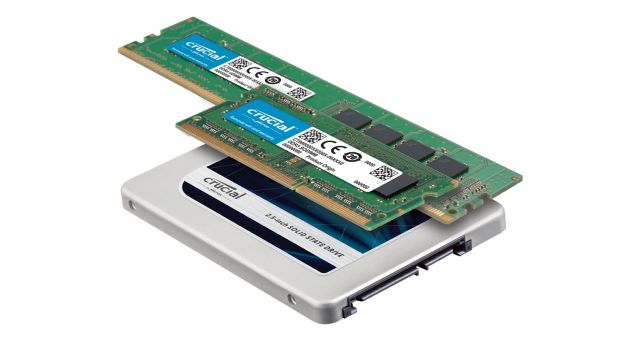
Credit: www.crucial.com
Impact On Computer Performance
Computer performance depends a lot on storage and memory. Both play different roles but work together to keep your device running smoothly. Understanding their impact helps you choose the right setup for your needs.
How Storage Affects Speed
Storage holds your files and programs. The type of storage affects how fast your computer can read and write data. Solid-state drives (SSDs) are much faster than traditional hard drives (HDDs). Faster storage means quicker boot times and faster file access. Slow storage can cause delays and make your computer feel sluggish.
Memory’s Role In Multitasking
Memory, or RAM, temporarily stores data your computer uses now. More RAM allows your computer to handle many tasks at once. If memory is low, your computer may slow down when running many programs. Good memory size helps apps open fast and switch smoothly between tasks.
Balancing Storage And Memory
Both storage and memory affect overall speed and efficiency. A fast SSD with little RAM can still slow down during heavy multitasking. Plenty of RAM with slow storage causes delays in loading files. A balanced mix gives the best experience for everyday use and work.
Common Misconceptions
Many people mix up computer storage and memory. This confusion leads to wrong ideas about how computers work. Understanding the common misconceptions helps clear things up. It also makes it easier to talk about computers correctly.
Memory And Storage Terminology
Memory and storage have different jobs. Memory, or RAM, holds data temporarily. Storage keeps data for a long time. Many call both “memory,” but they are not the same. Memory is fast but loses data when power goes off. Storage is slower but keeps data safe.
Misunderstanding Data Loss
People think data in memory lasts forever. It does not. Memory clears when the computer shuts down. Storage keeps data even without power. This difference is important. It explains why saving files matters before turning off the computer.
Confusing Capacity With Speed
Capacity means how much data can be stored. Speed means how fast data moves in or out. Memory usually has less capacity but is faster. Storage holds more data but works slower. Mixing these up can cause wrong choices for computer needs.
Future Trends In Storage And Memory
The future of computer storage and memory is full of exciting changes. New technologies will make devices faster and more efficient. These changes will help store more data and access it quickly. Understanding these trends can help you see how computers will improve.
Emerging Storage Technologies
Storage devices are evolving beyond traditional hard drives and SSDs. New types like DNA storage and holographic storage are being developed. These can hold huge amounts of data in tiny spaces. They also promise longer life and faster data access. Such technologies will change how we save information.
Advancements In Memory Design
Memory chips are becoming smaller and more powerful. Technologies like MRAM and ReRAM offer faster speeds and better durability. These memories use less power, which saves battery life. Improved memory designs help computers run smoother and handle more tasks at once.
Integration And Hybrid Solutions
Combining storage and memory into one system is a growing trend. Hybrid solutions mix the speed of memory with the capacity of storage. This helps reduce delays and improves data flow inside devices. Integration leads to smarter, faster computers and better user experiences.

Credit: www.hp.com
Frequently Asked Questions
What Is Computer Storage Used For?
Computer storage saves data and files permanently. It retains information even when the device is off. Examples include hard drives and SSDs, which hold operating systems, applications, and personal data.
How Does Computer Memory Differ From Storage?
Computer memory, or RAM, temporarily holds data for active processes. It is fast but volatile, losing data when powered off. Storage is slower but persistent, keeping data long-term for future use.
Why Is Memory Faster Than Storage?
Memory uses faster technology like RAM chips for quick data access. Storage relies on mechanical parts or slower flash memory. This speed difference helps run programs smoothly without delays.
Can Storage Affect Computer Performance?
Yes, storage speed impacts how fast files load and save. Slow storage can bottleneck performance, especially during boot or large data transfers. Using SSDs improves overall system responsiveness significantly.
Conclusion
Computer storage and computer memory serve different purposes in a computer. Storage keeps data safe for a long time, even when the power is off. Memory works faster but only holds data while the computer is on. Both are important for a computer to run well.
Understanding these differences helps you choose the right device or fix problems. Knowing how they work makes using a computer easier and less confusing. Simple but key parts of every computer system.
As an Amazon Associate, I earn from qualifying purchases.

