Driving a Ford F150 comes with many advanced safety features, and the Blind Spot Monitor is one of the most valuable. This system helps detect vehicles in your blind spot zones and alerts you with visual signals. But many F150 owners are unsure how to activate or use this feature correctly. Understanding the right steps can keep you safer on the road and help you make the most of your truck’s technology.
This guide will walk you through the entire process of activating the Blind Spot Monitor on your Ford F150. You’ll also learn how the system works, practical tips for daily use, and common mistakes to avoid. Whether you’re a new truck owner or just want to be sure you’re using every safety tool, this article will make things clear and simple.
What Is The Blind Spot Monitor?
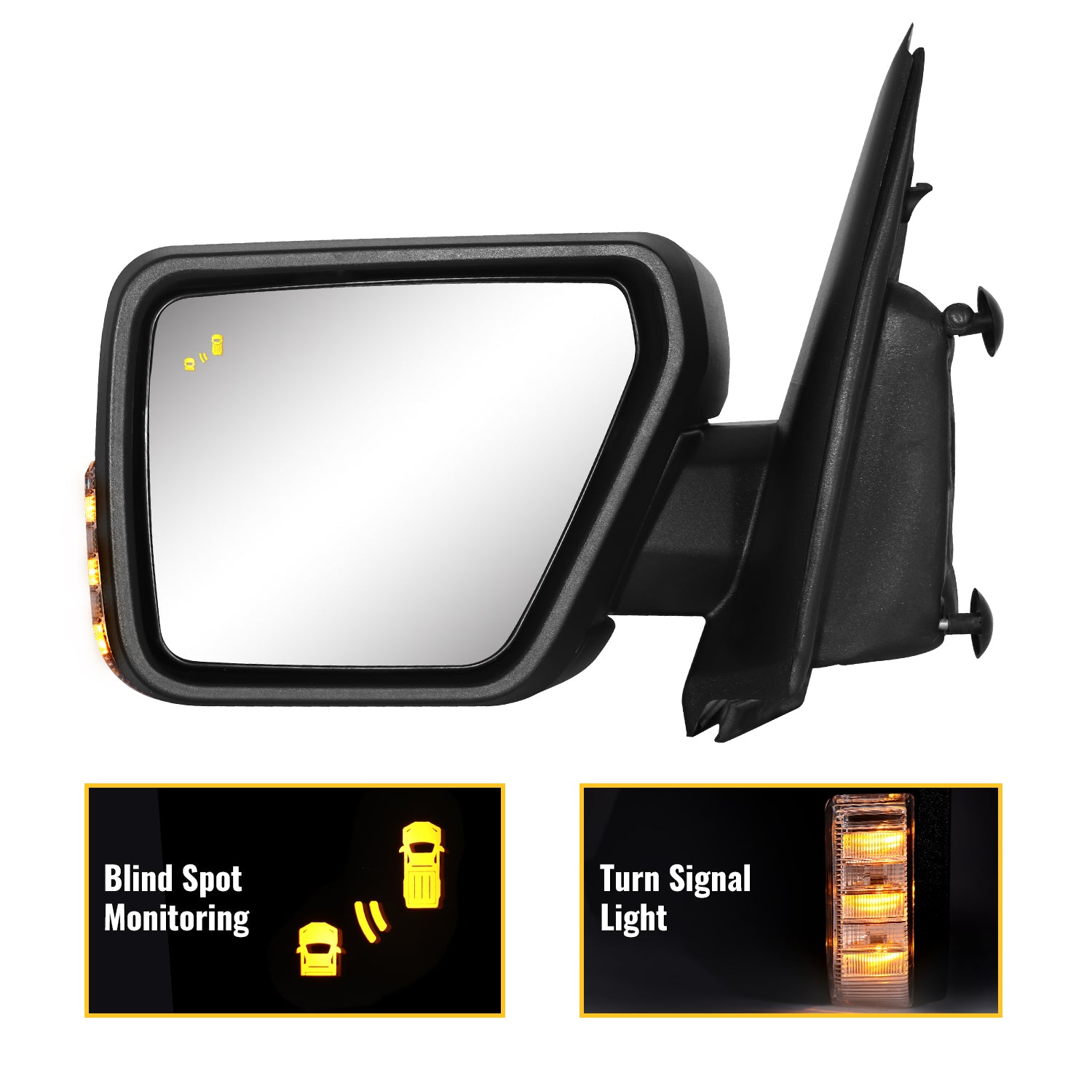
The Blind Spot Monitor (often called BLIS, or Blind Spot Information System) uses sensors, usually located in the rear bumper, to track vehicles in the blind spot areas on both sides of your F150. When a vehicle is detected, a warning light appears on the side mirror. This gives you extra confidence when changing lanes or merging.
Some models also include Cross Traffic Alert, which warns you if vehicles are approaching from the side when you’re backing out of parking spaces.
How It Works
- Sensors scan the area alongside and behind your truck.
- Warning lights appear on the mirrors if a vehicle is in your blind spot.
- Audible alerts sound if you signal a lane change while a vehicle is present.
Which Ford F150 Models Have Blind Spot Monitor?
Not every F150 comes with this feature as standard. It’s important to know if your truck has it before trying to activate it.
| Model Year | Trim Level | Blind Spot Monitor |
|---|---|---|
| 2015-2017 | Lariat, King Ranch, Platinum | Optional |
| 2018-2020 | XLT, Lariat, King Ranch, Platinum, Limited | Optional/Standard |
| 2021-2024 | XLT and above | Standard |
If you’re not sure, check your owner’s manual or look for the indicator icon in your side mirrors. Trucks with BLIS show a small car symbol on each mirror.
Credit: www.sanooer.com
How To Activate Blind Spot Monitor On Ford F150
Activating the Blind Spot Monitor is usually simple, but the steps can vary by model year and the version of Ford’s SYNC system in your truck.
Step-by-step Activation Guide
1. Start Your F150
Turn on your truck and make sure it is in Park.
2. Access The Sync Screen
On most F150s from 2015 and newer, press the ‘Menu’ button on your steering wheel or infotainment screen.
3. Navigate To Driver Assist Settings
Use the arrow keys or touchscreen to find ‘Settings. ’ Select ‘Driver Assist’ or ‘Driver Assistance. ’
4. Locate Blind Spot Information System (blis)
Scroll down the list of driver assist features. Look for ‘Blind Spot’ or ‘BLIS. ’
5. Toggle The Feature On
Select the BLIS option. Switch it from ‘Off’ to ‘On. ’ The system is now active.
6. Check Mirror Indicators
When BLIS is active, you should see a small icon in the upper corner of both side mirrors.
Here’s a summary for quick reference:
| Step | Action |
|---|---|
| 1 | Start your truck and go to Park |
| 2 | Open SYNC Menu |
| 3 | Select Settings > Driver Assist |
| 4 | Find BLIS/Blind Spot |
| 5 | Toggle On |
For Older F150 Models
If your F150 has an older SYNC system or no touchscreen, activation may be done using dashboard buttons and the instrument cluster display. The steps are similar but use the steering wheel buttons to navigate menus.
Important Tips For Using Blind Spot Monitor
Activating BLIS is just the start. Here are ways to get the most from this safety feature:
- Clean your sensors regularly. Dirt, snow, or ice on the rear bumper can block the sensors.
- Do not rely only on BLIS. Always check your mirrors and look over your shoulder before changing lanes.
- BLIS may not detect motorcycles, bikes, or small vehicles. Be extra cautious in heavy traffic.
- Towing a trailer? Many F150s let you set the trailer length in the system so BLIS can still work.
- Watch for system alerts. If you see a warning or error, BLIS may not be working correctly.
Credit: www.uftringautogroup.com
Common Issues And Troubleshooting
Sometimes, the Blind Spot Monitor may not work as expected. Here’s how to handle common problems:
Blis Not Activating
- Check if the system is turned on in the menu.
- Make sure sensors are clean and not damaged.
- Restart your truck to reset the system.
False Alerts Or No Alerts
- Heavy rain, mud, or ice can block sensors.
- Some aftermarket accessories can interfere.
- If problems continue, visit a Ford dealer for service.
Trailer Detection Problems
If you’re towing a trailer, enter the trailer’s length in the BLIS settings. The system needs this data to work correctly. Not entering the trailer size is a mistake many new owners make.
Blind Spot Monitor Vs Traditional Mirrors
You might wonder if BLIS makes mirrors useless. The answer is no—these systems work together.
| Feature | Traditional Mirrors | Blind Spot Monitor |
|---|---|---|
| Coverage Area | Wide, but leaves some blind spots | Targets hard-to-see zones |
| Reaction Time | Depends on driver | Instant warning |
| Weather Impact | Less affected | Can be blocked by dirt/ice |
| Reliability | Always available | Needs working sensors |
The best practice is to use BLIS as an extra tool. It’s not a replacement for careful driving.
Credit: www.friendlyfordgeneva.com
Non-obvious Insights For F150 Owners
Many new users miss these facts:
- BLIS resets after some service visits. If your truck has been at the dealer for repairs, double-check if BLIS is still activated.
- Aftermarket bumpers can block sensors. If you upgrade your rear bumper, make sure the sensors are not covered or removed. This is a common reason BLIS fails to work.
Safety And Confidence On The Road
Activating your Ford F150’s Blind Spot Monitor is a quick but important step for safer driving. By using the system correctly, keeping sensors clean, and understanding its limits, you can prevent accidents and drive with more confidence. Remember, technology works best when combined with good habits.
Take a moment to check your settings, and enjoy the extra peace of mind your F150 provides.
For more details about Ford driver-assist technology, see the official Ford Driver Assist Technology page.
Frequently Asked Questions
How Do I Know If My F150 Has Blind Spot Monitor?
Look for a small car icon in your side mirrors. If you see it, your truck has BLIS. You can also check the vehicle’s menu under Driver Assist settings.
Can I Add Blind Spot Monitor To My F150 If It Didn’t Come With It?
Adding BLIS to a truck without it from the factory is difficult and expensive. It requires sensors, wiring, and programming. Aftermarket systems exist, but they may not work as well.
Will Blis Work While Towing A Trailer?
Yes, but you need to enter the trailer’s length in the settings. This helps the system understand where to look for other vehicles.
Does Blind Spot Monitor Work In Bad Weather?
BLIS may have trouble if sensors are covered by snow, ice, or mud. Clean your rear bumper regularly for best results.
Is Blis A Replacement For Checking Mirrors?
No. Always use mirrors and look over your shoulder. BLIS is an extra safety tool, not a replacement for careful driving.
As an Amazon Associate, I earn from qualifying purchases.