Many Ford F150 owners love the ease of tightly locking and unlocking their trucks without a physical key. The keyless entry system is one of Ford’s most useful features, but sometimes you might need to reset it. Maybe you bought a used F150, lost your code, or want to change it for security. If you’re not sure how to reset keyless entry on Ford F150, you’re not alone. The process is simple, but there are small details that can confuse even experienced drivers. This guide will walk you through each step, share practical tips, and help you avoid common mistakes.
Understanding Ford F150 Keyless Entry
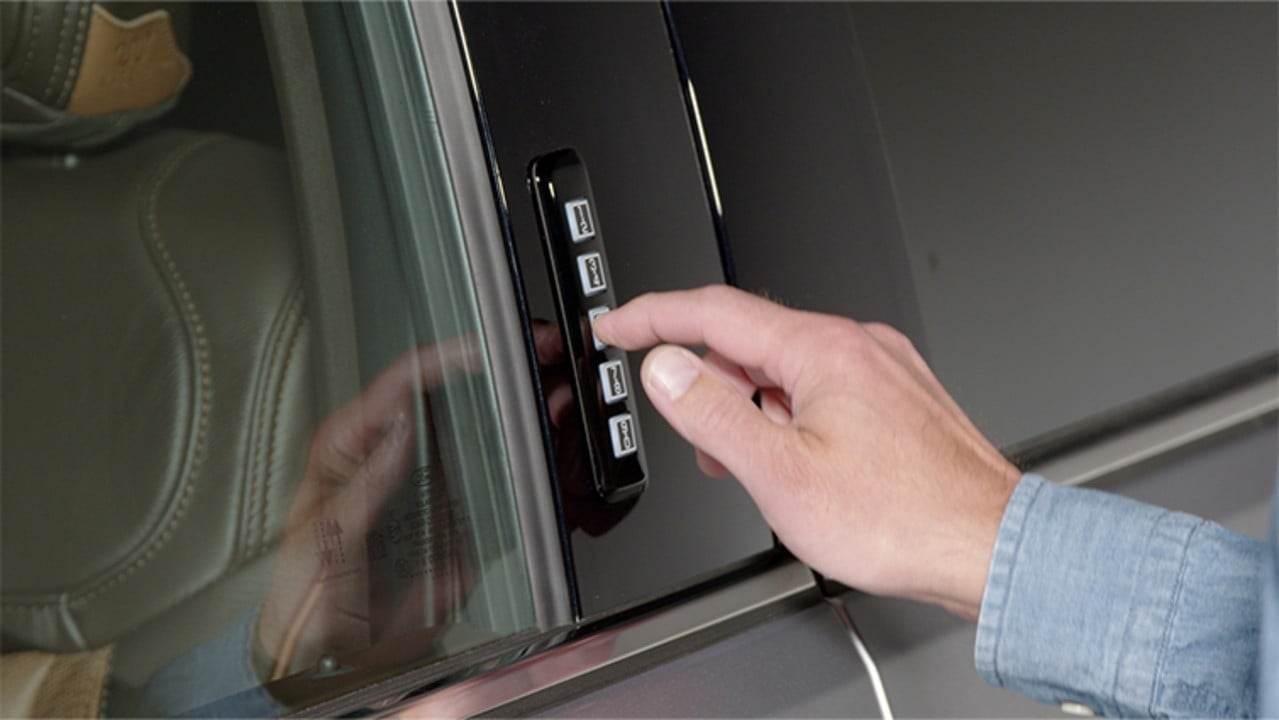
The keyless entry system uses a keypad, usually on the driver’s door, letting you unlock doors by entering a 5-digit code. This code is set at the factory, but you can add or change it. Resetting the system means erasing old user codes and setting up new ones.
There are two main reasons people reset their keyless entry:
- Security: After buying a used F150 or if you suspect someone else knows your code.
- Convenience: To create a code you’ll remember, or to add/remove codes for family.
What You Need Before You Start
Before you reset your keyless entry, you’ll need:
- Your factory-set code (usually found on a wallet card in the owner’s manual, or inside the truck).
- Both of your original key fobs (for some newer models).
- A pen and paper to write new codes.
If you don’t have your factory code, don’t worry. You can usually find it on a label:
- Under the dashboard (driver side, near the fuse box)
- Behind the glove box
- On the back of the owner’s manual
If all else fails, a Ford dealer can provide the code, but they may charge a fee.
Step-by-step: How To Reset Keyless Entry On Ford F150
Here’s a simple process you can follow for most F150 models from 2004 to 2023:
- Locate the Factory Code
- Find your five-digit factory code. This is required to access and reset the system.
- Enter the Factory Code
- Stand by the driver’s door keypad.
- Enter the factory code slowly and clearly.
- Press the 1/2 Button
- Within five seconds, press and hold the 1/2 button on the keypad.
- Hold it for two seconds until you hear a chime or see the doors lock/unlock.
- Input a New Personal Code
- Enter your new five-digit code.
- Avoid common numbers like 12345 or your birthday for better security.
- Test Your New Code
- Lock the truck, then try your new code to unlock it.
- If it doesn’t work, repeat the steps and check the code carefully.
- Delete Old Codes (Optional)
- If you want to clear all additional codes, enter the factory code and then press and hold the 1/2 button for two seconds again.
- Only the factory code will remain active.
Example: Resetting On A 2017 Ford F150
Suppose your factory code is 34567 and you want to set 98765 as your new code:
- Enter 34567 on the keypad
- Press and hold 1/2 for two seconds
- Enter 98765
- Lock and unlock the truck with 98765 to make sure it works
Key Differences By Model Year
The steps above work for most F150 models, but small changes exist between years. Here’s a quick comparison:
| Model Year | Keypad Location | Reset Method | Special Notes |
|---|---|---|---|
| 2004-2014 | Driver Door Frame | Keypad Only | Manual process, no fob needed |
| 2015-2020 | Pillar Next to Door | Keypad + Fob (sometimes) | Some trims require both fobs present |
| 2021-2023 | Pillar, Illuminated | Keypad + Fob | Smart key integration, instructions on screen |
Credit: stiversfordofmontgomery.com
Troubleshooting Common Problems
You might run into a few issues when resetting your keyless entry:
- Code Not Working: Double-check that you’re using the factory code and pressing buttons within five seconds.
- Keypad Unresponsive: Clean the keypad with a soft cloth. Dirt or moisture can cause problems.
- Lost Factory Code: If the code is missing, check all possible locations before contacting your dealer.
- Multiple Failed Attempts: Wait a few minutes before trying again. The system can lock you out for repeated wrong entries.
Practical Tips And Insights
Many F150 owners miss a few practical details:
- Change your code regularly if you share your truck with others, especially after selling or lending it.
- If you enter the wrong code five times, wait at least 60 seconds before trying again. This prevents system lockout.
- Do not store your code in the glove box. Write it somewhere safe but separate from sopmeone who could access your truck.
Advanced users sometimes program multiple personal codes (up to five for some models) for different drivers. This lets you track who accessed the truck and when, which can be useful for work or family vehicles.

Credit: www.fordofpottstown.com
Security Benefits Of Resetting Keyless Entry
Resetting your keyless entry code is more than just convenience:
- Prevents unauthorized access if you lose your keys or share the truck.
- Stops old codes from working if you bought a used F150.
- Reduces risk of theft, especially in urban areas.
A 2022 report by the National Insurance Crime Bureau showed that vehicles with personalized security codes are 37% less likely to be stolen compared to those using default codes.
When You Should Reset The System
Here are some common situations where you should reset your keyless entry:
| Situation | Why Reset? |
|---|---|
| Bought Used Truck | Previous owner may know code |
| Lost Code Card | For better security |
| Lending Truck | Set a temporary code for others |
| Family Changes | Add/remove codes for new drivers |

Credit: www.youtube.com
Frequently Asked Questions
How Do I Find My Ford F150 Factory Keyless Entry Code?
The factory code is often on a card in your owner’s manual or on a label inside the truck (driver’s side fuse box, behind the glove box, or on the manual itself). If you can’t find it, contact your local Ford dealer—they can retrieve it using your VIN.
Can I Reset Keyless Entry Without The Factory Code?
No, the factory code is required to access and reset the system. If you don’t have it, you must locate the code physically in the truck or get it from your dealer.
How Many Personal Codes Can I Program?
Most Ford F150 models allow you to program up to five personal codes in addition to the factory code. This is useful for families or work vehicles.
Will Resetting Keyless Entry Erase My Key Fobs?
No, resetting the keyless entry code only affects keypad codes. Your key fobs and remote start functions will continue to work as before.
Where Can I Learn More About Ford F150 Keyless Systems?
The official Ford website provides detailed guides and videos. You can visit Ford Owner Support for more information.
Resetting your keyless entry on a Ford F150 is a simple but important step for better security and convenience. By following the steps carefully and keeping your codes private, you’ll keep your truck safe and make life easier every time you hit the road.
As an Amazon Associate, I earn from qualifying purchases.