Mounting a 75 inch TV might seem simple, but getting the height just right can make all the difference in your viewing experience. You want to enjoy every detail without straining your neck or missing a moment.
So, how high should you mount your big screen for the best comfort and style? You’ll discover easy tips and tricks to find the perfect height that fits your room and your eyes. Keep reading to transform your space and watch your favorite shows like never before.
Credit: www.hellotech.com
Choosing The Ideal Height
Choosing the ideal height to mount a 75-inch TV is key for a good viewing experience. The right height reduces neck strain and makes watching more comfortable. Many factors affect this choice, such as where you sit and how your room is set up. Understanding these details helps you place the TV perfectly.
Eye Level Considerations
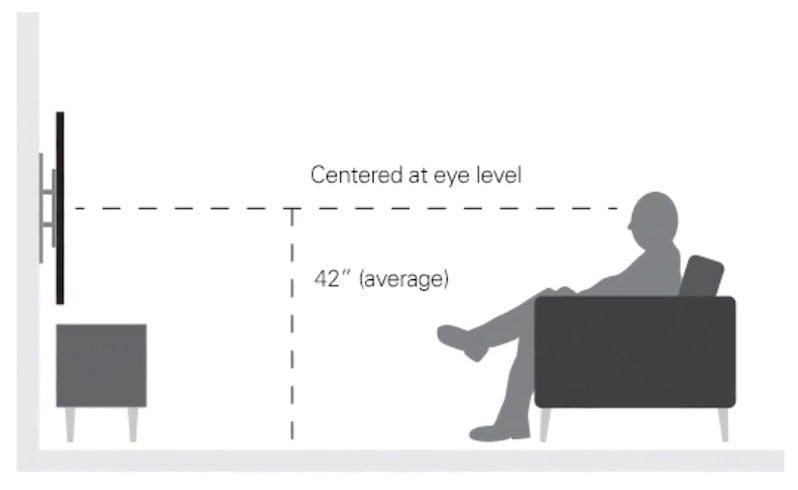
Your eyes should meet the center of the TV screen. This prevents neck pain and keeps watching easy. Sit in your usual spot. Measure the eye height from the floor. Mount the TV so its middle matches this height. This simple step makes a big difference.
Seating Distance Impact
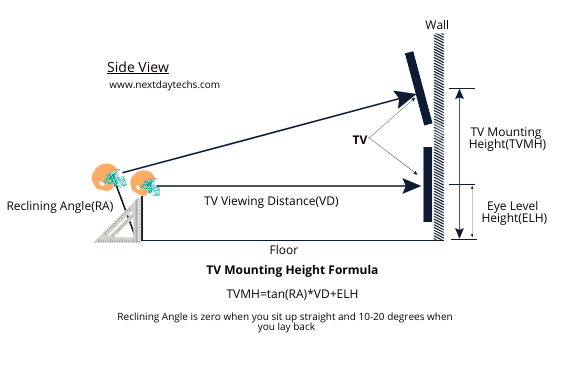
The distance between your seat and the TV affects height choice. For a 75-inch TV, sit about 8 to 12 feet away. If you sit far, mount the TV a little higher. Closer seats need the TV lower. Adjust height to keep the screen easy to see without moving your head.
Room Layout Factors
Look at your room’s shape and furniture. Wall space, windows, and lighting affect TV placement. Avoid glare by not placing the TV opposite bright windows. Make sure the TV is visible from all seats. Think about other elements like speakers or shelves. Plan the height to fit your room well.
Credit: nextdaytechs.com
Measuring For Your Space
Measuring your space before mounting a 75 inch TV is very important. It helps to find the perfect height and place for the screen. Good measurements make watching TV more comfortable. This section explains how to measure well for your room.
Determining Viewing Angle
The best viewing angle is usually at eye level. Sit where you watch TV most. Measure the height from the floor to your eyes. This height is where the center of the TV should be. Avoid placing the TV too high or low. A proper angle reduces neck and eye strain.
Wall Mount Vs. Stand Placement
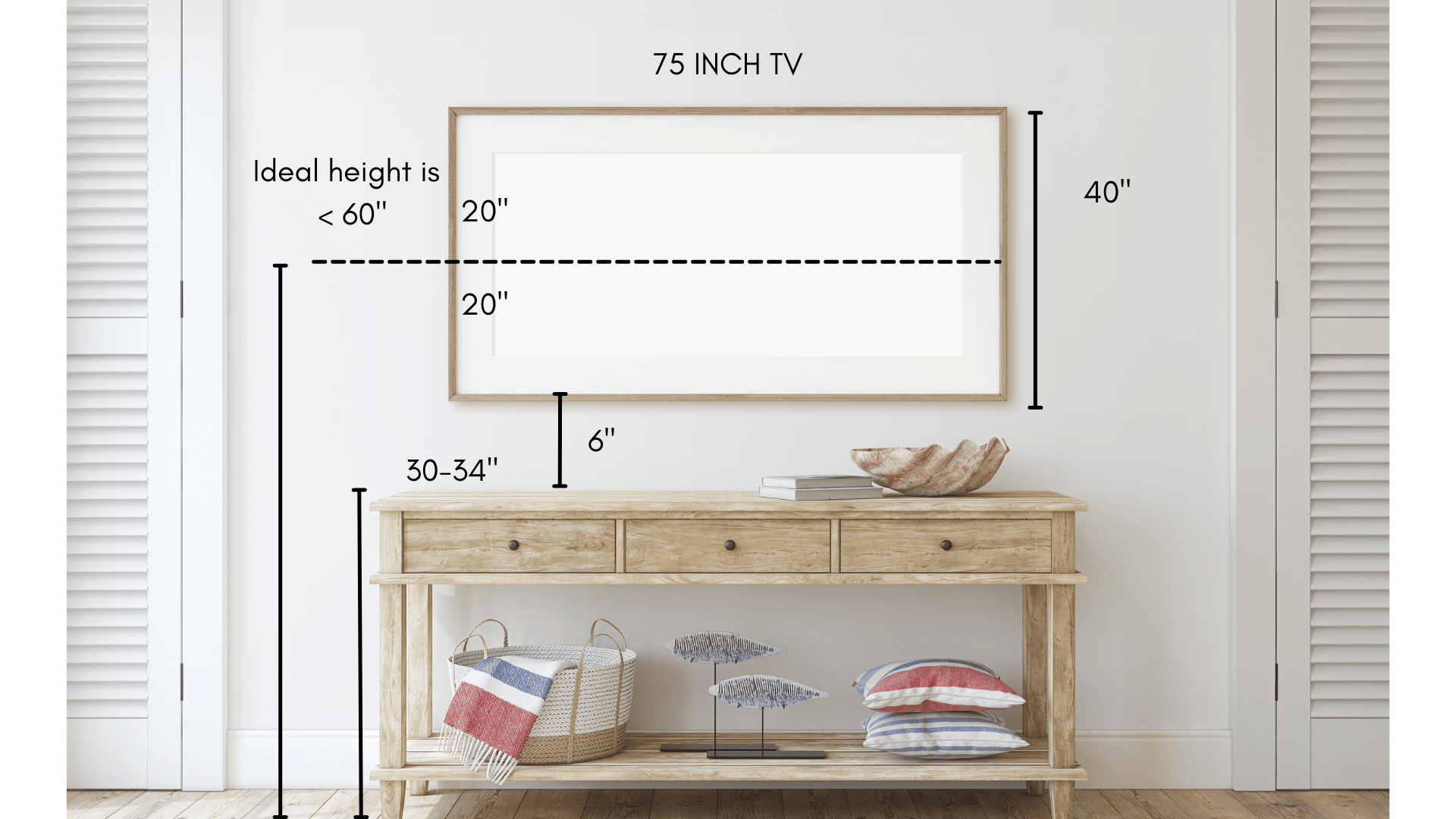
Wall mounts change how high the TV sits. Decide if the TV will hang on the wall or stand on furniture. Wall mounts may raise the TV higher than a stand. Check the height of your furniture if using a stand. Measure the total height from the floor to the top of the TV location.
Using A Tape Measure Effectively
Use a tape measure to get exact numbers. Start from the floor and measure up to eye level. Mark this spot on the wall or furniture. Measure the TV’s height and divide by two. Add this half-height to the eye level measurement. This helps find the center of the screen. Double-check all measurements before mounting.
Mount Types And Their Influence
Choosing the right mount affects how high to place your 75 inch TV. Mount type changes viewing angle and comfort. It also influences wall space and room layout. Understanding mount options helps find the best height for your TV.
Fixed Mounts
Fixed mounts keep the TV flat against the wall. They offer a clean look and save space. Height is set during installation and cannot change. Place the TV at eye level for the best view. Fixed mounts suit rooms where viewers sit in one spot.
Tilting Mounts
Tilting mounts allow the TV to angle up or down. This helps reduce glare from lights or windows. You can mount the TV slightly higher than eye level. Tilt it down for a better view. These mounts work well in rooms with varying light or seating positions.
Full-motion Mounts
Full-motion mounts let you pull the TV out and turn it side to side. You can adjust height, angle, and direction easily. Mount the TV higher since you can move it closer to your eyes. This mount fits rooms with multiple seating areas or open spaces.
Avoiding Common Mounting Mistakes
Mounting a 75 inch TV can improve your viewing experience. Avoiding common mistakes helps you get the best setup. Mistakes can cause discomfort and even damage your TV or wall. Below are some common errors to avoid.
Too High Or Too Low
Mounting the TV too high strains your neck. Sitting too low makes the screen hard to see. The ideal height places the center of the screen at eye level. This reduces neck pain and improves comfort.
Ignoring Glare And Lighting
Glare can ruin your viewing experience. Bright lights or windows can reflect on the screen. Position the TV to avoid direct light hitting it. Use curtains or blinds to control natural light.
Neglecting Wall Strength
Not checking the wall strength risks the TV falling. Drywall alone may not support a heavy 75 inch TV. Find studs or use proper anchors to secure the mount. This ensures safety and stability.
Enhancing Viewing Comfort
Enhancing viewing comfort is key when mounting a 75 inch TV. The right height reduces neck strain and eye fatigue. It creates a better watching experience for everyone in the room. Small changes in height can make a big difference in comfort.
Consider the room layout and how people will sit. Balance the TV height with sound and cable setup for a clean look. Planning these details helps you enjoy your TV to the fullest.
Adjusting For Multiple Seating Areas
Rooms with many seats need careful TV height planning. Mount the TV at a height that suits most viewers. The middle of the screen should be near eye level of the main seats. This avoids discomfort for people sitting in different spots.
Try to find a height that works for all viewers. Slight tilting mounts can help adjust the angle for better sightlines.
Balancing Height With Sound Setup
Speakers and soundbars affect the TV mounting height. Place the TV so the sound system fits well below or around it. Avoid blocking speakers with the TV or furniture.
Keep the sound system centered for clear, balanced audio. This setup improves both sound quality and viewing comfort.
Cable Management Tips
Good cable management keeps the area neat and safe. Use cable covers or raceways to hide wires along the wall. This prevents cables from hanging or tangling.
Plan the cable length before mounting. Leave enough slack for adjustments. Neat cables make the TV setup look professional and tidy.
Credit: stampinfool.com
Frequently Asked Questions
What Is The Ideal Height To Mount A 75 Inch Tv?
The ideal height is eye level when seated, usually 42 to 48 inches from the floor to the TV’s center. This reduces neck strain and offers the best viewing comfort for most living rooms.
How Far Should I Mount A 75 Inch Tv From The Floor?
Mount the TV so its center is about 42 to 48 inches above the floor. Adjust slightly based on your seating height and room layout for optimal viewing angles.
Should A 75 Inch Tv Be Mounted Higher Than Smaller Tvs?
Not necessarily. The mounting height depends on viewing distance and seating height, not just screen size. Keeping the center at eye level ensures comfortable viewing.
Does Mounting Height Affect Picture Quality On A 75 Inch Tv?
Yes, mounting height influences viewing angle, which can impact picture clarity and color accuracy. Proper height ensures the best visual experience without distortion or glare.
Conclusion
Mounting a 75-inch TV at the right height makes watching more comfortable. Place the center of the screen at eye level when seated. This helps reduce neck and eye strain. Keep the viewing distance about 1. 5 to 2. 5 times the screen size.
Adjust height slightly for room layout and furniture. Proper placement improves your overall TV experience. Simple steps lead to better comfort and enjoyment. Take your time to measure before mounting. Enjoy your big screen with the perfect setup.
As an Amazon Associate, I earn from qualifying purchases.