

Have you ever wondered what happens inside your printer when you hit “print”? It’s easy to take this everyday magic for granted, but understanding how printers work can save you time, money, and frustration.
Whether you’re sending a simple document or a colorful photo, knowing the basics behind the process helps you get the best results every time. Ready to discover the secrets behind your printer’s smooth operation? Let’s dive in and unravel how your printer brings your ideas to life on paper.
Types Of Printers
Printers come in different types, each designed for specific tasks. Understanding these types helps you choose the right printer for your needs. Some printers are great for photos, while others excel in speed or special printing jobs.
Inkjet Printers
Inkjet printers spray tiny droplets of ink onto paper. They work well for printing colorful photos and documents. These printers are affordable and common in homes. They handle a range of paper types and sizes.
Laser Printers
Laser printers use a laser beam to create images on a drum. Toner powder sticks to the drum and transfers to paper. These printers print fast and produce sharp text. Businesses often use laser printers for high-volume tasks.
3d Printers
3D printers build objects layer by layer using plastic or other materials. They create three-dimensional items from digital files. These printers are useful for prototypes, models, and art projects. 3D printing is growing in education and industry.
Dot Matrix Printers
Dot matrix printers use pins to strike an ink ribbon and paper. They produce characters from dots, creating low-resolution prints. These printers are noisy but reliable for multi-part forms. They remain useful in some offices and factories.
Printing Process Basics
Printers turn digital files into physical copies on paper. This process involves several key steps. Each step works together to create a clear, accurate print. Understanding these basics helps you know how printers function.
Printers receive data, interpret it, and then apply ink or toner to paper. The exact method can vary by printer type, but the core ideas remain the same. Let’s explore the main parts of the printing process.
From Digital File To Paper
The printing process starts with a digital file. This file contains text, images, or both. The printer reads this data and prepares it for printing. It sends signals to the printer’s hardware. This tells the printer where and how to place ink or toner on paper.
Role Of Printer Drivers
Printer drivers act as translators between the computer and printer. They convert the digital file into a language the printer understands. Drivers control print quality, paper size, and other settings. They help ensure the printout matches what appears on screen.
Color Management
Color management keeps colors true to the original design. Printers mix different inks to produce a wide color range. The process adjusts colors for the printer type and paper used. This prevents colors from looking dull or incorrect on the final print.
How Inkjet Printers Work
Inkjet printers create images by spraying tiny droplets of ink onto paper. They work with great precision. Small nozzles push out ink in controlled amounts. This process forms the text or picture you want. Understanding how inkjet printers work shows the science behind everyday printing.
Ink Droplet Formation
Ink droplets form inside tiny chambers in the printer head. The printer heats or vibrates the ink to make drops. These drops are very small, often less than a human hair. Each droplet lands exactly where it should on the paper. This accuracy creates sharp and clear images.
Nozzle Functionality
Nozzles are tiny holes that spray ink. They open and close quickly to control ink flow. Each nozzle can spray thousands of droplets per second. The printer moves the head side to side as it prints. This movement helps cover the entire paper with ink.
Paper Interaction
The paper absorbs the ink droplets. Different paper types affect how the ink spreads. Some papers soak ink fast, while others keep it on the surface. This impacts the sharpness and color of the print. The printer adjusts the ink amount based on paper type.
How Laser Printers Work
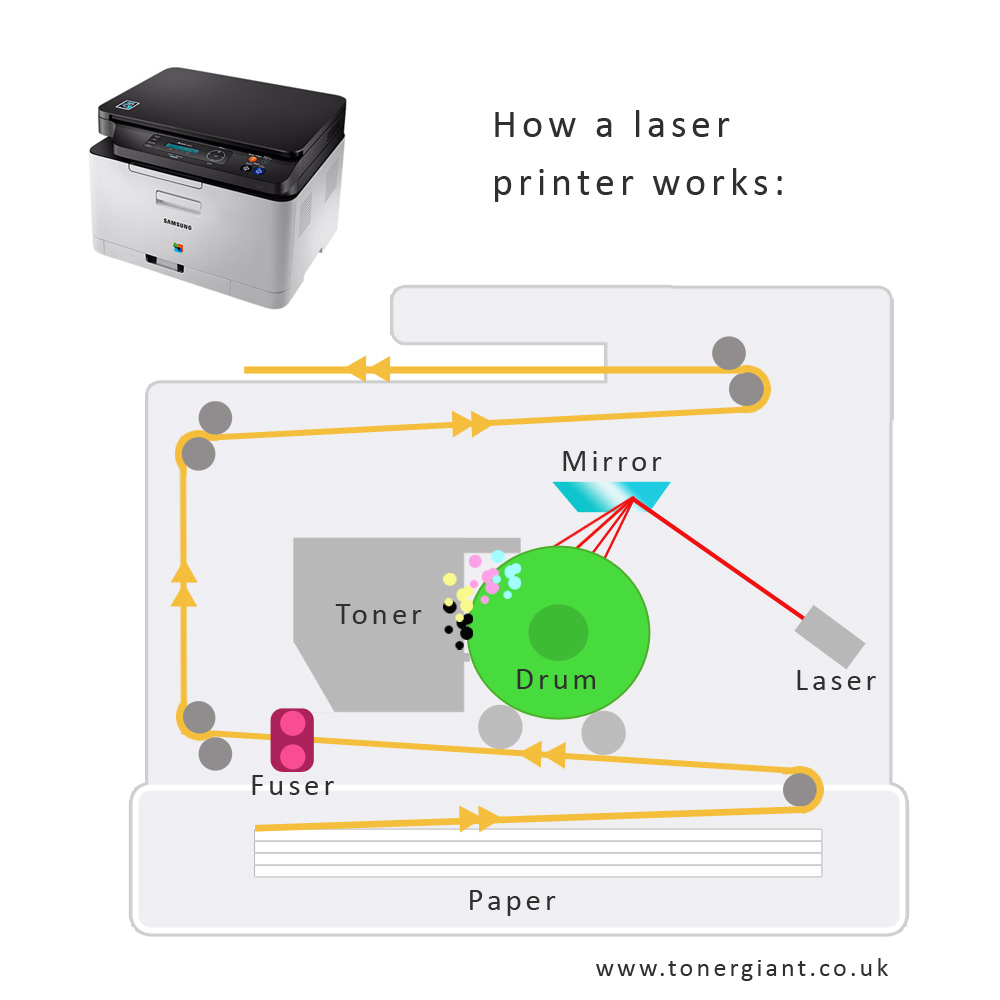
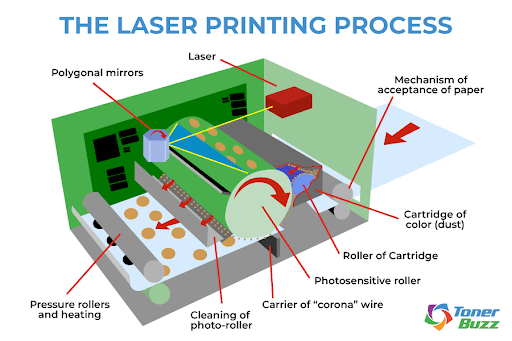
Laser printers create sharp and clear prints quickly. They use a mix of light, static electricity, and toner powder. The process has three main parts. Each part plays a key role in forming the final image on paper.
Laser Scanning Mechanism
A laser beam moves across a drum inside the printer. It draws the image by changing the drum’s electric charge. Where the laser hits, the drum loses its charge. This pattern matches the text or picture to print.
Toner Application
The toner is a fine powder that sticks to the charged areas. The drum rolls over the toner, picking up particles only where the laser drew. The toner then transfers from the drum to the paper, creating the image.
Fusing Process
The paper passes through heated rollers. These rollers melt the toner, bonding it firmly to the paper. This step makes the print dry and smudge-free right away.
3d Printing Mechanics
3D printing mechanics explain how printers create objects from digital files. This process builds shapes by adding material layer by layer. It differs from traditional printers that only put ink on paper.
Understanding these mechanics helps you see how designs turn into real items. Let’s explore the key parts of 3D printing.
Material Extrusion
Material extrusion is the most common 3D printing method. The printer pushes melted material through a small nozzle. The nozzle moves precisely to form shapes.
The material cools and hardens quickly. This process repeats for each new layer. It allows printers to create detailed and strong objects.
Layer-by-layer Construction
3D printers build objects one thin layer at a time. Each layer sticks to the one below it. This method makes complex shapes possible.
Printers follow a digital blueprint to place layers exactly. The layers stack up until the object is finished. This technique offers high accuracy and fine detail.
Common 3d Printing Materials
Several materials work well for 3D printing. The most popular is plastic, like PLA and ABS. These plastics are easy to melt and shape.
Other materials include resin, metal powders, and even ceramics. Each material suits different uses and printer types. The choice depends on strength, flexibility, and finish needed.
Credit: www.tonergiant.co.uk
Maintenance And Troubleshooting
Printers need regular care to work well. Maintenance and troubleshooting help avoid problems. They keep your printer running longer and printing clearly. Small efforts can stop big issues. Knowing simple fixes saves time and money.
Common Printer Issues
Printers often face paper jams. Paper gets stuck inside the machine. Ink smudges or fades on pages. Sometimes, the printer does not connect to the computer. Print quality may drop with low ink. Error messages can appear without clear reasons.
Cleaning And Care Tips
Clean the printer’s exterior with a soft cloth. Use a small brush to clear dust inside. Remove paper scraps carefully to avoid jams. Clean print heads with recommended solutions. Avoid touching ink cartridges with bare hands. Keep the printer in a dust-free area.
When To Replace Parts
Replace ink cartridges when colors fade. Change toner cartridges after many prints. Swap out worn rollers causing paper jams. Replace print heads if cleaning fails to improve quality. Upgrade parts based on the printer’s manual. Regular checks help spot parts needing replacement.
Future Trends In Printing
The future of printing holds exciting changes. New technologies will make printing faster and better. Printers will become smarter and more eco-friendly. These trends will change how we print at home and work.
Advances In Printing Technology
Printers will use new methods to create sharper images. 3D printing will grow, making objects instead of paper prints. Speed and quality will improve with better print heads and inks. Small, portable printers will become more common for easy use.
Eco-friendly Printing Solutions
Printing will focus more on saving the environment. Printers will use less ink and power. Recycled materials will be common in paper and cartridges. More printers will offer options to print double-sided to save paper.
Integration With Smart Devices
Printers will connect easily to phones and tablets. Users will print directly from apps without computers. Voice commands will allow hands-free printing. Smart printers will send alerts for low ink or paper, making maintenance simple.
Credit: www.tonerbuzz.com
Credit: www.printerbase.co.uk
Frequently Asked Questions
How Do Inkjet Printers Create Images On Paper?
Inkjet printers spray tiny ink droplets onto paper to form images. They use precise nozzles to control droplet size and placement. This method produces high-quality, detailed prints with vibrant colors. Ink droplets dry quickly, preventing smudging and ensuring clear, sharp images.
What Technology Do Laser Printers Use To Print?
Laser printers use a laser beam to create an electrostatic image on a drum. Toner powder sticks to this image and transfers to paper. Heat fuses the toner, producing fast, high-quality prints ideal for text and graphics. Laser printers are efficient for large-volume printing.
Why Do Printers Need Regular Maintenance?
Printers need maintenance to prevent clogs, jams, and poor print quality. Cleaning print heads and replacing ink or toner helps maintain performance. Regular checks ensure smooth operation and extend the printer’s lifespan. Proper care reduces errors and costly repairs.
How Do Printers Connect To Computers And Devices?
Printers connect via USB cables, Wi-Fi, or Bluetooth. Wired connections offer stable, fast data transfer. Wireless options provide convenience and allow multiple devices to print remotely. Modern printers support mobile printing apps for easy document sharing from smartphones or tablets.
Conclusion
Printers turn digital files into physical copies. They use ink or toner to create images and text. Different types use various methods to print, like spraying ink or pressing toner. Understanding how printers work helps you use them better. It also makes choosing the right printer easier.
Printing remains important in offices, schools, and homes. Technology keeps improving, making printers faster and clearer. Knowing these basics gives you a clearer picture of printing. Simple machines with a big role in daily life.
As an Amazon Associate, I earn from qualifying purchases.
