

Have you ever wished you could show something small or detailed to a whole group without everyone crowding around? That’s exactly where a document camera comes in handy.
Imagine turning your desk into a live presentation stage, where anything you place under the camera appears big and clear on a screen. Whether you’re teaching, presenting, or sharing ideas, a document camera makes it easier for everyone to see exactly what you want to show.
Keep reading to discover how this simple tool can change the way you share information and engage your audience.
What Is A Document Camera
A document camera is a device that shows real objects or papers on a screen. It helps share details clearly with a group of people. Teachers, presenters, and professionals use it to display documents, books, or small items live. It works like a digital magnifying glass.
This tool connects to a computer, projector, or monitor. It captures images in real time and shows them instantly. This makes it easier to explain or highlight important points.
Basic Functionality
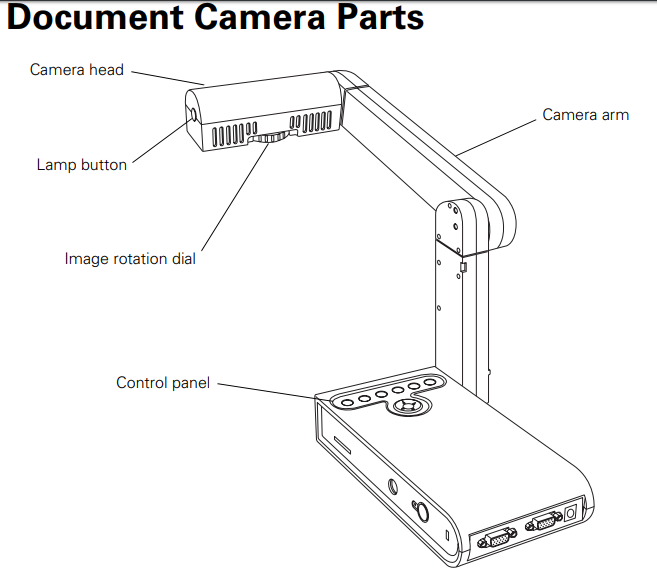
A document camera has a lens and a light source. It captures images or videos of documents or objects placed under it. The camera sends the image to a screen or projector. Users can zoom in or move the image to focus on details. It also allows recording or saving images for later use.
Common Uses
Teachers use document cameras to show books or notes to the whole class. Presenters display charts or small items during meetings. Artists show their work step-by-step to an audience. Lawyers use it to present evidence clearly in court. It also helps in online learning and video calls to share physical materials.

Credit: www.youtube.com
Key Features To Look For
Choosing a document camera requires attention to several important features. These features affect how well the camera performs and how easy it is to use. Understanding these key aspects helps pick the right camera for teaching, presentations, or recording.
Resolution And Image Quality
High resolution gives clear and sharp images. Look for cameras with at least 1080p resolution. Good image quality shows fine details and colors well. This helps viewers see text and objects clearly.
Connectivity Options
Check how the camera connects to other devices. USB ports are common and easy to use. Some cameras support HDMI for direct display connection. Wireless options add flexibility but may need more setup.
Portability And Design
Consider the size and weight of the camera. Lightweight and compact models are easy to carry. A foldable design saves space and protects the camera. Simple controls improve the user experience.
Zoom And Focus Capabilities
Zoom lets you enlarge small details without moving the camera. Optical zoom keeps the image clear while digital zoom may reduce quality. Autofocus helps keep images sharp automatically.
Lighting And Image Enhancement
Built-in lighting improves visibility in dark rooms. Adjustable lights help avoid glare and shadows. Some cameras offer image enhancement features like brightness and contrast control.
Benefits In Education
Document cameras offer many benefits in education. They help teachers share materials clearly. Students can see details on books, papers, or objects. This tool supports better learning experiences.
Interactive Learning
Document cameras make lessons more interactive. Teachers can show real-time examples easily. Students watch closely and ask questions. This creates a lively classroom environment. It helps students understand lessons better.
Engaging Presentations
Using a document camera makes presentations more engaging. Teachers display notes or drawings clearly. Students stay focused on the lesson. Visuals keep students interested and alert. Lessons become easier to follow and enjoy.
Supporting Remote Classes
Document cameras support remote learning well. Teachers share live videos of materials online. Students at home see everything clearly. It bridges the gap between classroom and home. This tool helps maintain lesson quality remotely.
Advantages For Business
Document cameras offer many benefits for businesses. They make work easier and meetings more effective. These devices show documents and objects clearly to everyone. This helps teams understand ideas faster and share information better.
Enhancing Meetings
Document cameras improve meeting quality by showing papers and products live. No need to pass papers around or guess details. Everyone sees the same thing at the same time. This keeps meetings focused and saves time. Presenters can highlight key points easily. It also helps remote workers follow along better.
Document Sharing
Sharing documents becomes simple with a document camera. You can display contracts, drawings, or reports instantly. This reduces printing and paper waste. Files can be saved as images or videos for later use. Teams can review materials anytime, not just in meetings. This tool supports quick and clear communication.
Improving Collaboration
Teams work better together using document cameras. They allow real-time feedback on shared content. Everyone can point out details and suggest changes instantly. This leads to faster decisions and fewer mistakes. Collaboration feels natural, even in virtual meetings. The device helps keep everyone on the same page.
Using Document Cameras In Creative Fields
Document cameras are useful tools in many creative fields. They show real-time images of objects or artwork. This helps artists and teachers share their work clearly with others. Using document cameras makes it easier to explain ideas and show details.
Creative professionals use document cameras for different tasks. These tools improve the way art and design lessons happen. They also help in live teaching and showing projects step-by-step. The camera captures every small detail, making learning more effective.
Art And Design Demonstrations
Artists use document cameras to display their drawing or painting process. Viewers see each brushstroke or pencil line up close. This helps students understand techniques better. It is like watching the artist work live, but on a big screen. The camera shows colors and textures clearly.
Live Tutorials
Document cameras allow teachers to give live tutorials easily. They can show how to use tools or materials in real time. Students watch each step and follow along. This method is better than just reading instructions. It keeps students focused and interested in learning.
Detailed Project Showcases
Creative professionals use document cameras to showcase their projects in detail. The camera shows every part of the work closely. This helps others see the quality and effort put into the project. It also allows for better feedback and discussion. Presenting work this way builds confidence and trust.
Choosing The Right Document Camera
Choosing the right document camera can improve your presentations and teaching. It helps show documents, objects, or live demonstrations clearly. Picking the best one depends on your specific needs and budget. Consider key factors before buying to get the best value and performance.
Assessing Your Needs
Think about what you want to use the camera for. Will you show small objects or large documents? Decide on the image quality you need. Some cameras offer higher resolution for clearer pictures. Consider if you need features like zoom or flexible arms. Also, check if it should connect to a computer or projector easily.
Budget Considerations
Set a budget before searching for a document camera. Prices vary from basic models to advanced ones with many features. Choose a camera that fits your budget but meets your needs. Avoid spending too much on unnecessary features. A good balance between cost and quality is best.
Brand And Warranty
Choose a brand known for quality and support. Reliable brands often provide better customer service. Check if the camera comes with a warranty. A warranty protects you from defects and damage. It adds peace of mind for your purchase.
Tips For Getting The Most Out Of Your Document Camera
Getting the most out of your document camera means using it the right way. Small changes can improve your experience and make your images clear. This section shares simple tips. Follow them to get sharp images and smooth presentations. These tips help you save time and avoid common mistakes.
Setup And Positioning
Place your document camera on a stable surface. Avoid shaky or moving desks. Position it directly above your document for a clear view. Keep the camera lens parallel to the paper. This reduces distortion and shadows. Adjust the height so the whole document fits in the frame. Check that nothing blocks the light or camera lens.
Optimizing Image Quality
Use good lighting to improve image clarity. Natural light or bright lamps work well. Avoid strong light from behind the document. This causes glare and dark areas. Adjust the focus manually if your camera allows it. Zoom in carefully to keep the image sharp. Choose the right resolution; higher settings give better detail but use more memory.
Maintenance And Care
Keep the lens clean with a soft cloth. Avoid touching it with fingers to prevent smudges. Store the camera in a dust-free place when not in use. Check cables and connections often for damage. Update the camera’s software to improve performance. Handle the device gently to avoid mechanical problems.

Credit: www.amazon.com
Credit: faq.owens.edu
Frequently Asked Questions
What Is A Document Camera Used For?
A document camera captures real-time images of documents or objects. It displays them on screens for presentations, teaching, or meetings. It enhances visual learning and remote communication effectively.
How Does A Document Camera Work?
A document camera uses a high-resolution camera to capture images of documents or objects. It connects to a computer or projector, displaying live images instantly on a screen.
What Are The Benefits Of A Document Camera?
Document cameras improve engagement by showing clear visuals in real-time. They support interactive teaching, save time, and allow easy sharing of documents during lessons or meetings.
Can Document Cameras Connect To Multiple Devices?
Yes, many document cameras connect via USB, HDMI, or Wi-Fi. They work with computers, projectors, and smartboards, ensuring versatile use in classrooms and offices.
Conclusion
A document camera helps show papers and objects clearly. It makes teaching and presentations easier. You can share details with many people at once. It works well in classrooms and meetings. Using a document camera saves time and effort. It lets everyone see the same thing at the same time.
This tool suits many uses and helps communication. Try a document camera to improve your visual sharing.
As an Amazon Associate, I earn from qualifying purchases.
