

Choosing the right computer for playing Sims 4 can change your entire gaming experience. You want smooth gameplay, quick loading times, and no annoying crashes.
But with so many options out there, how do you know which one fits your needs and budget? This guide will help you find the perfect computer that matches your style and keeps your Sims world running perfectly. Keep reading to discover what specs really matter and how to make the best choice for your game.
Sims 4 System Needs
The Sims 4 is a popular life simulation game enjoyed by millions. Knowing the system needs helps players choose the right computer. A good setup runs the game smoothly and avoids crashes. Sims 4 system requirements vary based on game settings and expansions. Meeting these needs ensures better gameplay and graphics quality.
Minimum Specs
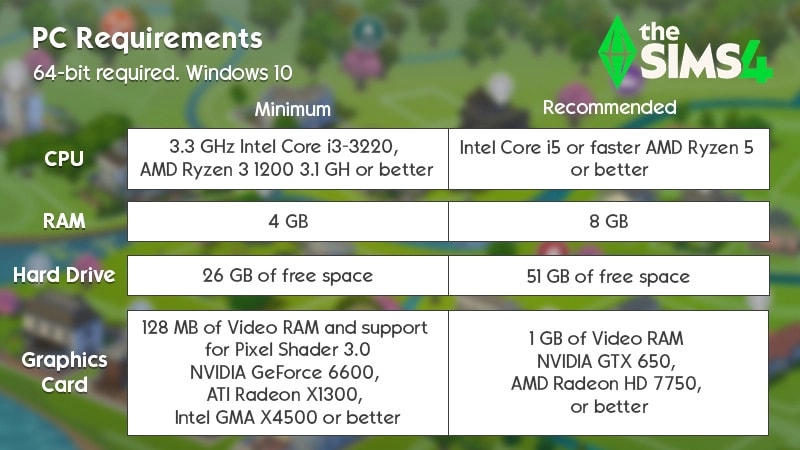
The minimum specs allow the game to start and run at low settings. You need at least an Intel Core 2 Duo or AMD Athlon 64 processor. The game requires 4 GB of RAM and a graphics card with 128 MB VRAM. Windows 7 or macOS 10.7.5 are the lowest supported operating systems. Storage space of 15 GB is necessary to install the base game.
Recommended Specs
Recommended specs improve game speed and visual quality. A faster Intel Core i5 or AMD Ryzen 3 processor is ideal. The game runs better with 8 GB of RAM and a dedicated graphics card. Nvidia GeForce GTX 650 or AMD Radeon HD 7750 meet this need. Windows 10 or macOS 10.14 offer the best compatibility. More storage space helps if you add expansions and custom content.
Impact Of Expansions
Expansions add new features and increase system demands. More RAM and better graphics cards help handle added content. Large expansions require more CPU power for smooth gameplay. Storage needs increase with each expansion pack installed. Players should upgrade their system if they want to enjoy all expansions.

Credit: www.youtube.com
Processor Choices
Choosing the right processor is key for playing Sims 4 smoothly. The processor handles all the game’s tasks and controls how fast everything runs. A good processor helps reduce lag and improves gameplay. Understanding processor options can help pick the best computer for Sims 4.
Intel Vs Amd
Intel and AMD are the main processor brands. Both offer good options for Sims 4. Intel processors often have strong single-core speed. This helps Sims 4 run better because the game uses fewer cores.
AMD processors provide more cores at lower prices. This can help if you run other programs while playing. Both brands have models that work well. The choice depends on your budget and other uses.
Core Count And Speed
Sims 4 benefits from higher core speed more than many cores. A fast core means tasks finish quicker. Four cores are usually enough for smooth gameplay.
Processors with speeds above 3.0 GHz perform well. Higher speed reduces wait times during gameplay. More cores help if you multitask, like streaming or chatting while playing.
Balance core count and speed for the best experience. Too many cores with low speed may slow the game. Aim for a processor that combines good speed and enough cores for your needs.
Graphics Options
Graphics play a big role in how The Sims 4 looks and runs on your computer.
Choosing the right graphics setup can make your game smooth and enjoyable.
Understanding the types of graphics cards helps you pick the best one.
Dedicated Vs Integrated Gpus
Dedicated GPUs are separate cards made for gaming and heavy graphics.
They have their own memory and power, which improves game performance.
Integrated GPUs are built into the computer’s processor or motherboard.
They share memory with the CPU, which can slow down the game.
Dedicated GPUs give better visuals and smoother gameplay for Sims 4.
Integrated GPUs work but may limit graphics quality and frame rates.
Best Gpus For Sims 4
For good Sims 4 play, mid-range dedicated GPUs are ideal.
NVIDIA GeForce GTX 1650 and AMD Radeon RX 570 perform well.
They handle detailed textures and large Sims 4 worlds without lag.
Higher-end cards like GTX 1660 or RTX 2060 offer extra smoothness.
Older cards like GTX 1050 can still run the game but slower.
Choose a GPU that fits your budget and desired game quality.
Credit: help.ea.com
Memory And Storage
Memory and storage play a big role in running Sims 4 smoothly. These parts help the game load faster and run without problems. Choosing the right memory and storage can make your game experience better.
Ram Requirements
RAM is the short-term memory of your computer. Sims 4 needs enough RAM to run without lag. At least 8GB of RAM works well for most players. More RAM helps if you use many mods or custom content. With 16GB, the game runs even smoother. Less than 8GB can cause slowdowns or crashes. Check your computer’s RAM before playing.
Ssd Vs Hdd
SSD and HDD are types of storage for your game files. SSDs are faster than HDDs. They help Sims 4 start quickly and load new areas fast. HDDs are slower but usually cheaper. If you want better game speed, choose an SSD. SSDs also reduce game freezes and delays. For large game libraries, HDDs offer more space but slower access. A small SSD for Sims 4 is a good choice.
Cooling And Noise
Cooling and noise are important for a good Sims 4 gaming experience. A computer that runs cool prevents parts from overheating. It keeps the game smooth and stops crashes. Noise can distract players and reduce fun. Quiet machines help maintain focus and comfort during long play sessions.
Effective Cooling Solutions
Good cooling means better game performance. Most gaming PCs use fans to push hot air out. Some have liquid cooling for faster heat removal. Proper airflow inside the case is key. Dust filters keep fans clean and working well. Choose a PC with enough cooling to handle Sims 4’s needs. Overheating can cause slowdowns and damage parts.
Quiet Gaming Pcs
Quiet gaming PCs use special fans that spin slowly. They produce less sound while still cooling well. Some use soundproof cases to block noise. Solid-state drives reduce noise compared to old hard drives. Quiet PCs keep players focused on the game. No loud fan noise means better immersion in Sims 4.
Prebuilt Vs Custom Pcs
Choosing the right computer for Sims 4 is important. Two popular options are prebuilt and custom PCs. Each type has its own strengths and suits different needs. Understanding these can help you decide which fits your gaming style and budget best.
Benefits Of Prebuilt Systems
Prebuilt systems come ready to use straight out of the box. They are easy to buy and set up. No need to worry about parts or assembly. These PCs often include tested hardware that works well together. You get support and warranty from the manufacturer. Prebuilt systems save time and reduce stress. Many models come with good specs for Sims 4. They offer a simple solution for players who want quick gaming access.
Advantages Of Custom Builds
Custom builds let you pick every part. You control the quality and performance of your PC. This option often gives better value for the money spent. You can upgrade parts easily in the future. Custom PCs can be tailored for high graphics settings in Sims 4. Building your own system can be a fun learning experience. This choice suits players who want more power and flexibility.
Budget Picks
Playing Sims 4 does not require an expensive computer. Many budget-friendly options offer good performance. These picks balance cost and power well. Perfect for casual players who want smooth gameplay without overspending.
Best Budget Desktops
Desktops usually give more power for less money. Look for models with at least an Intel i3 or AMD Ryzen 3 processor. Aim for 8GB of RAM to run Sims 4 smoothly. A dedicated graphics card like NVIDIA GTX 1050 helps with better visuals. Storage should include an SSD for quick loading times. Brands like Dell and HP offer solid budget desktops. These PCs handle Sims 4 and other basic games easily.
Affordable Laptops
Laptops give freedom to play Sims 4 anywhere. Choose models with Intel i3 or AMD Ryzen 3 CPUs. 8GB RAM is a must for good performance. A lightweight laptop with SSD storage boosts game speed. For graphics, integrated cards work, but dedicated GPUs improve visuals. ASUS and Acer have affordable laptops that run Sims 4 well. These laptops balance price with decent gaming power.
High-end Gaming Rigs
High-end gaming rigs offer the best experience for playing Sims 4. These computers handle the game smoothly at high settings. They provide fast loading times and stunning graphics. Playing with mods and expansions becomes easier. High-end rigs support multitasking and streaming without lag.
Top Performance Pcs
Top performance PCs have powerful processors and graphics cards. A fast CPU like Intel i7 or AMD Ryzen 7 improves game speed. GPUs such as Nvidia RTX 3060 or AMD Radeon RX 6700 XT deliver clear visuals. At least 16GB of RAM helps run the game and other apps. Solid-state drives (SSD) reduce loading times significantly. These PCs maintain stable frame rates for smooth gameplay.
Future-proof Components
Future-proof components keep the system ready for upcoming updates. Choosing a motherboard with PCIe 4.0 slots allows easy upgrades. High-capacity RAM, like 32GB, supports future game requirements. Efficient cooling systems prevent overheating during long sessions. Power supplies with extra wattage protect against hardware issues. These parts extend the computer’s lifespan and save money later.
Peripherals That Matter
Choosing the right computer for Sims 4 is important. Equally important are the peripherals you use. Peripherals help you interact with the game smoothly. They improve your comfort and gameplay experience. Good peripherals make playing Sims 4 more fun and less tiring.
Focus on the screen and input devices. These parts affect how you see and control the game. Poor peripherals can slow you down or make the game hard to play. Let’s explore the key peripherals that matter.
Monitors For Sims 4
A good monitor shows clear images and bright colors. Sims 4 has many details. A sharp screen helps you see them well. A monitor with at least 1080p resolution is best. Bigger screens give a better view of your Sims world. A 24-inch or larger screen works well.
Look for monitors with a fast refresh rate. It makes movements smoother in the game. A refresh rate of 60 Hz or higher is fine. Choose one with low response time to avoid blurring. This helps when you move the camera or scroll fast.
Keyboards And Mice
Your keyboard and mouse control your Sims and menu actions. A responsive keyboard with comfortable keys helps you play longer. Mechanical keyboards feel good for many users. They last longer and give clear feedback.
Choose a mouse with good precision and ergonomic design. Sims 4 needs careful clicking and scrolling. A mouse with adjustable DPI lets you change sensitivity. This makes controlling the game easier. Wireless or wired options both work well. Pick what feels best for you.
Optimizing Performance
Optimizing performance is key to enjoying Sims 4 without lag or delays. A smooth game helps you build, explore, and create without frustration. Simple tweaks can make a big difference. Both game settings and system care affect how well Sims 4 runs on your computer.
Game Settings Tips
Lower the game’s graphics settings for better speed. Turn off shadows or lower texture quality. Reduce resolution if the game feels slow. Close other apps before playing. This frees up memory and CPU power. Adjusting these settings keeps the game responsive and fun.
System Maintenance
Keep your computer clean and updated. Delete unused files and empty the recycle bin. Run a virus scan regularly. Update your graphics drivers for smooth visuals. Restart your PC before playing Sims 4. This clears temporary files and frees memory. A well-maintained system helps the game run without problems.

Credit: www.reddit.com
Frequently Asked Questions
What Are The Minimum Pc Specs For Sims 4?
The minimum specs include an Intel Core 2 Duo processor, 4GB RAM, and a 128MB graphics card. A 9GB free hard drive space is also required for smooth gameplay.
Which Processor Is Best For Sims 4 Gaming?
A modern Intel i5 or AMD Ryzen 5 processor is ideal. These CPUs offer strong performance for Sims 4 and allow smooth multitasking.
How Much Ram Is Needed For Sims 4?
At least 8GB of RAM is recommended. This ensures smooth gameplay and better performance when running expansions or mods.
Do I Need A Dedicated Graphics Card For Sims 4?
Yes, a dedicated GPU like NVIDIA GTX 650 or AMD Radeon HD 7750 improves visuals. Integrated graphics may cause lag or low frame rates.
Conclusion
Choosing the right computer helps you enjoy Sims 4 smoothly. A good balance of speed, graphics, and memory matters most. You do not need the most expensive option to play well. Focus on a system that matches your budget and game needs.
This way, your Sims will run without lag or crashes. Play comfortably and explore the game’s fun features. Your perfect Sims 4 computer awaits, ready to bring your virtual world to life.
As an Amazon Associate, I earn from qualifying purchases.
