

Have you ever looked at your tangled phone cable and wondered if it could double as an Ethernet cable? It’s a question many people ask when they’re trying to get online quickly or save money on cables.
You might think, “They both have similar connectors, so why not? ” But using the wrong cable can cause slow internet, dropped connections, or even damage to your devices. You’ll discover the truth about phone cables and Ethernet cables, why they’re different, and what happens if you try to swap them.
Keep reading to find out how to avoid common mistakes and make sure your internet runs smoothly.
Credit: www.reddit.com
Differences Between Phone And Ethernet Cables
Phone cables and Ethernet cables look similar but serve very different purposes. Knowing their differences helps you pick the right cable for your needs. Each type is built to handle specific signals and speeds. Using one in place of the other can cause problems. Here are the main differences between phone and Ethernet cables.
Cable Structure And Wiring
Phone cables usually have fewer wires inside, often just two or four. Ethernet cables contain eight wires grouped in four twisted pairs. These twisted pairs reduce noise and interference. Ethernet cables are thicker and more durable for data transfer. Phone cables are thinner and made for voice signals.
Signal Transmission And Speed
Phone cables carry analog signals for voice calls. They work well for low-speed data, like dial-up internet. Ethernet cables send digital data at high speeds. They support fast internet and local networks. Ethernet cables can handle speeds up to 10 Gbps or more. Phone cables cannot support such high speeds.
Connector Types
Phone cables use RJ11 connectors. These are smaller and fit phone jacks. Ethernet cables use RJ45 connectors. These connectors are larger with eight pins. RJ45 plugs fit network ports on computers and routers. RJ11 plugs do not fit Ethernet ports properly.
Why Phone Cables Aren’t Ideal For Ethernet
Phone cables and Ethernet cables look similar but serve very different purposes. Using a phone cable for Ethernet connections can cause several problems. These cables are not built to handle the demands of network data transfer. Their design limits speed, distance, and signal quality. This section explains why phone cables are not ideal for Ethernet use.
Bandwidth Limitations
Phone cables carry voice signals, not high-speed data. They have fewer wires and thinner copper strands. This limits the amount of data they can carry at once. Ethernet cables are designed to support faster speeds and more data traffic. Using a phone cable reduces your internet speed and network performance.
Interference And Crosstalk Issues
Phone cables lack proper shielding against interference. They do not twist wires tightly enough to reduce crosstalk. Crosstalk happens when signals mix between wires, causing errors. Ethernet cables have twisted pairs that reduce this problem. Without this design, your network connection becomes unstable and unreliable.
Distance And Signal Loss
Phone cables are not made for long-distance data transmission. Signals weaken over short distances in phone cables. Ethernet cables can carry data over longer distances without losing strength. Using phone cables can cause slow or dropped connections if the cable is too long.
Situations Where Phone Cables Might Work
Phone cables and Ethernet cables serve different purposes, but there are some cases where phone cables might work as Ethernet cables. The key is understanding the limits of phone cables. These cables are not designed for high-speed data transfer or long distances. Yet, in certain simple setups, they can carry data between devices.
Phone cables have fewer wires and less shielding compared to Ethernet cables. This affects speed and signal quality. Still, for small tasks with low demands, phone cables can be a quick fix. Knowing when this is possible helps avoid frustration and poor network performance.
Short Distance Connections
Phone cables can work well for very short distances. For example, inside a single room or between two nearby devices. The signal loss over short runs is minimal. So, the connection stays stable enough for basic network use. Avoid distances longer than 10 feet to prevent signal issues.
Short runs mean less interference. This helps phone cables carry data with fewer errors. In homes or small offices, short connections may use phone cables temporarily. This option suits simple tasks, like connecting a printer or a low-demand device.
Low-speed Network Requirements
Phone cables can handle low-speed network needs. They are not fit for fast internet or heavy data transfer. But for basic tasks like sending emails or browsing simple websites, phone cables might work.
Older devices or legacy systems often need only slow connections. Phone cables can support speeds up to a few megabits per second. This is enough for basic communication or small file transfers.
Using phone cables in low-speed setups avoids the cost of Ethernet cables. It also allows quick fixes in emergencies. Still, for high-speed or reliable connections, Ethernet cables remain the best choice.

Credit: medium.com
Risks Of Using Phone Cables For Ethernet
Using phone cables instead of Ethernet cables carries several risks. These cables are designed for different purposes. Phone cables lack the features needed for reliable network connections. Problems can arise that affect your internet speed and device safety.
Reduced Network Performance
Phone cables do not support high data speeds like Ethernet cables. Your internet connection will be slower and less stable. You may experience frequent disconnections and delays. This can disrupt streaming, gaming, and work tasks. The cable’s thin wires cause signal loss over distance. This reduces network efficiency and reliability.
Potential Hardware Damage
Phone cables might damage your network devices. They have different wiring and electrical standards. Using them can cause overheating or short circuits. This risks damaging your modem, router, or computer ports. Hardware repairs can be expensive and time-consuming. Always use the correct cables to protect your devices.
Proper Alternatives For Ethernet Connections
Using a phone cable as an Ethernet cable is not a good idea. Phone cables do not have the right wires or speed for internet connections. For a proper and stable internet connection, you need to use the right type of Ethernet cable. These cables are made to carry data quickly and without problems. Let’s explore some good alternatives for Ethernet connections.
Cat5e, Cat6, And Higher Grade Cables
Cat5e cables are common and work well for most home internet needs. They support speeds up to 1 Gigabit per second. Cat6 cables are better and can handle faster speeds and less interference. These cables work well for offices and places with many devices. Higher grade cables like Cat6a and Cat7 offer even faster speeds and more protection. They are good for very fast internet or long cable runs.
Choosing The Right Cable For Your Needs
Pick a cable based on your internet speed and the distance you need to cover. For normal home use, Cat5e is often enough. If you want faster speeds or have many devices, choose Cat6 or higher. Also, check the cable length. Longer cables may need a higher grade to keep speed stable. Using the right cable ensures better internet performance and fewer problems.
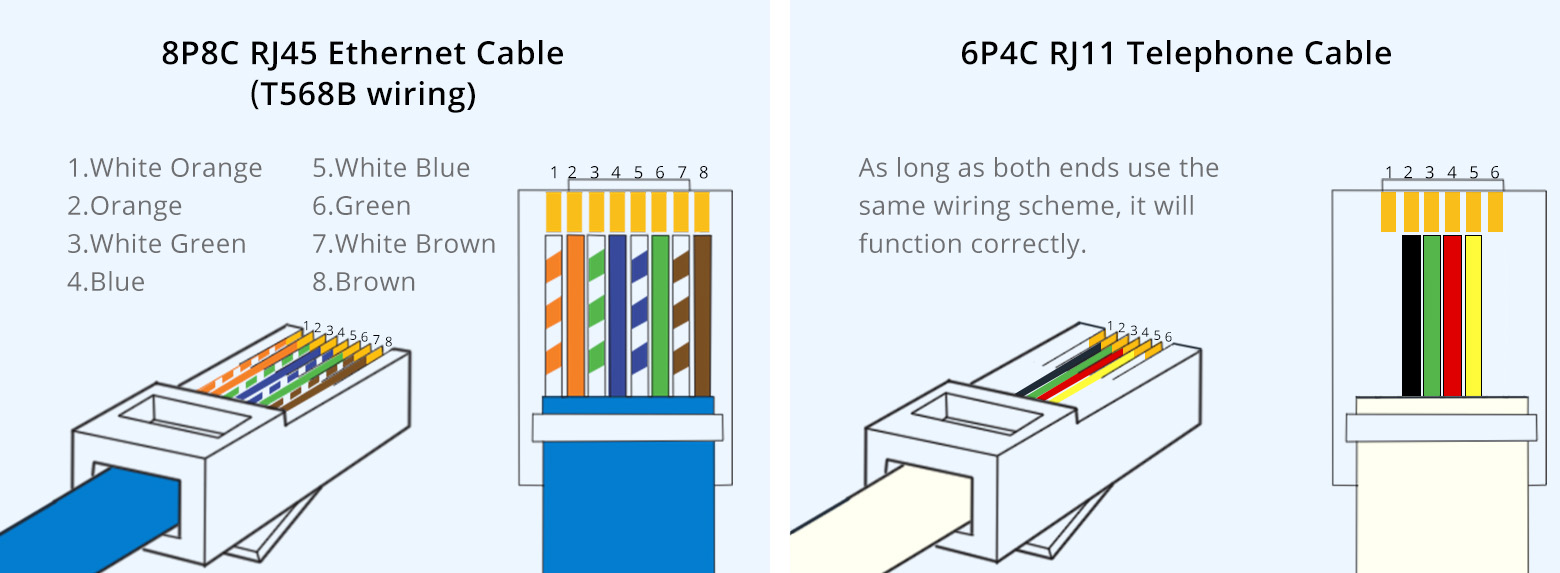
Credit: www.fs.com
Tips For Identifying Cables Correctly
Identifying cables correctly is key to avoid confusion and damage. Using the wrong cable can cause poor connection or no connection at all. Knowing how to tell phone cables from Ethernet cables saves time and effort. This section explains simple tips to help you spot the difference.
Visual Inspection
Look closely at the cable ends. Phone cables usually have smaller connectors called RJ11. These connectors are narrow and have fewer pins. Ethernet cables use larger RJ45 connectors with eight pins. Check the thickness of the cable too. Ethernet cables are thicker due to more wires inside. Phone cables are thinner and less sturdy.
Labeling And Color Codes
Cables often have labels printed on their outer jacket. Read these labels carefully. Phone cables might say “telephone” or “voice.” Ethernet cables often say “Cat5,” “Cat5e,” “Cat6,” or “network.” Color codes also help. Ethernet cables usually have twisted pairs of wires with distinct colors inside. Phone cables have fewer wires and simpler color patterns.
Frequently Asked Questions
Can I Connect Internet Using A Phone Cable?
No, a phone cable cannot provide reliable internet like Ethernet. Phone cables use fewer wires and lower data speeds, so they are unsuitable for internet connections requiring higher bandwidth.
What Are The Differences Between Phone And Ethernet Cables?
Phone cables have 2-4 wires and support low-speed signals. Ethernet cables have 8 wires, enabling faster, stable data transfer for networking and internet use.
Will A Phone Cable Work For Home Networking?
No, phone cables lack the wiring needed for home networks. Ethernet cables are designed for networking and ensure proper speed and connection stability.
Can Phone Cables Damage My Ethernet Devices?
Using phone cables in Ethernet ports typically won’t cause damage, but data transmission will be slow or fail. Always use proper Ethernet cables for best results.
Conclusion
Phone cables and Ethernet cables are very different. Phone cables carry phone signals, not internet data. Ethernet cables send data faster and more reliably. Using a phone cable for internet will cause slow speeds and connection problems. It is best to use the right cable for your network.
This helps keep your internet stable and strong. Choosing the correct cable saves time and frustration. Always pick a cable made for your device and needs. That way, your internet works well every time.
As an Amazon Associate, I earn from qualifying purchases.

