

Have you ever wondered if a phone line and an Ethernet cable are the same thing? At first glance, they might look similar, but they serve very different purposes.
Understanding the difference can save you time, money, and frustration when setting up your home or office network. You’ll discover what makes each cable unique and why using the right one matters for your internet speed and phone calls. Keep reading to make sure you’re not mixing them up and get the most out of your connections.
Credit: www.showmecables.com
Phone Line Basics
Understanding the basics of phone lines helps clear up common confusion. Many wonder if a phone line is the same as an Ethernet cable. These two serve different purposes in homes and offices. Let’s explore the fundamentals of phone lines to see how they work.
What Is A Phone Line?
A phone line is a wired connection used for voice calls. It carries analog signals between phones and telephone networks. Traditional landline phones use these lines to connect calls. The technology has been around for decades.
Phone lines transmit sound over copper wires. They allow people to talk across long distances. This simple yet effective system still supports many phone services today.
Common Uses Of Phone Lines
Phone lines mainly connect landline telephones. Many homes and businesses use them for voice communication. Some fax machines and modems also rely on phone lines. They provide a stable connection for these devices.
Phone lines sometimes carry DSL internet signals. This allows internet access through existing phone wires. Yet, phone lines do not support high-speed data like Ethernet cables.
Physical Characteristics
Phone lines usually use thin copper wires twisted together. They come in pairs inside a plastic jacket. The wires are smaller and less shielded than Ethernet cables. This limits their data speed and range.
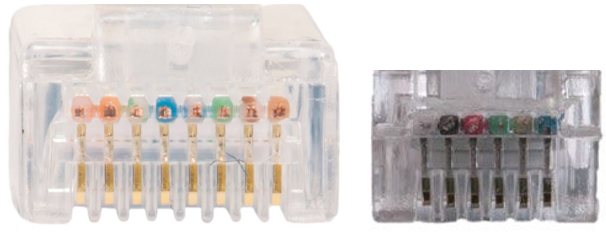
Phone line connectors are small and rectangular, called RJ11 plugs. These fit into phone sockets easily. Ethernet cables use larger RJ45 connectors, which are different in size and shape.
Ethernet Cable Essentials
Understanding Ethernet cables helps clear up confusion about phone lines and internet connections. These cables play a key role in wired internet setups.
They connect devices like computers and routers to the internet. Knowing their basics helps in choosing the right cable for your needs.
What Is An Ethernet Cable?
An Ethernet cable is a type of network cable. It connects devices within a local area network (LAN). This cable carries data for internet and network access. It works by sending electrical signals between devices.
Common Uses Of Ethernet Cables
People use Ethernet cables mainly to connect computers to the internet. Offices and homes use them for fast, stable connections. They link routers, modems, switches, and computers. This helps avoid slow Wi-Fi or signal drops. Gaming and streaming benefit from these cables.
Physical Characteristics
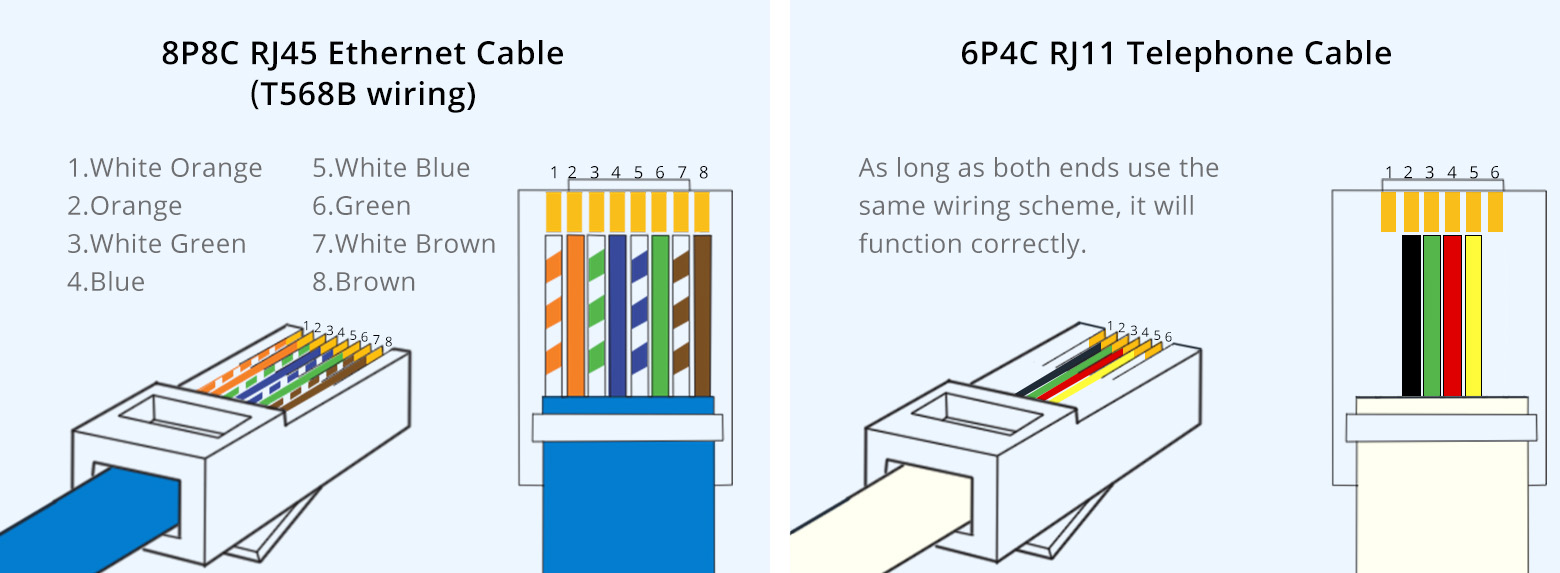
Ethernet cables usually have eight wires inside. These wires are twisted into four pairs to reduce interference. The cable has a plastic jacket for protection. It ends with an RJ45 connector that plugs into devices. Lengths vary but often range from 1 to 100 meters.
Comparing Functionality
Understanding the differences between a phone line and an Ethernet cable helps you choose the right connection. Both carry signals but serve different purposes. Their functions affect internet speed, signal quality, and stability. Below, we compare these aspects to clarify how each works.
Data Transmission Speed
Ethernet cables carry data much faster than phone lines. Ethernet supports speeds from 100 Mbps to 10 Gbps. Phone lines, mainly for voice, handle much slower data speeds. DSL over phone lines typically offers up to 100 Mbps. This speed gap makes Ethernet better for heavy internet use.
Signal Type And Quality
Phone lines transmit analog signals mostly for voice calls. Ethernet cables send digital signals for data and internet. Digital signals keep data clear and less prone to noise. Analog signals can degrade over distance, causing lower quality. Ethernet cables maintain better signal quality over longer distances.
Connection Stability
Ethernet connections are more stable than phone lines. They use dedicated cables and connectors for a steady link. Phone lines can face interference from other devices or weather. This interference may cause drops or slower speeds. Ethernet’s design reduces interruptions, ensuring reliable internet access.
Credit: www.reddit.com
Compatibility And Usage
Understanding the compatibility and usage of phone lines and Ethernet cables is important. These two cables serve different purposes. Knowing where and how to use each helps avoid connection problems.
Phone lines carry voice signals for telephones and some internet types. Ethernet cables handle data for computer networks. Each cable fits specific devices and environments.
Device Compatibility
Phone lines work with telephones and DSL modems only. They have smaller connectors called RJ11. Ethernet cables use RJ45 connectors. They connect computers, routers, and switches. Using the wrong cable can cause no signal or slow speeds.
Networking Environments
Phone lines appear in homes mainly for phone calls. Some internet services like DSL use them too. Ethernet cables are common in offices and homes for fast internet. They create local networks between devices. Ethernet supports higher data speeds than phone lines.
Practical Limitations
Phone lines have limited bandwidth and slower speeds. They cannot support large file transfers well. Ethernet cables handle high-speed data and longer distances. They are better for video streaming and gaming. Mixing these cables in a network can cause errors.
Installation And Cost
Understanding the installation and cost differences between a phone line and an Ethernet cable helps you choose the right option. Each has unique setup needs and expenses. Both impact your budget and time.
Setup Requirements
Phone lines need a phone jack and wiring from the provider. Installation often requires a technician. It can take longer if your home has old wiring. Ethernet cables need a router or switch. You can usually install them yourself. Running cables inside walls or floors may need extra work.
Cost Differences
Phone line setup often costs more upfront because of technician fees. Monthly service fees for phone lines are usually higher. Ethernet cables are cheaper to buy and install. No ongoing fees apply if you use your own network. Upgrading Ethernet is less expensive than phone lines.
Maintenance Needs
Phone lines may need repair if wires get damaged or old. Service interruptions can happen more often. Ethernet cables are more durable and last longer. They require less frequent repair or replacement. Keeping Ethernet clean and avoiding sharp bends helps maintain speed.
When To Choose Each
Choosing between a phone line and an Ethernet cable depends on your needs. Each has its strengths and ideal uses. Understanding these helps you pick the right option for your setup.
Best Use Cases For Phone Lines
Phone lines work well for voice calls and basic internet access. They support DSL internet services in many homes. Phone lines are common in older buildings with existing wiring. Use them if you need simple connectivity without high speed. They work fine for small offices or homes with low internet demand.
Best Use Cases For Ethernet Cables
Ethernet cables deliver fast and stable internet connections. They are best for gaming, streaming, and large file transfers. Offices and homes with many devices benefit from Ethernet. Use Ethernet when speed and reliability matter most. It also works well for smart home devices and network printers.
Future-proofing Your Network
Ethernet cables support faster speeds and new technology. They can handle growing internet needs without changes. Phone lines may become outdated as technology advances. Investing in Ethernet wiring prepares your network for the future. It helps avoid costly upgrades and improves overall performance.
Credit: www.fs.com
Frequently Asked Questions
What Is The Difference Between A Phone Line And Ethernet Cable?
A phone line carries analog signals for voice calls. Ethernet cables transmit digital data for internet and networking. They have different connectors and wiring standards, making them incompatible for the same uses.
Can I Use A Phone Line As An Ethernet Cable?
No, phone lines and Ethernet cables serve different purposes. Phone lines cannot handle the high-speed data transmission Ethernet cables provide. Using a phone line for networking will result in poor or no connectivity.
Do Phone Lines Support Internet Like Ethernet Cables?
Phone lines can support internet via DSL technology but at slower speeds. Ethernet cables provide faster, more reliable internet connections within local networks. Ethernet is preferred for modern high-speed internet needs.
Are Ethernet Cables Compatible With Phone Line Jacks?
No, Ethernet cables use RJ45 connectors, while phone lines use RJ11 connectors. These connectors differ in size and pin configuration, so they cannot be interchanged or connected directly.
Conclusion
Phone lines and Ethernet cables serve different purposes. Phone lines carry voice signals for calls. Ethernet cables transfer data for internet and networks. Using the right cable improves connection speed and quality. Mixing them up can cause problems with devices.
Knowing the difference helps you choose the best option. This ensures smooth communication and better internet performance. Always check cable type before setting up your system. Clear understanding saves time and avoids frustration later.
As an Amazon Associate, I earn from qualifying purchases.

