Have you ever wondered if you can enjoy cloud gaming without a controller? Maybe you don’t have one handy, or you just want to try something new.
The good news is, you might not need a controller at all. Imagine jumping into your favorite games right from your phone or laptop, using just your fingers or keyboard. You’ll discover how to play cloud games without a controller, what options are available, and tips to make the experience smooth and fun.
Keep reading to unlock the secrets that let you game your way, no extra gear required.
Cloud Gaming Essentials
Cloud gaming lets you play video games over the internet without a powerful console or PC. You stream the game from a remote server to your device. This means less waiting for downloads and no need for expensive hardware. Understanding the basics helps you enjoy cloud gaming smoothly.
Many people wonder if they can play cloud games without a controller. It is possible, but knowing the essentials is important. Let’s explore what cloud gaming is, popular platforms, and device compatibility.
What Is Cloud Gaming
Cloud gaming is a service that streams games to your device. The game runs on a server, not on your device. You only need a good internet connection. This saves storage space and hardware costs. You can play games instantly without downloads.
Popular Cloud Gaming Platforms
Several platforms offer cloud gaming services. Google Stadia, NVIDIA GeForce Now, and Xbox Cloud Gaming are well known. Each platform offers different games and features. Some allow keyboard and mouse, while others work best with controllers. Choose one that fits your gaming style.
Device Compatibility
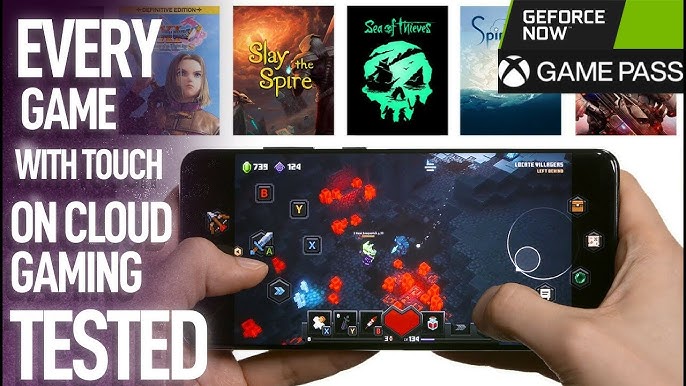
Cloud gaming works on many devices like smartphones, tablets, laptops, and smart TVs. Most platforms support Windows, macOS, Android, and iOS. Some games require a controller, but many support touch controls or keyboard and mouse. Check device and game requirements before playing.
Credit: www.youtube.com
Controller-free Gaming Options
Playing cloud games without a controller is easier than many think. Several options allow smooth gameplay without extra devices. These methods use the hardware you already have. Controller-free gaming works on phones, tablets, and computers. Each option offers unique ways to enjoy games in the cloud.
Explore these ways to play without a controller and find what fits best.
Touchscreen Controls
Many cloud games support touchscreen controls. Tap, swipe, and drag to move and interact. This method suits phones and tablets well. The screen acts like a gamepad. Games often show buttons or joysticks on the screen. Touch controls are easy to learn and quick to use.
Keyboard And Mouse Support
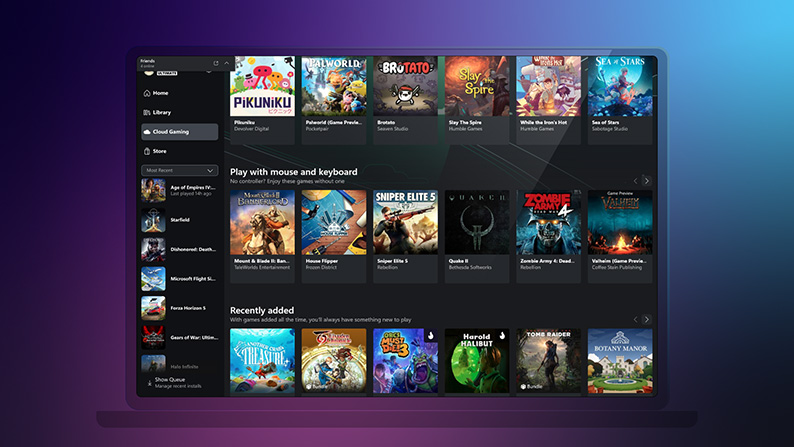
Cloud gaming on a PC or laptop lets players use a keyboard and mouse. This option works with most cloud platforms. Keys control movement and actions, while the mouse aims and clicks. It gives precise control for many games. No need to buy extra gear if you have these devices.
Using Built-in Device Sensors
Some cloud games use device sensors like gyroscopes and accelerometers. Tilt or move your device to control the game. This adds a fun, hands-free way to play. It works best on smartphones and tablets. Sensor controls can make games feel more immersive.
Setting Up For Controller-free Play
Playing cloud games without a controller is possible and can be fun. Setting up for controller-free play needs a few steps. You must adjust controls, improve your network, and change control layouts. These steps help you enjoy smooth and easy gameplay on different devices.
Follow this guide to get started quickly and play your favorite cloud games without a controller.
Configuring Controls On Different Devices
Many cloud gaming platforms support keyboard and mouse inputs. On PCs, keyboard keys often replace controller buttons. Mobile devices use touch controls that you can customize. Tablets usually allow both touch and external keyboards. Check the game settings to change controls easily. Some games allow you to map keys for better comfort. This makes playing without a controller simpler and more effective.
Optimizing Network For Smooth Gameplay
Good internet is crucial for cloud gaming without a controller. Use a strong Wi-Fi or wired connection for fewer delays. Close other apps that use the internet to keep speed steady. Test your connection speed before playing. Aim for at least 15 Mbps download speed. This reduces lag and keeps the game responsive. A stable network helps maintain smooth control without interruptions.
Customizing Control Layouts
Custom control layouts make playing easier without a controller. Many platforms let you change button positions on touchscreens. You can resize buttons to fit your fingers better. On PCs, remap keys to suit your play style. Save your custom layout for future games. Adjusting controls helps you play longer without strain. Personalizing controls adds comfort and improves your gaming experience.
Credit: support.xbox.com
Game Selection Without Controllers
Playing cloud games without a controller is possible. Many games work well with just a keyboard or touchscreen. Choosing the right games can improve your experience. Some games suit touch or keyboard better than others. This section helps you find the best games for controller-free play.
Cloud gaming platforms often support different input methods. Not all games need a controller to be fun. Understanding which games fit your setup can save time and frustration.
Best Genres For Touch Or Keyboard Play
Some game types work better without a controller. Puzzle games often use simple taps or clicks. Strategy games rely on menus and keyboard shortcuts. Casual games have easy controls for touchscreens. Role-playing games with turn-based combat fit keyboard play well. Fast-action games usually need controllers for smooth play.
Cloud Games With Native Touch Support
Many cloud games include touch controls by design. Mobile-style games often have large buttons for fingers. Some popular titles adapt controls for tablets and phones. Touch support makes cloud gaming accessible on many devices. Check game details to see if touch is supported. This lets you play without extra hardware.
Accessibility Features In Cloud Games
Cloud games often offer settings for easier play. Customizable controls let players use keyboards or touch. Some games have simplified control schemes. Visual aids and text options help players focus. These features make games playable without controllers. Accessibility helps more people enjoy cloud gaming.
Challenges And Limitations
Playing cloud games without a controller has some challenges. These challenges affect your gaming experience. Understanding these limits helps you decide if you want to play without a controller.
Input Lag Issues
Input lag is a delay between your action and the game response. Without a controller, this lag can feel longer. On-screen controls or keyboard and mouse add extra delay. This lag can make fast games hard to play well.
Reduced Control Precision
Controllers offer precise control with joysticks and buttons. Touchscreens and keyboards lack this accuracy. This reduces your ability to make quick and exact moves. Games needing sharp control become frustrating without a controller.
Compatibility Restrictions
Not all games support playing without a controller. Some require specific input devices to run. Cloud gaming platforms may limit input types too. This restricts the games you can enjoy without a controller.

Credit: www.youtube.com
Tips To Enhance Controller-free Experience
Playing cloud games without a controller can be tricky but fun. You can still enjoy many games on your phone, tablet, or computer. Some tips help improve the experience. These tips make controls easier and the game smoother. A better setup means more fun and less frustration.
Using Third-party Apps For Controls
Many apps can turn your device into a virtual controller. These apps offer touch buttons on your screen. Some apps allow you to customize the layout. This helps match the app to your favorite games. You can find these apps on app stores for free or cheap. They work well for games with simple controls.
Improving Device Responsiveness
Speed matters in cloud gaming. Close unused apps to free memory. Make sure your device is fully charged or plugged in. Use Wi-Fi instead of mobile data for a stable connection. Restart your device to clear any slowdowns. These steps help games run smoother without delays.
Troubleshooting Common Problems
Sometimes controls lag or don’t respond. Check your internet speed first. Reset the cloud gaming app if it freezes. Update the app and your device software often. Reinstall apps if problems continue. Clear cache to remove old data that slows things down. These fixes keep your game running well without a controller.
Future Trends In Cloud Gaming Controls
Cloud gaming is evolving fast. Controls are becoming easier and more natural. New technologies help players enjoy games without traditional controllers. The future holds exciting changes that make gaming more fun and accessible.
Advances In Gesture Recognition
Gesture recognition lets players control games with hand movements. Cameras and sensors track finger and arm motions. This tech removes the need for physical buttons. Players can interact with games more freely and naturally.
Developers improve accuracy and speed in gesture controls. Games respond quickly to simple and complex gestures. This trend helps players who prefer hands-free gaming options.
Voice Commands Integration
Voice commands allow players to control games by speaking. Saying simple words or phrases triggers actions in the game. This method suits players who want to keep their hands free.
Cloud gaming services add better voice recognition systems. They understand multiple languages and accents. Voice control makes gameplay more accessible and interactive for many users.
Ai-driven Control Adaptations
Artificial intelligence adjusts controls based on player habits. AI learns how you play and changes settings automatically. This makes controls easier to use and reduces frustration.
AI also suggests new control methods tailored to individual needs. It helps players with disabilities enjoy games more comfortably. This innovation supports a wider range of gamers in cloud gaming.
Frequently Asked Questions
Can I Play Cloud Gaming Using Keyboard And Mouse?
Yes, many cloud gaming platforms support keyboard and mouse input. This setup works well for PC games and improves precision in gameplay.
Is A Controller Necessary For Cloud Gaming?
A controller is not always necessary. You can use touch controls, keyboard, or mouse on supported devices for cloud gaming.
How Does Cloud Gaming Work Without A Controller?
Cloud gaming streams games to your device, allowing various input methods. You can play using touch, keyboard, or mouse instead of a controller.
Are Touch Controls Effective For Cloud Gaming?
Touch controls work for many cloud games, especially on mobile devices. However, some games may feel less precise compared to controllers.
Conclusion
Playing cloud games without a controller is possible and often simple. Many games support keyboard, mouse, or touch controls. Some platforms let you customize controls to fit your style. This means you can enjoy gaming on phones, tablets, or computers easily.
Just check game compatibility before starting. Not every game works well without a controller. Try different control options to see what feels best. Cloud gaming offers flexibility for all players. So, don’t worry if you lack a controller; you can still have fun.
As an Amazon Associate, I earn from qualifying purchases.