
Have you ever wondered how big your laptop screen really is? Knowing your screen size can change the way you work, watch movies, or even shop for the perfect laptop case.
It’s not always obvious just by looking. But don’t worry—this guide will help you find out your laptop screen size quickly and easily. By the end, you’ll feel confident about your screen’s dimensions and know exactly what fits your needs.
Keep reading, and let’s uncover the truth about your laptop screen!
Credit: www.reddit.com
Laptop Screen Sizes Explained
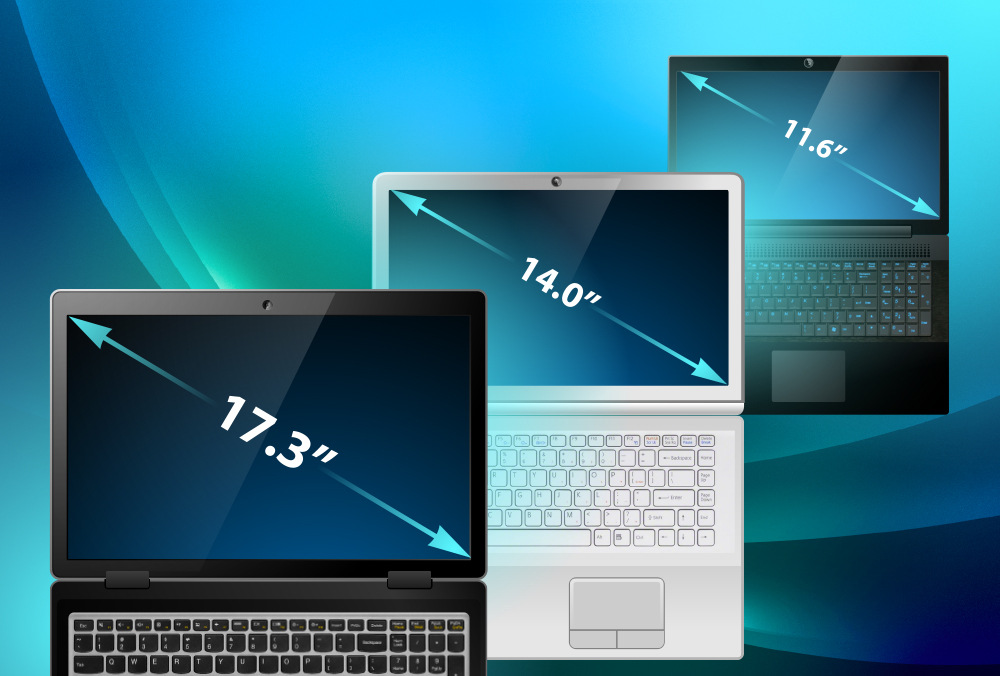
Laptop screens come in many sizes. Most common sizes range from 11 inches to 17 inches. The size means the length of the screen diagonally, corner to corner. Smaller screens like 11 to 13 inches are good for travel and light use. Medium sizes, 14 to 15 inches, balance portability and comfort. Larger screens, 16 to 17 inches, help with tasks needing more space, like design or gaming.
Aspect ratios show the shape of the screen. Common ratios include 16:9 and 16:10. A 16:9 screen is wider and good for watching videos. The 16:10 ratio offers a bit more height, helping with reading and work.
| Screen Size | Common Use | Aspect Ratio |
|---|---|---|
| 11 – 13 inches | Travel, light work | 16:9, 16:10 |
| 14 – 15 inches | Everyday use, balance | 16:9, 16:10 |
| 16 – 17 inches | Design, gaming, multitasking | 16:9 |
Credit: www.laptopscreen.com
Tools Needed For Measurement
Use a ruler or tape measure to find your laptop screen size. Measure diagonally from one corner to the opposite corner. This gives the screen’s size in inches. Make sure you measure only the visible screen, not the frame around it.
Digital measurement apps on smartphones can also help. These apps use your phone’s camera to measure objects. Hold your phone steady and follow the app’s instructions. They give quick and easy screen size results.
Step-by-step Measuring Process
Measure the screen’s diagonal from the bottom left corner to the top right corner. Use a ruler or tape measure. The number you get is the screen size in inches. This is how laptop sizes are usually shown.
Next, measure the width and height of the screen. Place the ruler at the left edge and measure to the right edge for the width. For height, measure from the bottom edge to the top edge. These numbers help you understand the exact screen shape.
| Step | What to Measure | How to Measure |
|---|---|---|
| 1 | Diagonal Length | Bottom left to top right corner |
| 2 | Screen Width | Left edge to right edge |
| 3 | Screen Height | Bottom edge to top edge |
Tips For Accurate Measurements
Measuring a laptop screen without removing it can cause errors. The screen size is the diagonal length, not the width or height. Use a ruler or tape measure and start from one corner to the opposite corner across the screen. Avoid including the frame or bezel in your measurement. The frame is the plastic or metal border around the screen and is not part of the display size.
Measure carefully to get the exact number in inches. Write down your measurement to compare with the laptop specs. Small mistakes, like measuring the frame, can make your screen seem bigger than it really is. Keep the measuring tool straight, not bent or tilted.
Interpreting Your Measurements
To convert laptop screen size from inches to centimeters, multiply by 2.54. For example, a 15-inch screen equals 38.1 cm. This helps when you see sizes listed in different units.
Matching your screen size to laptop models can guide your choices. Here is a simple table showing common screen sizes and typical laptop types:
| Screen Size (inches) | Screen Size (cm) | Common Laptop Models |
|---|---|---|
| 11.6″ | 29.5 cm | Small notebooks, Chromebooks |
| 13.3″ | 33.8 cm | Ultrabooks, lightweight laptops |
| 15.6″ | 39.6 cm | Mainstream laptops, gaming laptops |
| 17.3″ | 43.9 cm | Desktop replacements, gaming laptops |
Why Screen Size Matters
Screen size affects how easy a laptop is to carry. Smaller screens mean lighter and more compact devices. This makes them good for travel and working on the go. Bigger screens add weight and size, which can make carrying the laptop harder.
The screen size also changes how you see things on your laptop. Larger screens offer more space to open many windows and see details better. Smaller screens can feel tight and may need more scrolling or zooming.
| Screen Size | Portability | Viewing Experience |
|---|---|---|
| 11-13 inches | Very easy to carry, light | Small view, may feel crowded |
| 14-15 inches | Moderate to carry, medium weight | Good balance of space and size |
| 16 inches or more | Harder to carry, heavier | Large view, better for details |

Credit: gigarefurb.co.uk
Frequently Asked Questions
How Do I Measure My Laptop Screen Size?
To measure your laptop screen size, use a ruler or tape measure. Measure diagonally from one corner to the opposite corner. This gives the screen size in inches, excluding the bezel or frame around the screen.
What Units Are Laptop Screens Measured In?
Laptop screens are measured in inches. The measurement is taken diagonally across the display area. This standard helps compare different screen sizes easily.
Does Screen Size Affect Laptop Weight?
Yes, larger screens usually increase laptop weight. Bigger screens require more materials and components, adding to overall weight. However, design and materials also impact the laptop’s weight.
Can Screen Size Impact Battery Life?
Yes, larger screens generally consume more power. Bigger displays use more energy, which can reduce battery life. However, battery capacity and usage also affect overall battery performance.
Conclusion
Knowing your laptop screen size helps you choose the right device. It affects how clear and big things look on your screen. Measuring is simple with a tape measure or checking device specs. A good screen size makes work and play more comfortable.
Remember, bigger is not always better; balance size with your needs. Now you can find the perfect laptop screen for you. Keep this guide handy when shopping or comparing laptops. Your screen size matters for better viewing every day.
As an Amazon Associate, I earn from qualifying purchases.

