
Are you wondering if your ankle monitor is actually recording? It’s a question that can cause a lot of stress and uncertainty.
You want to make sure everything is working correctly, but you’re not sure how to check. Knowing for sure can give you peace of mind and help you avoid any problems. You’ll discover simple ways to tell if your ankle monitor is recording properly.
Keep reading to find out exactly what signs to look for and what steps you can take to stay in control.
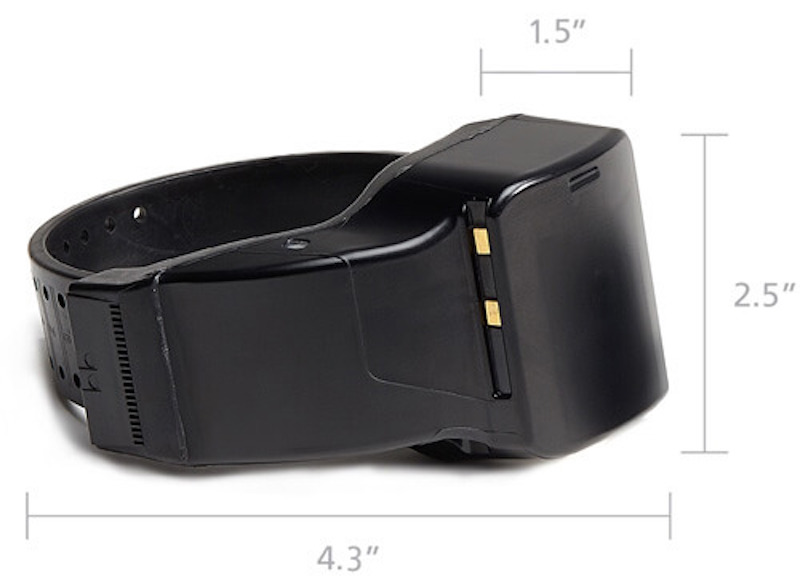
Credit: bi.com
Signs Your Ankle Monitor Is Active
Knowing if your ankle monitor is recording is important. The device has clear signs to show it is active. These signs help you stay aware and avoid trouble. Understanding these signals can give you peace of mind. Your ankle monitor uses lights, sounds, and vibrations to communicate its status.
Visual Indicators On The Device
Most ankle monitors have small lights on the front. A steady green light means the device is working well. A blinking light can show it is recording or sending data. Red or flashing lights usually mean a problem or low battery. Watch the lights often to check the device’s status.
Audible Alerts To Watch For
The device may make sounds or beeps at times. A single beep can mean it started recording. Multiple beeps might warn about a low battery or a loose fit. Listen carefully for these sounds in quiet settings. They help you know if the monitor needs attention.
Vibration Signals
Some ankle monitors use vibrations as signals. A short vibration can confirm the device is active. Repeated vibrations might signal a low battery or a tamper alert. You can feel these even if the device is under clothes. Vibrations are a subtle way the monitor communicates.
Common Issues Affecting Recording
An ankle monitor records your location and activity. Sometimes, it may stop recording correctly. Knowing common issues helps you check your device. This keeps you informed and avoids problems.
Battery Life And Charging
The battery powers the ankle monitor. Low battery can stop recording. Charging it fully is important. Use the charger that comes with the device. Check the battery indicator often. A dead battery means no data is recorded.
Device Malfunctions
Sometimes, the device itself may fail. Buttons may not respond or the screen may be blank. These signs show the device has a problem. Resetting the device might help. If problems continue, contact your monitoring officer. Do not ignore device errors.
Signal Interference
The monitor sends signals to the tracking system. Signal interference can block or delay this. Thick walls or metal objects cause interference. Keep the device away from such obstacles. Moving to open spaces can improve signal. Good signal means accurate and continuous recording.
How To Test Your Ankle Monitor
Testing your ankle monitor helps ensure it records your movements correctly. Regular checks avoid problems with your monitoring. Knowing how to test your device keeps you informed and secure.
Self-check Procedures
Start by observing the monitor’s lights. Usually, a green or blinking light shows it is working. Avoid covering the device or tampering with it. Check the strap is tight but not too tight. Make sure the monitor stays dry and clean. If your device vibrates or beeps, note the pattern. These signals often mean the device is recording or has a problem.
Contacting Your Officer Or Provider
Call your officer or the monitoring company for help. They can confirm if the device is working. Explain any issues clearly and calmly. Follow their instructions for checks or resets. Keep a record of your calls and their advice. This shows you are responsible and cooperative.
Using Apps Or Online Portals
Many programs offer apps or websites for monitoring. Log in to check your status and device signals. These tools show if the monitor is recording properly. Use the app to report problems quickly. Always update your app to the latest version. This keeps your data accurate and secure.
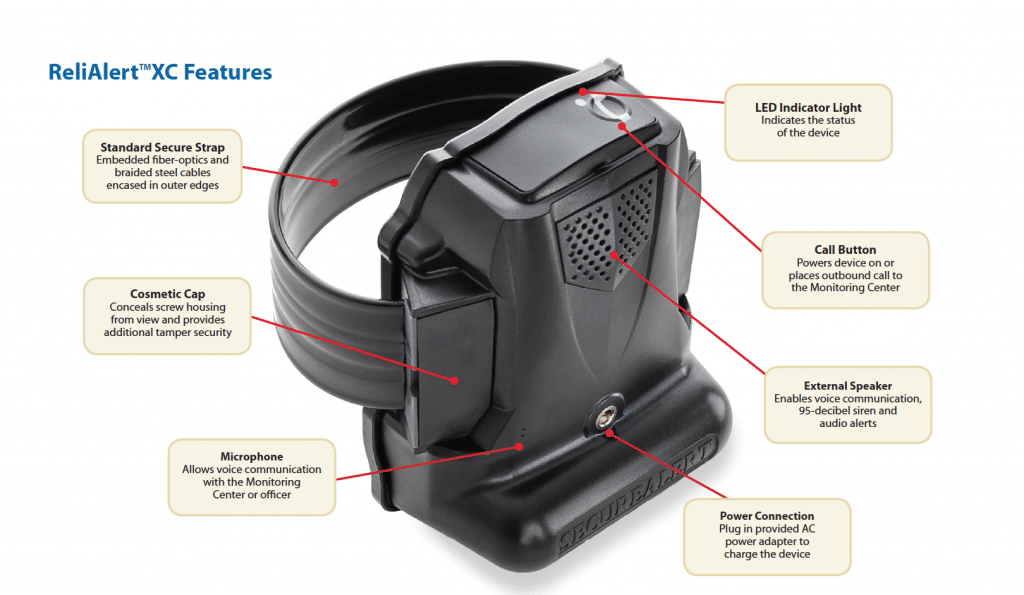
Credit: tampabaymonitoring.com
Maintaining Accurate Monitoring
Maintaining accurate monitoring is key for your ankle monitor to work properly. It ensures the device records your location and activity correctly. This helps avoid any problems with your monitoring program. Taking care of the device and following rules is important.
Proper Wear And Fit
Wear the ankle monitor snugly around your ankle. It should not be too loose or too tight. A loose fit can cause the device to move or fall off. A tight fit may cause discomfort or skin problems. Check the strap daily to keep it secure and comfortable.
Avoiding Tampering
Do not try to remove or damage the monitor. Tampering can stop the device from recording your movements. It may also trigger alarms or alerts. Keep the monitor clean and dry. Avoid covering it with heavy clothes or objects that block signals.
Regular Device Inspections
Look at the monitor every day to check for damage or alerts. Make sure the lights on the device are working. If the device shows error signals, report it to the monitoring agency immediately. Regular checks help catch problems early and keep the device working well.
When To Seek Help
Knowing when to seek help with your ankle monitor is very important. The device must work correctly to track your location. Problems may happen. You should act quickly to avoid bigger issues. Here are some signs that tell you it’s time to get help.
Reporting Device Issues
Call your monitoring officer right away if the device feels loose or broken. Do not try to fix it yourself. If the device stops beeping or showing signals, report it. Any strange noises or flashing lights need attention. Early reporting can prevent penalties.
Emergency Situations
If you feel unsafe or are in danger, seek help immediately. Call emergency services if needed. Do not wait to fix the device in urgent cases. Your safety comes first. Let authorities know about your situation and the monitor.
Support Resources
You can find help from support groups and legal advisors. Many communities have resources for people with ankle monitors. These resources provide advice and answer your questions. Use them to understand your rights and responsibilities better.

Credit: dgmoorelaw.com
Frequently Asked Questions
How Can I Tell If My Ankle Monitor Is Recording?
Most ankle monitors have indicator lights or sounds showing active recording. Check your device manual for specific signals. Contact your monitoring officer if unsure. Regularly inspect your device to ensure it is working properly and transmitting data as required.
What Do The Lights On An Ankle Monitor Mean?
Typically, green means the device is working, red signals an issue, and flashing may indicate recording. Each brand has unique light codes, so consult the user guide. Proper interpretation helps ensure compliance and avoid violations.
Can I Test If My Ankle Monitor Is Recording?
Do not attempt unauthorized tests on your ankle monitor. Instead, contact your monitoring agency to confirm proper function. They can verify if the device is recording and transmitting data correctly. Unauthorized tampering can lead to penalties.
How Often Does An Ankle Monitor Record Data?
Ankle monitors generally record and transmit location data continuously or at set intervals. Frequency varies by device and monitoring program. This ensures accurate tracking and compliance with court orders or probation terms.
Conclusion
Knowing if your ankle monitor records is important for peace of mind. Check the device for lights or sounds that show it is working. Keep the monitor charged and follow all rules given by authorities. Stay calm and trust the process.
Being aware helps you avoid issues and stay safe. Remember, the monitor is there to help, not to cause trouble. Stay informed and take care of your device every day. That way, you can focus on moving forward without worry.
As an Amazon Associate, I earn from qualifying purchases.

