
Have you ever lost your keys, wallet, or bag and spent precious minutes searching everywhere? Tile trackers are here to change that.
But how do these tiny devices actually work to help you find your lost items? Understanding how Tile trackers function can save you time, reduce stress, and keep your daily life running smoothly. Keep reading, and you’ll discover the simple technology behind these clever gadgets—and why they might be exactly what you need.
Tile Tracker Basics
Understanding the basics of Tile trackers is key to knowing how they help find lost items. These small devices attach to things like keys or bags. They use technology to show where your items are on a phone app. Simple and effective, Tile trackers offer peace of mind.
Let’s explore what a Tile tracker is and what parts make it work.
What Is A Tile Tracker
A Tile tracker is a small, lightweight device. It connects to your smartphone via Bluetooth. You attach it to items you want to keep track of. The Tile app shows the last known location of your item. It helps you find lost belongings quickly. The device works indoors and outdoors.
Core Components
Tile trackers have a few key parts. A Bluetooth chip sends signals to your phone. A speaker makes sounds to help you find the item nearby. The battery powers the device for months or years. A small button lets you activate or reset the Tile. All parts work together to track your items easily.

Credit: www.sciencedirect.com
Technology Behind Tile Trackers
Tile trackers use smart technology to help find lost items quickly. They combine several tools to keep track of your things. These tools work together to make locating items simple and fast.
Understanding the technology behind tile trackers shows how they stay connected and find lost objects. The main parts include Bluetooth, Ultra-Wideband, and a special community network.
Bluetooth Connectivity
Tile trackers mainly use Bluetooth to connect to your phone. Bluetooth creates a short-range wireless link. When your item is nearby, your phone can detect the tile’s signal. This connection lets you ring the tile or see its last known location. Bluetooth is low power, so the tile’s battery lasts long.
Ultra-wideband Integration
Some newer tile models include Ultra-Wideband (UWB) technology. UWB helps locate items more precisely than Bluetooth. It measures the distance and direction between your phone and the tile. This feature helps guide you directly to the lost item. UWB works best in close range and offers better accuracy.
Community Find Network
Tile trackers also use a crowd-sourced network to find lost items far away. When any phone with the Tile app comes near your lost item, it sends its location to you. This process happens anonymously and securely. The community network expands the search area beyond your Bluetooth range. It improves chances of finding lost items quickly.
Setting Up Your Tile Tracker
Setting up your Tile tracker is simple and fast. It helps you start tracking your items right away. Follow clear steps to connect the tracker to your phone and customize alerts. This ensures you get the most from your Tile device.
Pairing With Devices
First, download the Tile app from your app store. Open the app and create an account or log in. Press the button on your Tile to turn it on. The app will search and find your Tile automatically. Follow the on-screen instructions to finish pairing. Your Tile is now connected and ready to use.
App Features
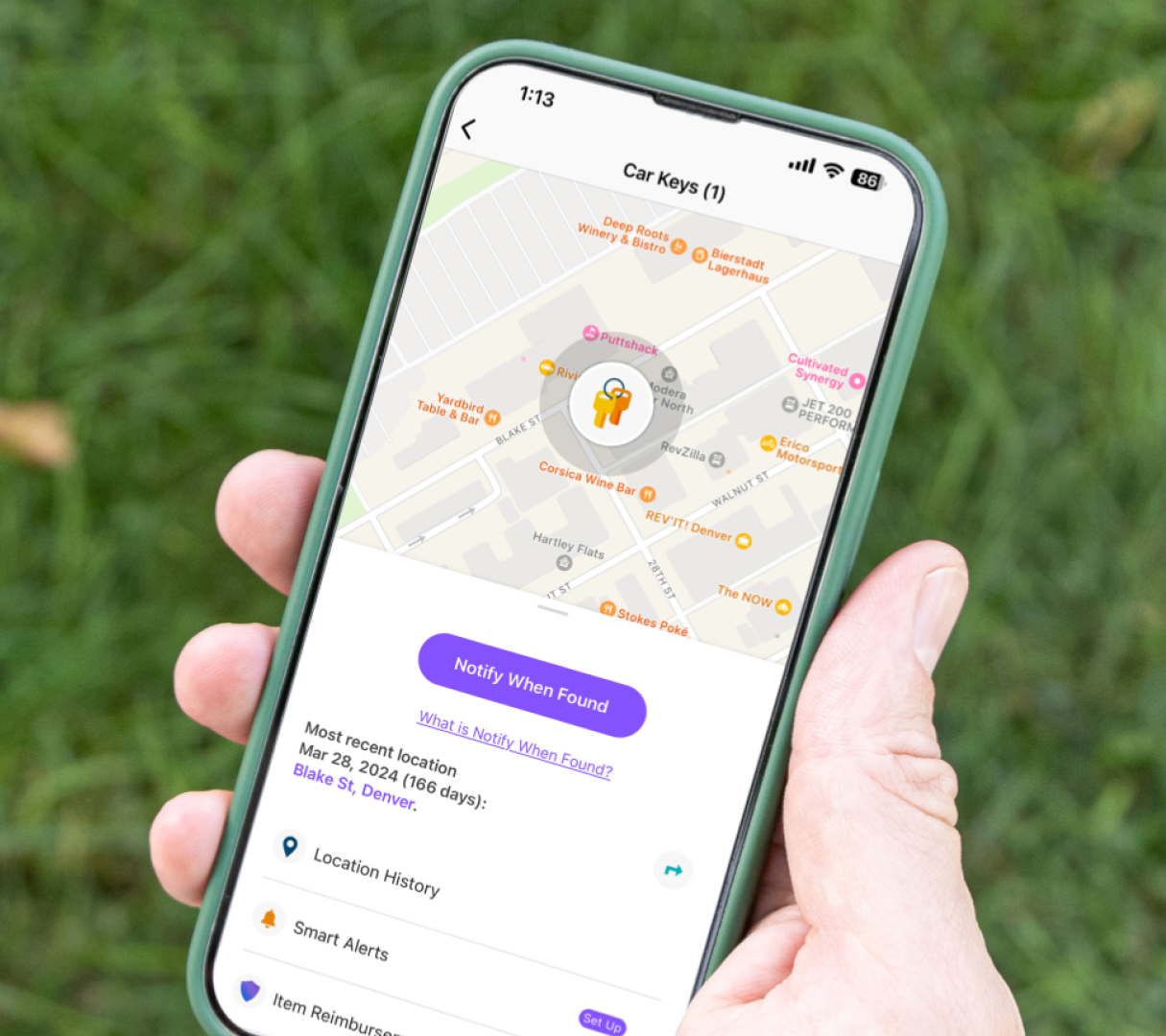
The Tile app shows your tracker’s location on a map. It can ring your Tile to help find it nearby. The app also notifies you if your Tile moves out of range. You can see the last known location if your item is lost. The app works with many devices, like phones and tablets.
Customizing Alerts
You can set alerts to notify you about your Tile. Choose sound types and volume to suit your needs. Set up separation alerts to warn if you leave items behind. Customize notifications for different Tiles on your account. These settings help you stay aware and protect your belongings.
Credit: www.life360.com
Locating Items With Tile
Locating items with Tile is simple and fast. Tile uses a small Bluetooth device attached to your belongings. When you misplace an item, the Tile app helps you find it quickly. The app connects with the Tile tracker and shows its location on your phone.
Using The App To Find Items
Open the Tile app on your smartphone. The app lists all your Tiles. Tap the item you want to find. The app shows the Tile’s location on a map. If the item is nearby, the app guides you to it.
Ring Feature Functionality
Press the “Ring” button in the app. The Tile tracker starts making a loud sound. The sound helps you find the item even if it’s under cushions or in a drawer. The ring keeps going until you find the item or stop it.
Last Known Location
If the item is out of Bluetooth range, the app shows its last known location. This location is where your phone last connected to the Tile. It helps narrow down the search area. You can start looking from that spot to find your lost item.
Privacy And Security Measures
Tile trackers help find lost items through smart technology. Protecting user privacy is a top priority for these devices. Several security measures keep your data safe and private. These measures prevent unauthorized access and protect your information.
Data Encryption
Tile trackers use strong data encryption to protect information. Encryption changes data into a code that only authorized devices can read. This stops hackers from stealing your location or personal details. Data moves safely between your tracker and phone using encryption. This keeps your information private at all times.
User Control Settings
Users have control over their privacy settings on Tile apps. You decide what information to share and with whom. You can turn off location sharing or delete your data anytime. These settings give you full control over your privacy. You stay in charge of your data and how it is used.
Battery Life And Maintenance
Tile trackers rely on batteries to stay active and help you find your items. Knowing about battery life and how to maintain it ensures your tracker works well. Proper care helps avoid sudden power loss and keeps your device ready to use.
Battery Types
Most tile trackers use coin cell batteries. These batteries are small and round, easy to replace. Some newer models have built-in rechargeable batteries. Rechargeable batteries let you charge the tracker without removing the battery.
Replacing Batteries
Replacing batteries is simple and fast. Open the tracker’s back cover carefully. Remove the old battery and insert a new one with the right side up. Close the cover tightly. Always use the correct battery type to avoid damage.
Extending Battery Life
Turn off features you do not need, like constant Bluetooth scanning. Lower the volume of alert sounds to save power. Keep the tracker away from extreme temperatures. Charge rechargeable trackers regularly to maintain battery health.
Comparing Tile With Other Trackers
Comparing Tile with other trackers helps understand its strengths and limits. Many trackers share features but differ in design and network size. Knowing these differences helps choose the best tracker for daily use. Below is a clear comparison of Tile against other popular brands.
Key Differences
Tile uses Bluetooth to connect with phones and other devices. It has a large user network to find lost items quickly. Other trackers may use GPS or cellular signals, which need more battery power.
Tile offers different models with various ranges and sizes. Some competitors focus on longer range or built-in speakers. Battery life varies, with Tile often lasting up to a year before replacement.
Pros And Cons
Tile’s pros include a wide user network and easy app interface. It works well indoors and in busy places. Tile’s battery replacement is simple for most models.
Cons include limited range compared to GPS trackers. Tile relies on nearby devices to find lost items. No built-in GPS means it may not track items outside Bluetooth range.
Other trackers may offer real-time GPS and global coverage. They often have higher costs and shorter battery life. Some models are bulkier and less suitable for small items.
Practical Uses For Tile Trackers
Tile trackers help find items quickly and reduce stress. They use Bluetooth to connect with your phone. When an item is lost, the app shows its last known location. This saves time and effort in searching.
These small devices fit almost anywhere. They work well for many daily uses. Here are some practical ways people use tile trackers.
Everyday Item Tracking
Tile trackers attach to keys, wallets, or bags. They help find these items fast. No more long searches before leaving home. The app rings the tile to show its spot. It works even if the item is under a couch or in another room.
Travel And Luggage
Attach a tile tracker to suitcases or backpacks. It helps keep track of bags in busy airports. You can check if your luggage is near. This lowers the chance of losing bags on trips. The app shows the last place your luggage was seen.
Pet Tracking
Tile trackers fit on pet collars. They help find pets that wander off. The app shows the pet’s location on a map. This offers peace of mind for pet owners. It is easier to bring pets home safely and fast.
Troubleshooting Common Issues
Troubleshooting common issues with Tile trackers helps keep them working well. Problems can stop the device from finding lost items. Fixing these issues is often simple and quick. Understanding common problems makes it easier to solve them fast.
Connectivity Problems
Tile trackers connect using Bluetooth. If the connection fails, the tracker won’t show its location. Check if Bluetooth is turned on your phone. Move closer to the Tile device to improve the signal. Restart your phone and the Tile to refresh the connection. Remove and re-add the Tile in the app if needed. Keep the Tile’s battery charged for better performance.
App Malfunctions
The Tile app controls the tracker and shows its location. Sometimes the app may freeze or crash. Close the app completely and open it again. Update the app to the latest version for new fixes. Clear the app cache in your phone settings to solve loading issues. Restart your phone to clear temporary glitches. Ensure your phone’s operating system is up to date for compatibility.

Credit: www.youtube.com
Frequently Asked Questions
How Do Tile Trackers Locate Lost Items?
Tile trackers use Bluetooth signals to connect with nearby devices. These devices send location updates to the Tile app. This helps users find items quickly by showing their last known location on a map.
Can Tile Trackers Work Without A Smartphone?
Tile trackers need a smartphone for initial setup and location tracking. However, the Tile community network helps locate items when your phone is out of range. Nearby Tile users anonymously update your item’s location for you.
How Accurate Is A Tile Tracker’s Location?
Tile trackers provide location accuracy within a few feet using Bluetooth. The exact accuracy depends on signal strength and obstacles like walls. The app shows the last known location to guide you to your lost item.
Do Tile Trackers Require Charging Or Batteries?
Most Tile trackers use replaceable batteries that last several months. Some models come with rechargeable batteries. Battery life varies based on usage and model type, ensuring minimal maintenance.
Conclusion
Tile trackers help find lost items quickly and easily. They use Bluetooth to connect with your phone. When an item goes missing, the tracker shows its last known location. Many also use a community network to widen the search. This technology saves time and reduces stress.
It keeps your important things within reach. Understanding how tile trackers work makes using them simple. They offer a practical way to stay organized every day. Give them a try to keep track of what matters most.
As an Amazon Associate, I earn from qualifying purchases.
