
Have you ever wondered what makes wireless speakers so convenient and powerful? You probably enjoy the freedom of moving around without tangled wires, but do you know how these devices actually work?
Understanding the magic behind wireless speakers can help you choose the right one and get the best sound experience. You’ll discover the simple technology that brings music to your ears without any cables holding you back. Ready to unlock the secrets of wireless sound?
Keep reading, and you’ll see how easy it is to enjoy great music anywhere.
Wireless Speaker Basics
Wireless speakers let you enjoy music without messy cables. They connect to your devices using signals sent through the air. This makes listening to music more flexible and convenient. Understanding how these speakers work helps you choose the right one for your needs.
Types Of Wireless Speakers
There are several types of wireless speakers. Bluetooth speakers connect directly to phones or tablets. Wi-Fi speakers link to your home network and stream music online. Some speakers use radio frequency (RF) signals to send sound over longer distances. Each type suits different uses and spaces.
Key Components
Wireless speakers have key parts that make them work. A receiver picks up the wireless signal. An amplifier boosts the sound power. The speaker drivers convert electrical signals into sound waves. A battery powers the speaker when there is no plug. Together, these parts create clear, wireless sound.
Credit: kdfoundation.org
Wireless Signal Transmission
Wireless speakers send audio without wires. They rely on signals that travel through the air. These signals carry sound data from your device to the speaker. Understanding how wireless signal transmission works helps you choose the right speaker.
Bluetooth Technology
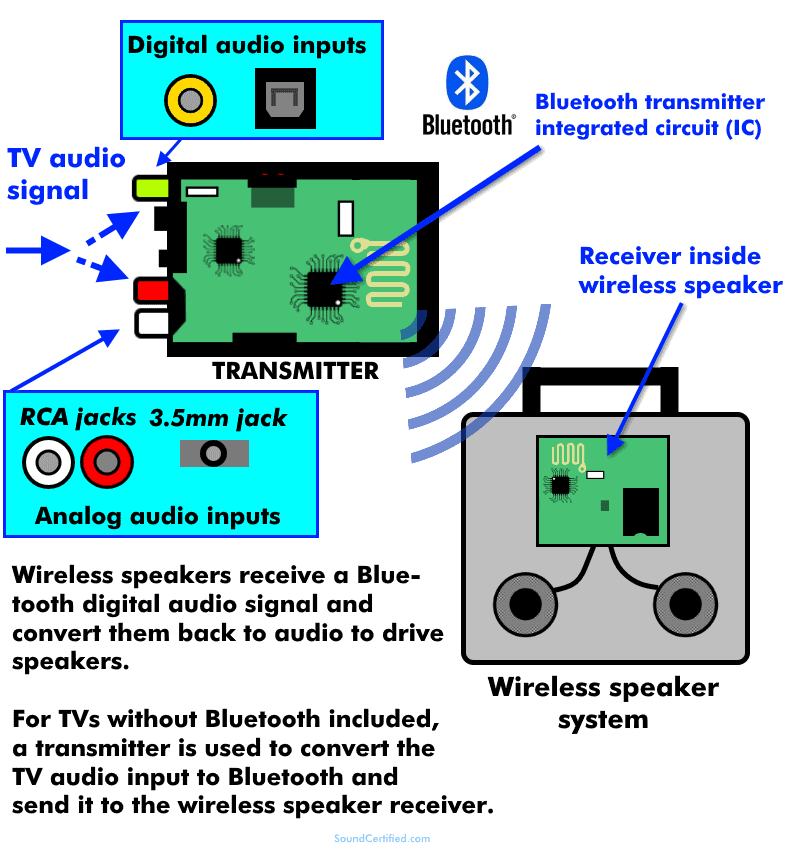
Bluetooth is a common method for wireless speakers. It creates a short-range connection between devices. Bluetooth uses radio waves to send audio signals. The signal travels from your phone or computer to the speaker. It pairs quickly and uses little power. Bluetooth works well in small rooms or close distances.
Wi-fi Connectivity
Wi-Fi speakers connect through your home internet network. They can stream music from the internet or your device. Wi-Fi allows longer range and better sound quality. It supports multiple speakers playing together. Wi-Fi speakers often have more features than Bluetooth models. They work best in larger homes or networks.
Other Wireless Methods
Some speakers use other wireless technologies like NFC or RF. NFC helps start connections quickly with a simple tap. RF signals can cover longer distances than Bluetooth. These methods may offer unique benefits for specific uses. Each has strengths depending on the speaker and environment.
Audio Processing Inside Speakers
Inside wireless speakers, audio processing transforms digital signals into sound. This process ensures clear, high-quality audio output. Two main steps occur: digital signal conversion and amplification. Each step plays a key role in making music and voices sound great from your speaker.
Digital Signal Conversion
Wireless speakers receive audio as digital data. This data cannot be heard directly. The speaker uses a digital-to-analog converter (DAC) to change this data into analog signals. These signals can move speaker parts to create sound waves. The DAC ensures sound matches the original recording closely. It handles different audio formats and keeps noise low.
Amplification Process
After conversion, the analog signal is weak. The speaker uses an amplifier to boost this signal. Amplification raises the signal’s power to move the speaker’s drivers. Drivers are parts that create sound by vibrating air. The amplifier balances power to avoid distortion. It helps produce loud and clear sound without damage.
Power And Battery Management
Power and battery management plays a key role in wireless speakers. It affects how long the speaker can play music without needing a recharge. Good battery life means more fun without interruptions. Efficient power use helps extend the speaker’s lifespan. Understanding battery types, charging methods, and power efficiency helps users make smart choices.
Battery Types
Most wireless speakers use lithium-ion batteries. These batteries store a lot of energy in a small size. They are light and last longer than older battery types. Some speakers may use lithium-polymer batteries, which are flexible and safe. Battery capacity is measured in milliamp-hours (mAh). Higher mAh means longer playtime but can add weight.
Charging Methods
Wireless speakers often charge via USB cables. USB-C is common due to fast charging and easy use. Some models support wireless charging pads. This adds convenience by removing the need for cables. Charging times vary from one to several hours. A quick charge feature allows partial use after a short charge.
Power Efficiency
Power efficiency extends battery life during use. Speakers use smart chips to reduce power waste. Automatic sleep mode activates when no sound plays. Volume level also affects battery life. Lower volumes use less power and last longer. Efficient design helps users enjoy longer music sessions.
Sound Quality Factors
Sound quality is a key part of wireless speakers. It affects how clear and rich the music sounds. Different parts and features of the speaker shape this quality. Understanding these factors helps choose the best speaker for your needs.
Speaker Drivers
Speaker drivers create the sound you hear. They move air to make sound waves. Larger drivers can produce deeper bass sounds. Smaller drivers handle higher notes well. Good drivers balance all sounds evenly. This balance makes music sound natural and full.
Acoustic Design
The shape and size of the speaker matter. Acoustic design controls how sound moves inside the speaker. It stops sound from bouncing around too much. This control reduces echoes and distortion. Materials used in the speaker also affect sound. Soft or hard materials change how sound feels to your ear.
Signal Interference
Wireless speakers get sound signals through the air. Other devices can block or weaken these signals. This problem is called interference. It can make music cut out or sound bad. Good speakers use strong signals to avoid interference. Some use special technology to keep the sound clear.
Credit: www.sony.ee
Pairing And Connectivity
Pairing and connectivity are key to enjoying wireless speakers. These steps link your device and speaker without wires. The process lets you play music smoothly and control sound easily. Understanding pairing helps avoid common connection problems.
Device Pairing Steps
Turn on your wireless speaker first. Make sure it is in pairing mode. Usually, a light blinks to show this. On your phone or computer, open Bluetooth settings. Look for the speaker name in the list. Tap the name to connect. Wait a few seconds. A sound or light confirms the link. Your device is now ready to play music through the speaker.
Multi-speaker Setup
Some wireless speakers support multiple units linked together. This setup gives louder and richer sound. Use the speaker app or buttons to connect them. Turn on all speakers and enable pairing mode. Choose the main speaker to control others. Connect each speaker in the app or settings. The speakers work as one system. Enjoy music in different rooms or outdoors with clear sound.
Troubleshooting Common Issues
Wireless speakers bring great convenience but sometimes face issues. Troubleshooting helps fix these common problems quickly. Understanding basic fixes saves time and frustration.
Most problems relate to connection, sound quality, or battery. Simple steps often restore your speaker’s performance. This guide covers easy solutions for typical troubles.
Connectivity Problems
Speakers may fail to connect with your device. Check if Bluetooth is on and the speaker is in pairing mode. Move closer to the speaker to avoid weak signals. Restart both devices to refresh connections. Remove old or unused devices from Bluetooth settings. Update your device’s software to fix bugs affecting connection.
Audio Distortion
Distorted sound can ruin your listening experience. Lower the volume to prevent speaker overload. Make sure no objects block the speaker’s sound path. Interference from other wireless devices can cause distortion. Change the speaker’s location away from routers or microwaves. Reset the speaker to factory settings if distortion continues.
Battery Life Concerns
Battery issues reduce playtime and cause power loss. Charge the speaker fully before use. Use the original charger and cable for best results. Avoid extreme temperatures as they harm battery life. Turn off the speaker when not in use to save power. Replace the battery if it drains too fast after many uses.
Future Trends In Wireless Audio
Wireless speakers send sound using signals from devices like phones or computers. These signals travel through Bluetooth or Wi-Fi to play music without wires. Advances focus on better sound and longer battery life for easier use.
Advances In Wireless Tech
Wireless audio is changing fast. New technology makes sound clearer and connections stronger. Bluetooth is getting better with faster data transfer and less power use. Wi-Fi speakers offer higher quality sound and longer range. Some systems use multiple connections to avoid drops in sound. Expect smaller devices with bigger sound in the near future.
Smart Features Integration
Wireless speakers now work with smart assistants like Alexa and Google. This makes control easy with just your voice. Many speakers connect with home automation systems to play music in different rooms. They can learn your preferences and adjust sound automatically. Smart features will continue to grow, making speakers more helpful and fun to use.
:max_bytes(150000):strip_icc()/wireless-speakers-and-home-theater-1846770-976e460c9c3248c7b0e9f0e6c489cfe0.png)
Credit: www.lifewire.com
Frequently Asked Questions
How Do Wireless Speakers Connect To Devices?
Wireless speakers connect via Bluetooth, Wi-Fi, or proprietary signals. They pair with smartphones, tablets, or computers for audio streaming. This eliminates cables and allows flexible placement. Connection quality depends on range and interference.
What Powers Wireless Speakers Without Cables?
Wireless speakers are powered by rechargeable batteries or built-in lithium-ion cells. Battery life varies by model, often lasting 6 to 20 hours. Some models support USB charging or wireless charging pads.
Are Wireless Speakers Compatible With All Devices?
Most wireless speakers support Bluetooth, making them compatible with many devices. Wi-Fi speakers require the same network connection as the source device. Compatibility depends on supported protocols and operating systems.
Do Wireless Speakers Affect Sound Quality?
Wireless technology can slightly affect sound quality due to compression. High-end speakers use advanced codecs to minimize loss. Proper placement and signal strength also impact audio performance.
Conclusion
Wireless speakers use signals to play music without wires. They connect through Bluetooth or Wi-Fi. This lets you move freely and enjoy sound anywhere. Batteries power most models for cordless use. Sound quality depends on speaker size and technology. Understanding how they work helps you choose the right one.
Wireless speakers offer convenience and flexibility for everyday listening. Simple, smart, and easy to use. Perfect for music lovers who want freedom.
As an Amazon Associate, I earn from qualifying purchases.

