
Are you confused about how to find the exact size of your laptop screen? Knowing your screen size is more important than you might think.
It affects everything from your viewing comfort to choosing the right accessories. You’ll discover a simple, step-by-step way to measure your laptop screen accurately. By the end, you’ll have the confidence to pick the perfect laptop or accessories that match your needs.
Keep reading, and let’s make this easy for you!
Laptop Screen Basics
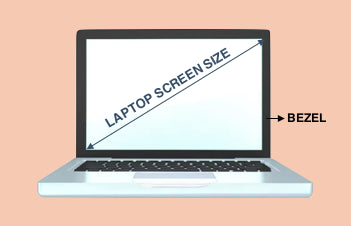
The screen size of a laptop is the length of the screen’s diagonal. It is measured in inches. This number tells how big the screen is, not the width or height alone.
The aspect ratio shows the screen’s shape. It is the ratio of the width to the height. Common aspect ratios are 16:9 and 16:10. These numbers mean the screen is wider than it is tall.
| Common Screen Size (inches) | Typical Use |
|---|---|
| 11.6″ | Very portable, small laptops |
| 13.3″ | Lightweight and easy to carry |
| 15.6″ | Most common size, good balance |
| 17.3″ | Large screen, good for movies |

Credit: www.youtube.com
Tools Needed For Measurement
To measure a laptop screen size, a ruler or tape measure works well. Place the tool at one corner of the screen, not including the frame. Measure diagonally across to the opposite corner. This length is the screen size, usually shown in inches.
Digital measuring tools can also help. Apps on smartphones can measure distances quickly. These tools can be more precise and easier for some people. Just align the screen corners on the app’s guide. The app will show the diagonal length instantly.
Step-by-step Measurement Process
To measure a laptop screen size, start by finding a ruler or tape measure. Measure the screen from the top left corner to the bottom right corner. This diagonal length is the main size of the screen. Be sure to measure only the visible screen, not the laptop frame or edges.
Next, measure the screen width by placing the ruler from the left edge to the right edge of the visible screen. Then, measure the screen height from the top edge to the bottom edge. These width and height measurements help understand the screen shape and aspect ratio.
| Measurement | How to Measure |
|---|---|
| Diagonal Length | Measure from top-left to bottom-right corner of the screen. |
| Width | Measure from left edge to right edge of the screen. |
| Height | Measure from top edge to bottom edge of the screen. |
Credit: www.agvabags.com
Interpreting Screen Size Results
Screen size is measured diagonally across the screen. It is shown in inches. Pixels are different. They show how many tiny dots create the image. More pixels mean a clearer picture.
Two screens can have the same size but different pixels. A 15-inch laptop can have fewer or more pixels. This changes how sharp the image looks. Pixels affect the screen’s resolution.
| Screen Size (inches) | Common Resolutions (pixels) |
|---|---|
| 13.3″ | 1920 x 1080 (Full HD) |
| 15.6″ | 1366 x 768, 1920 x 1080 |
| 17.3″ | 1920 x 1080, 3840 x 2160 (4K) |
Choosing screen size depends on your needs. Bigger screens show more but can weigh more. Smaller screens are light but show less space.
Tips For Accurate Measurement
Measure only the visible screen area, not the bezels. Bezels are the plastic or metal frames around the screen. Including them makes the size look bigger than it is.
Use a ruler or tape measure. Start from one corner of the screen’s glass. Measure diagonally to the opposite corner inside the bezel. This diagonal is the screen size in inches.
Do not measure the width or height alone. The screen size is always the diagonal length. This helps compare different laptop screens easily.

Credit: geekscallout.co.uk
Why Screen Size Matters
Screen size affects how easy a laptop is to carry. Smaller screens make laptops lighter and fit better in bags. Bigger screens add weight and take more space. This can make laptops less handy to move around with.
The size also changes how clear and big things look on the screen. A larger screen shows more details and is better for watching videos or working on projects. Smaller screens may feel cramped and harder to see clearly for long times.
Frequently Asked Questions
How Do You Measure Laptop Screen Size Accurately?
Measure diagonally from one corner of the screen to the opposite corner. Do not include the laptop’s bezel or frame in this measurement. Use a ruler or tape measure for precision. This diagonal length in inches is the laptop’s screen size.
Why Is Laptop Screen Size Measured Diagonally?
Diagonal measurement captures the true display area since screens are rectangular. Measuring width or height alone doesn’t represent the full screen size. The diagonal gives a consistent way to compare different screens regardless of their aspect ratio.
Does Bezel Size Affect Laptop Screen Measurement?
No, the bezel size does not affect screen measurement. Screen size is the visible display area only. Always measure from the inside edges of the bezel, not including the frame, to get the accurate screen size.
Can Screen Resolution Affect Perceived Laptop Size?
Screen resolution does not change the physical screen size. It determines display clarity and detail, not the actual dimensions. Two laptops with the same screen size can have different resolutions and visual sharpness.
Conclusion
Measuring a laptop screen size is simple and useful. Always measure diagonally from one corner to the opposite. Use a ruler or tape measure for accuracy. Knowing screen size helps choose the right laptop for your needs. It also guides you when buying accessories or cases.
Keep this method in mind for easy and quick checks. Now, you can confidently find the exact screen size. No confusion, just clear and simple steps.
As an Amazon Associate, I earn from qualifying purchases.

