
As an Amazon Associate, I earn from qualifying purchases.
Have you ever wondered how many keys are on a full size keyboard? Whether you’re typing up a storm, gaming, or just curious about your setup, knowing the exact number can help you understand your keyboard better.
This simple detail affects your comfort, speed, and even the shortcuts you use every day. Stick with me, and by the end, you’ll see your keyboard in a whole new light—and maybe even type a little smarter. Ready to find out?
Let’s dive in.
Full Size Keyboard Basics
A full size keyboard is a popular choice for many computer users. It offers a complete set of keys needed for various tasks. This type of keyboard is easy to use and familiar to most people. It helps improve typing speed and accuracy. Understanding its basic features can help you decide if it suits your needs.
Full size keyboards are common in offices, schools, and homes. They provide all the essential keys in one device. This makes them practical for everyday use. Knowing the key count and layout helps you use the keyboard better.
Standard Key Count
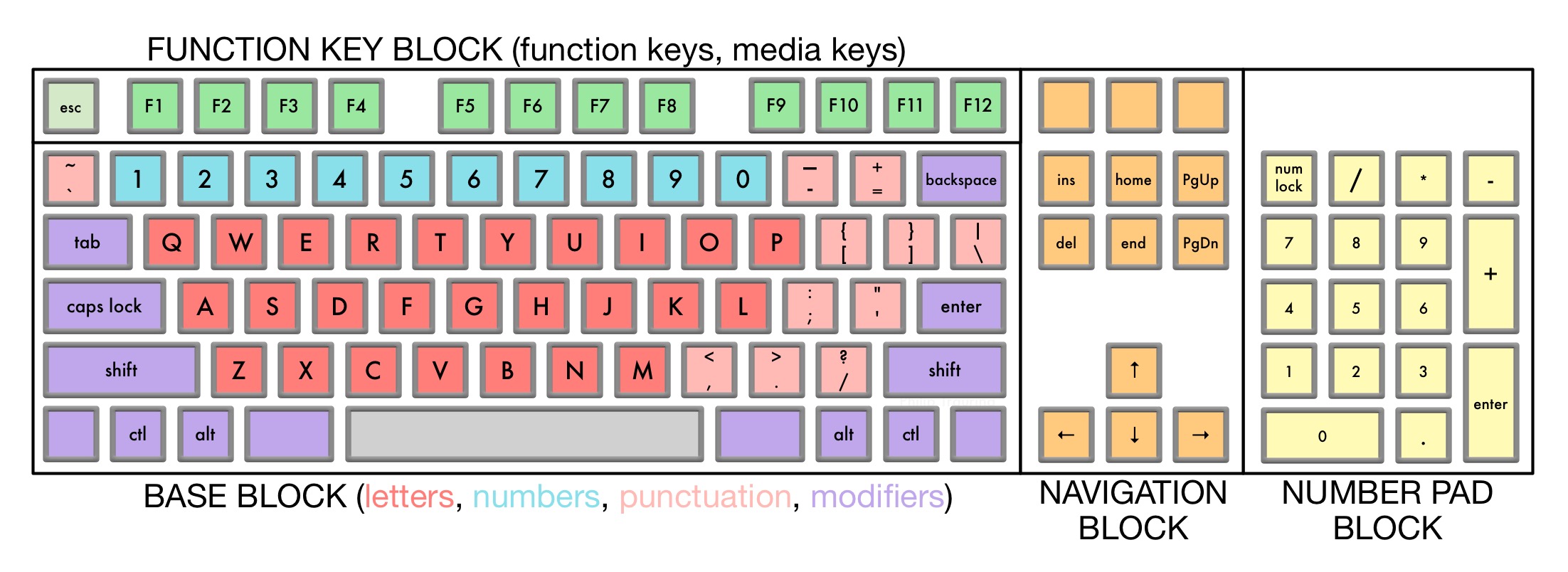
A full size keyboard usually has 104 keys. These include letters, numbers, and special function keys. The number may vary slightly by brand or model. Most full size keyboards have a numeric keypad on the right side. This keypad is useful for quick number entry. The keyboard also includes arrow keys and function keys from F1 to F12.
Key Layout Features
The keys are arranged in a familiar pattern. The main section has alphabet keys in a QWERTY layout. Above it, there are function keys for quick commands. The numeric keypad is separated for easy access. Arrow keys are placed below the right Shift key. This layout helps users type and navigate efficiently. Full size keyboards also often include keys like Insert, Delete, Home, and End. These keys help with editing and moving around documents.
Function Keys And Their Roles
The function keys play a special role on a full size keyboard. They help you perform tasks quickly. These keys are usually found on the top row of the keyboard. They work differently from letters and numbers. Each function key has a unique task. Some function keys change depending on the software you use. Understanding these keys can save time and make work easier.
Top Row Functions
The top row has keys named F1 to F12. Each key does something different. F1 often opens help menus in many programs. F2 is used to rename files or folders. F3 usually opens search functions. F5 refreshes web pages or documents. F11 toggles full screen mode in browsers. These keys help you access features fast. They are useful for both beginners and experts.
Special Shortcut Keys
Some function keys work with other keys like Ctrl or Alt. Pressing these keys together can open new windows or close programs. For example, Ctrl + F4 closes the current tab or window. Alt + F4 closes the whole program. These shortcuts reduce the need to use the mouse. They increase speed and efficiency. Learning a few shortcuts can improve your daily computer use.
Numpad Importance
A full-size keyboard usually has 104 keys, including the numpad. The numpad helps with quick number entry and calculations. It makes typing numbers faster and easier.
Numeric Entry Benefits
The numpad makes typing numbers faster and easier. It helps users enter data quickly in spreadsheets and forms. People who work with numbers daily find the numpad very useful. It reduces finger movement and speeds up typing. This section of the keyboard is designed for efficient number input. Tasks like billing, accounting, and coding benefit a lot from the numpad.
Key Count Contribution
The numpad adds extra keys to a full-size keyboard. Typically, it includes 17 keys for numbers and math symbols. These keys increase the total key count significantly. Without the numpad, a keyboard has fewer keys and less functionality. Its presence makes a keyboard “full-size,” distinguishing it from smaller models. Users who need many keys prefer full-size keyboards for this reason.

Credit: hirosarts.com
Additional Keys Explained
Full-size keyboards have more than just letters and numbers. They include extra keys that help users work faster and easier. These keys are grouped by their purpose and location. Understanding these keys can improve your typing and navigation experience.
Navigation Cluster
The navigation cluster helps move the cursor quickly. It includes keys like Home, End, Page Up, and Page Down. These keys jump to different parts of a document or webpage. Arrow keys are also part of this cluster. They move the cursor up, down, left, or right.
Modifier Keys
Modifier keys change the function of other keys. Common ones are Shift, Ctrl, and Alt. Pressing them with other keys creates shortcuts. For example, Ctrl + C copies text. These keys save time and make tasks easier.
Media Control Keys
Media control keys manage audio and video playback. You can play, pause, or stop music with them. Volume keys adjust sound levels quickly. Some keyboards have a mute button to silence sound instantly.
Variations In Key Counts
Key counts on full-size keyboards are not always the same. They can change based on the keyboard’s design and purpose. Some keyboards have more keys, while others have fewer. This section explains why key counts vary and what affects these differences.
Regional Differences
Keyboards made for different countries often have different keys. Layouts change to fit local languages and symbols. For example, European keyboards usually have extra keys for accented letters. Japanese keyboards include keys for kana characters.
Some regions add keys to support currency symbols like the Euro or Pound. The placement of keys like Enter or Shift can also differ. These changes affect the total number of keys on the keyboard.
Custom And Gaming Keyboards
Custom keyboards allow users to add or remove keys. Many gamers prefer keyboards with extra keys for shortcuts. These keys help perform actions faster in games.
Some custom keyboards have special macro keys. They let users program complex commands to one key. Others may remove keys like the number pad to save space. This flexibility causes wide variation in key counts.
Key Size And Spacing Impact
The size and spacing of keys on a full size keyboard affect how users interact with it daily. Key size influences how easily fingers find each key without mistakes. Spacing between keys helps prevent accidental presses and enhances typing accuracy.
Proper key spacing and size can reduce finger strain. They make typing more comfortable and efficient. Small keys or tight spacing may cause discomfort over time. Large keys with enough space allow smoother finger movement.
Ergonomics And Comfort
Ergonomics focus on reducing strain and injury risks. Key size must fit finger sizes comfortably. Keys too small or close together increase finger fatigue. Spaced keys help maintain natural hand posture. Comfortable key design supports longer typing sessions without pain.
Typing Speed Considerations
Key size and spacing impact typing speed significantly. Larger keys reduce errors and improve accuracy. Proper spacing prevents fingers from hitting wrong keys. Fast typists benefit from well-sized keys and clear spacing. Good layout helps maintain a steady and quick rhythm.
How Key Count Affects Usage
The number of keys on a full-size keyboard impacts how users interact with their device daily. More keys mean more options for shortcuts and commands. It can change how fast and easy tasks become. Different users have varied needs based on key count. This section explores how key count affects usage in productivity and gaming.
Productivity Benefits
A full-size keyboard includes keys for numbers, functions, and navigation. These extra keys help complete tasks faster. Number pads speed up data entry for accountants and office workers. Function keys provide quick access to system controls. Arrow keys and navigation buttons make editing documents easier. More keys reduce the need to switch between mouse and keyboard. This helps keep focus and improves workflow speed.
Gaming Performance
Gamers benefit from keyboards with additional keys for macros and commands. Extra keys allow quick access to game functions without complex key combinations. This can improve reaction time and game control. Programmable keys customize gameplay and create unique shortcuts. Full-size keyboards often include anti-ghosting and n-key rollover features. These ensure every key press registers correctly during fast gameplay. The right key count supports better gaming precision and comfort.

Credit: goblintechkeys.com
Credit: trauring.org
Frequently Asked Questions
How Many Keys Does A Full Size Keyboard Have?
A full size keyboard typically has 104 keys. It includes alphanumeric keys, function keys, a numeric keypad, and navigation keys. This layout is standard for most desktop keyboards, offering complete functionality for typing, gaming, and numeric input.
What Keys Are Included On A Full Size Keyboard?
A full size keyboard includes letters, numbers, function keys (F1-F12), arrow keys, and a numeric keypad. It also has special keys like Ctrl, Alt, Shift, and Windows or Command keys. This variety supports diverse computing tasks efficiently.
Why Do Full Size Keyboards Have A Numeric Keypad?
The numeric keypad on full size keyboards allows quick number entry. It is essential for data entry, accounting, and spreadsheet work. This keypad improves speed and accuracy compared to using number keys above the letters.
Are Full Size Keyboards Better For Gaming?
Full size keyboards offer more keys, including macro and function keys, useful for gaming. However, some gamers prefer compact keyboards for portability. The choice depends on personal preference and gaming style.
Conclusion
A full size keyboard usually has 104 keys. These keys include letters, numbers, and special function keys. They help you type, control your computer, and use shortcuts. Knowing the key count helps you choose the right keyboard. Whether for work or play, a full size keyboard offers all needed keys.
It fits most users and tasks well. Now, you understand what to expect from a full size keyboard. Choose wisely and enjoy typing with ease.
As an Amazon Associate, I earn from qualifying purchases.

