
As an Amazon Associate, I earn from qualifying purchases.
Have you ever looked at your laptop charger and wondered, “How many watts does this actually use?” Knowing the wattage of your charger is more important than you might think.
It affects how fast your laptop charges and whether your device stays safe while plugged in. If you’re unsure about what those numbers mean or how they impact your laptop’s performance, you’re in the right place. Keep reading, and you’ll learn everything you need to know about laptop charger watts—and how to choose the right one for your needs.
Credit: charbycharge.com
Laptop Charger Wattage Basics
Wattage shows how much power a laptop charger gives. It helps to know if the charger fits your laptop. Higher watts mean more power. Lower watts mean less power.
Most laptop chargers have wattage between 30 watts and 90 watts. Small laptops use about 30 to 45 watts. Bigger laptops, like gaming ones, need 60 to 90 watts or more. Using a charger with too low wattage can make charging slow or stop. Too high wattage chargers are usually safe because laptops only use what they need.
| Type of Laptop | Common Wattage Range |
|---|---|
| Small/Light Laptops | 30W – 45W |
| Regular Laptops | 45W – 65W |
| Gaming/High-Performance Laptops | 65W – 90W+ |

Credit: www.amazon.com
Factors Affecting Charger Wattage
Laptop size affects charger wattage. Bigger laptops need more power. Small laptops use chargers around 30-45 watts. Larger models require 60-100 watts or more.
Battery capacity also matters. Bigger batteries need more watts to charge fast. A 50Wh battery needs less power than a 90Wh battery.
Usage scenarios change wattage needs. Heavy tasks like gaming or video editing use more power. Light tasks like browsing need less. Chargers with higher wattage support better performance during heavy use.
Identifying Your Laptop Charger Wattage
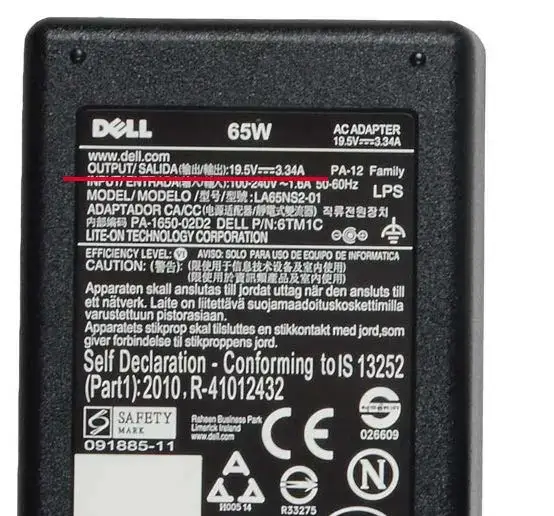
Most laptop chargers have their wattage printed on a label. This label is usually on the charger brick. It shows numbers like 45W, 65W, or 90W. These numbers tell how much power the charger gives to the laptop.
Another way is to check the laptop’s specifications. This info is often on the laptop box or user manual. It shows the recommended charger wattage for safe use.
Many websites and tools can help find your charger’s wattage. Some allow you to enter your laptop model and get the right wattage. This helps avoid using chargers with too low or too high power.
Choosing The Right Charger Wattage
Always choose a charger with the same wattage as the original one. This ensures your laptop gets the right power it needs to work well. Using a charger with lower wattage can cause your laptop to charge slowly or not charge at all. It may also damage the battery over time.
Chargers with higher wattage than your laptop needs are usually safe. They can charge your laptop faster but might be larger and heavier. Make sure the voltage matches to avoid any problems. Using a much higher watt charger than recommended can cause overheating or damage.
| Wattage Type | Effect | Notes |
|---|---|---|
| Matching Wattage | Best performance and safety | Recommended for all laptops |
| Lower Wattage | Slow charging or no charge | Can damage battery or charger |
| Higher Wattage | Faster charging | Check voltage to avoid damage |
Usb-c And Power Delivery Standards
USB-C charging uses a special cable that can send power and data. It is small and reversible, so you can plug it in any way. Power Delivery (PD) is a standard that lets devices talk to chargers. They decide how much power to send safely.
Power Delivery has different wattage levels. They range from 5 watts to 100 watts or more. Low power is good for phones and small devices. Higher power works for laptops and bigger gadgets.
| Power Delivery Level | Wattage | Devices |
|---|---|---|
| Level 1 | 5-15 W | Phones, small gadgets |
| Level 2 | 18-45 W | Tablets, small laptops |
| Level 3 | 60-100 W | Laptops, large devices |
Compatibility matters. A laptop must accept the charger’s wattage. Using less power can slow charging. Too much power will not harm because devices control it. Always use a charger that matches your device’s needs.
Tips For Charger Safety And Efficiency
Avoid overheating by placing the laptop on hard, flat surfaces. Soft surfaces block air vents and trap heat. Unplug the charger if the laptop feels very hot. Let it cool before using again. Overheating can damage battery and parts.
Always use certified chargers made for your laptop model. Cheap or fake chargers may cause damage or fire. Certified chargers keep power steady and safe. Check the charger’s label for correct voltage and wattage.
Follow proper charging habits. Do not charge laptop all night. Unplug once fully charged to save battery life. Avoid using the laptop while charging to reduce heat. Charging in cool places helps keep battery healthy.

Credit: www.vegerpower.com
Frequently Asked Questions
What Is The Typical Wattage Of A Laptop Charger?
Most laptop chargers range from 45 to 90 watts. The exact wattage depends on the laptop model and power needs. Higher-performance laptops usually require chargers with higher wattage for efficient charging.
Can I Use A Charger With Different Wattage?
Using a charger with higher wattage is generally safe if voltage matches. A lower wattage charger may cause slow charging or damage. Always check compatibility before using a different wattage charger.
How Do I Find My Laptop Charger Wattage?
Check the charger label or the laptop’s user manual for wattage info. It is usually listed in watts (W) or volts (V) and amps (A). Multiply volts by amps to get the wattage.
Does Wattage Affect Laptop Charging Speed?
Yes, higher wattage chargers can charge laptops faster. However, the laptop’s internal circuitry limits maximum charging speed. Using the recommended wattage ensures safe and optimal charging performance.
Conclusion
Knowing the wattage of your laptop charger helps you choose the right power source. Using the correct wattage keeps your laptop safe and working well. Chargers with too low wattage may charge slowly or not at all. Too high wattage chargers can cause damage or overheating.
Always check your laptop’s manual or label for the recommended wattage. This small step saves time and protects your device. Remember, a good charger supports your laptop’s performance every day. Simple and clear—power your laptop the right way.
As an Amazon Associate, I earn from qualifying purchases.

