
Is your laptop screen cracked, flickering, or just not working right? You might be wondering, “How much will it cost to replace my laptop screen?” This question is more important than you think because the price can vary a lot depending on your laptop model and the type of damage.
You’ll get clear answers that help you decide whether to fix it yourself, get a professional repair, or consider other options. Keep reading to find out how to save money and avoid surprises when fixing your laptop screen.
Credit: www.gophermods.com
Factors Influencing Screen Replacement Costs
The screen size affects replacement costs. Bigger screens usually cost more. High resolution screens, like 4K, are pricier than standard ones.
Laptop brand and model matter. Some brands have expensive parts. Rare or older models can be harder to find parts for, raising the price.
Screen technology also plays a role. Touchscreens and OLED displays cost more than regular LCDs. This raises the overall repair cost.
The damage extent affects price too. A cracked screen alone costs less than damage to internal parts behind it. More damage means higher repair costs.
Labor charges vary by location and repair shop. Some places charge a flat fee. Others charge hourly rates. This can make prices different across shops.
Average Price Ranges For Screen Replacement
The price to replace a laptop screen changes by the type of laptop. Budget laptops usually cost between $50 and $100. These screens are simpler and cheaper to fix.
Mid-range laptops have better screens and cost more to repair. Prices range from $100 to $200. These screens have higher quality and better colors.
High-end laptops use the best screens. Replacement costs can be $200 to $400 or more. These screens are sharper, brighter, and more complex.
| Laptop Type | Screen Replacement Cost |
|---|---|
| Budget Laptops | $50 – $100 |
| Mid-Range Laptops | $100 – $200 |
| High-End Laptops | $200 – $400+ |
Cost Breakdown: Parts Vs. Labor
The price of replacement screens varies by laptop model and screen type. Basic screens cost around $50 to $150. High-resolution or touchscreen models can be more expensive, sometimes reaching $200 or more. Quality and brand also affect the price.
Professional repair fees usually include labor and parts. Labor costs range from $50 to $120. Some shops charge a flat rate, while others charge hourly. Total repair costs often fall between $100 and $300.
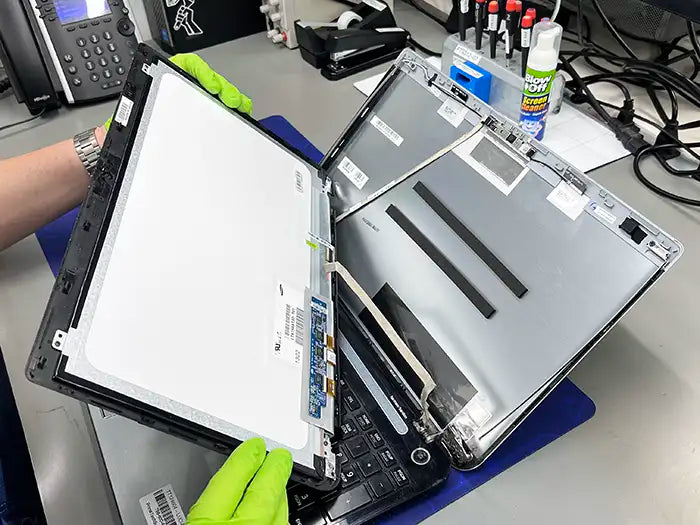
DIY replacement savings can be significant. Buying the screen alone might cost less than paying for labor. But DIY repair needs care and some tools. Mistakes can cause more damage, leading to higher costs later.
Credit: primetechsupport.com
Where To Get Your Screen Replaced
Authorized service centers offer reliable repairs with original parts. They usually provide a warranty on screen replacements. Prices can be higher, but quality is often guaranteed. Wait times may be longer due to official procedures.
Third-party repair shops are often cheaper and faster. Many skilled technicians work in these shops. Quality varies, so check reviews before choosing. Parts used may not always be original, but the cost is lower.
Online repair services let you send your laptop by mail. This option can be convenient if no local repair shops are nearby. Prices vary and may include shipping fees. Turnaround time depends on shipping and repair speed.
Self-repair options save money if you are careful. You need the right tools and a replacement screen. Many guides and videos are available online. Mistakes can cause more damage, so only try if confident.
Tips To Save On Laptop Screen Replacement
Buying laptop screens online can save a lot of money. Many websites sell screens at lower prices than repair shops. Make sure the screen matches your laptop model exactly. Check reviews to avoid low-quality parts. Some sellers offer free shipping or discounts for bulk orders.
Warranty and insurance claims might cover screen replacement costs. Check your laptop’s warranty terms carefully. Insurance policies sometimes include accidental damage protection. Submitting a claim can reduce your out-of-pocket expenses. Keep receipts and photos as proof when filing claims.
Choosing the right time for repair helps save money. Some shops offer discounts during off-peak seasons. Avoid urgent repairs that can cost more. Scheduling repairs during sales or promotions can lower costs.
| Tip | Benefit |
|---|---|
| Buy Screens Online | Lower prices, more choices |
| Use Warranty/Insurance | Reduce repair costs |
| Choose Repair Timing | Save with discounts |
| Compare Multiple Quotes | Find best price |
Signs You Might Need A Replacement
Cracks and physical damage are clear signs you need a screen replacement. Even small cracks can grow and harm the display further. Sharp edges might cause injury.
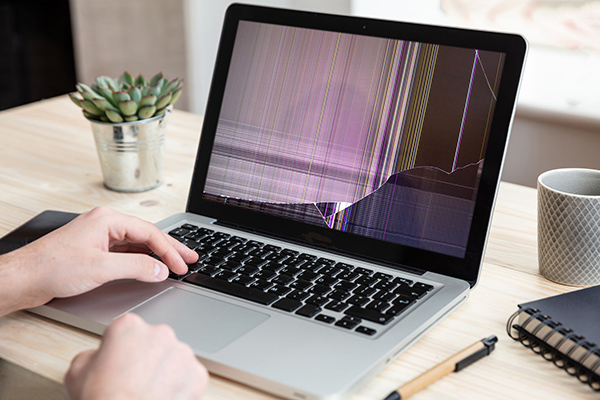
Display malfunctions include lines, strange colors, or parts of the screen not showing images. These problems make it hard to use the laptop properly.
Flickering and dead pixels also signal screen trouble. Flickering causes eyestrain and headaches. Dead pixels are tiny black or white spots that do not change.
Touchscreen issues mean the screen does not respond well to touch. It may not react at all or may act erratically, making it tough to work or play.
Alternatives To Full Screen Replacement
Screen repair kits offer a cheaper way to fix minor cracks or dead pixels. These kits include tools and glue to help you repair small issues. They work best for light damage but cannot fix major problems.
Using external monitors is a smart choice if the laptop screen is badly broken. Connect your laptop to a monitor via HDMI or VGA cable. This lets you keep using the laptop without paying for a new screen immediately.
Temporary fixes like tape or screen protectors can stop cracks from spreading. They do not restore full screen function but can help you use the laptop a bit longer. Such fixes are only short-term solutions.

Credit: roobotech.com.au
Frequently Asked Questions
How Much Does It Cost To Replace A Laptop Screen?
Replacing a laptop screen typically costs between $100 and $300. The price varies by laptop model and screen size. Higher-end or touchscreen models may cost more. Labor fees also affect the total cost.
Can I Replace My Laptop Screen Myself?
Yes, you can replace your laptop screen yourself if you have basic technical skills. Use proper tools and follow a detailed guide. Be cautious to avoid damaging internal components. However, professional service ensures safety and quality.
What Factors Affect Laptop Screen Replacement Cost?
Screen size, resolution, and laptop brand impact replacement cost. Touchscreen or high-resolution displays cost more to replace. Labor charges and part availability also influence the price. Warranty status can reduce or cover the cost.
How Long Does A Laptop Screen Replacement Take?
A laptop screen replacement usually takes 1 to 2 hours. Time depends on the technician’s experience and laptop model complexity. DIY replacements may take longer due to unfamiliarity with the process.
Conclusion
Replacing a laptop screen costs vary by model and repair type. You can save money by comparing prices from different shops. Doing it yourself might lower costs but needs care and skill. Always choose quality parts to avoid future problems.
Repairing your screen can extend your laptop’s life. Consider your budget and how long you plan to keep the device. Screen replacement is often worth it to keep your laptop working well. Take time to research before deciding. Simple steps can help you fix your laptop without stress.
As an Amazon Associate, I earn from qualifying purchases.

