
Imagine walking into your home and having the lights turn on just for you. Your favorite music starts playing, the thermostat adjusts to your perfect temperature, and the door locks behind you automatically.
Sounds like magic, right? But it’s not—it’s a smart home, and you can create one yourself. If you want to make your life easier, safer, and more comfortable, this guide will show you exactly how to build a smart home step by step.
Ready to transform your living space into a futuristic haven? Keep reading, because your smarter home is closer than you think.
Choosing Smart Home Devices
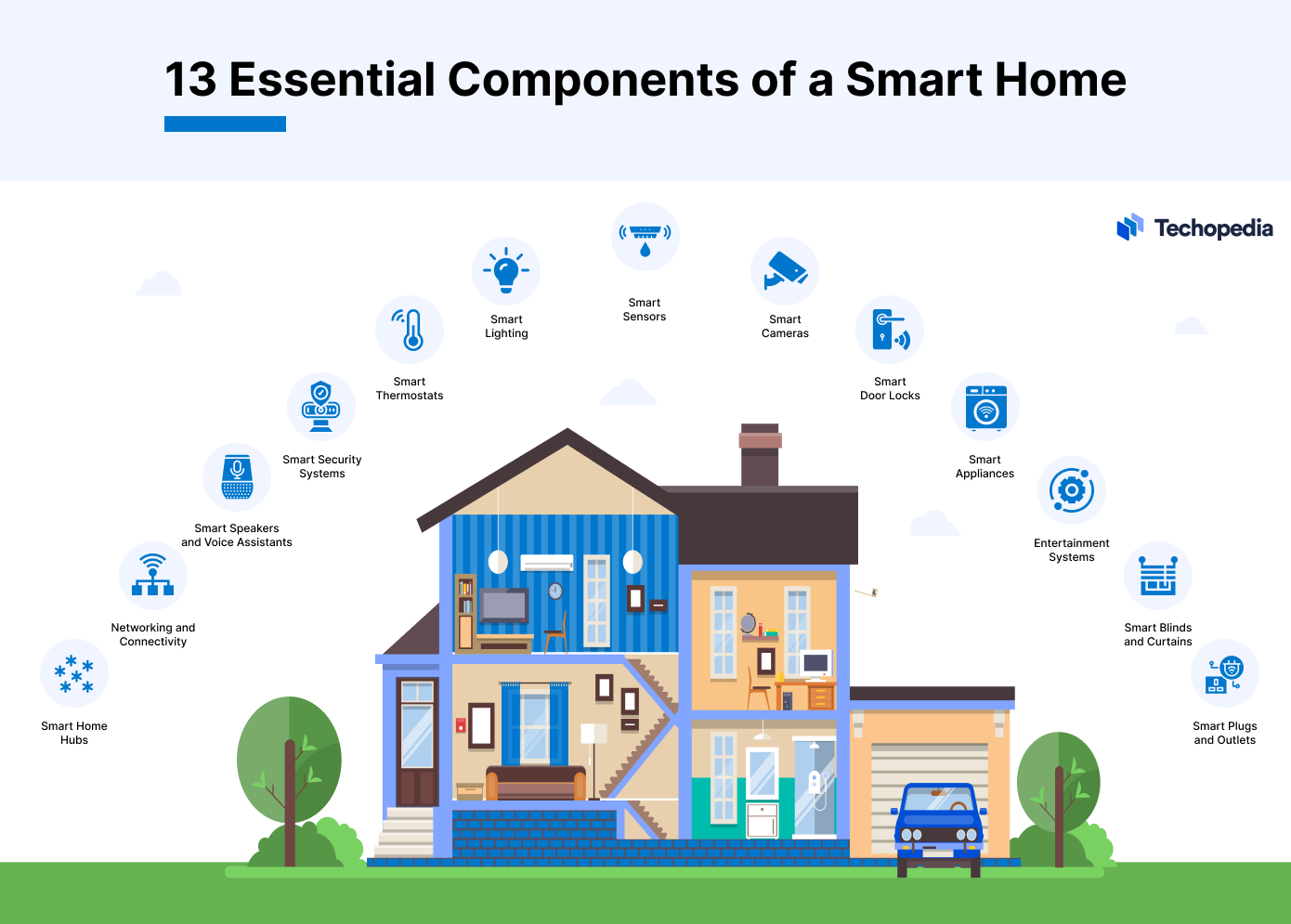
Choosing smart home devices sets the foundation for a connected home. Devices must work well together and meet your needs. Start with core devices that control and enhance your home’s comfort and security. This makes building your smart home simple and effective.
Smart Hubs And Controllers
Smart hubs act as the brain of your smart home. They connect different devices, allowing them to communicate. Choose a hub that supports many brands and protocols. This keeps your options open for future additions. Controllers like apps or dedicated remotes help manage your system easily.
Lighting And Thermostats
Smart lighting enhances convenience and saves energy. Select bulbs or switches that fit your fixtures. Look for devices offering dimming and color options. Smart thermostats keep your home comfortable and reduce energy bills. Pick models with easy scheduling and remote control features.
Security Cameras And Sensors
Security cameras provide peace of mind by monitoring your home. Choose cameras with clear video and night vision. Sensors detect motion, doors, or windows opening. They alert you to unusual activity. Reliable sensors and cameras increase your home’s safety and security.
Voice Assistants
Voice assistants add hands-free control to your smart home. Popular options recognize simple commands and answer questions. They can control lights, music, and other devices. Select an assistant compatible with your smart hub and devices for smooth operation.

Credit: www.youtube.com
Planning Your Smart Home Setup
Planning your smart home setup is the first step to a smooth and efficient system. Careful thought saves time and money later. It helps create a home that fits your lifestyle and needs. Start by understanding what you want from your smart home.
Assessing Your Needs
List the tasks you want to automate or control remotely. Think about security, lighting, heating, or entertainment. Consider the number of rooms and devices you need. Focus on features that improve comfort and convenience. Prioritize what matters most to you and your family.
Budget Considerations
Set a clear budget for your smart home project. Costs vary based on devices and complexity. Include installation and future upgrades in your plan. Choose products that offer good value and durability. Avoid overspending on features you may not use.
Network Requirements
A strong and reliable Wi-Fi network is essential. Check your current internet speed and coverage areas. Consider upgrading your router or adding Wi-Fi extenders. Secure your network to protect your devices and data. Plan for enough bandwidth to handle multiple devices.
Device Compatibility
Choose devices that work well together and with your phone or tablet. Check if devices support common platforms like Alexa, Google Assistant, or Apple HomeKit. Avoid mixing too many brands to reduce setup issues. Look for products with good reviews and regular updates.
Installing Smart Devices
Installing smart devices is the next step in building your smart home. These devices make your daily life easier and safer. Setting them up correctly ensures they work well together. Each device has its own setup process. Follow simple steps to get started.
Setting Up Smart Lighting
Smart lighting lets you control lights with a phone or voice. Start by choosing bulbs that fit your sockets. Connect bulbs to your home Wi-Fi network. Use the app to turn lights on and off or change colors. Set schedules to save energy and add comfort.
Configuring Security Systems
Smart security includes cameras, sensors, and alarms. Place cameras at main entrances and common areas. Connect sensors to doors and windows to detect movement. Use the app to monitor your home from anywhere. Set alerts to notify you of unusual activity.
Integrating Voice Control
Voice control lets you manage devices without using your hands. Choose a smart speaker or display that fits your needs. Connect it to your smart home devices through the app. Use simple commands to turn on lights or play music. Voice control adds convenience to your routine.
Managing Smart Appliances
Smart appliances include refrigerators, ovens, and washing machines. Connect them to your home network for remote control. Use apps to check status and start or stop cycles. Set timers and alerts for better efficiency. These appliances help save time and energy.
Credit: mazaya-iot.org
Automating Your Home
Automating your home makes daily life easier and more comfortable. It lets you control many devices without lifting a finger. Smart home automation saves time and adds convenience. It also helps reduce energy use and keeps your home safe. This section explains key ways to automate your home simply and effectively.
Creating Routines And Scenes
Routines and scenes group multiple actions into one command. For example, a “Good Morning” routine can turn on lights and start the coffee maker. Scenes set the mood by adjusting lights and music together. Creating these saves effort and personalizes your space. You can trigger them by voice or app with one tap.
Using Geofencing Features
Geofencing uses your phone’s location to control devices automatically. It can turn on lights when you arrive home. It also locks doors or lowers the thermostat when you leave. This feature adds comfort and security without manual steps. Set it up through your smart home app for seamless control.
Scheduling Devices
Scheduling lets you set specific times for devices to run. You can turn lights on at sunset or off at bedtime. Smart plugs and thermostats work well with schedules. This automation keeps your home running smoothly and saves energy. Adjust schedules anytime to fit your daily routine.
Energy Management
Smart home automation helps track and reduce energy use. Smart thermostats learn your habits to optimize heating and cooling. Energy monitoring devices show real-time power consumption. You can set limits and get alerts for high usage. Managing energy this way lowers bills and benefits the environment.
Maintaining And Troubleshooting
Building a smart home is not just about installing devices. Maintaining and troubleshooting your system keeps it working smoothly. Regular care helps avoid problems and improves your experience. Here are some key steps to keep your smart home in top shape.
Regular Updates And Security
Smart devices need regular software updates. These updates fix bugs and add new features. Check your devices weekly for available updates. Secure your home network with strong passwords. Use two-factor authentication when possible. This keeps hackers away from your smart home.
Troubleshooting Connectivity Issues
Connectivity problems are common in smart homes. Restart your router and devices to fix many issues. Check if your Wi-Fi signal is strong in every room. Move devices closer to the router if needed. Reset devices to factory settings if problems continue. Keep firmware updated to improve connections.
Optimizing Performance
Slow devices can frustrate users. Reduce the number of devices connected to the network. Use a mesh Wi-Fi system for wider coverage. Clear device caches to boost speed. Schedule device restarts during off-hours. These steps help your smart home run faster and smoother.
Expanding Your System
Adding new devices should be simple. Choose products compatible with your existing system. Plan for future needs before buying new gadgets. Test new devices in one room first. Keep track of all connected devices for easy management. Gradual expansion avoids overload and keeps your system stable.
Future Trends In Smart Living
The future of smart living promises exciting changes. Technology will make homes more efficient, safe, and comfortable. New trends will shape how we interact with our living spaces. These innovations will blend convenience with smart design.
Ai Integration
Artificial intelligence will become smarter and more common in homes. Devices will learn habits and adjust settings automatically. AI can control lighting, temperature, and security systems. It will make homes more responsive to daily needs. This means less manual work and more comfort.
Smart Home Health Devices
Health monitoring devices will grow in popularity. They will track vital signs and alert users about problems. Sensors will monitor air quality and detect allergens. These tools will help maintain a healthier home environment. Health technology will become an essential part of smart living.
Sustainable Technologies
Energy-saving devices will reduce waste and lower bills. Solar panels and smart thermostats will be widely used. Homes will use renewable energy more efficiently. Water-saving systems will also gain attention. Sustainability will become a key focus in smart home design.
Enhanced Connectivity
Faster internet and better networks will connect all devices seamlessly. 5G and Wi-Fi 6 will improve speed and reliability. Homes will have smoother control over smart gadgets. Enhanced connectivity will support more complex smart systems. This will make smart homes more efficient and easier to manage.

Credit: community.tp-link.com
Frequently Asked Questions
What Are The Essential Devices For A Smart Home?
Essential devices include smart lights, thermostats, security cameras, and voice assistants. These devices improve convenience, security, and energy efficiency in your home.
How Do I Start Building A Smart Home System?
Start with a central hub or voice assistant. Then add compatible smart devices gradually for lighting, security, and climate control to create a connected system.
Is A Smart Home System Secure From Hackers?
Smart home security depends on strong passwords, regular updates, and secure networks. Use two-factor authentication to protect devices from hacking risks.
Can I Control Smart Home Devices Remotely?
Yes, most smart devices allow remote control via smartphone apps. This feature lets you manage lighting, security, and appliances from anywhere.
Conclusion
Building a smart home can make daily life easier and safer. Start with simple devices and add more over time. Choose products that work well together to avoid problems. Stay patient as you learn new technology. Enjoy the comfort and control that smart living brings.
Small steps today lead to a smarter home tomorrow.
As an Amazon Associate, I earn from qualifying purchases.

