As an Amazon Associate, I earn from qualifying purchases.
If you own Beats earbuds, you know how important it is to keep them charged and ready to go. But are you sure you’re charging them the right way?
A quick mistake can lead to longer charging times or even damage your earbuds. In this guide, you’ll discover simple steps to charge your Beats earbuds efficiently and safely. Keep reading to make sure your earbuds always deliver the best sound when you need them most.
Credit: support.apple.com
Charging Basics
Charging Beats earbuds is simple and quick. Knowing the basics helps keep your earbuds ready to use. Proper charging increases battery life and performance. This section explains the main points about charging Beats earbuds.
Charging Methods
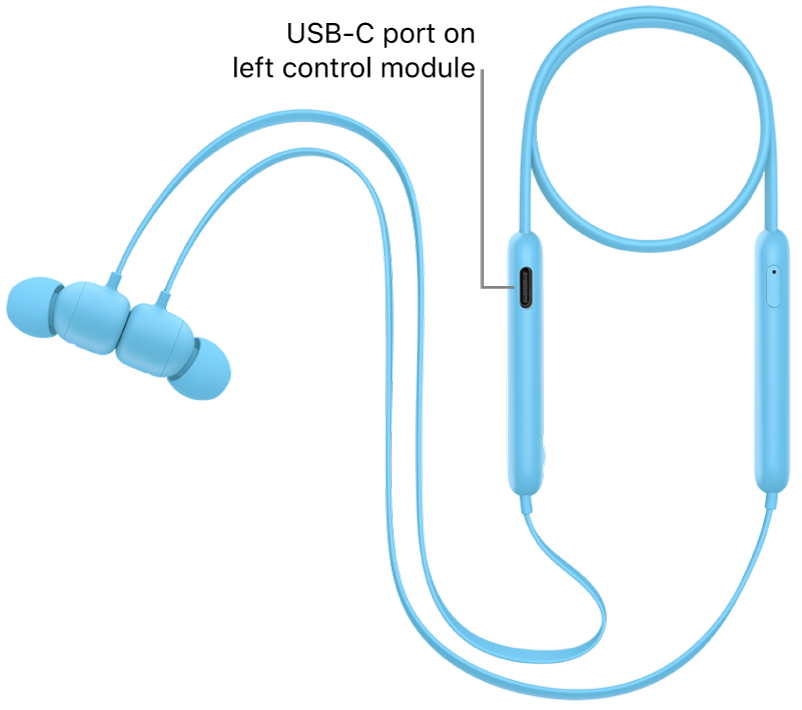
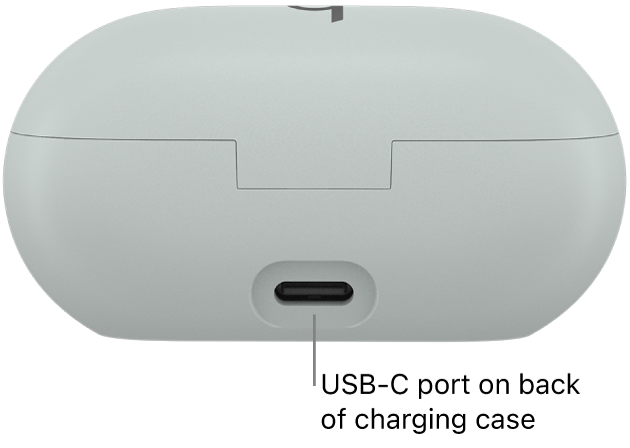
Beats earbuds charge using a charging case. Place the earbuds inside the case to start charging. The case itself needs power to charge the earbuds. You can charge the case with a cable or wirelessly, depending on your model.
Compatible Chargers
Use the charger that came with your Beats earbuds. It usually includes a USB-C or Lightning cable. Avoid using chargers with too high or too low power. Wireless charging pads work with some Beats models. Check your model’s instructions for the best charger type.
Battery Indicators
Beats earbuds and case have LED lights to show battery status. A green light means fully charged. Amber or red means charging or low battery. Some earbuds show battery level on your phone screen. Watch these indicators to know when to charge.

Credit: www.youtube.com
Step-by-step Charging
Charging your Beats earbuds is simple and quick. Follow these steps to keep your earbuds ready to use. Proper charging helps maintain battery life and ensures great sound every time.
Using The Charging Case
Place your earbuds inside the charging case carefully. Make sure each earbud fits snugly in its spot. The case will show a light to confirm charging has started. Keep the lid closed during charging for best results.
Charging The Case
The charging case itself needs power. Connect the case to a charger using the provided cable. The case has a small light that shows charging progress. Charge the case fully before using earbuds for longer playtime.
Connecting To Power
Use a wall adapter or USB port to connect the charging cable. Avoid low-power sources like some computer USB ports. Plug the charger securely to ensure steady power flow. Disconnect the charger once the light shows full battery.
Charging Tips
Charging your Beats earbuds correctly helps keep them working longer. Good charging habits protect the battery and improve performance. Follow these simple tips to get the best from your earbuds’ battery life.
Maximizing Battery Life
Charge your earbuds before the battery is completely empty. Partial charges are better than full drain cycles. Keep the battery between 20% and 80% for longer life. Avoid letting the earbuds stay uncharged for days. Store them in a cool, dry place when not in use.
Avoiding Overcharging
Unplug your earbuds once fully charged to prevent overcharging. Most Beats earbuds stop charging automatically. Still, unplugging helps keep the battery healthy. Avoid leaving them on the charger overnight or for many hours. Use the original charger or a certified one for safety.
Charging Time Expectations
Beats earbuds usually take about 1 to 2 hours to charge fully. A quick 5 to 10-minute charge gives several hours of playtime. Charging times vary by model and battery level. Check the LED light on the case for charging status. Plan your charging time to avoid running out of battery.
Troubleshooting Charging Issues
Charging issues with Beats earbuds can be frustrating. Many users face problems that stop their earbuds from charging properly. Understanding common problems and simple fixes can save time. This section helps you solve charging troubles quickly.
Common Problems
Sometimes earbuds do not charge because of dirty connectors. Dirt or dust blocks the connection between earbuds and case. Another problem is using the wrong charger or cable. This can stop charging or slow it down. Battery drain due to old firmware also causes issues. Low power in the charging case may prevent earbuds from charging. Checking these common problems first is important.
Resetting Your Earbuds
Resetting Beats earbuds can fix many charging issues. It clears minor software bugs that stop charging. To reset, place earbuds in the case and close the lid. Wait for 30 seconds. Then, open the lid and press the button on the case. Hold the button for 15 seconds until the light flashes. This signals a successful reset. After resetting, try charging the earbuds again.
When To Seek Support
If earbuds still do not charge, contact customer support. Problems like broken connectors or battery failure need expert help. Also, if the charging case does not work, service may be needed. Keep your purchase details ready for faster assistance. Professional support ensures your earbuds get the right repair or replacement.
Battery Maintenance
Proper battery maintenance helps your Beats earbuds last longer. Good care keeps the battery healthy and improves charging speed. Follow simple steps to protect your earbuds and enjoy clear sound every day.
Storage Tips
Store your earbuds in a cool, dry place. Avoid places with high heat or moisture. Always keep them in the charging case when not in use. This prevents dust and damage. Do not leave the earbuds fully charged for too long. Let the battery drain a bit before storing.
Long-term Care
Charge your earbuds regularly even if you don’t use them. Avoid letting the battery die completely. Full discharges can reduce battery life. Use the original charger to avoid battery damage. Keep charging cycles between 20% and 80% for better health. This range reduces battery stress and keeps it strong.
Firmware Updates
Check for firmware updates often. Updates improve battery performance and fix bugs. Connect your earbuds to the Beats app or device. Follow on-screen instructions to install updates. Updated firmware helps the earbuds charge efficiently and last longer.
Credit: support.apple.com
Frequently Asked Questions
How Do I Charge Beats Earbuds Properly?
To charge Beats earbuds, place them in the charging case. Connect the case to power using a USB-C or Lightning cable. Ensure the charging indicator lights up, signaling charging has started. Fully charge the case before using earbuds for optimal battery life.
How Long Does It Take To Charge Beats Earbuds?
Beats earbuds typically take about 1 to 1. 5 hours to fully charge. The charging case may take longer, around 2 hours. Charging times can vary slightly depending on the model and charger used.
Can I Use Any Charger For Beats Earbuds?
It’s best to use the official Beats or Apple charger. Using third-party chargers with proper specifications is usually safe. Avoid using low-quality or incompatible chargers to prevent battery damage or charging issues.
How To Check Battery Level On Beats Earbuds?
You can check the battery level on your iPhone’s Bluetooth settings or in the Beats app. The charging case also has LED indicators showing the battery status. This helps you know when to recharge the earbuds or case.
Conclusion
Charging Beats earbuds is simple and quick with the right steps. Always use the original charging cable for best results. Keep the earbuds in their case while charging. Watch the LED lights to know the charging status. Avoid overcharging to protect the battery life.
Regular charging helps your earbuds work longer. Now you can enjoy your music without interruptions. Easy care keeps your earbuds ready to use anytime. Follow these tips, and your Beats earbuds will stay powered up.
As an Amazon Associate, I earn from qualifying purchases.